
Skip to content
  • Categories
  • Recent
  • Tags
  • Popular
  • Users
  • Groups
  • Search
  • Get Qt Extensions
  • Unsolved
Collapse
Brand Logo
  1. Home
  2. Qt Development
  3. Mobile and Embedded
  4. Raspbian 2 player chess game
Forum Updated to NodeBB v4.3 + New Features

Raspbian 2 player chess game

Scheduled Pinned Locked Moved Unsolved Mobile and Embedded
56 Posts 4 Posters 10.3k Views 1 Watching
  • Oldest to Newest
  • Newest to Oldest
  • Most Votes
Reply
  • Reply as topic
Log in to reply
This topic has been deleted. Only users with topic management privileges can see it.
  • JonBJ JonB

    @Quantum1982
    The code I gave you told you exactly what you need to do:

    with the MainWindow as its parent: WhiteQueen = new QLabel(this).

    You have chosen not to do anything about this, so there's not much point keep telling you. I'll leave you to it.

    Q Offline
    Q Offline
    Quantum1982
    wrote on last edited by
    #26

    Ok but why do you have to use a pointer ?

    1 Reply Last reply
    0
    • Q Quantum1982

      I want to add the pieces programmatically. I don't want to drag and drop labels onto the form. These pieces are going to be stored inside an array which will be loaded dynamically.

      JonBJ Online
      JonBJ Online
      JonB
      wrote on last edited by
      #27

      @Quantum1982 said in Raspbian 2 player chess game:

      These pieces are going to be stored inside an array which will be loaded dynamically.

      That's one reason. Another reason is there may be more than 1 white queen. Another reason is that you'll want to create pieces as you go.

      If you don't want to use a pointer, set its parent in the header file, or via setParent(). Or when you add it properly onto the form, such as onto MainWindow's centralWidget(), which you are not doing at the moment anyway, so it will appear in an odd place.

      1 Reply Last reply
      1
      • Q Offline
        Q Offline
        Quantum1982
        wrote on last edited by
        #28

        Can you show me exactly where in the code these changes need to be made ?

        JonBJ 1 Reply Last reply
        0
        • Q Quantum1982

          Can you show me exactly where in the code these changes need to be made ?

          JonBJ Online
          JonBJ Online
          JonB
          wrote on last edited by
          #29

          @Quantum1982
          .h file:

          public:
              QLabel *WhiteQueen;
          

          .cpp file, in MainWindow::MainWindow()

          // QLabel WhiteQueen; --- instead of that line the following one:
          WhiteQueen = new QLabel(this);
          
          1 Reply Last reply
          1
          • Q Offline
            Q Offline
            Quantum1982
            wrote on last edited by
            #30

            Thank you very much. It is working now.

            1 Reply Last reply
            0
            • Q Offline
              Q Offline
              Quantum1982
              wrote on last edited by
              #31

              Although the next stage is decide what mechanism to use to draw a checkered board.

              1 Reply Last reply
              0
              • Q Offline
                Q Offline
                Quantum1982
                wrote on last edited by
                #32

                Ok I am making progress. This is the output so far :!ChessOutput.jpg

                Do you have any idea why the last column and row is being stretched ?

                1 Reply Last reply
                0
                • Q Offline
                  Q Offline
                  Quantum1982
                  wrote on last edited by
                  #33

                  Sorry here is the code :
                  #include "mainwindow.h"
                  #include "ui_mainwindow.h"

                  #include <QImage>
                  #include <QLabel>

                  MainWindow::MainWindow(QWidget *parent)
                  : QMainWindow(parent)
                  , ui(new Ui::MainWindow)
                  {
                  ui->setupUi(this);
                  scene = new QGraphicsScene(this);
                  ui->graphicsView->setScene(scene);

                  QBrush greenBrush(Qt::green);
                  QBrush blueBrush(Qt::blue);
                  QPen outlinePen(Qt::black);
                  outlinePen.setWidth(2);
                  
                  for (int i=0;i<8;i++)
                      for (int j=0;j<8;j++)
                          if ((i+j)%2==0)
                          rectangle = scene->addRect(BOARD_X1+(i*SQUARE_WIDTH),BOARD_Y1+(j*SQUARE_HEIGHT)
                                                     ,BOARD_X1+(i*SQUARE_WIDTH)+SQUARE_WIDTH ,
                                                     BOARD_Y1+(j*SQUARE_HEIGHT)+SQUARE_HEIGHT, outlinePen, blueBrush);
                          else rectangle = scene->addRect(BOARD_X1+(i*SQUARE_WIDTH),BOARD_Y1+(j*SQUARE_HEIGHT)
                                                          ,BOARD_X1+(i*SQUARE_WIDTH)+SQUARE_WIDTH ,
                                                          BOARD_Y1+(j*SQUARE_HEIGHT)+SQUARE_HEIGHT, outlinePen, greenBrush);
                  
                  
                  QString ChessPieces[12];
                  
                  ChessPieces[0] = "C:/Users/User/Desktop/WhitePawn.jpg";
                  ChessPieces[1] = "C:/Users/User/Desktop/WhiteRook.jpg";
                  ChessPieces[2] = "C:/Users/User/Desktop/WhiteKnight.jpg";
                  ChessPieces[3] = "C:/Users/User/Desktop/WhiteBishop.jpg";
                  ChessPieces[4] = "C:/Users/User/Desktop/WhiteQueen.jpg";
                  ChessPieces[5] = "C:/Users/User/Desktop/WhiteKing.jpg";
                  ChessPieces[6] = "C:/Users/User/Desktop/BlackPawn.jpg";
                  ChessPieces[7] = "C:/Users/User/Desktop/BlackRook.jpg";
                  ChessPieces[8] = "C:/Users/User/Desktop/BlackKnight.jpg";
                  ChessPieces[9] = "C:/Users/User/Desktop/BlackBishop.jpg";
                  ChessPieces[10] = "C:/Users/User/Desktop/BlackQueen.jpg";
                  ChessPieces[11] = "C:/Users/User/Desktop/BlackKing.jpg";
                  
                  QPixmap Pixmap("C:/Users/User/Desktop/WhiteQueen.jpg");
                  WhiteQueen = new QLabel(this);
                  
                  WhiteQueen->setGeometry(50,50,100,100);
                  WhiteQueen->setPixmap(Pixmap);
                  

                  }

                  MainWindow::~MainWindow()
                  {
                  delete ui;
                  }

                  #ifndef MAINWINDOW_H
                  #define MAINWINDOW_H

                  #define BOARD_X1 20
                  #define BOARD_Y1 20
                  #define SQUARE_WIDTH 50
                  #define SQUARE_HEIGHT 50

                  #include <QMainWindow>
                  #include <QGraphicsView>
                  #include <QGraphicsItem>
                  #include <QLabel>

                  class CChessBoard : public QGraphicsView
                  {
                  public:

                  };

                  QT_BEGIN_NAMESPACE
                  namespace Ui { class MainWindow; }
                  QT_END_NAMESPACE

                  class MainWindow : public QMainWindow
                  {
                  Q_OBJECT

                  public:
                  QLabel *WhiteQueen;
                  MainWindow(QWidget *parent = nullptr);
                  ~MainWindow();

                  private:
                  Ui::MainWindow *ui;
                  QGraphicsScene *scene;
                  QGraphicsRectItem *rectangle;
                  };
                  #endif // MAINWINDOW_H

                  1 Reply Last reply
                  0
                  • SGaistS Offline
                    SGaistS Offline
                    SGaist
                    Lifetime Qt Champion
                    wrote on last edited by
                    #34

                    Are you doing anything else with rectangle ?

                    Since you are using the graphics view framework, why are you using QLabel for your chess pieces ?

                    Interested in AI ? www.idiap.ch
                    Please read the Qt Code of Conduct - https://forum.qt.io/topic/113070/qt-code-of-conduct

                    1 Reply Last reply
                    0
                    • Q Offline
                      Q Offline
                      Quantum1982
                      wrote on last edited by
                      #35

                      Well can I use an array of QImages instead ?

                      1 Reply Last reply
                      0
                      • SGaistS Offline
                        SGaistS Offline
                        SGaist
                        Lifetime Qt Champion
                        wrote on last edited by
                        #36

                        QGraphicsPixmapItem

                        You really should take the time to explore the documentation.

                        Interested in AI ? www.idiap.ch
                        Please read the Qt Code of Conduct - https://forum.qt.io/topic/113070/qt-code-of-conduct

                        1 Reply Last reply
                        1
                        • Q Offline
                          Q Offline
                          Quantum1982
                          wrote on last edited by
                          #37

                          Yeah QGraphicsPixmapItem solves the problem

                          JonBJ 1 Reply Last reply
                          0
                          • Q Offline
                            Q Offline
                            Quantum1982
                            wrote on last edited by
                            #38

                            I am having a problem loading multiple pixmaps ?

                            #include "mainwindow.h"
                            #include "ui_mainwindow.h"

                            #include <QImage>
                            #include <QLabel>

                            MainWindow::MainWindow(QWidget *parent)
                            : QMainWindow(parent)
                            , ui(new Ui::MainWindow)
                            {
                            ui->setupUi(this);
                            scene = new QGraphicsScene(this);
                            ui->graphicsView->setScene(scene);

                            QBrush greenBrush(Qt::green);
                            QBrush blueBrush(Qt::blue);
                            QPen outlinePen(Qt::black);
                            outlinePen.setWidth(2);
                            
                            for (int i=0;i<8;i++)
                                for (int j=0;j<8;j++)
                                    if ((i+j)%2==0)
                                    rectangle = scene->addRect(BOARD_X1+(i*SQUARE_WIDTH),BOARD_Y1+(j*SQUARE_HEIGHT)
                                                               ,BOARD_X1+(i*SQUARE_WIDTH)+SQUARE_WIDTH ,
                                                               BOARD_Y1+(j*SQUARE_HEIGHT)+SQUARE_HEIGHT, outlinePen, blueBrush);
                                    else rectangle = scene->addRect(BOARD_X1+(i*SQUARE_WIDTH),BOARD_Y1+(j*SQUARE_HEIGHT)
                                                                    ,BOARD_X1+(i*SQUARE_WIDTH)+SQUARE_WIDTH ,
                                                                    BOARD_Y1+(j*SQUARE_HEIGHT)+SQUARE_HEIGHT, outlinePen, greenBrush);
                            
                            
                            QString ChessPieces[12];
                            
                            ChessPieces[0] = "C:/Users/User/Desktop/WhitePawn.jpg";
                            ChessPieces[1] = "C:/Users/User/Desktop/WhiteRook.jpg";
                            ChessPieces[2] = "C:/Users/User/Desktop/WhiteKnight.jpg";
                            ChessPieces[3] = "C:/Users/User/Desktop/WhiteBishop.jpg";
                            ChessPieces[4] = "C:/Users/User/Desktop/WhiteQueen.jpg";
                            ChessPieces[5] = "C:/Users/User/Desktop/WhiteKing.jpg";
                            ChessPieces[6] = "C:/Users/User/Desktop/BlackPawn.jpg";
                            ChessPieces[7] = "C:/Users/User/Desktop/BlackRook.jpg";
                            ChessPieces[8] = "C:/Users/User/Desktop/BlackKnight.jpg";
                            ChessPieces[9] = "C:/Users/User/Desktop/BlackBishop.jpg";
                            ChessPieces[10] = "C:/Users/User/Desktop/BlackQueen.jpg";
                            ChessPieces[11] = "C:/Users/User/Desktop/BlackKing.jpg";
                            
                            for (int i=0;i<8;i++)
                                ChessPieceIndexes[i][1] = 0; // White Pawns
                            ChessPieceIndexes[0][0] = 1; // White Rook
                            ChessPieceIndexes[7][0] = 1; // White Rook
                            
                            ChessPieceIndexes[1][0] = 2; // White Knight
                            ChessPieceIndexes[7][0] = 2; // White Knight
                            
                            ChessPieceIndexes[2][0] = 3; // White Bishop
                            ChessPieceIndexes[6][0] = 3; // White Bishop
                            
                            ChessPieceIndexes[3][0] = 4; // White Queen
                            ChessPieceIndexes[4][0] = 5; // White King
                            
                            
                            /*
                            WhiteQueen = new QLabel(this);
                            
                            WhiteQueen->setGeometry(BOARD_X1+4*SQUARE_WIDTH,BOARD_Y1+4*SQUARE_HEIGHT,
                                                    BOARD_X1+4*SQUARE_WIDTH+SQUARE_WIDTH,BOARD_Y1+4*SQUARE_HEIGHT+SQUARE_HEIGHT);
                            WhiteQueen->setPixmap(Pixmap);
                            */
                            
                            QPixmap Pixmap(ChessPieces[0]); // White Pawn
                            
                            for (int i=0;i<8;i++)
                            {
                                QGraphicsPixmapItem* item = new QGraphicsPixmapItem(Pixmap);
                                item->setPos(BOARD_X1+(i*SQUARE_WIDTH),BOARD_Y1+(7*SQUARE_HEIGHT));
                                scene->addItem(item);
                            }
                            // White Rooks
                            Pixmap.load(ChessPieces[1]);
                            QGraphicsPixmapItem* item = new QGraphicsPixmapItem(Pixmap);
                            item->setPos(BOARD_X1+(0*SQUARE_WIDTH),BOARD_Y1+(8*SQUARE_HEIGHT));
                            scene->addItem(item);
                            
                            //QGraphicsPixmapItem* item = new QGraphicsPixmapItem(Pixmap);
                            item->setPos(BOARD_X1+(7*SQUARE_WIDTH),BOARD_Y1+(8*SQUARE_HEIGHT));
                            scene->addItem(item);
                            
                            // White Knights
                            Pixmap.load(ChessPieces[2]);
                            //QGraphicsPixmapItem* item = new QGraphicsPixmapItem(Pixmap);
                            item->setPos(BOARD_X1+(1*SQUARE_WIDTH),BOARD_Y1+(8*SQUARE_HEIGHT));
                            scene->addItem(item);
                            

                            }

                            MainWindow::~MainWindow()
                            {
                            delete ui;
                            }

                            1 Reply Last reply
                            0
                            • Q Quantum1982

                              Yeah QGraphicsPixmapItem solves the problem

                              JonBJ Online
                              JonBJ Online
                              JonB
                              wrote on last edited by
                              #39

                              @Quantum1982 said in Raspbian 2 player chess game:

                              Yeah QGraphicsPixmapItem solves the problem

                              Which is why I wrote earlier:

                              I'm not sure I would do this whole chess UI with widgets, probably a graphics scene with QGraphicsPixmapItems instead, but that's a whole different matter.

                              I am having a problem loading multiple pixmaps ?

                              I'm not following your code --- what is your problem?

                              1 Reply Last reply
                              0
                              • Q Offline
                                Q Offline
                                Quantum1982
                                wrote on last edited by
                                #40

                                It's not adding the pixmapitems correctly. It adds the pawns but not the rooks ?

                                JonBJ 1 Reply Last reply
                                0
                                • Q Quantum1982

                                  It's not adding the pixmapitems correctly. It adds the pawns but not the rooks ?

                                  JonBJ Online
                                  JonBJ Online
                                  JonB
                                  wrote on last edited by
                                  #41

                                  @Quantum1982
                                  Check the return result from Pixmap.load(ChessPieces[1]);? And when developing code at least check the return result of every function which returns one, always, if only with a Q_ASSERT(false) in the failure case.

                                  1 Reply Last reply
                                  0
                                  • SGaistS Offline
                                    SGaistS Offline
                                    SGaist
                                    Lifetime Qt Champion
                                    wrote on last edited by
                                    #42

                                    Rather than using lists that does not allow you to properly reason about how your pieces are put on your chessboard, you should cleanup your code first.

                                    Use proper naming for your variables. If you want to store the paths to your images in a single structure, use a QMap with a clear meaningful key using for example an enum.

                                    Write your code in clear separate steps. Start by drawing the board, then put the pawns in place, then the king, queen, etc. Stop trying to make everything as compact as possible. You are losing time and not learning to do things properly. Write code that you and other people can understand.

                                    Interested in AI ? www.idiap.ch
                                    Please read the Qt Code of Conduct - https://forum.qt.io/topic/113070/qt-code-of-conduct

                                    1 Reply Last reply
                                    1
                                    • Q Offline
                                      Q Offline
                                      Quantum1982
                                      wrote on last edited by
                                      #43

                                      Ok. My debugger doesn't work or load. Are there settings that I need to configure ?

                                      1 Reply Last reply
                                      0
                                      • Q Offline
                                        Q Offline
                                        Quantum1982
                                        wrote on last edited by
                                        #44

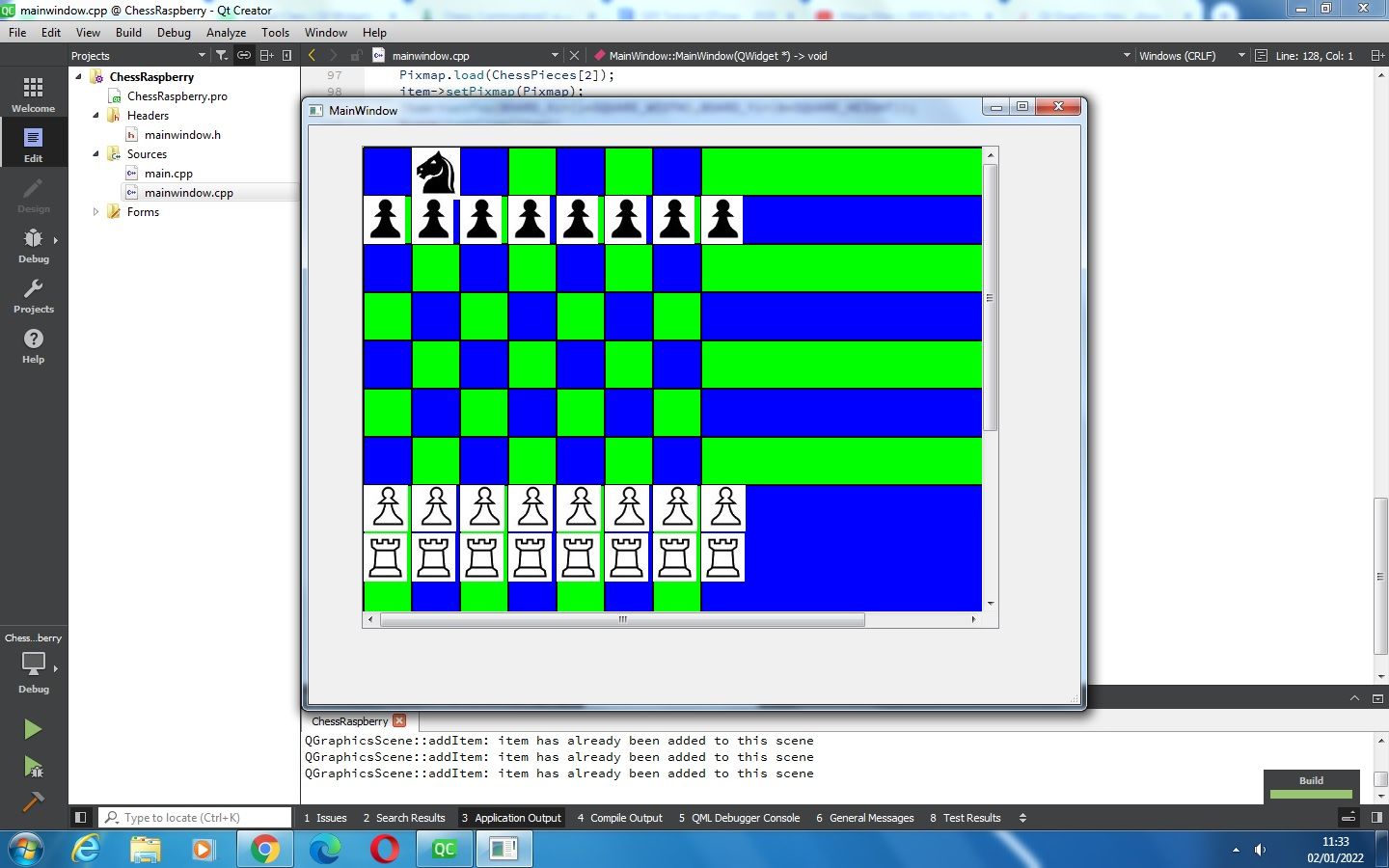
                                        When I put the pixmaps inside a loop, then it loads. But the other pieces don't ?
                                        ChessOutput.jpg

                                        JonBJ 1 Reply Last reply
                                        0
                                        • Q Quantum1982

                                          When I put the pixmaps inside a loop, then it loads. But the other pieces don't ?
                                          ChessOutput.jpg

                                          JonBJ Online
                                          JonBJ Online
                                          JonB
                                          wrote on last edited by
                                          #45

                                          @Quantum1982
                                          a. Debug your code. That's what developers do when things go wrong.
                                          b. Deal with the warnings I see in the output window.

                                          1 Reply Last reply
                                          0

                                          • Login

                                          • Login or register to search.
                                          • First post
                                            Last post
                                          0
                                          • Categories
                                          • Recent
                                          • Tags
                                          • Popular
                                          • Users
                                          • Groups
                                          • Search
                                          • Get Qt Extensions
                                          • Unsolved