Skip to content
  • Categories
  • Recent
  • Tags
  • Popular
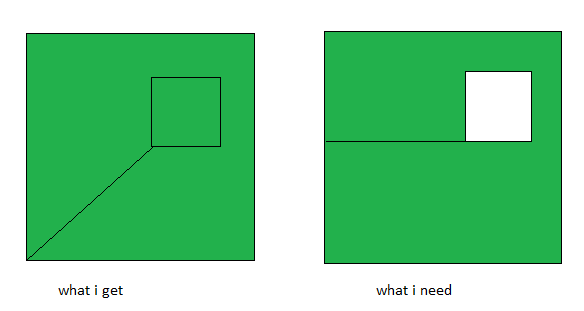
  • Users
  • Groups
  • Search
  • Get Qt Extensions
  • Unsolved
Collapse
Brand Logo
  1. Home
  2. Qt Development
  3. General and Desktop
  4. get different extra edge for hollow polygon

get different extra edge for hollow polygon

Scheduled Pinned Locked Moved Unsolved General and Desktop
9 Posts 3 Posters 706 Views 2 Watching
  • Oldest to Newest
  • Newest to Oldest
  • Most Votes
Reply
  • Reply as topic
Log in to reply
This topic has been deleted. Only users with topic management privileges can see it.
  • U Offline
    U Offline
    user4592357
    wrote on last edited by user4592357
    #1

    the following method returns points:

    QPolygonF(QPointF(1,1) QPointF(1,6) QPointF(6,6) QPointF(6,1) QPointF(1,1) QPointF(2,2) QPointF(2,3) QPointF(3,3) QPointF(3,2) QPointF(2,2) QPointF(1,1))
    
    #include <QPolygonF>
    #include <QDebug>
    
    int main()
    {
    	QPolygonF inner;
    	inner.push_back({ 2, 2 });
    	inner.push_back({ 2, 3 });
    	inner.push_back({ 3, 3 });
    	inner.push_back({ 3, 2 });
    
    	QPolygonF outer;
    	outer.push_back({ 1, 1 });
    	outer.push_back({ 1, 6 });
    	outer.push_back({ 6, 6 });
    	outer.push_back({ 6, 1 });
    
    	const auto &hollowPoly = outer.subtracted(inner);
    	qDebug() << hollowPoly;
    }
    

    what i need is to have the following points:

    QPolygonF(QPointF(1,1) QPointF(1,6) QPointF(6,6) QPointF(6,1) QPointF(1,1) QPointF(1,2) QPointF(2,2) QPointF(3,2) QPointF(3,3) QPointF(2,3) QPointF(2,2) QPointF(1,2))
    

    is that possible to get?

    jsulmJ 1 Reply Last reply
    0
    • U user4592357

      the following method returns points:

      QPolygonF(QPointF(1,1) QPointF(1,6) QPointF(6,6) QPointF(6,1) QPointF(1,1) QPointF(2,2) QPointF(2,3) QPointF(3,3) QPointF(3,2) QPointF(2,2) QPointF(1,1))
      
      #include <QPolygonF>
      #include <QDebug>
      
      int main()
      {
      	QPolygonF inner;
      	inner.push_back({ 2, 2 });
      	inner.push_back({ 2, 3 });
      	inner.push_back({ 3, 3 });
      	inner.push_back({ 3, 2 });
      
      	QPolygonF outer;
      	outer.push_back({ 1, 1 });
      	outer.push_back({ 1, 6 });
      	outer.push_back({ 6, 6 });
      	outer.push_back({ 6, 1 });
      
      	const auto &hollowPoly = outer.subtracted(inner);
      	qDebug() << hollowPoly;
      }
      

      what i need is to have the following points:

      QPolygonF(QPointF(1,1) QPointF(1,6) QPointF(6,6) QPointF(6,1) QPointF(1,1) QPointF(1,2) QPointF(2,2) QPointF(3,2) QPointF(3,3) QPointF(2,3) QPointF(2,2) QPointF(1,2))
      

      is that possible to get?

      jsulmJ Offline
      jsulmJ Offline
      jsulm
      Lifetime Qt Champion
      wrote on last edited by
      #2

      @user4592357 said in get different extra edge for hollow polygon:

      is that possible to get?

      Why not? Did you try?

      https://forum.qt.io/topic/113070/qt-code-of-conduct

      U 1 Reply Last reply
      0
      • jsulmJ jsulm

        @user4592357 said in get different extra edge for hollow polygon:

        is that possible to get?

        Why not? Did you try?

        U Offline
        U Offline
        user4592357
        wrote on last edited by
        #3

        @jsulm
        how? is there method that will return such result?

        jsulmJ 1 Reply Last reply
        0
        • U user4592357

          @jsulm
          how? is there method that will return such result?

          jsulmJ Offline
          jsulmJ Offline
          jsulm
          Lifetime Qt Champion
          wrote on last edited by
          #4

          @user4592357 Can you please explain better what you want to do? Because it is not clear to me...

          https://forum.qt.io/topic/113070/qt-code-of-conduct

          U 1 Reply Last reply
          0
          • jsulmJ jsulm

            @user4592357 Can you please explain better what you want to do? Because it is not clear to me...

            U Offline
            U Offline
            user4592357
            wrote on last edited by
            #5

            @jsulm
            from docs:

            QPolygonF QPolygonF::subtracted(const QPolygonF &r) const
            Set operations on polygons will treat the polygons as areas.
            

            due to this the coordinates of the resulting polygon aren't as expected by renderer, so it doesn't draw the hollow part but instead fills it will color.
            i need to get the other set of points as resulting polygon so that the renderer will draw the hollow part. in that set of points, outer vertices are in clockwise, and inner vertices in counter-clockwise direction.

            1 Reply Last reply
            0
            • SGaistS Offline
              SGaistS Offline
              SGaist
              Lifetime Qt Champion
              wrote on last edited by
              #6

              Hi,

              I think I follow your query but could you provide an image of the result you are expecting ?

              Interested in AI ? www.idiap.ch
              Please read the Qt Code of Conduct - https://forum.qt.io/topic/113070/qt-code-of-conduct

              U 1 Reply Last reply
              0
              • SGaistS SGaist

                Hi,

                I think I follow your query but could you provide an image of the result you are expecting ?

                U Offline
                U Offline
                user4592357
                wrote on last edited by
                #7

                @SGaist
                sure.
                f2fab8ee-9b2e-4483-a367-2993ca450ab2-image.png

                U 1 Reply Last reply
                0
                • U user4592357

                  @SGaist
                  sure.
                  f2fab8ee-9b2e-4483-a367-2993ca450ab2-image.png

                  U Offline
                  U Offline
                  user4592357
                  wrote on last edited by
                  #8

                  @SGaist do you have a suggestion how to do this?

                  1 Reply Last reply
                  0
                  • SGaistS Offline
                    SGaistS Offline
                    SGaist
                    Lifetime Qt Champion
                    wrote on last edited by
                    #9

                    Which version of Qt are you using ?
                    Can you complete your example so that we also have the same drawing output ?

                    Interested in AI ? www.idiap.ch
                    Please read the Qt Code of Conduct - https://forum.qt.io/topic/113070/qt-code-of-conduct

                    1 Reply Last reply
                    0

                    • Login

                    • Login or register to search.
                    • First post
                      Last post
                    0
                    • Categories
                    • Recent
                    • Tags
                    • Popular
                    • Users
                    • Groups
                    • Search
                    • Get Qt Extensions
                    • Unsolved