Skip to content
  • Categories
  • Recent
  • Tags
  • Popular
  • Users
  • Groups
  • Search
  • Get Qt Extensions
  • Unsolved
Collapse
Brand Logo
  1. Home
  2. Qt Development
  3. General and Desktop
  4. Can't paint points on my widget
Qt 6.11 is out! See what's new in the release blog

Can't paint points on my widget

Scheduled Pinned Locked Moved Solved General and Desktop
39 Posts 3 Posters 14.6k Views 1 Watching
  • Oldest to Newest
  • Newest to Oldest
  • Most Votes
Reply
  • Reply as topic
Log in to reply
This topic has been deleted. Only users with topic management privileges can see it.
  • mrjjM mrjj

    Hi
    You are ONLY allowed to paint in paintEvent function so you must add the function
    to your class

    PointViewer:.paintEvent(QPaintEvent *e) {
    QPen pen(Qt::green, z, Qt::SolidLine, Qt::RoundCap);
    QPainter painters(this); <<<<<<<<<<<<<<<<< notice the change.
    painter.begin(ui->liveFeedWidget);
    painter.setPen(pen);
    painter.drawPoint(x,y);
    painter.end();
    }

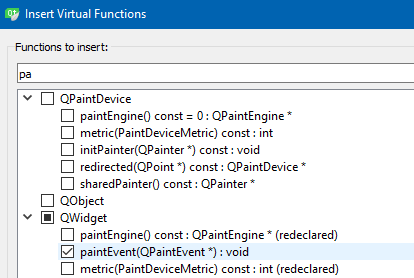
    To easy add it.
    Go to your .h file, right click on class PointViewer, select refactor menu and
    insert virtual base function. then find in list.
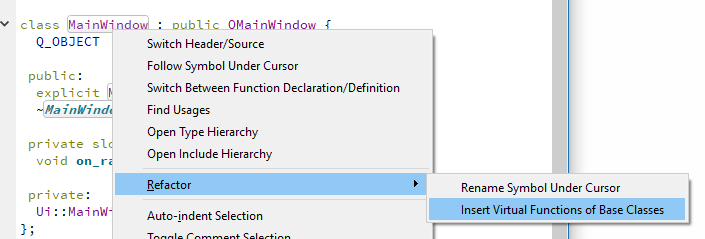
    alt text

    alt text

    and then press ok.

    G Offline
    G Offline
    graniteDev
    wrote on last edited by
    #3

    @mrjj So first off, the example code provided by Qt, "basicdrawing" doesn't use this at all, so how is it able to work?

    Second, if I do as you suggest, I can only paint once. I need to be able to repaint the points when new data is provided.

    mrjjM 1 Reply Last reply
    0
    • G graniteDev

      @mrjj So first off, the example code provided by Qt, "basicdrawing" doesn't use this at all, so how is it able to work?

      Second, if I do as you suggest, I can only paint once. I need to be able to repaint the points when new data is provided.

      mrjjM Offline
      mrjjM Offline
      mrjj
      Lifetime Qt Champion
      wrote on last edited by mrjj
      #4

      @graniteDev
      show me link. most likely it paints on image. (which is only case where allowed outside)
      you can call widget->update() at any time to repaint.

      G 1 Reply Last reply
      0
      • mrjjM mrjj

        @graniteDev
        show me link. most likely it paints on image. (which is only case where allowed outside)
        you can call widget->update() at any time to repaint.

        G Offline
        G Offline
        graniteDev
        wrote on last edited by
        #5

        @mrjj
        Qt example I am trying to follow from: https://doc.qt.io/qt-5/qtwidgets-painting-basicdrawing-example.html

        How do I pass parameters into the function? I suppose I could set global variables with the data, and then call that data from the override "paintEvent" but I'd prefer to just pass it in by reference if I can.

        mrjjM 1 Reply Last reply
        0
        • G graniteDev

          @mrjj
          Qt example I am trying to follow from: https://doc.qt.io/qt-5/qtwidgets-painting-basicdrawing-example.html

          How do I pass parameters into the function? I suppose I could set global variables with the data, and then call that data from the override "paintEvent" but I'd prefer to just pass it in by reference if I can.

          mrjjM Offline
          mrjjM Offline
          mrjj
          Lifetime Qt Champion
          wrote on last edited by mrjj
          #6

          @graniteDev
          Ah. well it paints via
          void RenderArea ::paintEvent(QPaintEvent *event) override;

          You cant change paintEvent signature so you will have to copy the points to member variables
          and then call update and in paintEvent use those member variables.
          No reason for global vars. just let PointViewer store them and let paintEvent use those member vars.
          something like
          PointViewer::ShowPoint(int x, int y, int z) {
          m_x=x; m_y=y; m_z=z;
          update();
          }

          and paintEvent uses m_x,m_y etc.
          you could let it point to original data in other class if its heavy but for some ints i dont think it matters.

          G O 2 Replies Last reply
          1
          • mrjjM mrjj

            @graniteDev
            Ah. well it paints via
            void RenderArea ::paintEvent(QPaintEvent *event) override;

            You cant change paintEvent signature so you will have to copy the points to member variables
            and then call update and in paintEvent use those member variables.
            No reason for global vars. just let PointViewer store them and let paintEvent use those member vars.
            something like
            PointViewer::ShowPoint(int x, int y, int z) {
            m_x=x; m_y=y; m_z=z;
            update();
            }

            and paintEvent uses m_x,m_y etc.
            you could let it point to original data in other class if its heavy but for some ints i dont think it matters.

            G Offline
            G Offline
            graniteDev
            wrote on last edited by
            #7

            @mrjj Yes, that's what I meant to say... I think of member variables as global because of their scope, but I didn't not mean global to the whole application.

            I tried the code as you provided, but still nothing happened.

            void PointViewer::paintEvent(QPaintEvent *)
            {
                QPen pen(Qt::green, 20, Qt::SolidLine, Qt::RoundCap);
                QPainter painter(this);
                painter.begin(ui->liveFeedWidget);
                painter.setPen(pen);
                painter.drawPoint(100,200);
                painter.end();
            }
            
            mrjjM 1 Reply Last reply
            0
            • mrjjM mrjj

              @graniteDev
              Ah. well it paints via
              void RenderArea ::paintEvent(QPaintEvent *event) override;

              You cant change paintEvent signature so you will have to copy the points to member variables
              and then call update and in paintEvent use those member variables.
              No reason for global vars. just let PointViewer store them and let paintEvent use those member vars.
              something like
              PointViewer::ShowPoint(int x, int y, int z) {
              m_x=x; m_y=y; m_z=z;
              update();
              }

              and paintEvent uses m_x,m_y etc.
              you could let it point to original data in other class if its heavy but for some ints i dont think it matters.

              O Offline
              O Offline
              ofmrew
              wrote on last edited by
              #8

              @mrjj I usually create a new class, MyCanvas, and promote the Widget to it, mainly because I what to capture mouse and other events. Which is the Qt preferred way?

              mrjjM 1 Reply Last reply
              0
              • O ofmrew

                @mrjj I usually create a new class, MyCanvas, and promote the Widget to it, mainly because I what to capture mouse and other events. Which is the Qt preferred way?

                mrjjM Offline
                mrjjM Offline
                mrjj
                Lifetime Qt Champion
                wrote on last edited by mrjj
                #9

                @ofmrew
                Well that is indeed a good way as it allows both design time handling and
                custom drawing. I think PointViewer is sort of a MyCanvas type.

                1 Reply Last reply
                0
                • G graniteDev

                  @mrjj Yes, that's what I meant to say... I think of member variables as global because of their scope, but I didn't not mean global to the whole application.

                  I tried the code as you provided, but still nothing happened.

                  void PointViewer::paintEvent(QPaintEvent *)
                  {
                      QPen pen(Qt::green, 20, Qt::SolidLine, Qt::RoundCap);
                      QPainter painter(this);
                      painter.begin(ui->liveFeedWidget);
                      painter.setPen(pen);
                      painter.drawPoint(100,200);
                      painter.end();
                  }
                  
                  mrjjM Offline
                  mrjjM Offline
                  mrjj
                  Lifetime Qt Champion
                  wrote on last edited by mrjj
                  #10

                  @graniteDev
                  Did you use override ?
                  so we ar sure its correct ?
                  try put qDebug() << "im in paint";
                  to check it is indeed called.

                  Also what is
                  begin(ui->liveFeedWidget);
                  that looks wrong.
                  Are you trying to draw to multiple widgets from PointViewer ?
                  try with
                  painter.begin();

                  also, make sure widget is at least 100,200 in size.

                  G 1 Reply Last reply
                  0
                  • mrjjM mrjj

                    @graniteDev
                    Did you use override ?
                    so we ar sure its correct ?
                    try put qDebug() << "im in paint";
                    to check it is indeed called.

                    Also what is
                    begin(ui->liveFeedWidget);
                    that looks wrong.
                    Are you trying to draw to multiple widgets from PointViewer ?
                    try with
                    painter.begin();

                    also, make sure widget is at least 100,200 in size.

                    G Offline
                    G Offline
                    graniteDev
                    wrote on last edited by
                    #11

                    @mrjj

                    begin(ui->liveFeedWidget);
                    

                    is in the code you provided. That is the widget within my ui that I want to paint to. I don't want to paint directly to "this" as "this" has buttons, and labels. I want to paint to the QWidget inside it's form ui->liveFeedWidget

                    My header file

                    protected:
                        void paintEvent(QPaintEvent *) override;
                    

                    My source file

                    void PointViewer::paintEvent(QPaintEvent *)
                    {
                        QPen pen(Qt::green, 20, Qt::SolidLine, Qt::RoundCap);
                        QPainter painter(this);
                        painter.begin(ui->liveFeedWidget);
                        painter.setPen(pen);
                        painter.drawPoint(100,200);
                        painter.end();
                    }
                    
                    mrjjM 1 Reply Last reply
                    0
                    • G graniteDev

                      @mrjj

                      begin(ui->liveFeedWidget);
                      

                      is in the code you provided. That is the widget within my ui that I want to paint to. I don't want to paint directly to "this" as "this" has buttons, and labels. I want to paint to the QWidget inside it's form ui->liveFeedWidget

                      My header file

                      protected:
                          void paintEvent(QPaintEvent *) override;
                      

                      My source file

                      void PointViewer::paintEvent(QPaintEvent *)
                      {
                          QPen pen(Qt::green, 20, Qt::SolidLine, Qt::RoundCap);
                          QPainter painter(this);
                          painter.begin(ui->liveFeedWidget);
                          painter.setPen(pen);
                          painter.drawPoint(100,200);
                          painter.end();
                      }
                      
                      mrjjM Offline
                      mrjjM Offline
                      mrjj
                      Lifetime Qt Champion
                      wrote on last edited by mrjj
                      #12

                      Hi
                      Sorry didnt spot it before.
                      So goal is to paint from
                      PointViewer to ui->liveFeedWidget
                      or IS the ui->liveFeedWidget a PointViewer instance?

                      If liveFeedWidget is completely other widget , then it need to have the paintEvent and not
                      PointViewer.

                      You cannot paint from other widget to other widgets.

                      G 2 Replies Last reply
                      0
                      • mrjjM mrjj

                        Hi
                        Sorry didnt spot it before.
                        So goal is to paint from
                        PointViewer to ui->liveFeedWidget
                        or IS the ui->liveFeedWidget a PointViewer instance?

                        If liveFeedWidget is completely other widget , then it need to have the paintEvent and not
                        PointViewer.

                        You cannot paint from other widget to other widgets.

                        G Offline
                        G Offline
                        graniteDev
                        wrote on last edited by
                        #13

                        @mrjj Ah, ok

                        So, liveFeedWidget is a widget I added to the PointViewer class's pointviewer.ui form file. Is it possible to access it from PointViewer and override it's paintEvent without my making another class and promoting it to that class? I don't like to make extra classes if I can avoid it, it makes the code harder to follow for those that come behind me. Self contained classes are best if it can be achieved.

                        mrjjM 1 Reply Last reply
                        0
                        • G graniteDev

                          @mrjj Ah, ok

                          So, liveFeedWidget is a widget I added to the PointViewer class's pointviewer.ui form file. Is it possible to access it from PointViewer and override it's paintEvent without my making another class and promoting it to that class? I don't like to make extra classes if I can avoid it, it makes the code harder to follow for those that come behind me. Self contained classes are best if it can be achieved.

                          mrjjM Offline
                          mrjjM Offline
                          mrjj
                          Lifetime Qt Champion
                          wrote on last edited by
                          #14

                          @graniteDev said in Can't paint points on my widget:

                          liveFeedWidget

                          But is it a custom control ?
                          What type is it ?

                          G 1 Reply Last reply
                          0
                          • mrjjM mrjj

                            @graniteDev said in Can't paint points on my widget:

                            liveFeedWidget

                            But is it a custom control ?
                            What type is it ?

                            G Offline
                            G Offline
                            graniteDev
                            wrote on last edited by
                            #15

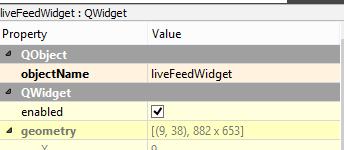
                            @mrjj it's just a QWidget

                            0_1526045360721_69e31ace-face-4a69-8f1e-9d381138b063-image.png

                            mrjjM 1 Reply Last reply
                            0
                            • G graniteDev

                              @mrjj it's just a QWidget

                              0_1526045360721_69e31ace-face-4a69-8f1e-9d381138b063-image.png

                              mrjjM Offline
                              mrjjM Offline
                              mrjj
                              Lifetime Qt Champion
                              wrote on last edited by
                              #16

                              @graniteDev
                              Ok, you could use QLabel and paint to a pixmap and assign pixmap
                              to the label.
                              Else only way is to add paintEvent to custom widget.
                              PaintEvent is virtual and only way to override is to subclass.

                              1 Reply Last reply
                              0
                              • mrjjM mrjj

                                Hi
                                Sorry didnt spot it before.
                                So goal is to paint from
                                PointViewer to ui->liveFeedWidget
                                or IS the ui->liveFeedWidget a PointViewer instance?

                                If liveFeedWidget is completely other widget , then it need to have the paintEvent and not
                                PointViewer.

                                You cannot paint from other widget to other widgets.

                                G Offline
                                G Offline
                                graniteDev
                                wrote on last edited by
                                #17

                                @mrjj

                                This still didn't work

                                void PointViewer::paintEvent(QPaintEvent *)
                                {
                                    QPen pen(Qt::green, 20, Qt::SolidLine, Qt::RoundCap);
                                    QPainter painter(this);
                                    painter.setPen(pen);
                                    painter.drawPoint(100,200);
                                }
                                

                                I'm expecting, that at 20 pixels I should be able to see SOME dot on the screen, but I see nothing

                                mrjjM 1 Reply Last reply
                                0
                                • G graniteDev

                                  @mrjj

                                  This still didn't work

                                  void PointViewer::paintEvent(QPaintEvent *)
                                  {
                                      QPen pen(Qt::green, 20, Qt::SolidLine, Qt::RoundCap);
                                      QPainter painter(this);
                                      painter.setPen(pen);
                                      painter.drawPoint(100,200);
                                  }
                                  

                                  I'm expecting, that at 20 pixels I should be able to see SOME dot on the screen, but I see nothing

                                  mrjjM Offline
                                  mrjjM Offline
                                  mrjj
                                  Lifetime Qt Champion
                                  wrote on last edited by mrjj
                                  #18

                                  @graniteDev

                                  There should be a point at 100,200

                                  insert qDebug() to be sure its called.

                                  If you really dont want a custom widget for drawing, you can do like

                                  QPixmap pix(200, 200);
                                  pix.fill(Qt::blue);
                                  QPainter painter(&pix);
                                  painter.drawpoint(50, 50);
                                  ui->label->setPixmap(pix); 
                                  
                                  G 2 Replies Last reply
                                  2
                                  • mrjjM mrjj

                                    @graniteDev

                                    There should be a point at 100,200

                                    insert qDebug() to be sure its called.

                                    If you really dont want a custom widget for drawing, you can do like

                                    QPixmap pix(200, 200);
                                    pix.fill(Qt::blue);
                                    QPainter painter(&pix);
                                    painter.drawpoint(50, 50);
                                    ui->label->setPixmap(pix); 
                                    
                                    G Offline
                                    G Offline
                                    graniteDev
                                    wrote on last edited by
                                    #19

                                    @mrjj WE HAVE A DOT!!!!!

                                    UGH, I have no idea why the previous code did not work. But this looks like it does. I'm going to see if this works for me. I'm hoping that as it's updated with new data it does not flicker.

                                    mrjjM 1 Reply Last reply
                                    0
                                    • G graniteDev

                                      @mrjj WE HAVE A DOT!!!!!

                                      UGH, I have no idea why the previous code did not work. But this looks like it does. I'm going to see if this works for me. I'm hoping that as it's updated with new data it does not flicker.

                                      mrjjM Offline
                                      mrjjM Offline
                                      mrjj
                                      Lifetime Qt Champion
                                      wrote on last edited by
                                      #20

                                      @graniteDev
                                      \o/
                                      Long live the DOT.

                                      Qwidgets uses double buffer system internally so often there is no flicker.

                                      Did you use pixmap or paintEvent ?

                                      G 1 Reply Last reply
                                      0
                                      • mrjjM mrjj

                                        @graniteDev

                                        There should be a point at 100,200

                                        insert qDebug() to be sure its called.

                                        If you really dont want a custom widget for drawing, you can do like

                                        QPixmap pix(200, 200);
                                        pix.fill(Qt::blue);
                                        QPainter painter(&pix);
                                        painter.drawpoint(50, 50);
                                        ui->label->setPixmap(pix); 
                                        
                                        G Offline
                                        G Offline
                                        graniteDev
                                        wrote on last edited by
                                        #21

                                        @mrjj Crud, now I have a different problem, how do I draw different points with different sizes at the same time? Drawing many points of the same size is easy, that's readily handled, but I need to draw different sized points to denote how far or near a marker is that the point represents.

                                        mrjjM 1 Reply Last reply
                                        0
                                        • mrjjM mrjj

                                          @graniteDev
                                          \o/
                                          Long live the DOT.

                                          Qwidgets uses double buffer system internally so often there is no flicker.

                                          Did you use pixmap or paintEvent ?

                                          G Offline
                                          G Offline
                                          graniteDev
                                          wrote on last edited by
                                          #22

                                          @mrjj said in Can't paint points on my widget:

                                          @graniteDev
                                          \o/
                                          Long live the DOT.

                                          Qwidgets uses double buffer system internally so often there is no flicker.

                                          Did you use pixmap or paintEvent ?

                                          void PointViewer::paintMarkers(int x, int y, int z)
                                          {
                                              QPen pen(Qt::green, z, Qt::SolidLine, Qt::RoundCap);
                                              QPixmap pix(800,600);
                                              pix.fill(Qt::black);
                                              QPainter painter(&pix);
                                              painter.setPen(pen);
                                              painter.drawPoint(x,y);
                                              ui->pointViewerLabel->setPixmap(pix);
                                          }
                                          

                                          and I got a large green dot about where I expected to

                                          1 Reply Last reply
                                          0

                                          • Login

                                          • Login or register to search.
                                          • First post
                                            Last post
                                          0
                                          • Categories
                                          • Recent
                                          • Tags
                                          • Popular
                                          • Users
                                          • Groups
                                          • Search
                                          • Get Qt Extensions
                                          • Unsolved