Skip to content
  • Categories
  • Recent
  • Tags
  • Popular
  • Users
  • Groups
  • Search
  • Get Qt Extensions
  • Unsolved
Collapse
Brand Logo
  1. Home
  2. Qt Development
  3. General and Desktop
  4. Cant build files

Cant build files

Scheduled Pinned Locked Moved Unsolved General and Desktop
24 Posts 3 Posters 7.3k Views 2 Watching
  • Oldest to Newest
  • Newest to Oldest
  • Most Votes
Reply
  • Reply as topic
Log in to reply
This topic has been deleted. Only users with topic management privileges can see it.
  • SGaistS Offline
    SGaistS Offline
    SGaist
    Lifetime Qt Champion
    wrote on last edited by
    #9

    Can you show your .pro file ?

    Interested in AI ? www.idiap.ch
    Please read the Qt Code of Conduct - https://forum.qt.io/topic/113070/qt-code-of-conduct

    1 Reply Last reply
    0
    • K Offline
      K Offline
      kzzmzz
      wrote on last edited by
      #10

      How can i show .pro file ?

      i also got this message.

      :-1: error: No rule to make target '../Desktop/C', needed by 'C.o'. Stop.

      mrjjM 1 Reply Last reply
      0
      • K kzzmzz

        How can i show .pro file ?

        i also got this message.

        :-1: error: No rule to make target '../Desktop/C', needed by 'C.o'. Stop.

        mrjjM Offline
        mrjjM Offline
        mrjj
        Lifetime Qt Champion
        wrote on last edited by mrjj
        #11

        @kzzmzz
        Just double click it and it will open. Copy paste it here.

        Also , you seem to be on linux. You have gcc and build tools installed?

        1 Reply Last reply
        0
        • K Offline
          K Offline
          kzzmzz
          wrote on last edited by kzzmzz
          #12

          TEMPLATE = app
          CONFIG += console
          CONFIG -= app_bundle
          CONFIG -= qt

          SOURCES += main.c
          ../Desktop/C Reseni Zadaci iz Knjiga/Chapter-9-Zadatak-6.c

          yes i have gcc installed

          When im making new file everything is ok, i can build, debuge etc

          but when i want to add my old c files i cant

          1 Reply Last reply
          0
          • mrjjM Offline
            mrjjM Offline
            mrjj
            Lifetime Qt Champion
            wrote on last edited by
            #13

            Just for test.
            rename it to
            myfile.c and put it next to main.c ( in same folder)
            Then add it.
            I suspect it might be path related.

            1 Reply Last reply
            0
            • K Offline
              K Offline
              kzzmzz
              wrote on last edited by
              #14

              Still nothing

              :-1: error: No rule to make target '../Desktop/C', needed by 'C.o'. Stop.

              mrjjM 1 Reply Last reply
              0
              • K kzzmzz

                Still nothing

                :-1: error: No rule to make target '../Desktop/C', needed by 'C.o'. Stop.

                mrjjM Offline
                mrjjM Offline
                mrjj
                Lifetime Qt Champion
                wrote on last edited by
                #15

                @kzzmzz

                But if you renamed the file,
                why does it talk
                about C.o ?
                should be myfile.o or Chapter-9-Zadatak-6.o ?

                1 Reply Last reply
                0
                • K Offline
                  K Offline
                  kzzmzz
                  wrote on last edited by
                  #16

                  I have added another folder on desktop test and i copyed myfile.c and now i can add the file but still cant build or run?

                  mrjjM 1 Reply Last reply
                  0
                  • K kzzmzz

                    I have added another folder on desktop test and i copyed myfile.c and now i can add the file but still cant build or run?

                    mrjjM Offline
                    mrjjM Offline
                    mrjj
                    Lifetime Qt Champion
                    wrote on last edited by
                    #17

                    @kzzmzz
                    well it surely works so im not sure why it fails in your setup.
                    Could u zip your test project and let me see it ?

                    1 Reply Last reply
                    0
                    • SGaistS Offline
                      SGaistS Offline
                      SGaist
                      Lifetime Qt Champion
                      wrote on last edited by
                      #18

                      At the very least your are missing quotes in your .pro files.

                      ../Desktop/C Reseni Zadaci iz Knjiga/Chapter-9-Zadatak-6.c each space tells qmake that what follows is a new file hence your errors with the "strange" paths.

                      Interested in AI ? www.idiap.ch
                      Please read the Qt Code of Conduct - https://forum.qt.io/topic/113070/qt-code-of-conduct

                      1 Reply Last reply
                      1
                      • K Offline
                        K Offline
                        kzzmzz
                        wrote on last edited by
                        #19

                        http://www.megafileupload.com/2M5eA/Test.tar.gz

                        1 Reply Last reply
                        0
                        • K Offline
                          K Offline
                          kzzmzz
                          wrote on last edited by
                          #20

                          22:02:17: Running steps for project Chapter-9-Zadatak-7...
                          22:02:17: Configuration unchanged, skipping qmake step.
                          22:02:17: Starting: "/usr/bin/make"
                          make: *** No rule to make target '../Desktop/C', needed by 'C.o'. Stop.
                          22:02:17: The process "/usr/bin/make" exited with code 2.
                          Error while building/deploying project Chapter-9-Zadatak-7 (kit: Desktop Qt 5.6.1 GCC 64bit)
                          When executing step "Make"
                          22:02:17: Elapsed time: 00:00

                          mrjjM 1 Reply Last reply
                          0
                          • K kzzmzz

                            22:02:17: Running steps for project Chapter-9-Zadatak-7...
                            22:02:17: Configuration unchanged, skipping qmake step.
                            22:02:17: Starting: "/usr/bin/make"
                            make: *** No rule to make target '../Desktop/C', needed by 'C.o'. Stop.
                            22:02:17: The process "/usr/bin/make" exited with code 2.
                            Error while building/deploying project Chapter-9-Zadatak-7 (kit: Desktop Qt 5.6.1 GCC 64bit)
                            When executing step "Make"
                            22:02:17: Elapsed time: 00:00

                            mrjjM Offline
                            mrjjM Offline
                            mrjj
                            Lifetime Qt Champion
                            wrote on last edited by
                            #21

                            @kzzmzz

                            Hi
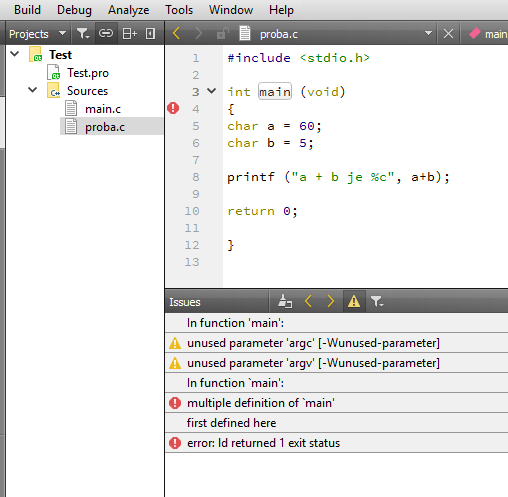
                            Your project just worked here.
                            alt text

                            Complaining about you have 2 main functions -
                            so there must be something wrong with your setup
                            since it wont compile in your place.

                            Can you create a Default Qt Gui project and run it ?

                            1 Reply Last reply
                            0
                            • K Offline
                              K Offline
                              kzzmzz
                              wrote on last edited by
                              #22

                              yes i can run default and change it and run again, but the problem is with new files that i want to add. Im still google for solution :)

                              mrjjM 1 Reply Last reply
                              0
                              • K kzzmzz

                                yes i can run default and change it and run again, but the problem is with new files that i want to add. Im still google for solution :)

                                mrjjM Offline
                                mrjjM Offline
                                mrjj
                                Lifetime Qt Champion
                                wrote on last edited by
                                #23

                                @kzzmzz
                                Very odd.
                                So the same project, do not compile proba.c
                                even it does here ?
                                Can you check your kit that there is a .c compiler assigned ?

                                alt text

                                1 Reply Last reply
                                0
                                • SGaistS Offline
                                  SGaistS Offline
                                  SGaist
                                  Lifetime Qt Champion
                                  wrote on last edited by
                                  #24

                                  Are you adding files with spaces in the path ?

                                  Interested in AI ? www.idiap.ch
                                  Please read the Qt Code of Conduct - https://forum.qt.io/topic/113070/qt-code-of-conduct

                                  1 Reply Last reply
                                  1

                                  • Login

                                  • Login or register to search.
                                  • First post
                                    Last post
                                  0
                                  • Categories
                                  • Recent
                                  • Tags
                                  • Popular
                                  • Users
                                  • Groups
                                  • Search
                                  • Get Qt Extensions
                                  • Unsolved