Skip to content
  • Categories
  • Recent
  • Tags
  • Popular
  • Users
  • Groups
  • Search
  • Get Qt Extensions
  • Unsolved
Collapse
Brand Logo
  1. Home
  2. Qt Development
  3. General and Desktop
  4. Cant build files
Qt 6.11 is out! See what's new in the release blog

Cant build files

Scheduled Pinned Locked Moved Unsolved General and Desktop
24 Posts 3 Posters 17.6k Views 2 Watching
  • Oldest to Newest
  • Newest to Oldest
  • Most Votes
Reply
  • Reply as topic
Log in to reply
This topic has been deleted. Only users with topic management privileges can see it.
  • K kzzmzz

    I just to use qt creator, and i have trouble to build files that i created with codeblocks but that doesn`t matter i think. I click on file/open file or project and choose file test.c for example and when test.c is opened i cant click on build or start or debug.

    mrjjM Offline
    mrjjM Offline
    mrjj
    Lifetime Qt Champion
    wrote on last edited by
    #2

    @kzzmzz
    Hi
    You need to have a project file.
    ( a .pro file)
    Else you are just editing the file and Creator do not know how to compile/build the file.

    Please read this
    http://doc.qt.io/qtcreator/creator-project-creating.html

    1 Reply Last reply
    2
    • K Offline
      K Offline
      kzzmzz
      wrote on last edited by kzzmzz
      #3

      I created c project and when i go to add existing file and choose my file.c nothing happened i also try to delete main.c and add again my file and nothing?

      1 Reply Last reply
      0
      • SGaistS Offline
        SGaistS Offline
        SGaist
        Lifetime Qt Champion
        wrote on last edited by
        #4

        Hi and welcome to devnet,

        How did you create your project ?

        Interested in AI ? www.idiap.ch
        Please read the Qt Code of Conduct - https://forum.qt.io/topic/113070/qt-code-of-conduct

        1 Reply Last reply
        0
        • K Offline
          K Offline
          kzzmzz
          wrote on last edited by
          #5

          File / New file or project / non qt project/ plain c application

          is it wrong ? Thank you for helping

          1 Reply Last reply
          0
          • SGaistS Offline
            SGaistS Offline
            SGaist
            Lifetime Qt Champion
            wrote on last edited by
            #6

            No, that's fine. What exact error are you getting ?

            Interested in AI ? www.idiap.ch
            Please read the Qt Code of Conduct - https://forum.qt.io/topic/113070/qt-code-of-conduct

            1 Reply Last reply
            0
            • K Offline
              K Offline
              kzzmzz
              wrote on last edited by kzzmzz
              #7

              I dont get error , i creat project and right click add existing file and nothing change , only main.c is there, i tryed to delete main.c and add existing file again but nothing happend!?

              1 Reply Last reply
              0
              • K Offline
                K Offline
                kzzmzz
                wrote on last edited by
                #8

                This is what i get

                20:20:25: Running steps for project untitled2...
                20:20:25: Starting: "/usr/bin/make" clean
                rm -f C.o Reseni.o Zadaci.o iz.o Chapter.o 9.o -.o Zadatak.o 6.o
                rm: invalid option -- '.'
                Try 'rm --help' for more information.
                Makefile:496: recipe for target 'clean' failed
                rm -f *~ core *.core
                make: [clean] Error 1 (ignored)
                20:20:26: The process "/usr/bin/make" exited normally.
                20:20:26: Elapsed time: 00:00.

                1 Reply Last reply
                0
                • SGaistS Offline
                  SGaistS Offline
                  SGaist
                  Lifetime Qt Champion
                  wrote on last edited by
                  #9

                  Can you show your .pro file ?

                  Interested in AI ? www.idiap.ch
                  Please read the Qt Code of Conduct - https://forum.qt.io/topic/113070/qt-code-of-conduct

                  1 Reply Last reply
                  0
                  • K Offline
                    K Offline
                    kzzmzz
                    wrote on last edited by
                    #10

                    How can i show .pro file ?

                    i also got this message.

                    :-1: error: No rule to make target '../Desktop/C', needed by 'C.o'. Stop.

                    mrjjM 1 Reply Last reply
                    0
                    • K kzzmzz

                      How can i show .pro file ?

                      i also got this message.

                      :-1: error: No rule to make target '../Desktop/C', needed by 'C.o'. Stop.

                      mrjjM Offline
                      mrjjM Offline
                      mrjj
                      Lifetime Qt Champion
                      wrote on last edited by mrjj
                      #11

                      @kzzmzz
                      Just double click it and it will open. Copy paste it here.

                      Also , you seem to be on linux. You have gcc and build tools installed?

                      1 Reply Last reply
                      0
                      • K Offline
                        K Offline
                        kzzmzz
                        wrote on last edited by kzzmzz
                        #12

                        TEMPLATE = app
                        CONFIG += console
                        CONFIG -= app_bundle
                        CONFIG -= qt

                        SOURCES += main.c
                        ../Desktop/C Reseni Zadaci iz Knjiga/Chapter-9-Zadatak-6.c

                        yes i have gcc installed

                        When im making new file everything is ok, i can build, debuge etc

                        but when i want to add my old c files i cant

                        1 Reply Last reply
                        0
                        • mrjjM Offline
                          mrjjM Offline
                          mrjj
                          Lifetime Qt Champion
                          wrote on last edited by
                          #13

                          Just for test.
                          rename it to
                          myfile.c and put it next to main.c ( in same folder)
                          Then add it.
                          I suspect it might be path related.

                          1 Reply Last reply
                          0
                          • K Offline
                            K Offline
                            kzzmzz
                            wrote on last edited by
                            #14

                            Still nothing

                            :-1: error: No rule to make target '../Desktop/C', needed by 'C.o'. Stop.

                            mrjjM 1 Reply Last reply
                            0
                            • K kzzmzz

                              Still nothing

                              :-1: error: No rule to make target '../Desktop/C', needed by 'C.o'. Stop.

                              mrjjM Offline
                              mrjjM Offline
                              mrjj
                              Lifetime Qt Champion
                              wrote on last edited by
                              #15

                              @kzzmzz

                              But if you renamed the file,
                              why does it talk
                              about C.o ?
                              should be myfile.o or Chapter-9-Zadatak-6.o ?

                              1 Reply Last reply
                              0
                              • K Offline
                                K Offline
                                kzzmzz
                                wrote on last edited by
                                #16

                                I have added another folder on desktop test and i copyed myfile.c and now i can add the file but still cant build or run?

                                mrjjM 1 Reply Last reply
                                0
                                • K kzzmzz

                                  I have added another folder on desktop test and i copyed myfile.c and now i can add the file but still cant build or run?

                                  mrjjM Offline
                                  mrjjM Offline
                                  mrjj
                                  Lifetime Qt Champion
                                  wrote on last edited by
                                  #17

                                  @kzzmzz
                                  well it surely works so im not sure why it fails in your setup.
                                  Could u zip your test project and let me see it ?

                                  1 Reply Last reply
                                  0
                                  • SGaistS Offline
                                    SGaistS Offline
                                    SGaist
                                    Lifetime Qt Champion
                                    wrote on last edited by
                                    #18

                                    At the very least your are missing quotes in your .pro files.

                                    ../Desktop/C Reseni Zadaci iz Knjiga/Chapter-9-Zadatak-6.c each space tells qmake that what follows is a new file hence your errors with the "strange" paths.

                                    Interested in AI ? www.idiap.ch
                                    Please read the Qt Code of Conduct - https://forum.qt.io/topic/113070/qt-code-of-conduct

                                    1 Reply Last reply
                                    1
                                    • K Offline
                                      K Offline
                                      kzzmzz
                                      wrote on last edited by
                                      #19

                                      http://www.megafileupload.com/2M5eA/Test.tar.gz

                                      1 Reply Last reply
                                      0
                                      • K Offline
                                        K Offline
                                        kzzmzz
                                        wrote on last edited by
                                        #20

                                        22:02:17: Running steps for project Chapter-9-Zadatak-7...
                                        22:02:17: Configuration unchanged, skipping qmake step.
                                        22:02:17: Starting: "/usr/bin/make"
                                        make: *** No rule to make target '../Desktop/C', needed by 'C.o'. Stop.
                                        22:02:17: The process "/usr/bin/make" exited with code 2.
                                        Error while building/deploying project Chapter-9-Zadatak-7 (kit: Desktop Qt 5.6.1 GCC 64bit)
                                        When executing step "Make"
                                        22:02:17: Elapsed time: 00:00

                                        mrjjM 1 Reply Last reply
                                        0
                                        • K kzzmzz

                                          22:02:17: Running steps for project Chapter-9-Zadatak-7...
                                          22:02:17: Configuration unchanged, skipping qmake step.
                                          22:02:17: Starting: "/usr/bin/make"
                                          make: *** No rule to make target '../Desktop/C', needed by 'C.o'. Stop.
                                          22:02:17: The process "/usr/bin/make" exited with code 2.
                                          Error while building/deploying project Chapter-9-Zadatak-7 (kit: Desktop Qt 5.6.1 GCC 64bit)
                                          When executing step "Make"
                                          22:02:17: Elapsed time: 00:00

                                          mrjjM Offline
                                          mrjjM Offline
                                          mrjj
                                          Lifetime Qt Champion
                                          wrote on last edited by
                                          #21

                                          @kzzmzz

                                          Hi
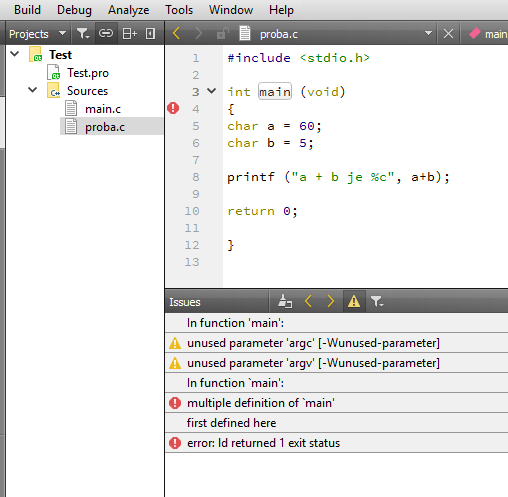
                                          Your project just worked here.
                                          alt text

                                          Complaining about you have 2 main functions -
                                          so there must be something wrong with your setup
                                          since it wont compile in your place.

                                          Can you create a Default Qt Gui project and run it ?

                                          1 Reply Last reply
                                          0

                                          • Login

                                          • Login or register to search.
                                          • First post
                                            Last post
                                          0
                                          • Categories
                                          • Recent
                                          • Tags
                                          • Popular
                                          • Users
                                          • Groups
                                          • Search
                                          • Get Qt Extensions
                                          • Unsolved