Skip to content
  • Categories
  • Recent
  • Tags
  • Popular
  • Users
  • Groups
  • Search
  • Get Qt
  • Unsolved
Collapse
qtws26_logo

The Qt Event of the Year: Qt World Summit 2026

Save Your Spot >
Brand Logo
  1. Home
  2. Qt Development
  3. General and Desktop
  4. Cant build files
Qt 6.12 LTS is out! See what's new in the release blog

Cant build files

Scheduled Pinned Locked Moved Unsolved General and Desktop
24 Posts 3 Posters 19.0k Views 2 Watching
  • Oldest to Newest
  • Newest to Oldest
  • Most Votes
Reply
  • Reply as topic
Log in to reply
This topic has been deleted. Only users with topic management privileges can see it.
  • SGaistS Offline
    SGaistS Offline
    SGaist
    Lifetime Qt Champion
    wrote on last edited by
    #6

    No, that's fine. What exact error are you getting ?

    Interested in AI ? www.idiap.ch
    Please read the Qt Code of Conduct - https://forum.qt.io/topic/113070/qt-code-of-conduct

    1 Reply Last reply
    0
    • K Offline
      K Offline
      kzzmzz
      wrote on last edited by kzzmzz
      #7

      I dont get error , i creat project and right click add existing file and nothing change , only main.c is there, i tryed to delete main.c and add existing file again but nothing happend!?

      1 Reply Last reply
      0
      • K Offline
        K Offline
        kzzmzz
        wrote on last edited by
        #8

        This is what i get

        20:20:25: Running steps for project untitled2...
        20:20:25: Starting: "/usr/bin/make" clean
        rm -f C.o Reseni.o Zadaci.o iz.o Chapter.o 9.o -.o Zadatak.o 6.o
        rm: invalid option -- '.'
        Try 'rm --help' for more information.
        Makefile:496: recipe for target 'clean' failed
        rm -f *~ core *.core
        make: [clean] Error 1 (ignored)
        20:20:26: The process "/usr/bin/make" exited normally.
        20:20:26: Elapsed time: 00:00.

        1 Reply Last reply
        0
        • SGaistS Offline
          SGaistS Offline
          SGaist
          Lifetime Qt Champion
          wrote on last edited by
          #9

          Can you show your .pro file ?

          Interested in AI ? www.idiap.ch
          Please read the Qt Code of Conduct - https://forum.qt.io/topic/113070/qt-code-of-conduct

          1 Reply Last reply
          0
          • K Offline
            K Offline
            kzzmzz
            wrote on last edited by
            #10

            How can i show .pro file ?

            i also got this message.

            :-1: error: No rule to make target '../Desktop/C', needed by 'C.o'. Stop.

            mrjjM 1 Reply Last reply
            0
            • K kzzmzz

              How can i show .pro file ?

              i also got this message.

              :-1: error: No rule to make target '../Desktop/C', needed by 'C.o'. Stop.

              mrjjM Offline
              mrjjM Offline
              mrjj
              Lifetime Qt Champion
              wrote on last edited by mrjj
              #11

              @kzzmzz
              Just double click it and it will open. Copy paste it here.

              Also , you seem to be on linux. You have gcc and build tools installed?

              1 Reply Last reply
              0
              • K Offline
                K Offline
                kzzmzz
                wrote on last edited by kzzmzz
                #12

                TEMPLATE = app
                CONFIG += console
                CONFIG -= app_bundle
                CONFIG -= qt

                SOURCES += main.c
                ../Desktop/C Reseni Zadaci iz Knjiga/Chapter-9-Zadatak-6.c

                yes i have gcc installed

                When im making new file everything is ok, i can build, debuge etc

                but when i want to add my old c files i cant

                1 Reply Last reply
                0
                • mrjjM Offline
                  mrjjM Offline
                  mrjj
                  Lifetime Qt Champion
                  wrote on last edited by
                  #13

                  Just for test.
                  rename it to
                  myfile.c and put it next to main.c ( in same folder)
                  Then add it.
                  I suspect it might be path related.

                  1 Reply Last reply
                  0
                  • K Offline
                    K Offline
                    kzzmzz
                    wrote on last edited by
                    #14

                    Still nothing

                    :-1: error: No rule to make target '../Desktop/C', needed by 'C.o'. Stop.

                    mrjjM 1 Reply Last reply
                    0
                    • K kzzmzz

                      Still nothing

                      :-1: error: No rule to make target '../Desktop/C', needed by 'C.o'. Stop.

                      mrjjM Offline
                      mrjjM Offline
                      mrjj
                      Lifetime Qt Champion
                      wrote on last edited by
                      #15

                      @kzzmzz

                      But if you renamed the file,
                      why does it talk
                      about C.o ?
                      should be myfile.o or Chapter-9-Zadatak-6.o ?

                      1 Reply Last reply
                      0
                      • K Offline
                        K Offline
                        kzzmzz
                        wrote on last edited by
                        #16

                        I have added another folder on desktop test and i copyed myfile.c and now i can add the file but still cant build or run?

                        mrjjM 1 Reply Last reply
                        0
                        • K kzzmzz

                          I have added another folder on desktop test and i copyed myfile.c and now i can add the file but still cant build or run?

                          mrjjM Offline
                          mrjjM Offline
                          mrjj
                          Lifetime Qt Champion
                          wrote on last edited by
                          #17

                          @kzzmzz
                          well it surely works so im not sure why it fails in your setup.
                          Could u zip your test project and let me see it ?

                          1 Reply Last reply
                          0
                          • SGaistS Offline
                            SGaistS Offline
                            SGaist
                            Lifetime Qt Champion
                            wrote on last edited by
                            #18

                            At the very least your are missing quotes in your .pro files.

                            ../Desktop/C Reseni Zadaci iz Knjiga/Chapter-9-Zadatak-6.c each space tells qmake that what follows is a new file hence your errors with the "strange" paths.

                            Interested in AI ? www.idiap.ch
                            Please read the Qt Code of Conduct - https://forum.qt.io/topic/113070/qt-code-of-conduct

                            1 Reply Last reply
                            1
                            • K Offline
                              K Offline
                              kzzmzz
                              wrote on last edited by
                              #19

                              http://www.megafileupload.com/2M5eA/Test.tar.gz

                              1 Reply Last reply
                              0
                              • K Offline
                                K Offline
                                kzzmzz
                                wrote on last edited by
                                #20

                                22:02:17: Running steps for project Chapter-9-Zadatak-7...
                                22:02:17: Configuration unchanged, skipping qmake step.
                                22:02:17: Starting: "/usr/bin/make"
                                make: *** No rule to make target '../Desktop/C', needed by 'C.o'. Stop.
                                22:02:17: The process "/usr/bin/make" exited with code 2.
                                Error while building/deploying project Chapter-9-Zadatak-7 (kit: Desktop Qt 5.6.1 GCC 64bit)
                                When executing step "Make"
                                22:02:17: Elapsed time: 00:00

                                mrjjM 1 Reply Last reply
                                0
                                • K kzzmzz

                                  22:02:17: Running steps for project Chapter-9-Zadatak-7...
                                  22:02:17: Configuration unchanged, skipping qmake step.
                                  22:02:17: Starting: "/usr/bin/make"
                                  make: *** No rule to make target '../Desktop/C', needed by 'C.o'. Stop.
                                  22:02:17: The process "/usr/bin/make" exited with code 2.
                                  Error while building/deploying project Chapter-9-Zadatak-7 (kit: Desktop Qt 5.6.1 GCC 64bit)
                                  When executing step "Make"
                                  22:02:17: Elapsed time: 00:00

                                  mrjjM Offline
                                  mrjjM Offline
                                  mrjj
                                  Lifetime Qt Champion
                                  wrote on last edited by
                                  #21

                                  @kzzmzz

                                  Hi
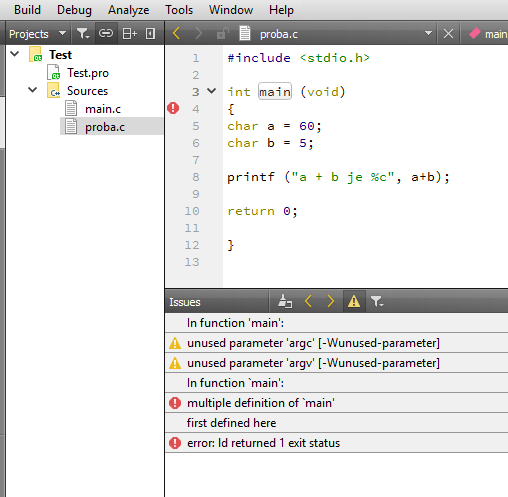
                                  Your project just worked here.
                                  alt text

                                  Complaining about you have 2 main functions -
                                  so there must be something wrong with your setup
                                  since it wont compile in your place.

                                  Can you create a Default Qt Gui project and run it ?

                                  1 Reply Last reply
                                  0
                                  • K Offline
                                    K Offline
                                    kzzmzz
                                    wrote on last edited by
                                    #22

                                    yes i can run default and change it and run again, but the problem is with new files that i want to add. Im still google for solution :)

                                    mrjjM 1 Reply Last reply
                                    0
                                    • K kzzmzz

                                      yes i can run default and change it and run again, but the problem is with new files that i want to add. Im still google for solution :)

                                      mrjjM Offline
                                      mrjjM Offline
                                      mrjj
                                      Lifetime Qt Champion
                                      wrote on last edited by
                                      #23

                                      @kzzmzz
                                      Very odd.
                                      So the same project, do not compile proba.c
                                      even it does here ?
                                      Can you check your kit that there is a .c compiler assigned ?

                                      alt text

                                      1 Reply Last reply
                                      0
                                      • SGaistS Offline
                                        SGaistS Offline
                                        SGaist
                                        Lifetime Qt Champion
                                        wrote on last edited by
                                        #24

                                        Are you adding files with spaces in the path ?

                                        Interested in AI ? www.idiap.ch
                                        Please read the Qt Code of Conduct - https://forum.qt.io/topic/113070/qt-code-of-conduct

                                        1 Reply Last reply
                                        1

                                        • Login

                                        • Login or register to search.
                                        • First post
                                          Last post
                                        0
                                        • Categories
                                        • Recent
                                        • Tags
                                        • Popular
                                        • Users
                                        • Groups
                                        • Search
                                        • Get Qt
                                        • Unsolved