Skip to content
  • Categories
  • Recent
  • Tags
  • Popular
  • Users
  • Groups
  • Search
  • Get Qt Extensions
  • Unsolved
Collapse
Brand Logo
  1. Home
  2. Qt Development
  3. General and Desktop
  4. Layout issues
Forum Updated to NodeBB v4.3 + New Features

Layout issues

Scheduled Pinned Locked Moved Solved General and Desktop
46 Posts 6 Posters 18.1k Views 2 Watching
  • Oldest to Newest
  • Newest to Oldest
  • Most Votes
Reply
  • Reply as topic
Log in to reply
This topic has been deleted. Only users with topic management privileges can see it.
  • Cobra91151C Cobra91151

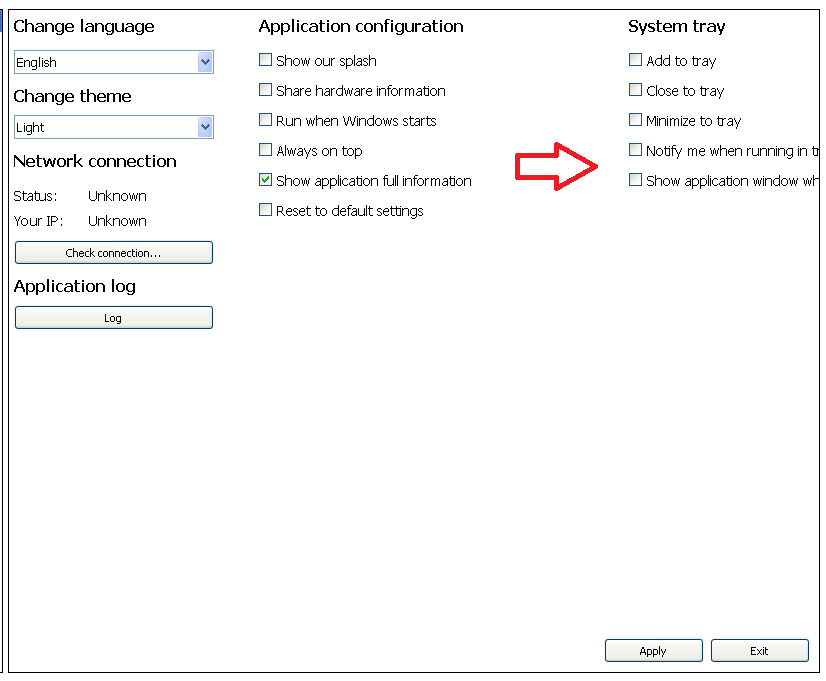
    I have tried different approaches but nothing works. Is there any other solution how to fix layout issue?

    Screenshots:
    alt text
    alt text

    Also I have tried QVBoxLayout, QHBoxLayout, QGridLayout but it not properly displays widgets. Thanks.

    J.HilkJ Offline
    J.HilkJ Offline
    J.Hilk
    Moderators
    wrote on last edited by
    #9

    @Cobra91151

    have you tried it with a QScrollArea ?


    Be aware of the Qt Code of Conduct, when posting : https://forum.qt.io/topic/113070/qt-code-of-conduct


    Q: What's that?
    A: It's blue light.
    Q: What does it do?
    A: It turns blue.

    Cobra91151C 1 Reply Last reply
    0
    • J.HilkJ J.Hilk

      @Cobra91151

      have you tried it with a QScrollArea ?

      Cobra91151C Offline
      Cobra91151C Offline
      Cobra91151
      wrote on last edited by
      #10

      @J.Hilk

      I have added QScrollArea, but it not fixed the issue. This issue is only appear when I have maximized my app window on small screen resolutions. So I think there should be solution with adding some layout.

      1 Reply Last reply
      0
      • Cobra91151C Offline
        Cobra91151C Offline
        Cobra91151
        wrote on last edited by Cobra91151
        #11

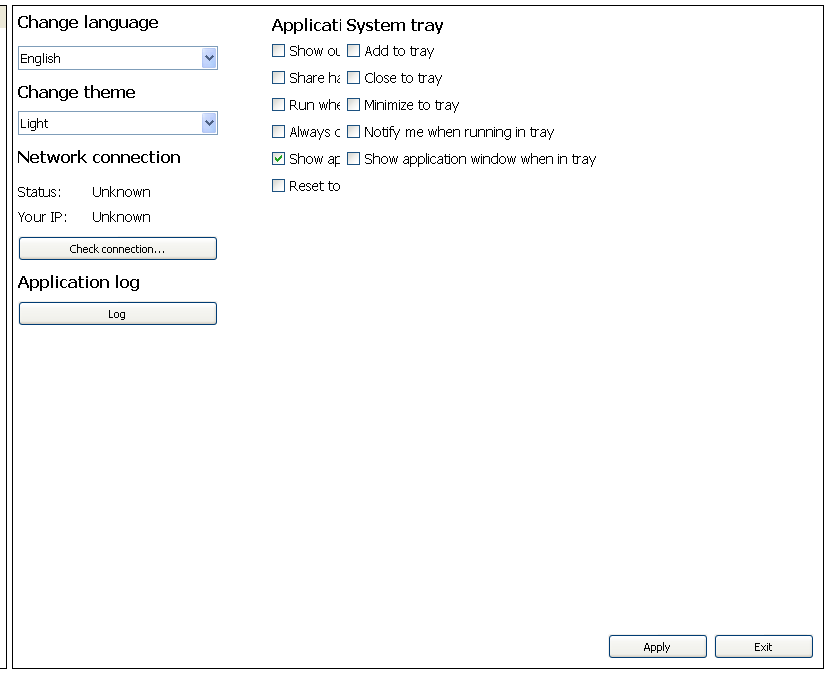
        I have combined QVBoxLayout with QHBoxLayout and it fixes the issue but it not properly displays widgets?
        alt text

        Update:
        These issues are with 800x600,1024x768, 1152x864 screen resolutions. From 1280x720 works normal.

        A 1 Reply Last reply
        0
        • Cobra91151C Cobra91151

          I have combined QVBoxLayout with QHBoxLayout and it fixes the issue but it not properly displays widgets?

          alt text

          Update:
          These issues are with 800x600,1024x768, 1152x864 screen resolutions. From 1280x720 works normal.

          A Offline
          A Offline
          ambershark
          wrote on last edited by
          #12

          @Cobra91151 Yea your layout code is definitely bad. Can you post the code so we can either duplicate the problem or at least see where you are going wrong?

          It doesn't have to be the actual code you could throw some dummy code into a sample app that duplicates the issue so we can play with it.

          My L-GPL'd C++ Logger github.com/ambershark-mike/sharklog

          Cobra91151C 1 Reply Last reply
          1
          • SGaistS Offline
            SGaistS Offline
            SGaist
            Lifetime Qt Champion
            wrote on last edited by
            #13

            Hi,

            Why are you setting your QStackedLayout inside a QHBoxLayout before setting it on the widget ? It looks like a layer to much.

            You could maybe even remove that widget altoghether and use a QStackedWidget directly, no ?

            Interested in AI ? www.idiap.ch
            Please read the Qt Code of Conduct - https://forum.qt.io/topic/113070/qt-code-of-conduct

            1 Reply Last reply
            0
            • A ambershark

              @Cobra91151 Yea your layout code is definitely bad. Can you post the code so we can either duplicate the problem or at least see where you are going wrong?

              It doesn't have to be the actual code you could throw some dummy code into a sample app that duplicates the issue so we can play with it.

              Cobra91151C Offline
              Cobra91151C Offline
              Cobra91151
              wrote on last edited by Cobra91151
              #14

              @ambershark @SGaist

              Hi!
              I use QStackedLayout to emulate tab behavior. I will test QStackedWidget and post code later.

              1 Reply Last reply
              0
              • Cobra91151C Offline
                Cobra91151C Offline
                Cobra91151
                wrote on last edited by Cobra91151
                #15

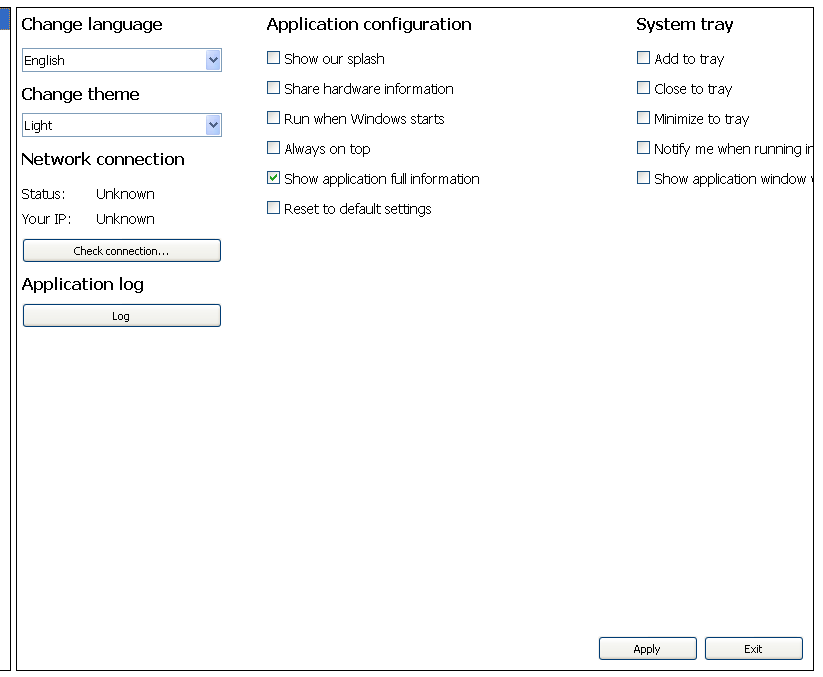
                I have tested QStackedWidget, but the issue is still present on small screen resolutions. I have deleted all layouts and added QHBoxLayout for apply and exit buttons.

                This is without layout. QHBoxLayout has just buttons (Apply/Exit).
                alt text

                Code:

                QListWidget *settingsView = new QListWidget(tabSettings);  //tabSettings is QTabWidget
                
                QWidget *appSettingsTab = new QWidget(settingsView);
                QStackedWidget *settingsStackedWidget = new QStackedWidget();
                settingsStackedWidget->addWidget(appSettingsTab);
                
                QHBoxLayout *appSettingsButtonLayout = new QHBoxLayout();
                appSettingsButtonLayout->addStretch(0);
                appSettingsButtonLayout->setAlignment(Qt::AlignBottom | Qt::AlignRight);
                appSettingsButtonLayout->addWidget(appSettingsApplyButton);
                appSettingsButtonLayout->addWidget(appSettingsExitButton);
                appSettingsTab->setLayout(appSettingsButtonLayout);
                
                QHBoxLayout *allSettingsDataLayout = new QHBoxLayout();
                allSettingsDataLayout->addWidget(settingsStackedWidget);
                allSettingsDataLayout->setContentsMargins(0, 0, 0, 0);
                settingsView->setLayout(allSettingsDataLayout);
                

                So how should I combine layouts to display widgets in three columns?

                1 Reply Last reply
                0
                • SGaistS Offline
                  SGaistS Offline
                  SGaist
                  Lifetime Qt Champion
                  wrote on last edited by
                  #16

                  What does small screen represent ?

                  Interested in AI ? www.idiap.ch
                  Please read the Qt Code of Conduct - https://forum.qt.io/topic/113070/qt-code-of-conduct

                  Cobra91151C 1 Reply Last reply
                  0
                  • SGaistS SGaist

                    What does small screen represent ?

                    Cobra91151C Offline
                    Cobra91151C Offline
                    Cobra91151
                    wrote on last edited by
                    #17

                    @SGaist

                    QWidgets are not fully visible on 800x600,1024x768, 1152x864 screen resolutions.

                    1 Reply Last reply
                    0
                    • SGaistS Offline
                      SGaistS Offline
                      SGaist
                      Lifetime Qt Champion
                      wrote on last edited by
                      #18

                      Ok, so pretty standard sizes.

                      Why are you putting settingsViewin appSettingsTab and not directly in the QStackedWidget ? That makes settingsView a "floating" widget inside appSettingsTab.

                      Interested in AI ? www.idiap.ch
                      Please read the Qt Code of Conduct - https://forum.qt.io/topic/113070/qt-code-of-conduct

                      Cobra91151C 1 Reply Last reply
                      0
                      • SGaistS SGaist

                        Ok, so pretty standard sizes.

                        Why are you putting settingsViewin appSettingsTab and not directly in the QStackedWidget ? That makes settingsView a "floating" widget inside appSettingsTab.

                        Cobra91151C Offline
                        Cobra91151C Offline
                        Cobra91151
                        wrote on last edited by Cobra91151
                        #19

                        @SGaist

                        I have app with horizontal tabs (QTabWidgets), the last tab is settings and it displays two views for a list of different settings menu and settings which controls QStackedWidget. I will try to combine layouts and post code later.

                        1 Reply Last reply
                        0
                        • Cobra91151C Offline
                          Cobra91151C Offline
                          Cobra91151
                          wrote on last edited by Cobra91151
                          #20

                          I also have layout issue with buttons:

                          Code:

                              QVBoxLayout *firstButtonsColumnLayout = new QVBoxLayout;
                              firstButtonsColumnLayout->addStretch(0);
                              firstButtonsColumnLayout->setContentsMargins(0, 0, 0, 0);
                              firstButtonsColumnLayout->setAlignment(Qt::AlignTop | Qt::AlignLeft);
                              firstButtonsColumnLayout->addWidget(registryButton, 0,);
                              firstButtonsColumnLayout->addWidget(recycleBinButton, 0);
                              firstButtonsColumnLayout->addWidget(deviceManagerButton, 0);
                              firstButtonsColumnLayout->addWidget(windowsUpdateButton, 0);
                              firstButtonsColumnLayout->addWidget(systemConfigButton, 0);
                          
                              QHBoxLayout *testLayout = new QHBoxLayout;
                              testLayout->setAlignment(Qt::AlignTop | Qt::AlignLeft);
                              testLayout->addLayout(firstButtonsColumnLayout);
                              commandsTab->setLayout(testLayout);
                          

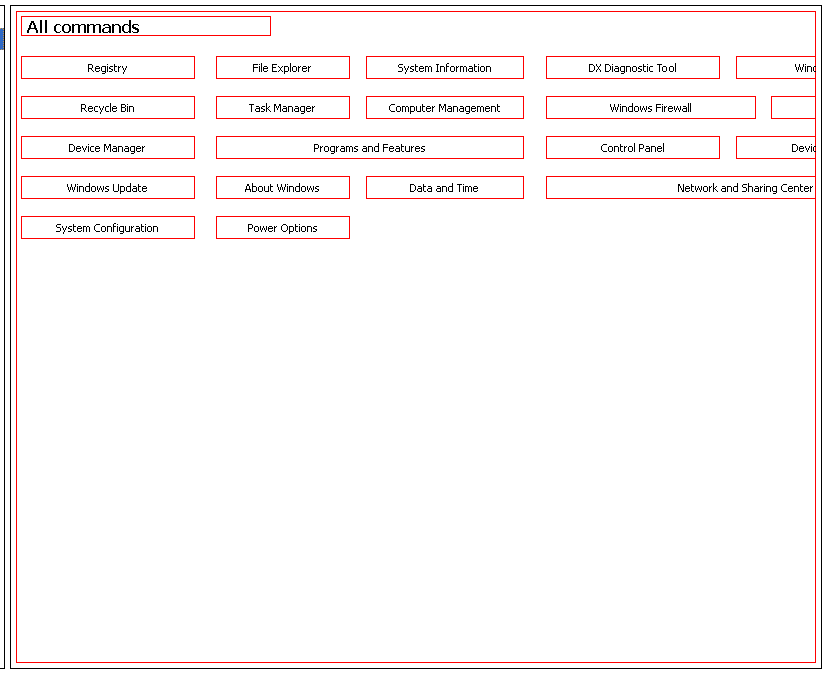
                          The problem is that buttons are not fully visible at small screen resolutions without layouts. So when I have added layout to some of them it displayed bottom not top.

                          Screenshot:
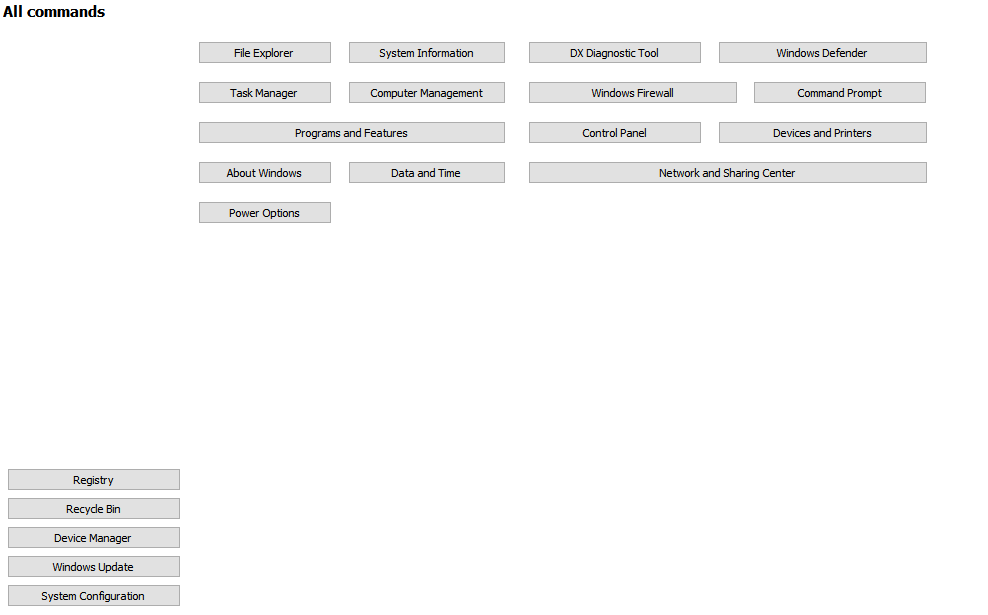
                          alt text

                          It should look like this with layouts:
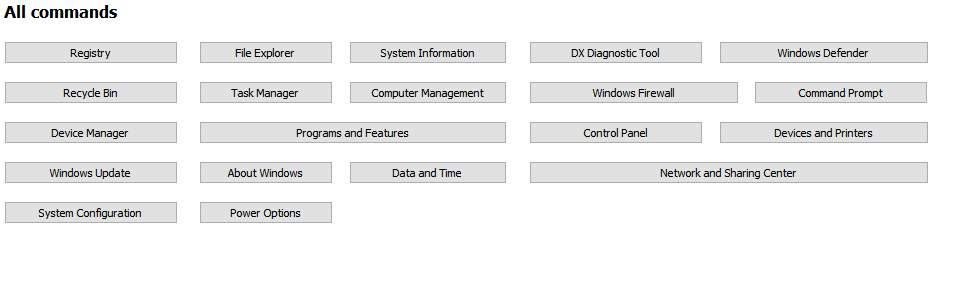
                          alt text

                          How to fix these layout issues? What layout I should use?

                          A 1 Reply Last reply
                          0
                          • SGaistS Offline
                            SGaistS Offline
                            SGaist
                            Lifetime Qt Champion
                            wrote on last edited by
                            #21

                            Not knowing how you build the rest of the buttons, it's not really possible to guess what is going wrong.

                            Interested in AI ? www.idiap.ch
                            Please read the Qt Code of Conduct - https://forum.qt.io/topic/113070/qt-code-of-conduct

                            1 Reply Last reply
                            0
                            • Cobra91151C Cobra91151

                              I also have layout issue with buttons:

                              Code:

                                  QVBoxLayout *firstButtonsColumnLayout = new QVBoxLayout;
                                  firstButtonsColumnLayout->addStretch(0);
                                  firstButtonsColumnLayout->setContentsMargins(0, 0, 0, 0);
                                  firstButtonsColumnLayout->setAlignment(Qt::AlignTop | Qt::AlignLeft);
                                  firstButtonsColumnLayout->addWidget(registryButton, 0,);
                                  firstButtonsColumnLayout->addWidget(recycleBinButton, 0);
                                  firstButtonsColumnLayout->addWidget(deviceManagerButton, 0);
                                  firstButtonsColumnLayout->addWidget(windowsUpdateButton, 0);
                                  firstButtonsColumnLayout->addWidget(systemConfigButton, 0);
                              
                                  QHBoxLayout *testLayout = new QHBoxLayout;
                                  testLayout->setAlignment(Qt::AlignTop | Qt::AlignLeft);
                                  testLayout->addLayout(firstButtonsColumnLayout);
                                  commandsTab->setLayout(testLayout);
                              

                              The problem is that buttons are not fully visible at small screen resolutions without layouts. So when I have added layout to some of them it displayed bottom not top.

                              Screenshot:
                              alt text

                              It should look like this with layouts:
                              alt text

                              How to fix these layout issues? What layout I should use?

                              A Offline
                              A Offline
                              ambershark
                              wrote on last edited by
                              #22

                              @Cobra91151 Since the project you are doing is big enough not to share the code, it's really hard for us to figure out what is going on.

                              How about this.. Can you write up a quick/small project that just uses dummy widgets to show the same problem. Something you can share with us so we can see what you are doing wrong?

                              That way it is minimal code to share, and there is nothing that is proprietary being given to us on the forums here.

                              I don't see anything wrong, but I can't see the whole picture either. I don't have these issues with layouts and can't duplicate your problem.

                              My L-GPL'd C++ Logger github.com/ambershark-mike/sharklog

                              1 Reply Last reply
                              1
                              • Cobra91151C Offline
                                Cobra91151C Offline
                                Cobra91151
                                wrote on last edited by Cobra91151
                                #23

                                Ok. I will create small project and post it here later.

                                Update:
                                I will upload test project on Mega and post link here.

                                1 Reply Last reply
                                0
                                • Cobra91151C Offline
                                  Cobra91151C Offline
                                  Cobra91151
                                  wrote on last edited by
                                  #24

                                  Test project is available here - Mega. Thanks.

                                  A J.HilkJ 2 Replies Last reply
                                  0
                                  • Cobra91151C Cobra91151

                                    Test project is available here - Mega. Thanks.

                                    A Offline
                                    A Offline
                                    ambershark
                                    wrote on last edited by
                                    #25

                                    @Cobra91151 Ok in looking at your example project, the major problem I see is you are using fixed sizing for everything. When you use fixed sizing you are limiting what the layout can do to help display your widgets. This is why you are having issues with things going off screen.

                                    So questions:

                                    1. Why do you want to use fixed sizes?
                                    2. How do you want your buttons to look? Is it the second picture you posted with the "All Commands"? I can try to throw together a quick layout for you that has those buttons in it.

                                    My L-GPL'd C++ Logger github.com/ambershark-mike/sharklog

                                    Cobra91151C 1 Reply Last reply
                                    1
                                    • Cobra91151C Cobra91151

                                      Test project is available here - Mega. Thanks.

                                      J.HilkJ Offline
                                      J.HilkJ Offline
                                      J.Hilk
                                      Moderators
                                      wrote on last edited by J.Hilk
                                      #26

                                      @Cobra91151
                                      jep @ambershark is right,
                                      a QGridLayout where your buttons are imbedded should solve all the layout issues you have with them.

                                      QGridLayouts allow Layoutitems to span more than 1 row or column, therefore it's the best option here, as long as you want those 2 special buttons that are twice as wide as the others.

                                      At the moment you order them in 4 different QVBoxLayouts and 1 QHBoxLayout that combination that does not really support the multi column span mechanic you want.

                                      to add a widget to a QGridlayout you can do the following:

                                      QGridLayout* gLay = new QGridlayout();
                                      //add widget the default way at cell (0,0):
                                      gLay->addWidget(myWidget, 0,0);
                                      
                                      //add widget that spans 2 columns at (origin) cell (0,1):
                                      gLay->addWidget(myWidget,0,1,1,2)
                                      

                                      Be aware of the Qt Code of Conduct, when posting : https://forum.qt.io/topic/113070/qt-code-of-conduct


                                      Q: What's that?
                                      A: It's blue light.
                                      Q: What does it do?
                                      A: It turns blue.

                                      Cobra91151C 1 Reply Last reply
                                      1
                                      • A ambershark

                                        @Cobra91151 Ok in looking at your example project, the major problem I see is you are using fixed sizing for everything. When you use fixed sizing you are limiting what the layout can do to help display your widgets. This is why you are having issues with things going off screen.

                                        So questions:

                                        1. Why do you want to use fixed sizes?
                                        2. How do you want your buttons to look? Is it the second picture you posted with the "All Commands"? I can try to throw together a quick layout for you that has those buttons in it.
                                        Cobra91151C Offline
                                        Cobra91151C Offline
                                        Cobra91151
                                        wrote on last edited by
                                        #27

                                        @ambershark

                                        1. To get buttons fix size and position them.
                                        2. Yes, like in the second picture.

                                        I have changed code to setGeometry function but it looks not like in the second picture. The question is how to control widgets size and position in layouts, or what layout should I use?

                                        1 Reply Last reply
                                        0
                                        • J.HilkJ J.Hilk

                                          @Cobra91151
                                          jep @ambershark is right,
                                          a QGridLayout where your buttons are imbedded should solve all the layout issues you have with them.

                                          QGridLayouts allow Layoutitems to span more than 1 row or column, therefore it's the best option here, as long as you want those 2 special buttons that are twice as wide as the others.

                                          At the moment you order them in 4 different QVBoxLayouts and 1 QHBoxLayout that combination that does not really support the multi column span mechanic you want.

                                          to add a widget to a QGridlayout you can do the following:

                                          QGridLayout* gLay = new QGridlayout();
                                          //add widget the default way at cell (0,0):
                                          gLay->addWidget(myWidget, 0,0);
                                          
                                          //add widget that spans 2 columns at (origin) cell (0,1):
                                          gLay->addWidget(myWidget,0,1,1,2)
                                          
                                          Cobra91151C Offline
                                          Cobra91151C Offline
                                          Cobra91151
                                          wrote on last edited by Cobra91151
                                          #28

                                          @J.Hilk

                                          I will try QGridLayout and reply.

                                          Update:
                                          I have set QGridLayout on buttons but it looks like this - Mega. Can someone write an example how to properly style widgets in Qt by code. Thanks in advance.

                                          A 1 Reply Last reply
                                          0

                                          • Login

                                          • Login or register to search.
                                          • First post
                                            Last post
                                          0
                                          • Categories
                                          • Recent
                                          • Tags
                                          • Popular
                                          • Users
                                          • Groups
                                          • Search
                                          • Get Qt Extensions
                                          • Unsolved