
Skip to content
  • Categories
  • Recent
  • Tags
  • Popular
  • Users
  • Groups
  • Search
  • Get Qt Extensions
  • Unsolved
Collapse
Brand Logo
  1. Home
  2. Qt Development
  3. General and Desktop
  4. Layout issues
Forum Updated to NodeBB v4.3 + New Features

Layout issues

Scheduled Pinned Locked Moved Solved General and Desktop
46 Posts 6 Posters 18.2k Views 2 Watching
  • Oldest to Newest
  • Newest to Oldest
  • Most Votes
Reply
  • Reply as topic
Log in to reply
This topic has been deleted. Only users with topic management privileges can see it.
  • Cobra91151C Offline
    Cobra91151C Offline
    Cobra91151
    wrote on last edited by Cobra91151
    #15

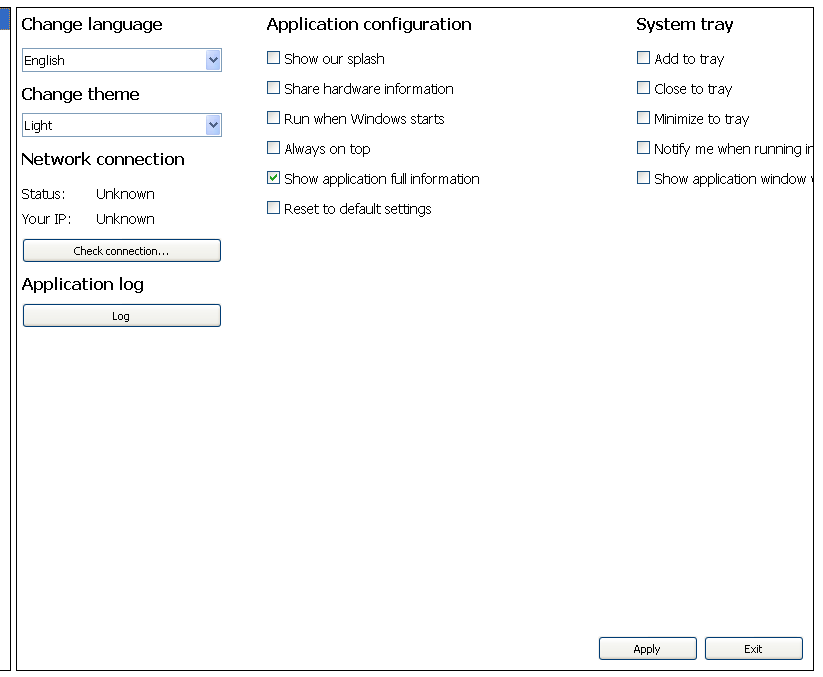
    I have tested QStackedWidget, but the issue is still present on small screen resolutions. I have deleted all layouts and added QHBoxLayout for apply and exit buttons.

    This is without layout. QHBoxLayout has just buttons (Apply/Exit).
    alt text

    Code:

    QListWidget *settingsView = new QListWidget(tabSettings);  //tabSettings is QTabWidget
    
    QWidget *appSettingsTab = new QWidget(settingsView);
    QStackedWidget *settingsStackedWidget = new QStackedWidget();
    settingsStackedWidget->addWidget(appSettingsTab);
    
    QHBoxLayout *appSettingsButtonLayout = new QHBoxLayout();
    appSettingsButtonLayout->addStretch(0);
    appSettingsButtonLayout->setAlignment(Qt::AlignBottom | Qt::AlignRight);
    appSettingsButtonLayout->addWidget(appSettingsApplyButton);
    appSettingsButtonLayout->addWidget(appSettingsExitButton);
    appSettingsTab->setLayout(appSettingsButtonLayout);
    
    QHBoxLayout *allSettingsDataLayout = new QHBoxLayout();
    allSettingsDataLayout->addWidget(settingsStackedWidget);
    allSettingsDataLayout->setContentsMargins(0, 0, 0, 0);
    settingsView->setLayout(allSettingsDataLayout);
    

    So how should I combine layouts to display widgets in three columns?

    1 Reply Last reply
    0
    • SGaistS Offline
      SGaistS Offline
      SGaist
      Lifetime Qt Champion
      wrote on last edited by
      #16

      What does small screen represent ?

      Interested in AI ? www.idiap.ch
      Please read the Qt Code of Conduct - https://forum.qt.io/topic/113070/qt-code-of-conduct

      Cobra91151C 1 Reply Last reply
      0
      • SGaistS SGaist

        What does small screen represent ?

        Cobra91151C Offline
        Cobra91151C Offline
        Cobra91151
        wrote on last edited by
        #17

        @SGaist

        QWidgets are not fully visible on 800x600,1024x768, 1152x864 screen resolutions.

        1 Reply Last reply
        0
        • SGaistS Offline
          SGaistS Offline
          SGaist
          Lifetime Qt Champion
          wrote on last edited by
          #18

          Ok, so pretty standard sizes.

          Why are you putting settingsViewin appSettingsTab and not directly in the QStackedWidget ? That makes settingsView a "floating" widget inside appSettingsTab.

          Interested in AI ? www.idiap.ch
          Please read the Qt Code of Conduct - https://forum.qt.io/topic/113070/qt-code-of-conduct

          Cobra91151C 1 Reply Last reply
          0
          • SGaistS SGaist

            Ok, so pretty standard sizes.

            Why are you putting settingsViewin appSettingsTab and not directly in the QStackedWidget ? That makes settingsView a "floating" widget inside appSettingsTab.

            Cobra91151C Offline
            Cobra91151C Offline
            Cobra91151
            wrote on last edited by Cobra91151
            #19

            @SGaist

            I have app with horizontal tabs (QTabWidgets), the last tab is settings and it displays two views for a list of different settings menu and settings which controls QStackedWidget. I will try to combine layouts and post code later.

            1 Reply Last reply
            0
            • Cobra91151C Offline
              Cobra91151C Offline
              Cobra91151
              wrote on last edited by Cobra91151
              #20

              I also have layout issue with buttons:

              Code:

                  QVBoxLayout *firstButtonsColumnLayout = new QVBoxLayout;
                  firstButtonsColumnLayout->addStretch(0);
                  firstButtonsColumnLayout->setContentsMargins(0, 0, 0, 0);
                  firstButtonsColumnLayout->setAlignment(Qt::AlignTop | Qt::AlignLeft);
                  firstButtonsColumnLayout->addWidget(registryButton, 0,);
                  firstButtonsColumnLayout->addWidget(recycleBinButton, 0);
                  firstButtonsColumnLayout->addWidget(deviceManagerButton, 0);
                  firstButtonsColumnLayout->addWidget(windowsUpdateButton, 0);
                  firstButtonsColumnLayout->addWidget(systemConfigButton, 0);
              
                  QHBoxLayout *testLayout = new QHBoxLayout;
                  testLayout->setAlignment(Qt::AlignTop | Qt::AlignLeft);
                  testLayout->addLayout(firstButtonsColumnLayout);
                  commandsTab->setLayout(testLayout);
              

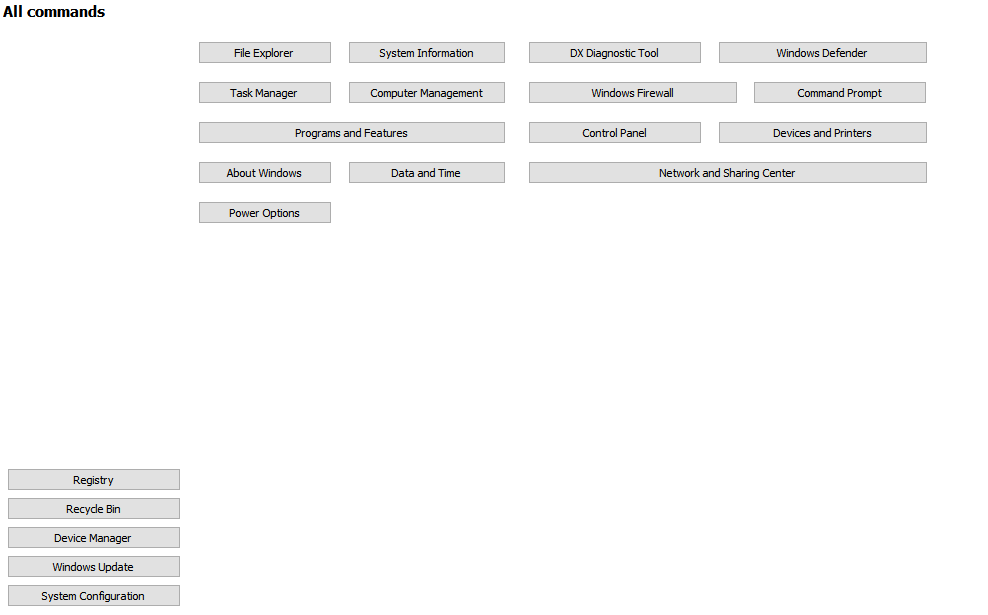
              The problem is that buttons are not fully visible at small screen resolutions without layouts. So when I have added layout to some of them it displayed bottom not top.

              Screenshot:
              alt text

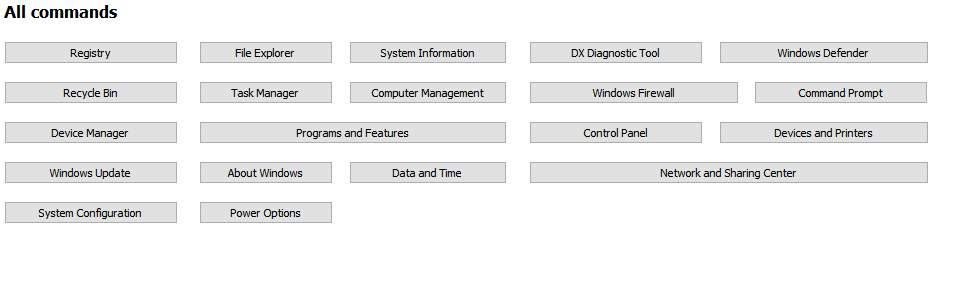
              It should look like this with layouts:
              alt text

              How to fix these layout issues? What layout I should use?

              A 1 Reply Last reply
              0
              • SGaistS Offline
                SGaistS Offline
                SGaist
                Lifetime Qt Champion
                wrote on last edited by
                #21

                Not knowing how you build the rest of the buttons, it's not really possible to guess what is going wrong.

                Interested in AI ? www.idiap.ch
                Please read the Qt Code of Conduct - https://forum.qt.io/topic/113070/qt-code-of-conduct

                1 Reply Last reply
                0
                • Cobra91151C Cobra91151

                  I also have layout issue with buttons:

                  Code:

                      QVBoxLayout *firstButtonsColumnLayout = new QVBoxLayout;
                      firstButtonsColumnLayout->addStretch(0);
                      firstButtonsColumnLayout->setContentsMargins(0, 0, 0, 0);
                      firstButtonsColumnLayout->setAlignment(Qt::AlignTop | Qt::AlignLeft);
                      firstButtonsColumnLayout->addWidget(registryButton, 0,);
                      firstButtonsColumnLayout->addWidget(recycleBinButton, 0);
                      firstButtonsColumnLayout->addWidget(deviceManagerButton, 0);
                      firstButtonsColumnLayout->addWidget(windowsUpdateButton, 0);
                      firstButtonsColumnLayout->addWidget(systemConfigButton, 0);
                  
                      QHBoxLayout *testLayout = new QHBoxLayout;
                      testLayout->setAlignment(Qt::AlignTop | Qt::AlignLeft);
                      testLayout->addLayout(firstButtonsColumnLayout);
                      commandsTab->setLayout(testLayout);
                  

                  The problem is that buttons are not fully visible at small screen resolutions without layouts. So when I have added layout to some of them it displayed bottom not top.

                  Screenshot:
                  alt text

                  It should look like this with layouts:
                  alt text

                  How to fix these layout issues? What layout I should use?

                  A Offline
                  A Offline
                  ambershark
                  wrote on last edited by
                  #22

                  @Cobra91151 Since the project you are doing is big enough not to share the code, it's really hard for us to figure out what is going on.

                  How about this.. Can you write up a quick/small project that just uses dummy widgets to show the same problem. Something you can share with us so we can see what you are doing wrong?

                  That way it is minimal code to share, and there is nothing that is proprietary being given to us on the forums here.

                  I don't see anything wrong, but I can't see the whole picture either. I don't have these issues with layouts and can't duplicate your problem.

                  My L-GPL'd C++ Logger github.com/ambershark-mike/sharklog

                  1 Reply Last reply
                  1
                  • Cobra91151C Offline
                    Cobra91151C Offline
                    Cobra91151
                    wrote on last edited by Cobra91151
                    #23

                    Ok. I will create small project and post it here later.

                    Update:
                    I will upload test project on Mega and post link here.

                    1 Reply Last reply
                    0
                    • Cobra91151C Offline
                      Cobra91151C Offline
                      Cobra91151
                      wrote on last edited by
                      #24

                      Test project is available here - Mega. Thanks.

                      A J.HilkJ 2 Replies Last reply
                      0
                      • Cobra91151C Cobra91151

                        Test project is available here - Mega. Thanks.

                        A Offline
                        A Offline
                        ambershark
                        wrote on last edited by
                        #25

                        @Cobra91151 Ok in looking at your example project, the major problem I see is you are using fixed sizing for everything. When you use fixed sizing you are limiting what the layout can do to help display your widgets. This is why you are having issues with things going off screen.

                        So questions:

                        1. Why do you want to use fixed sizes?
                        2. How do you want your buttons to look? Is it the second picture you posted with the "All Commands"? I can try to throw together a quick layout for you that has those buttons in it.

                        My L-GPL'd C++ Logger github.com/ambershark-mike/sharklog

                        Cobra91151C 1 Reply Last reply
                        1
                        • Cobra91151C Cobra91151

                          Test project is available here - Mega. Thanks.

                          J.HilkJ Offline
                          J.HilkJ Offline
                          J.Hilk
                          Moderators
                          wrote on last edited by J.Hilk
                          #26

                          @Cobra91151
                          jep @ambershark is right,
                          a QGridLayout where your buttons are imbedded should solve all the layout issues you have with them.

                          QGridLayouts allow Layoutitems to span more than 1 row or column, therefore it's the best option here, as long as you want those 2 special buttons that are twice as wide as the others.

                          At the moment you order them in 4 different QVBoxLayouts and 1 QHBoxLayout that combination that does not really support the multi column span mechanic you want.

                          to add a widget to a QGridlayout you can do the following:

                          QGridLayout* gLay = new QGridlayout();
                          //add widget the default way at cell (0,0):
                          gLay->addWidget(myWidget, 0,0);
                          
                          //add widget that spans 2 columns at (origin) cell (0,1):
                          gLay->addWidget(myWidget,0,1,1,2)
                          

                          Be aware of the Qt Code of Conduct, when posting : https://forum.qt.io/topic/113070/qt-code-of-conduct


                          Q: What's that?
                          A: It's blue light.
                          Q: What does it do?
                          A: It turns blue.

                          Cobra91151C 1 Reply Last reply
                          1
                          • A ambershark

                            @Cobra91151 Ok in looking at your example project, the major problem I see is you are using fixed sizing for everything. When you use fixed sizing you are limiting what the layout can do to help display your widgets. This is why you are having issues with things going off screen.

                            So questions:

                            1. Why do you want to use fixed sizes?
                            2. How do you want your buttons to look? Is it the second picture you posted with the "All Commands"? I can try to throw together a quick layout for you that has those buttons in it.
                            Cobra91151C Offline
                            Cobra91151C Offline
                            Cobra91151
                            wrote on last edited by
                            #27

                            @ambershark

                            1. To get buttons fix size and position them.
                            2. Yes, like in the second picture.

                            I have changed code to setGeometry function but it looks not like in the second picture. The question is how to control widgets size and position in layouts, or what layout should I use?

                            1 Reply Last reply
                            0
                            • J.HilkJ J.Hilk

                              @Cobra91151
                              jep @ambershark is right,
                              a QGridLayout where your buttons are imbedded should solve all the layout issues you have with them.

                              QGridLayouts allow Layoutitems to span more than 1 row or column, therefore it's the best option here, as long as you want those 2 special buttons that are twice as wide as the others.

                              At the moment you order them in 4 different QVBoxLayouts and 1 QHBoxLayout that combination that does not really support the multi column span mechanic you want.

                              to add a widget to a QGridlayout you can do the following:

                              QGridLayout* gLay = new QGridlayout();
                              //add widget the default way at cell (0,0):
                              gLay->addWidget(myWidget, 0,0);
                              
                              //add widget that spans 2 columns at (origin) cell (0,1):
                              gLay->addWidget(myWidget,0,1,1,2)
                              
                              Cobra91151C Offline
                              Cobra91151C Offline
                              Cobra91151
                              wrote on last edited by Cobra91151
                              #28

                              @J.Hilk

                              I will try QGridLayout and reply.

                              Update:
                              I have set QGridLayout on buttons but it looks like this - Mega. Can someone write an example how to properly style widgets in Qt by code. Thanks in advance.

                              A 1 Reply Last reply
                              0
                              • Cobra91151C Cobra91151

                                @J.Hilk

                                I will try QGridLayout and reply.

                                Update:
                                I have set QGridLayout on buttons but it looks like this - Mega. Can someone write an example how to properly style widgets in Qt by code. Thanks in advance.

                                A Offline
                                A Offline
                                ambershark
                                wrote on last edited by SGaist
                                #29

                                @Cobra91151 Here ya go.. This does the buttons with a grid exactly as you want them.. Scales up and down to a minimum just below 800. You could get them smaller if you wanted by changing font and reducing wording on your buttons.

                                #include <QApplication>
                                #include <QWidget>
                                #include <QGridLayout>
                                #include <QPushButton>
                                
                                int main(int ac, char **av)
                                {
                                	QApplication app(ac, av);
                                
                                	// create a main window
                                	QWidget mw;
                                	mw.resize(800, 600);
                                	mw.show();
                                
                                	// create a layout with our buttons
                                	auto grid = new QGridLayout;
                                
                                	grid->addWidget(new QPushButton("Registry"), 0, 0);
                                	grid->addWidget(new QPushButton("File Explorer"), 0, 1);
                                	grid->addWidget(new QPushButton("System Information"), 0, 2);
                                	grid->addWidget(new QPushButton("DX Diagnostic Tool"), 0, 3);
                                	grid->addWidget(new QPushButton("Windows Defender"), 0, 4);
                                
                                	grid->addWidget(new QPushButton("Recycle Bin"), 1, 0);
                                	grid->addWidget(new QPushButton("Task Manager"), 1, 1);
                                	grid->addWidget(new QPushButton("Computer Management"), 1, 2);
                                	grid->addWidget(new QPushButton("Windows Firewall"), 1, 3);
                                	grid->addWidget(new QPushButton("Command Prompt"), 1, 4);
                                
                                	grid->addWidget(new QPushButton("Device Manager"), 2, 0);
                                	grid->addWidget(new QPushButton("Programs and Features"), 2, 1, 1, 2);
                                	grid->addWidget(new QPushButton("Control Panel"), 2, 3);
                                	grid->addWidget(new QPushButton("Devices and Printers"), 2, 4);
                                
                                	grid->addWidget(new QPushButton("Windows Update"), 3, 0);
                                	grid->addWidget(new QPushButton("About Windows"), 3, 1);
                                	grid->addWidget(new QPushButton("Date and Time"), 3, 2);
                                	grid->addWidget(new QPushButton("Network and Sharing Center"), 3, 3, 1, 2);
                                
                                	grid->addWidget(new QPushButton("System Configuration"), 4, 0);
                                	grid->addWidget(new QPushButton("Power Options"), 4, 1);
                                
                                	// create a vbox to hold our grid so we can add stretches to squish it to look proper
                                	auto layout = new QVBoxLayout;
                                	layout->addStretch(1);
                                	layout->addLayout(grid);
                                	layout->addStretch(1);
                                
                                	// set layout on our widget
                                	mw.setLayout(layout);
                                
                                	return app.exec();
                                }
                                

                                [edit: fixed small typo SGaist]

                                My L-GPL'd C++ Logger github.com/ambershark-mike/sharklog

                                Cobra91151C 1 Reply Last reply
                                3
                                • A ambershark

                                  @Cobra91151 Here ya go.. This does the buttons with a grid exactly as you want them.. Scales up and down to a minimum just below 800. You could get them smaller if you wanted by changing font and reducing wording on your buttons.

                                  #include <QApplication>
                                  #include <QWidget>
                                  #include <QGridLayout>
                                  #include <QPushButton>
                                  
                                  int main(int ac, char **av)
                                  {
                                  	QApplication app(ac, av);
                                  
                                  	// create a main window
                                  	QWidget mw;
                                  	mw.resize(800, 600);
                                  	mw.show();
                                  
                                  	// create a layout with our buttons
                                  	auto grid = new QGridLayout;
                                  
                                  	grid->addWidget(new QPushButton("Registry"), 0, 0);
                                  	grid->addWidget(new QPushButton("File Explorer"), 0, 1);
                                  	grid->addWidget(new QPushButton("System Information"), 0, 2);
                                  	grid->addWidget(new QPushButton("DX Diagnostic Tool"), 0, 3);
                                  	grid->addWidget(new QPushButton("Windows Defender"), 0, 4);
                                  
                                  	grid->addWidget(new QPushButton("Recycle Bin"), 1, 0);
                                  	grid->addWidget(new QPushButton("Task Manager"), 1, 1);
                                  	grid->addWidget(new QPushButton("Computer Management"), 1, 2);
                                  	grid->addWidget(new QPushButton("Windows Firewall"), 1, 3);
                                  	grid->addWidget(new QPushButton("Command Prompt"), 1, 4);
                                  
                                  	grid->addWidget(new QPushButton("Device Manager"), 2, 0);
                                  	grid->addWidget(new QPushButton("Programs and Features"), 2, 1, 1, 2);
                                  	grid->addWidget(new QPushButton("Control Panel"), 2, 3);
                                  	grid->addWidget(new QPushButton("Devices and Printers"), 2, 4);
                                  
                                  	grid->addWidget(new QPushButton("Windows Update"), 3, 0);
                                  	grid->addWidget(new QPushButton("About Windows"), 3, 1);
                                  	grid->addWidget(new QPushButton("Date and Time"), 3, 2);
                                  	grid->addWidget(new QPushButton("Network and Sharing Center"), 3, 3, 1, 2);
                                  
                                  	grid->addWidget(new QPushButton("System Configuration"), 4, 0);
                                  	grid->addWidget(new QPushButton("Power Options"), 4, 1);
                                  
                                  	// create a vbox to hold our grid so we can add stretches to squish it to look proper
                                  	auto layout = new QVBoxLayout;
                                  	layout->addStretch(1);
                                  	layout->addLayout(grid);
                                  	layout->addStretch(1);
                                  
                                  	// set layout on our widget
                                  	mw.setLayout(layout);
                                  
                                  	return app.exec();
                                  }
                                  

                                  [edit: fixed small typo SGaist]

                                  Cobra91151C Offline
                                  Cobra91151C Offline
                                  Cobra91151
                                  wrote on last edited by
                                  #30

                                  @ambershark

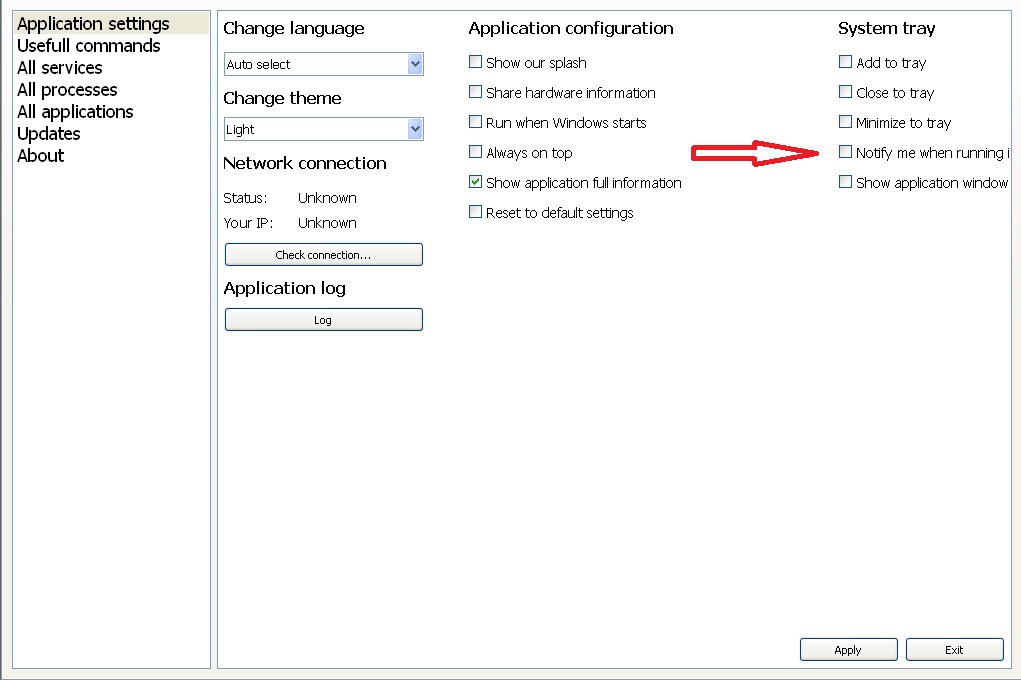
                                  Thanks for the example code. I have fixed buttons layout issue adding QSizePolicy testSizePolicy(QSizePolicy::Expanding, QSizePolicy::Fixed);. But the problem with adding layouts to different widgets still present and QGridLayout is not working well with it. For example:
                                  alt text

                                  I need to add some layout to display widgets like in the image above. What layout should I use?

                                  A 1 Reply Last reply
                                  0
                                  • Cobra91151C Cobra91151

                                    @ambershark

                                    Thanks for the example code. I have fixed buttons layout issue adding QSizePolicy testSizePolicy(QSizePolicy::Expanding, QSizePolicy::Fixed);. But the problem with adding layouts to different widgets still present and QGridLayout is not working well with it. For example:

                                    alt text

                                    I need to add some layout to display widgets like in the image above. What layout should I use?

                                    A Offline
                                    A Offline
                                    ambershark
                                    wrote on last edited by ambershark
                                    #31

                                    @Cobra91151 For that I would use 3 QVBoxLayouts with a QHBoxLayout container.

                                    It would go something like this:

                                    auto vb1 = new QVBoxLayout();
                                    vb1->addWidget(new QLabel("Change Language"));
                                    // ... add other widets
                                    vb1->addWidget(new QPushButton("Log"));
                                    vb1->addStretch(1);
                                    
                                    auto vb2 = new QVBoxLayout();
                                    vb2->addWidget(new QLabel("Application Configuration"));
                                    // .. add other widgets
                                    vb2->addWidget(new QCheckBox("Reset to default settings"));
                                    vb2->addStretch(1);
                                    
                                    auto vb3 = new QVBoxLayout();
                                    vb3->addWidget(new QLabel("System Tray"));
                                    // .. add other widgets
                                    vb3->addWidget(new QCheckBox("Show application window"));
                                    vb3->addStretch(1);
                                    
                                    auto layout = new QHBoxLayout();
                                    layout->addLayout(vb1);
                                    layout->addLayout(vb2);
                                    layout->addLayout(vb3);
                                    layout->addStretch(1);
                                    
                                    yourWidget->setLayout(layout);
                                    

                                    That was untested code I just typed for this post, so typos may be there, but you should get the idea. ;)

                                    My L-GPL'd C++ Logger github.com/ambershark-mike/sharklog

                                    Cobra91151C 1 Reply Last reply
                                    0
                                    • A ambershark

                                      @Cobra91151 For that I would use 3 QVBoxLayouts with a QHBoxLayout container.

                                      It would go something like this:

                                      auto vb1 = new QVBoxLayout();
                                      vb1->addWidget(new QLabel("Change Language"));
                                      // ... add other widets
                                      vb1->addWidget(new QPushButton("Log"));
                                      vb1->addStretch(1);
                                      
                                      auto vb2 = new QVBoxLayout();
                                      vb2->addWidget(new QLabel("Application Configuration"));
                                      // .. add other widgets
                                      vb2->addWidget(new QCheckBox("Reset to default settings"));
                                      vb2->addStretch(1);
                                      
                                      auto vb3 = new QVBoxLayout();
                                      vb3->addWidget(new QLabel("System Tray"));
                                      // .. add other widgets
                                      vb3->addWidget(new QCheckBox("Show application window"));
                                      vb3->addStretch(1);
                                      
                                      auto layout = new QHBoxLayout();
                                      layout->addLayout(vb1);
                                      layout->addLayout(vb2);
                                      layout->addLayout(vb3);
                                      layout->addStretch(1);
                                      
                                      yourWidget->setLayout(layout);
                                      

                                      That was untested code I just typed for this post, so typos may be there, but you should get the idea. ;)

                                      Cobra91151C Offline
                                      Cobra91151C Offline
                                      Cobra91151
                                      wrote on last edited by Cobra91151
                                      #32

                                      @ambershark

                                      Thanks for the code. I have some small issues:
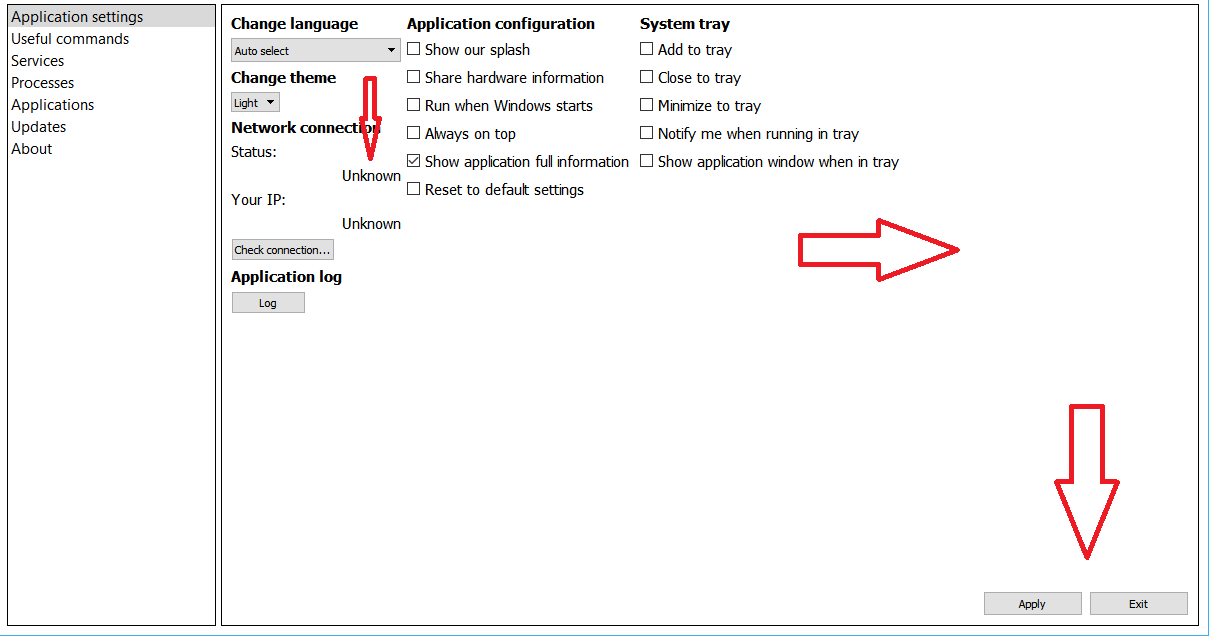
                                      alt text

                                      Code:

                                       QVBoxLayout *vBoxLayout1 = new QVBoxLayout();
                                       vBoxLayout1->addWidget(changeLanguageLabel);
                                       vBoxLayout1->addWidget(changeLanguageComboBox);
                                       vBoxLayout1->addWidget(changeThemeLabel);
                                       vBoxLayout1->addWidget(changeThemeComboBox);
                                       vBoxLayout1->addWidget(networkConnectionLabel);
                                       vBoxLayout1->addWidget(networkStatusTitleLabel);
                                       vBoxLayout1->addWidget(networkStatusLabel, 1, Qt::AlignRight);
                                       vBoxLayout1->addWidget(networkIPTitleLabel);
                                       vBoxLayout1->addWidget(networkIPLabel, 1, Qt::AlignRight);
                                       vBoxLayout1->addWidget(checkConnectionButton);
                                       vBoxLayout1->addWidget(appLogLabel);
                                       vBoxLayout1->addWidget(applicationLogButton);
                                       vBoxLayout1->addStretch(1);
                                      
                                       QVBoxLayout *vBoxLayout2 = new QVBoxLayout();
                                       vBoxLayout2->addWidget(appConfigLabel);
                                       vBoxLayout2->addWidget(showOurSplashCheckBox);
                                       vBoxLayout2->addWidget(shareHardwareInfoCheckBox);
                                       vBoxLayout2->addWidget(runWhenWindowsStartsCheckBox);
                                       vBoxLayout2->addWidget(showAllwaysOnTopCheckBox);
                                       vBoxLayout2->addWidget(showAppFullInfoCheckBox);
                                       vBoxLayout2->addWidget(resetToDefaultsCheckBox);
                                       vBoxLayout2->addStretch(1);
                                      
                                       QVBoxLayout *vBoxLayout3 = new QVBoxLayout();
                                       vBoxLayout3->addWidget(appSystemTrayLabel);
                                       vBoxLayout3->addWidget(addToTrayCheckBox);
                                       vBoxLayout3->addWidget(closeToTrayCheckBox);
                                       vBoxLayout3->addWidget(minimizeToTrayCheckBox);
                                       vBoxLayout3->addWidget(notifyWhenInTrayCheckBox);
                                       vBoxLayout3->addWidget(showAppWindowWhenInTrayCheckBox);
                                       vBoxLayout3->addStretch(1);
                                      
                                       QHBoxLayout *appSettingsButtonLayout = new QHBoxLayout();
                                       appSettingsButtonLayout->setAlignment(Qt::AlignBottom | Qt::AlignRight);
                                       appSettingsButtonLayout->addStretch(1);
                                       appSettingsButtonLayout->addWidget(appSettingsApplyButton);
                                       appSettingsButtonLayout->addWidget(appSettingsExitButton);
                                      
                                       QHBoxLayout *appSettingsLayout = new QHBoxLayout();
                                       appSettingsLayout->addLayout(vBoxLayout1);
                                       appSettingsLayout->addLayout(vBoxLayout2);
                                       appSettingsLayout->addLayout(vBoxLayout3);
                                       appSettingsLayout->addStretch(0);
                                       appSettingsLayout->addLayout(appSettingsButtonLayout);
                                       appSettingsTab->setLayout(appSettingsLayout);
                                      

                                      Issues:

                                      • "Unknown" labels should be on the same line as "Status" and "Your IP" with some space
                                      • "Apply" and "Exit" buttons layout consume to much space on the right and make all layout aligned to the left

                                      What is your suggestions? Thanks in advance.

                                      jsulmJ A 2 Replies Last reply
                                      0
                                      • Cobra91151C Cobra91151

                                        @ambershark

                                        Thanks for the code. I have some small issues:

                                        alt text

                                        Code:

                                         QVBoxLayout *vBoxLayout1 = new QVBoxLayout();
                                         vBoxLayout1->addWidget(changeLanguageLabel);
                                         vBoxLayout1->addWidget(changeLanguageComboBox);
                                         vBoxLayout1->addWidget(changeThemeLabel);
                                         vBoxLayout1->addWidget(changeThemeComboBox);
                                         vBoxLayout1->addWidget(networkConnectionLabel);
                                         vBoxLayout1->addWidget(networkStatusTitleLabel);
                                         vBoxLayout1->addWidget(networkStatusLabel, 1, Qt::AlignRight);
                                         vBoxLayout1->addWidget(networkIPTitleLabel);
                                         vBoxLayout1->addWidget(networkIPLabel, 1, Qt::AlignRight);
                                         vBoxLayout1->addWidget(checkConnectionButton);
                                         vBoxLayout1->addWidget(appLogLabel);
                                         vBoxLayout1->addWidget(applicationLogButton);
                                         vBoxLayout1->addStretch(1);
                                        
                                         QVBoxLayout *vBoxLayout2 = new QVBoxLayout();
                                         vBoxLayout2->addWidget(appConfigLabel);
                                         vBoxLayout2->addWidget(showOurSplashCheckBox);
                                         vBoxLayout2->addWidget(shareHardwareInfoCheckBox);
                                         vBoxLayout2->addWidget(runWhenWindowsStartsCheckBox);
                                         vBoxLayout2->addWidget(showAllwaysOnTopCheckBox);
                                         vBoxLayout2->addWidget(showAppFullInfoCheckBox);
                                         vBoxLayout2->addWidget(resetToDefaultsCheckBox);
                                         vBoxLayout2->addStretch(1);
                                        
                                         QVBoxLayout *vBoxLayout3 = new QVBoxLayout();
                                         vBoxLayout3->addWidget(appSystemTrayLabel);
                                         vBoxLayout3->addWidget(addToTrayCheckBox);
                                         vBoxLayout3->addWidget(closeToTrayCheckBox);
                                         vBoxLayout3->addWidget(minimizeToTrayCheckBox);
                                         vBoxLayout3->addWidget(notifyWhenInTrayCheckBox);
                                         vBoxLayout3->addWidget(showAppWindowWhenInTrayCheckBox);
                                         vBoxLayout3->addStretch(1);
                                        
                                         QHBoxLayout *appSettingsButtonLayout = new QHBoxLayout();
                                         appSettingsButtonLayout->setAlignment(Qt::AlignBottom | Qt::AlignRight);
                                         appSettingsButtonLayout->addStretch(1);
                                         appSettingsButtonLayout->addWidget(appSettingsApplyButton);
                                         appSettingsButtonLayout->addWidget(appSettingsExitButton);
                                        
                                         QHBoxLayout *appSettingsLayout = new QHBoxLayout();
                                         appSettingsLayout->addLayout(vBoxLayout1);
                                         appSettingsLayout->addLayout(vBoxLayout2);
                                         appSettingsLayout->addLayout(vBoxLayout3);
                                         appSettingsLayout->addStretch(0);
                                         appSettingsLayout->addLayout(appSettingsButtonLayout);
                                         appSettingsTab->setLayout(appSettingsLayout);
                                        

                                        Issues:

                                        • "Unknown" labels should be on the same line as "Status" and "Your IP" with some space
                                        • "Apply" and "Exit" buttons layout consume to much space on the right and make all layout aligned to the left

                                        What is your suggestions? Thanks in advance.

                                        jsulmJ Offline
                                        jsulmJ Offline
                                        jsulm
                                        Lifetime Qt Champion
                                        wrote on last edited by
                                        #33

                                        @Cobra91151 Don't put the Apply and Exit buttons in the same layout. Instead put them into a HBoxLayout and put this HBoxLayout in a VBoxLayout together with appSettingsLayout.

                                        Put status and its label in their own HBoxLayout, same for IP and its label.

                                        https://forum.qt.io/topic/113070/qt-code-of-conduct

                                        1 Reply Last reply
                                        1
                                        • Cobra91151C Cobra91151

                                          @ambershark

                                          Thanks for the code. I have some small issues:

                                          alt text

                                          Code:

                                           QVBoxLayout *vBoxLayout1 = new QVBoxLayout();
                                           vBoxLayout1->addWidget(changeLanguageLabel);
                                           vBoxLayout1->addWidget(changeLanguageComboBox);
                                           vBoxLayout1->addWidget(changeThemeLabel);
                                           vBoxLayout1->addWidget(changeThemeComboBox);
                                           vBoxLayout1->addWidget(networkConnectionLabel);
                                           vBoxLayout1->addWidget(networkStatusTitleLabel);
                                           vBoxLayout1->addWidget(networkStatusLabel, 1, Qt::AlignRight);
                                           vBoxLayout1->addWidget(networkIPTitleLabel);
                                           vBoxLayout1->addWidget(networkIPLabel, 1, Qt::AlignRight);
                                           vBoxLayout1->addWidget(checkConnectionButton);
                                           vBoxLayout1->addWidget(appLogLabel);
                                           vBoxLayout1->addWidget(applicationLogButton);
                                           vBoxLayout1->addStretch(1);
                                          
                                           QVBoxLayout *vBoxLayout2 = new QVBoxLayout();
                                           vBoxLayout2->addWidget(appConfigLabel);
                                           vBoxLayout2->addWidget(showOurSplashCheckBox);
                                           vBoxLayout2->addWidget(shareHardwareInfoCheckBox);
                                           vBoxLayout2->addWidget(runWhenWindowsStartsCheckBox);
                                           vBoxLayout2->addWidget(showAllwaysOnTopCheckBox);
                                           vBoxLayout2->addWidget(showAppFullInfoCheckBox);
                                           vBoxLayout2->addWidget(resetToDefaultsCheckBox);
                                           vBoxLayout2->addStretch(1);
                                          
                                           QVBoxLayout *vBoxLayout3 = new QVBoxLayout();
                                           vBoxLayout3->addWidget(appSystemTrayLabel);
                                           vBoxLayout3->addWidget(addToTrayCheckBox);
                                           vBoxLayout3->addWidget(closeToTrayCheckBox);
                                           vBoxLayout3->addWidget(minimizeToTrayCheckBox);
                                           vBoxLayout3->addWidget(notifyWhenInTrayCheckBox);
                                           vBoxLayout3->addWidget(showAppWindowWhenInTrayCheckBox);
                                           vBoxLayout3->addStretch(1);
                                          
                                           QHBoxLayout *appSettingsButtonLayout = new QHBoxLayout();
                                           appSettingsButtonLayout->setAlignment(Qt::AlignBottom | Qt::AlignRight);
                                           appSettingsButtonLayout->addStretch(1);
                                           appSettingsButtonLayout->addWidget(appSettingsApplyButton);
                                           appSettingsButtonLayout->addWidget(appSettingsExitButton);
                                          
                                           QHBoxLayout *appSettingsLayout = new QHBoxLayout();
                                           appSettingsLayout->addLayout(vBoxLayout1);
                                           appSettingsLayout->addLayout(vBoxLayout2);
                                           appSettingsLayout->addLayout(vBoxLayout3);
                                           appSettingsLayout->addStretch(0);
                                           appSettingsLayout->addLayout(appSettingsButtonLayout);
                                           appSettingsTab->setLayout(appSettingsLayout);
                                          

                                          Issues:

                                          • "Unknown" labels should be on the same line as "Status" and "Your IP" with some space
                                          • "Apply" and "Exit" buttons layout consume to much space on the right and make all layout aligned to the left

                                          What is your suggestions? Thanks in advance.

                                          A Offline
                                          A Offline
                                          ambershark
                                          wrote on last edited by ambershark
                                          #34

                                          @Cobra91151 @jsulm said exactly what I would have. A bit more of my thoughts on the labels though.. you can approach this in 2 ways. The HBoxLayout way that @jsulm mentioned, or you can use a single QLabel and set it with myLabel->setText(QString("Your IP: %1").arg(ip)));. Either way works fine, up to you on preferred style there.

                                          If you don't like the extra space on the right, I added that on purpose by adding the stretch to the end of the hboxlayout. You can remove that stretch and your controls will fill the entire window. I find it looks better with the stretch usually, but it's easy to test and see which you like more. Just comment out the layout->addStretch(1); line and see what you like more.

                                          Edit: nevermind I see you added your buttons to the rest of the layout. That is what jsulm meant with take them out of the "same layout".. Definitely do that and don't mess with the stretch. I didn't realize those were in there. Let me know if you need some help with the code for this and I'll show what jsulm means.

                                          My L-GPL'd C++ Logger github.com/ambershark-mike/sharklog

                                          Cobra91151C 1 Reply Last reply
                                          0

                                          • Login

                                          • Login or register to search.
                                          • First post
                                            Last post
                                          0
                                          • Categories
                                          • Recent
                                          • Tags
                                          • Popular
                                          • Users
                                          • Groups
                                          • Search
                                          • Get Qt Extensions
                                          • Unsolved