
Skip to content
  • Categories
  • Recent
  • Tags
  • Popular
  • Users
  • Groups
  • Search
  • Get Qt
  • Unsolved
Collapse
qtws26_logo

The Qt Event of the Year: Qt World Summit 2026

Save Your Spot >
Brand Logo
  1. Home
  2. Qt Development
  3. General and Desktop
  4. Layout issues
Qt 6.12 LTS is out! See what's new in the release blog

Layout issues

Scheduled Pinned Locked Moved Solved General and Desktop
46 Posts 6 Posters 32.0k Views 2 Watching
  • Oldest to Newest
  • Newest to Oldest
  • Most Votes
Reply
  • Reply as topic
Log in to reply
This topic has been deleted. Only users with topic management privileges can see it.
  • A ambershark

    @Cobra91151 You don't really need to add scrollbars to list views. They will happen automatically when you have enough items for them.

    Unless you have a reason beyond the normal for needing scroll bars.

    Cobra91151C Offline
    Cobra91151C Offline
    Cobra91151
    wrote on last edited by
    #4

    @ambershark

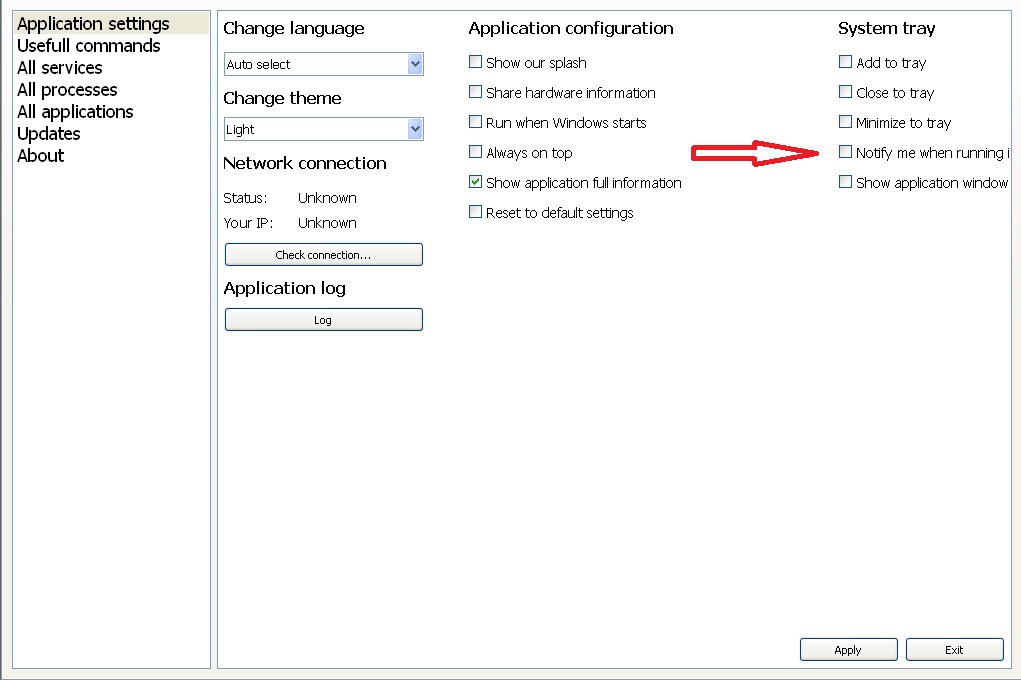
    The problem is that qscrollbars is not added to QListWidget when I have added some widgets and it is not properly display the widgets on small screen resolutions.
    alt text

    So how to fix it?

    A 1 Reply Last reply
    0
    • Cobra91151C Cobra91151

      @ambershark

      The problem is that qscrollbars is not added to QListWidget when I have added some widgets and it is not properly display the widgets on small screen resolutions.

      alt text

      So how to fix it?

      A Offline
      A Offline
      ambershark
      wrote on last edited by
      #5

      @Cobra91151 That is weird... that looks more like a layout issue than one with scroll bars.

      What does your layout code or UI look like for that list widget?

      My L-GPL'd C++ Logger github.com/ambershark-mike/sharklog

      Cobra91151C 1 Reply Last reply
      0
      • A ambershark

        @Cobra91151 That is weird... that looks more like a layout issue than one with scroll bars.

        What does your layout code or UI look like for that list widget?

        Cobra91151C Offline
        Cobra91151C Offline
        Cobra91151
        wrote on last edited by Cobra91151
        #6

        @ambershark

        I use QHBoxLayout layout. Also to emulate tab behavior I use QStackedLayout:

        QHBoxLayout *settingsLayout = new QHBoxLayout();
        settingsLayout->addWidget(settingsMenuView);
        settingsLayout->addWidget(settingsView);
        this->setLayout(settingsLayout);
        

        Code for setting QStackedLayout.

        QHBoxLayout *allSettingsDataLayout = new QHBoxLayout();
        allSettingsDataLayout->addLayout(settingsStackedLayout);
        allSettingsDataLayout->setContentsMargins(0, 0, 0, 0);
        settingsView->setLayout(allSettingsDataLayout);
        

        Maybe the problem is in QStackedLayout?

        A 1 Reply Last reply
        0
        • Cobra91151C Cobra91151

          @ambershark

          I use QHBoxLayout layout. Also to emulate tab behavior I use QStackedLayout:

          QHBoxLayout *settingsLayout = new QHBoxLayout();
          settingsLayout->addWidget(settingsMenuView);
          settingsLayout->addWidget(settingsView);
          this->setLayout(settingsLayout);
          

          Code for setting QStackedLayout.

          QHBoxLayout *allSettingsDataLayout = new QHBoxLayout();
          allSettingsDataLayout->addLayout(settingsStackedLayout);
          allSettingsDataLayout->setContentsMargins(0, 0, 0, 0);
          settingsView->setLayout(allSettingsDataLayout);
          

          Maybe the problem is in QStackedLayout?

          A Offline
          A Offline
          ambershark
          wrote on last edited by
          #7

          @Cobra91151 It definitely has the layout feel to it. I don't see any glaring issue with the code though.

          Maybe try adding a right margin (or some padding, or even a spacer) to your hbox that has the list widget in it and see if it corrects that behavior. It looks like the layout is allowing itself to go "out of bounds".. it really shouldn't do that if it was set up properly.

          You could also try adding a componeny like a QLabel on the right of the list to see if it bleed over into that QLabel or if it is an edge of the window type of thing.

          My L-GPL'd C++ Logger github.com/ambershark-mike/sharklog

          1 Reply Last reply
          0
          • Cobra91151C Offline
            Cobra91151C Offline
            Cobra91151
            wrote on last edited by Cobra91151
            #8

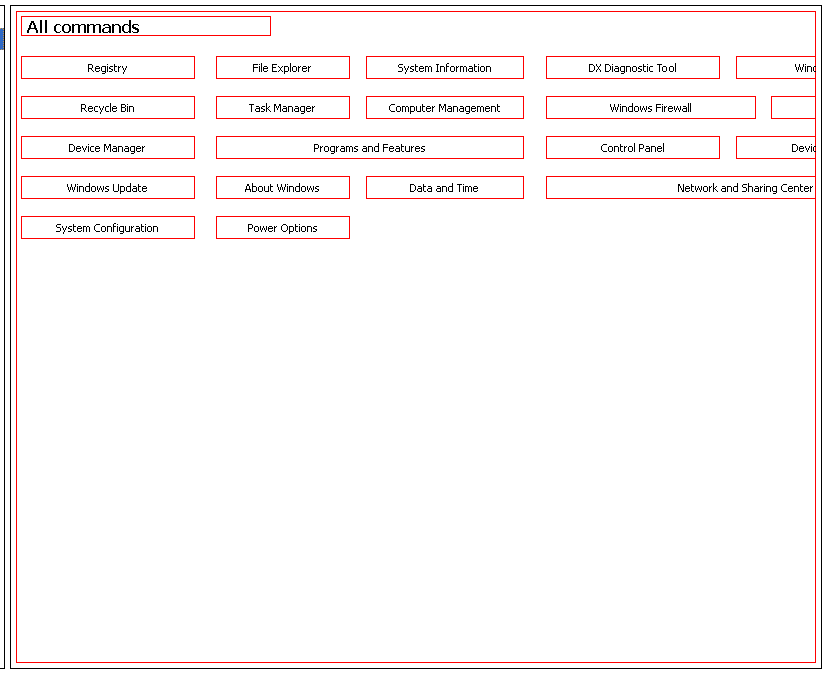
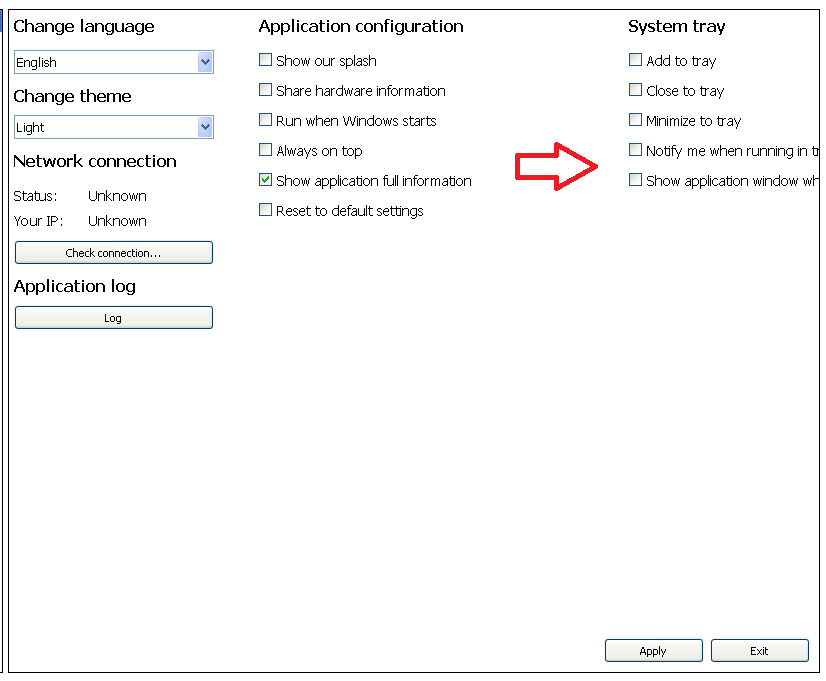
            I have tried different approaches but nothing works. Is there any other solution how to fix layout issue?

            Screenshots:
            alt text
            alt text

            Also I have tried QVBoxLayout, QHBoxLayout, QGridLayout but it not properly displays widgets. Thanks.

            J.HilkJ 1 Reply Last reply
            0
            • Cobra91151C Cobra91151

              I have tried different approaches but nothing works. Is there any other solution how to fix layout issue?

              Screenshots:
              alt text
              alt text

              Also I have tried QVBoxLayout, QHBoxLayout, QGridLayout but it not properly displays widgets. Thanks.

              J.HilkJ Offline
              J.HilkJ Offline
              J.Hilk
              Moderators
              wrote on last edited by
              #9

              @Cobra91151

              have you tried it with a QScrollArea ?


              Be aware of the Qt Code of Conduct, when posting : https://forum.qt.io/topic/113070/qt-code-of-conduct


              Q: What's that?
              A: It's blue light.
              Q: What does it do?
              A: It turns blue.

              Cobra91151C 1 Reply Last reply
              0
              • J.HilkJ J.Hilk

                @Cobra91151

                have you tried it with a QScrollArea ?

                Cobra91151C Offline
                Cobra91151C Offline
                Cobra91151
                wrote on last edited by
                #10

                @J.Hilk

                I have added QScrollArea, but it not fixed the issue. This issue is only appear when I have maximized my app window on small screen resolutions. So I think there should be solution with adding some layout.

                1 Reply Last reply
                0
                • Cobra91151C Offline
                  Cobra91151C Offline
                  Cobra91151
                  wrote on last edited by Cobra91151
                  #11

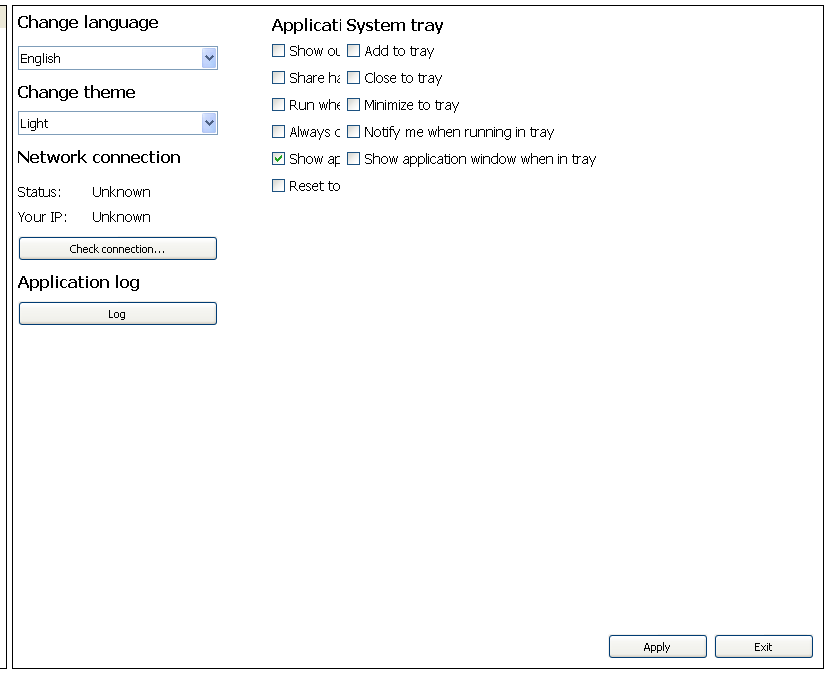
                  I have combined QVBoxLayout with QHBoxLayout and it fixes the issue but it not properly displays widgets?
                  alt text

                  Update:
                  These issues are with 800x600,1024x768, 1152x864 screen resolutions. From 1280x720 works normal.

                  A 1 Reply Last reply
                  0
                  • Cobra91151C Cobra91151

                    I have combined QVBoxLayout with QHBoxLayout and it fixes the issue but it not properly displays widgets?

                    alt text

                    Update:
                    These issues are with 800x600,1024x768, 1152x864 screen resolutions. From 1280x720 works normal.

                    A Offline
                    A Offline
                    ambershark
                    wrote on last edited by
                    #12

                    @Cobra91151 Yea your layout code is definitely bad. Can you post the code so we can either duplicate the problem or at least see where you are going wrong?

                    It doesn't have to be the actual code you could throw some dummy code into a sample app that duplicates the issue so we can play with it.

                    My L-GPL'd C++ Logger github.com/ambershark-mike/sharklog

                    Cobra91151C 1 Reply Last reply
                    1
                    • SGaistS Offline
                      SGaistS Offline
                      SGaist
                      Lifetime Qt Champion
                      wrote on last edited by
                      #13

                      Hi,

                      Why are you setting your QStackedLayout inside a QHBoxLayout before setting it on the widget ? It looks like a layer to much.

                      You could maybe even remove that widget altoghether and use a QStackedWidget directly, no ?

                      Interested in AI ? www.idiap.ch
                      Please read the Qt Code of Conduct - https://forum.qt.io/topic/113070/qt-code-of-conduct

                      1 Reply Last reply
                      0
                      • A ambershark

                        @Cobra91151 Yea your layout code is definitely bad. Can you post the code so we can either duplicate the problem or at least see where you are going wrong?

                        It doesn't have to be the actual code you could throw some dummy code into a sample app that duplicates the issue so we can play with it.

                        Cobra91151C Offline
                        Cobra91151C Offline
                        Cobra91151
                        wrote on last edited by Cobra91151
                        #14

                        @ambershark @SGaist

                        Hi!
                        I use QStackedLayout to emulate tab behavior. I will test QStackedWidget and post code later.

                        1 Reply Last reply
                        0
                        • Cobra91151C Offline
                          Cobra91151C Offline
                          Cobra91151
                          wrote on last edited by Cobra91151
                          #15

                          I have tested QStackedWidget, but the issue is still present on small screen resolutions. I have deleted all layouts and added QHBoxLayout for apply and exit buttons.

                          This is without layout. QHBoxLayout has just buttons (Apply/Exit).
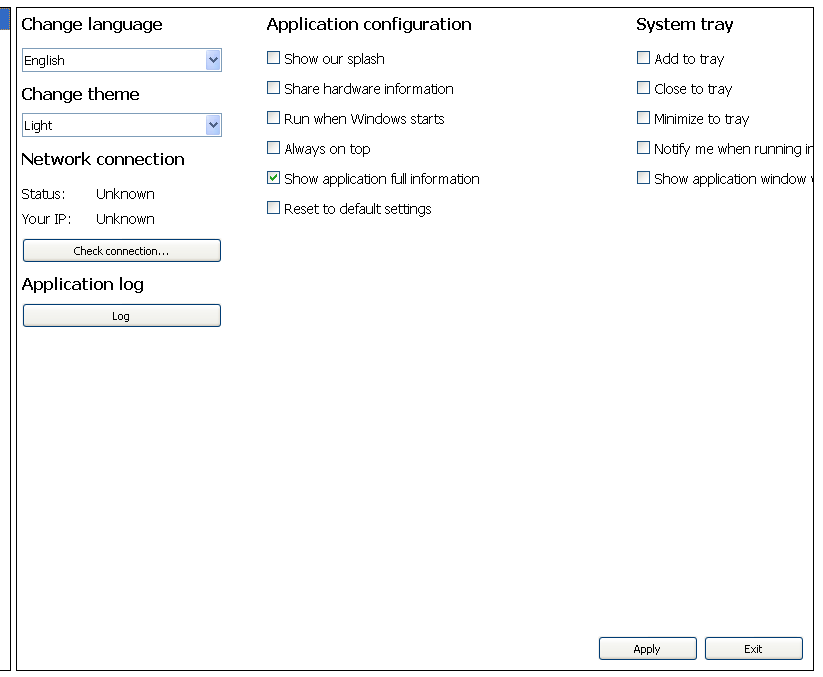
                          alt text

                          Code:

                          QListWidget *settingsView = new QListWidget(tabSettings);  //tabSettings is QTabWidget
                          
                          QWidget *appSettingsTab = new QWidget(settingsView);
                          QStackedWidget *settingsStackedWidget = new QStackedWidget();
                          settingsStackedWidget->addWidget(appSettingsTab);
                          
                          QHBoxLayout *appSettingsButtonLayout = new QHBoxLayout();
                          appSettingsButtonLayout->addStretch(0);
                          appSettingsButtonLayout->setAlignment(Qt::AlignBottom | Qt::AlignRight);
                          appSettingsButtonLayout->addWidget(appSettingsApplyButton);
                          appSettingsButtonLayout->addWidget(appSettingsExitButton);
                          appSettingsTab->setLayout(appSettingsButtonLayout);
                          
                          QHBoxLayout *allSettingsDataLayout = new QHBoxLayout();
                          allSettingsDataLayout->addWidget(settingsStackedWidget);
                          allSettingsDataLayout->setContentsMargins(0, 0, 0, 0);
                          settingsView->setLayout(allSettingsDataLayout);
                          

                          So how should I combine layouts to display widgets in three columns?

                          1 Reply Last reply
                          0
                          • SGaistS Offline
                            SGaistS Offline
                            SGaist
                            Lifetime Qt Champion
                            wrote on last edited by
                            #16

                            What does small screen represent ?

                            Interested in AI ? www.idiap.ch
                            Please read the Qt Code of Conduct - https://forum.qt.io/topic/113070/qt-code-of-conduct

                            Cobra91151C 1 Reply Last reply
                            0
                            • SGaistS SGaist

                              What does small screen represent ?

                              Cobra91151C Offline
                              Cobra91151C Offline
                              Cobra91151
                              wrote on last edited by
                              #17

                              @SGaist

                              QWidgets are not fully visible on 800x600,1024x768, 1152x864 screen resolutions.

                              1 Reply Last reply
                              0
                              • SGaistS Offline
                                SGaistS Offline
                                SGaist
                                Lifetime Qt Champion
                                wrote on last edited by
                                #18

                                Ok, so pretty standard sizes.

                                Why are you putting settingsViewin appSettingsTab and not directly in the QStackedWidget ? That makes settingsView a "floating" widget inside appSettingsTab.

                                Interested in AI ? www.idiap.ch
                                Please read the Qt Code of Conduct - https://forum.qt.io/topic/113070/qt-code-of-conduct

                                Cobra91151C 1 Reply Last reply
                                0
                                • SGaistS SGaist

                                  Ok, so pretty standard sizes.

                                  Why are you putting settingsViewin appSettingsTab and not directly in the QStackedWidget ? That makes settingsView a "floating" widget inside appSettingsTab.

                                  Cobra91151C Offline
                                  Cobra91151C Offline
                                  Cobra91151
                                  wrote on last edited by Cobra91151
                                  #19

                                  @SGaist

                                  I have app with horizontal tabs (QTabWidgets), the last tab is settings and it displays two views for a list of different settings menu and settings which controls QStackedWidget. I will try to combine layouts and post code later.

                                  1 Reply Last reply
                                  0
                                  • Cobra91151C Offline
                                    Cobra91151C Offline
                                    Cobra91151
                                    wrote on last edited by Cobra91151
                                    #20

                                    I also have layout issue with buttons:

                                    Code:

                                        QVBoxLayout *firstButtonsColumnLayout = new QVBoxLayout;
                                        firstButtonsColumnLayout->addStretch(0);
                                        firstButtonsColumnLayout->setContentsMargins(0, 0, 0, 0);
                                        firstButtonsColumnLayout->setAlignment(Qt::AlignTop | Qt::AlignLeft);
                                        firstButtonsColumnLayout->addWidget(registryButton, 0,);
                                        firstButtonsColumnLayout->addWidget(recycleBinButton, 0);
                                        firstButtonsColumnLayout->addWidget(deviceManagerButton, 0);
                                        firstButtonsColumnLayout->addWidget(windowsUpdateButton, 0);
                                        firstButtonsColumnLayout->addWidget(systemConfigButton, 0);
                                    
                                        QHBoxLayout *testLayout = new QHBoxLayout;
                                        testLayout->setAlignment(Qt::AlignTop | Qt::AlignLeft);
                                        testLayout->addLayout(firstButtonsColumnLayout);
                                        commandsTab->setLayout(testLayout);
                                    

                                    The problem is that buttons are not fully visible at small screen resolutions without layouts. So when I have added layout to some of them it displayed bottom not top.

                                    Screenshot:
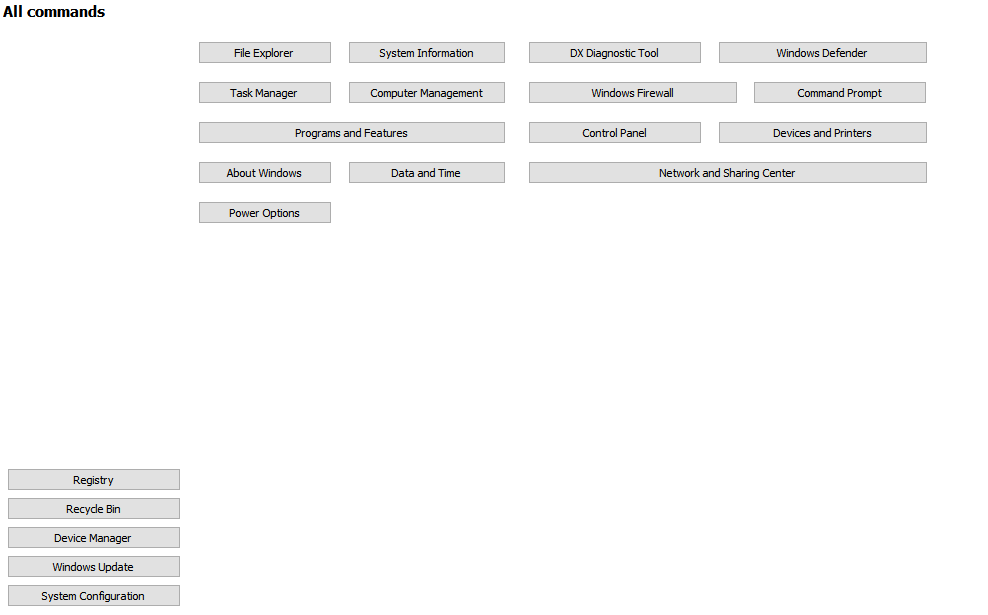
                                    alt text

                                    It should look like this with layouts:
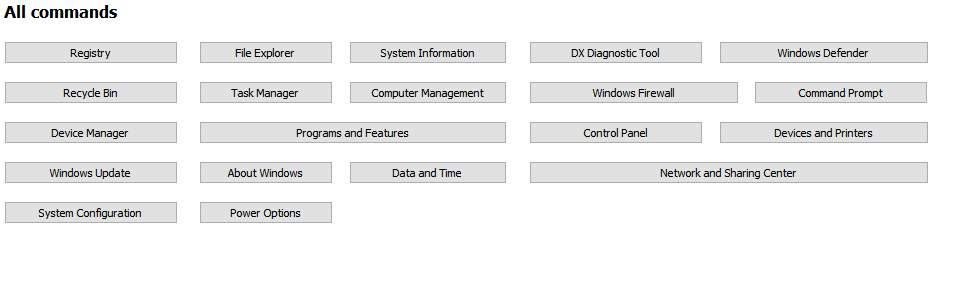
                                    alt text

                                    How to fix these layout issues? What layout I should use?

                                    A 1 Reply Last reply
                                    0
                                    • SGaistS Offline
                                      SGaistS Offline
                                      SGaist
                                      Lifetime Qt Champion
                                      wrote on last edited by
                                      #21

                                      Not knowing how you build the rest of the buttons, it's not really possible to guess what is going wrong.

                                      Interested in AI ? www.idiap.ch
                                      Please read the Qt Code of Conduct - https://forum.qt.io/topic/113070/qt-code-of-conduct

                                      1 Reply Last reply
                                      0
                                      • Cobra91151C Cobra91151

                                        I also have layout issue with buttons:

                                        Code:

                                            QVBoxLayout *firstButtonsColumnLayout = new QVBoxLayout;
                                            firstButtonsColumnLayout->addStretch(0);
                                            firstButtonsColumnLayout->setContentsMargins(0, 0, 0, 0);
                                            firstButtonsColumnLayout->setAlignment(Qt::AlignTop | Qt::AlignLeft);
                                            firstButtonsColumnLayout->addWidget(registryButton, 0,);
                                            firstButtonsColumnLayout->addWidget(recycleBinButton, 0);
                                            firstButtonsColumnLayout->addWidget(deviceManagerButton, 0);
                                            firstButtonsColumnLayout->addWidget(windowsUpdateButton, 0);
                                            firstButtonsColumnLayout->addWidget(systemConfigButton, 0);
                                        
                                            QHBoxLayout *testLayout = new QHBoxLayout;
                                            testLayout->setAlignment(Qt::AlignTop | Qt::AlignLeft);
                                            testLayout->addLayout(firstButtonsColumnLayout);
                                            commandsTab->setLayout(testLayout);
                                        

                                        The problem is that buttons are not fully visible at small screen resolutions without layouts. So when I have added layout to some of them it displayed bottom not top.

                                        Screenshot:
                                        alt text

                                        It should look like this with layouts:
                                        alt text

                                        How to fix these layout issues? What layout I should use?

                                        A Offline
                                        A Offline
                                        ambershark
                                        wrote on last edited by
                                        #22

                                        @Cobra91151 Since the project you are doing is big enough not to share the code, it's really hard for us to figure out what is going on.

                                        How about this.. Can you write up a quick/small project that just uses dummy widgets to show the same problem. Something you can share with us so we can see what you are doing wrong?

                                        That way it is minimal code to share, and there is nothing that is proprietary being given to us on the forums here.

                                        I don't see anything wrong, but I can't see the whole picture either. I don't have these issues with layouts and can't duplicate your problem.

                                        My L-GPL'd C++ Logger github.com/ambershark-mike/sharklog

                                        1 Reply Last reply
                                        1
                                        • Cobra91151C Offline
                                          Cobra91151C Offline
                                          Cobra91151
                                          wrote on last edited by Cobra91151
                                          #23

                                          Ok. I will create small project and post it here later.

                                          Update:
                                          I will upload test project on Mega and post link here.

                                          1 Reply Last reply
                                          0

                                          • Login

                                          • Login or register to search.
                                          • First post
                                            Last post
                                          0
                                          • Categories
                                          • Recent
                                          • Tags
                                          • Popular
                                          • Users
                                          • Groups
                                          • Search
                                          • Get Qt
                                          • Unsolved