
Skip to content
  • Categories
  • Recent
  • Tags
  • Popular
  • Users
  • Groups
  • Search
  • Get Qt Extensions
  • Unsolved
Collapse
Brand Logo
  1. Home
  2. Qt Development
  3. General and Desktop
  4. Draw in an empty QTabWidget
Qt 6.11 is out! See what's new in the release blog

Draw in an empty QTabWidget

Scheduled Pinned Locked Moved Solved General and Desktop
2 Posts 2 Posters 1.1k Views 2 Watching
  • Oldest to Newest
  • Newest to Oldest
  • Most Votes
Reply
  • Reply as topic
Log in to reply
This topic has been deleted. Only users with topic management privileges can see it.
  • M Offline
    M Offline
    Mr Gisa
    wrote on last edited by
    #1

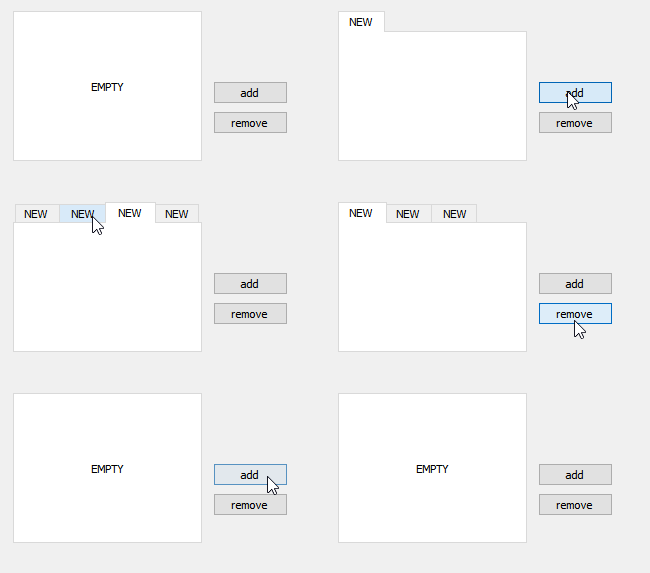
    HI, I was wondering how to draw in an empty QTabWidget.
    I noticed that when a QTabWidget has no tabs it's just a white widget with nothing in it, I was wondering how to draw some texts over it and when the user creates a tab it disappears?

    1 Reply Last reply
    0
    • mrjjM Offline
      mrjjM Offline
      mrjj
      Lifetime Qt Champion
      wrote on last edited by mrjj
      #2

      Hi
      Then you must subclass it and override paintEvent
      and handle the no tab logic.

      Update:
      very fast sample.

      class MyTab : public QTabWidget {
        Q_OBJECT
       public:
        explicit MyTab(QWidget* parent = nullptr) : QTabWidget(parent) {}
       protected:
        virtual void paintEvent(QPaintEvent* e ) override {
          QTabWidget::paintEvent(e);
          QPainter painter(this);
          if ( ! count() ) // has no tabs
          {
              painter.drawText( rect(), Qt::AlignCenter, "EMPTY");
          }
        }
      };
      

      alt text

      1 Reply Last reply
      2

      • Login

      • Login or register to search.
      • First post
        Last post
      0
      • Categories
      • Recent
      • Tags
      • Popular
      • Users
      • Groups
      • Search
      • Get Qt Extensions
      • Unsolved