
QWidget modification at runtime
-
I have now correctly applied layouts to all my widgets, but the ui still does not correctly resize, however it does definitely change.
Here is how it looks once the program starts:
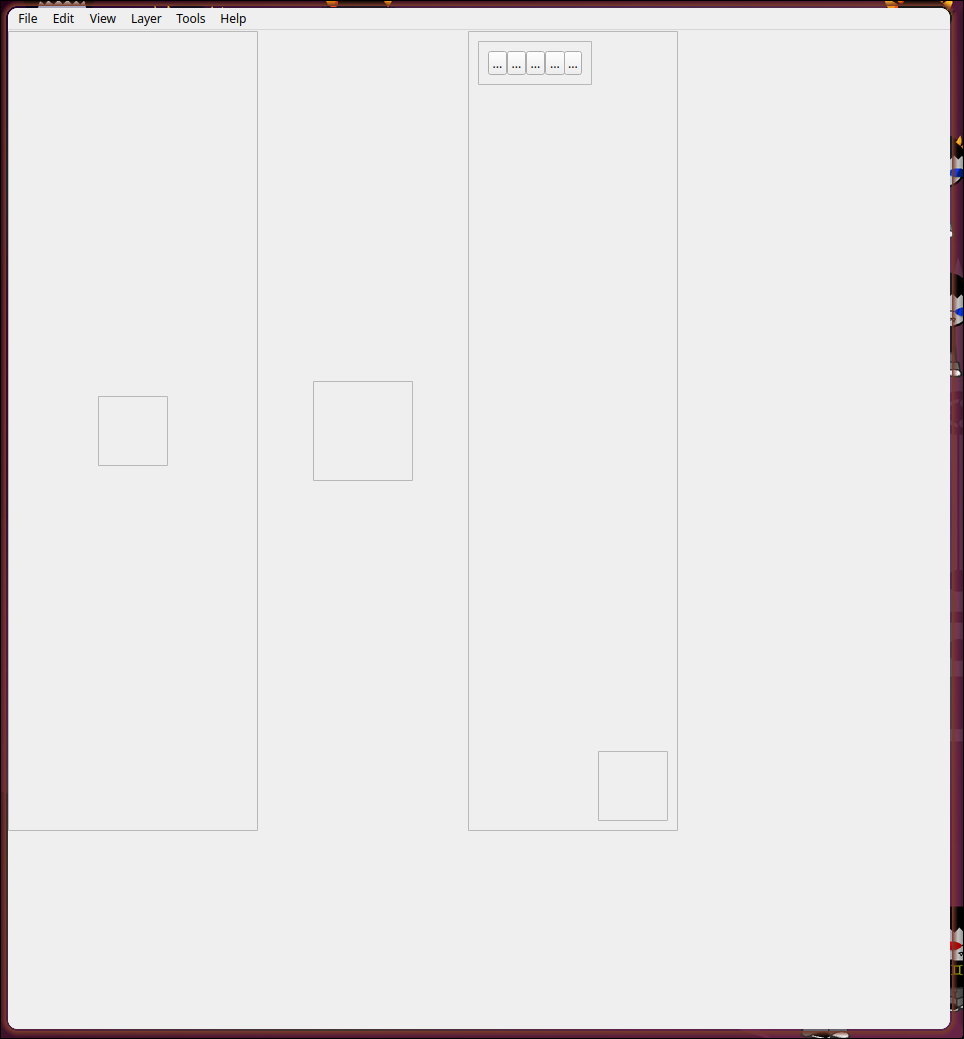
And here is how it looks when the refresh function is called manually afterwards:
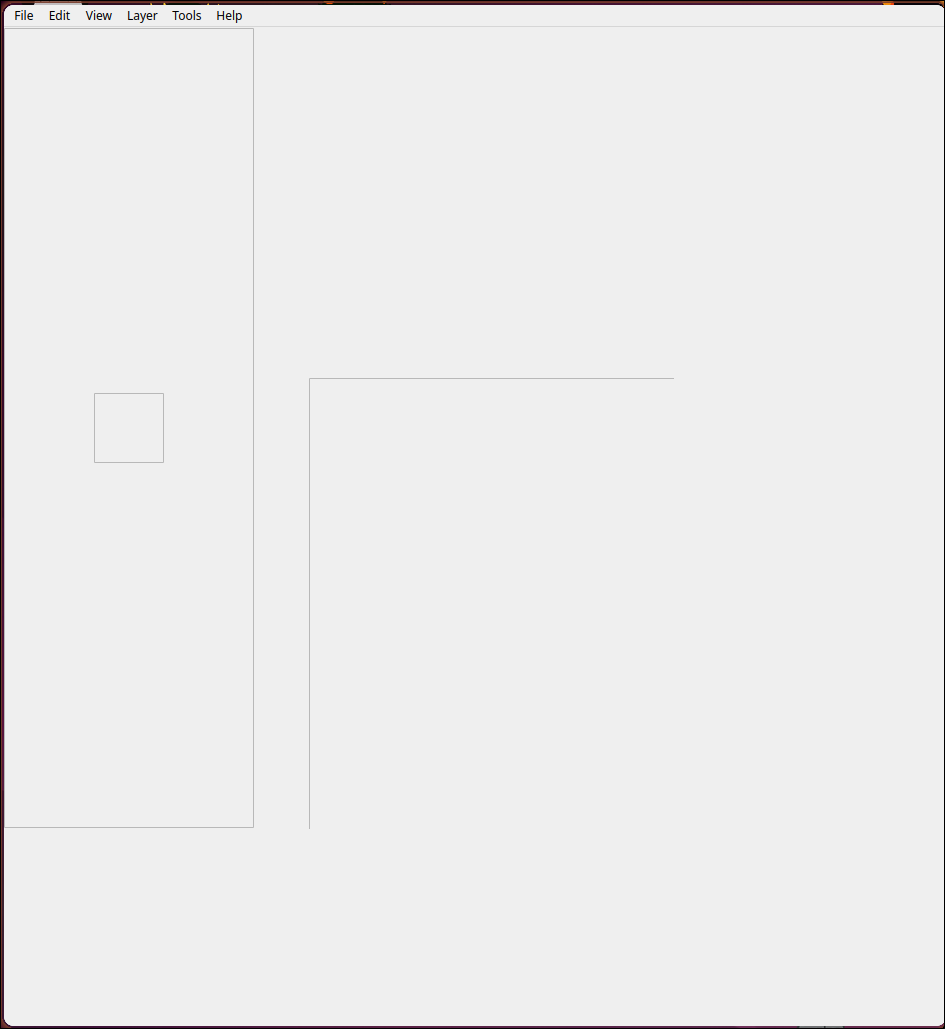
(the big box in the middle of this image is the same as the small one in the middle of the first image, for some reason part of it is obstructed)I checked and the alignments and size policies are still set how I think they should be
I also realised I wasn't resizing the central widget and that might be part of the issue but now that I am resizing it it's behaviour is unchanged -
I also realised I wasn't resizing the central widget and that might be part of the issue but now that I am resizing it it's behaviour is unchanged
The central widget should automatically resize when you resize the QMainWindow, if it does not then it has not been properly set as central widget or something else strange is at play..
-
I have now correctly applied layouts to all my widgets, but the ui still does not correctly resize, however it does definitely change.
Here is how it looks once the program starts:
And here is how it looks when the refresh function is called manually afterwards:
(the big box in the middle of this image is the same as the small one in the middle of the first image, for some reason part of it is obstructed)I checked and the alignments and size policies are still set how I think they should be
I also realised I wasn't resizing the central widget and that might be part of the issue but now that I am resizing it it's behaviour is unchanged@SamuraiDestroy
Qt widget layouts is a dark art. Everything you do in Designer is saved in (fairly) readable XML in the generated.uifile, nothing else. You can look at that to try to figure what is going on, and if you are really stuck you can paste it here and people can tell you what you need so long as they understand what you are trying to achieve. -
@SamuraiDestroy
Qt widget layouts is a dark art. Everything you do in Designer is saved in (fairly) readable XML in the generated.uifile, nothing else. You can look at that to try to figure what is going on, and if you are really stuck you can paste it here and people can tell you what you need so long as they understand what you are trying to achieve.@JonB Sorry for the late response, I was super busy. Here is the block of XML for the UI:
<widget class="QWidget" name="centralwidget"> <widget class="QWidget" name="horizontalLayoutWidget"> <property name="geometry"> <rect> <x>0</x> <y>0</y> <width>670</width> <height>802</height> </rect> </property> <layout class="QHBoxLayout" name="horizontalLayout"> <property name="spacing"> <number>0</number> </property> <property name="sizeConstraint"> <enum>QLayout::SetNoConstraint</enum> </property> <item alignment="Qt::AlignLeft|Qt::AlignVCenter"> <widget class="QFrame" name="toolList"> <property name="sizePolicy"> <sizepolicy hsizetype="Preferred" vsizetype="Expanding"> <horstretch>0</horstretch> <verstretch>0</verstretch> </sizepolicy> </property> <property name="minimumSize"> <size> <width>250</width> <height>800</height> </size> </property> <property name="sizeIncrement"> <size> <width>6</width> <height>16</height> </size> </property> <property name="frameShape"> <enum>QFrame::StyledPanel</enum> </property> <property name="frameShadow"> <enum>QFrame::Raised</enum> </property> <layout class="QHBoxLayout" name="horizontalLayout_4"> <item> <layout class="QGridLayout" name="gridLayout"> <property name="spacing"> <number>0</number> </property> </layout> </item> <item alignment="Qt::AlignHCenter|Qt::AlignVCenter"> <widget class="QScrollArea" name="scrollArea"> <property name="widgetResizable"> <bool>true</bool> </property> <widget class="QWidget" name="scrollAreaWidgetContents"> <property name="geometry"> <rect> <x>0</x> <y>0</y> <width>68</width> <height>68</height> </rect> </property> </widget> </widget> </item> </layout> </widget> </item> <item alignment="Qt::AlignHCenter|Qt::AlignVCenter"> <widget class="QFrame" name="imageViewer"> <property name="sizePolicy"> <sizepolicy hsizetype="Expanding" vsizetype="Expanding"> <horstretch>1</horstretch> <verstretch>1</verstretch> </sizepolicy> </property> <property name="minimumSize"> <size> <width>100</width> <height>100</height> </size> </property> <property name="frameShape"> <enum>QFrame::StyledPanel</enum> </property> <property name="frameShadow"> <enum>QFrame::Plain</enum> </property> </widget> </item> <item alignment="Qt::AlignRight|Qt::AlignVCenter"> <widget class="QFrame" name="layerList"> <property name="sizePolicy"> <sizepolicy hsizetype="Preferred" vsizetype="Expanding"> <horstretch>1</horstretch> <verstretch>1</verstretch> </sizepolicy> </property> <property name="minimumSize"> <size> <width>200</width> <height>800</height> </size> </property> <property name="maximumSize"> <size> <width>2000</width> <height>8000</height> </size> </property> <property name="sizeIncrement"> <size> <width>1</width> <height>4</height> </size> </property> <property name="toolTip"> <string><html><head/><body><p><br/></p></body></html></string> </property> <property name="frameShape"> <enum>QFrame::StyledPanel</enum> </property> <property name="frameShadow"> <enum>QFrame::Raised</enum> </property> <property name="lineWidth"> <number>3</number> </property> <property name="midLineWidth"> <number>1</number> </property> <layout class="QHBoxLayout" name="horizontalLayout_3"> <item alignment="Qt::AlignHCenter|Qt::AlignTop"> <widget class="QFrame" name="frame"> <property name="sizePolicy"> <sizepolicy hsizetype="Expanding" vsizetype="Preferred"> <horstretch>0</horstretch> <verstretch>0</verstretch> </sizepolicy> </property> <property name="frameShape"> <enum>QFrame::StyledPanel</enum> </property> <property name="frameShadow"> <enum>QFrame::Raised</enum> </property> <layout class="QVBoxLayout" name="verticalLayout"> <item> <layout class="QHBoxLayout" name="horizontalLayout_2"> <property name="spacing"> <number>0</number> </property> <item> <widget class="QToolButton" name="toolButton_add"> <property name="sizePolicy"> <sizepolicy hsizetype="Expanding" vsizetype="Expanding"> <horstretch>0</horstretch> <verstretch>0</verstretch> </sizepolicy> </property> <property name="sizeIncrement"> <size> <width>1</width> <height>1</height> </size> </property> <property name="text"> <string>...</string> </property> <property name="icon"> <iconset resource="../../resources.qrc"> <normaloff>:/resources/plus.png</normaloff>:/resources/plus.png</iconset> </property> <property name="iconSize"> <size> <width>32</width> <height>32</height> </size> </property> <property name="popupMode"> <enum>QToolButton::InstantPopup</enum> </property> </widget> </item> <item> <widget class="QToolButton" name="toolButton_dup"> <property name="sizePolicy"> <sizepolicy hsizetype="Expanding" vsizetype="Expanding"> <horstretch>0</horstretch> <verstretch>0</verstretch> </sizepolicy> </property> <property name="sizeIncrement"> <size> <width>1</width> <height>1</height> </size> </property> <property name="text"> <string>...</string> </property> <property name="icon"> <iconset resource="../../resources.qrc"> <normaloff>:/resources/dup.png</normaloff>:/resources/dup.png</iconset> </property> <property name="iconSize"> <size> <width>32</width> <height>32</height> </size> </property> </widget> </item> <item> <widget class="QToolButton" name="toolButton_lock"> <property name="sizePolicy"> <sizepolicy hsizetype="Expanding" vsizetype="Expanding"> <horstretch>0</horstretch> <verstretch>0</verstretch> </sizepolicy> </property> <property name="sizeIncrement"> <size> <width>1</width> <height>1</height> </size> </property> <property name="text"> <string>...</string> </property> <property name="icon"> <iconset resource="../../resources.qrc"> <normaloff>:/resources/lock.png</normaloff>:/resources/lock.png</iconset> </property> <property name="iconSize"> <size> <width>32</width> <height>32</height> </size> </property> <property name="checkable"> <bool>true</bool> </property> </widget> </item> <item> <widget class="QToolButton" name="toolButton_hide"> <property name="sizePolicy"> <sizepolicy hsizetype="Expanding" vsizetype="Expanding"> <horstretch>0</horstretch> <verstretch>0</verstretch> </sizepolicy> </property> <property name="minimumSize"> <size> <width>20</width> <height>20</height> </size> </property> <property name="sizeIncrement"> <size> <width>1</width> <height>1</height> </size> </property> <property name="text"> <string>...</string> </property> <property name="icon"> <iconset resource="../../resources.qrc"> <normaloff>:/resources/hide.png</normaloff>:/resources/hide.png</iconset> </property> <property name="iconSize"> <size> <width>32</width> <height>32</height> </size> </property> <property name="checkable"> <bool>true</bool> </property> </widget> </item> <item> <widget class="QToolButton" name="toolButton_del"> <property name="sizePolicy"> <sizepolicy hsizetype="Expanding" vsizetype="Expanding"> <horstretch>0</horstretch> <verstretch>0</verstretch> </sizepolicy> </property> <property name="sizeIncrement"> <size> <width>1</width> <height>1</height> </size> </property> <property name="text"> <string>...</string> </property> <property name="icon"> <iconset resource="../../resources.qrc"> <normaloff>:/resources/x.png</normaloff>:/resources/x.png</iconset> </property> <property name="iconSize"> <size> <width>32</width> <height>32</height> </size> </property> </widget> </item> </layout> </item> </layout> </widget> </item> <item alignment="Qt::AlignHCenter|Qt::AlignBottom"> <widget class="QScrollArea" name="scrollArea_2"> <property name="widgetResizable"> <bool>true</bool> </property> <widget class="QWidget" name="scrollAreaWidgetContents_2"> <property name="geometry"> <rect> <x>0</x> <y>0</y> <width>68</width> <height>68</height> </rect> </property> </widget> </widget> </item> </layout> </widget> </item> </layout> </widget> </widget> -
There you go:
centralwidgethas no layout.Interested in AI ? www.idiap.ch
Please read the Qt Code of Conduct - https://forum.qt.io/topic/113070/qt-code-of-conduct -
@SGaist said in QWidget modification at runtime:
There you go: centralwidget has no layout.
@SamuraiDestroy
...And in order to to set a layout on thecentralwidgeton aQMainWindowin Designer you have to set it (right-click, select Lay out > item) on the parentMainWindowinstead.... Note that this brain -damaged behaviour applies only in this case. -
@SGaist said in QWidget modification at runtime:
There you go: centralwidget has no layout.
@SamuraiDestroy
...And in order to to set a layout on thecentralwidgeton aQMainWindowin Designer you have to set it (right-click, select Lay out > item) on the parentMainWindowinstead.... Note that this brain -damaged behaviour applies only in this case.@JonB said in QWidget modification at runtime:
Note that this brain -damaged behaviour applies only in this case.
That's not true! It also applies for QStackedWidget (to set the layout of the page you need to make that page current and then set the layout of the stacked widget IIRC).
-
@JonB said in QWidget modification at runtime:
Note that this brain -damaged behaviour applies only in this case.
That's not true! It also applies for QStackedWidget (to set the layout of the page you need to make that page current and then set the layout of the stacked widget IIRC).
@SimonSchroeder I would venture that it is almost more intuitive for QStackedWidget 😅
-
@SGaist said in QWidget modification at runtime:
There you go: centralwidget has no layout.
@SamuraiDestroy
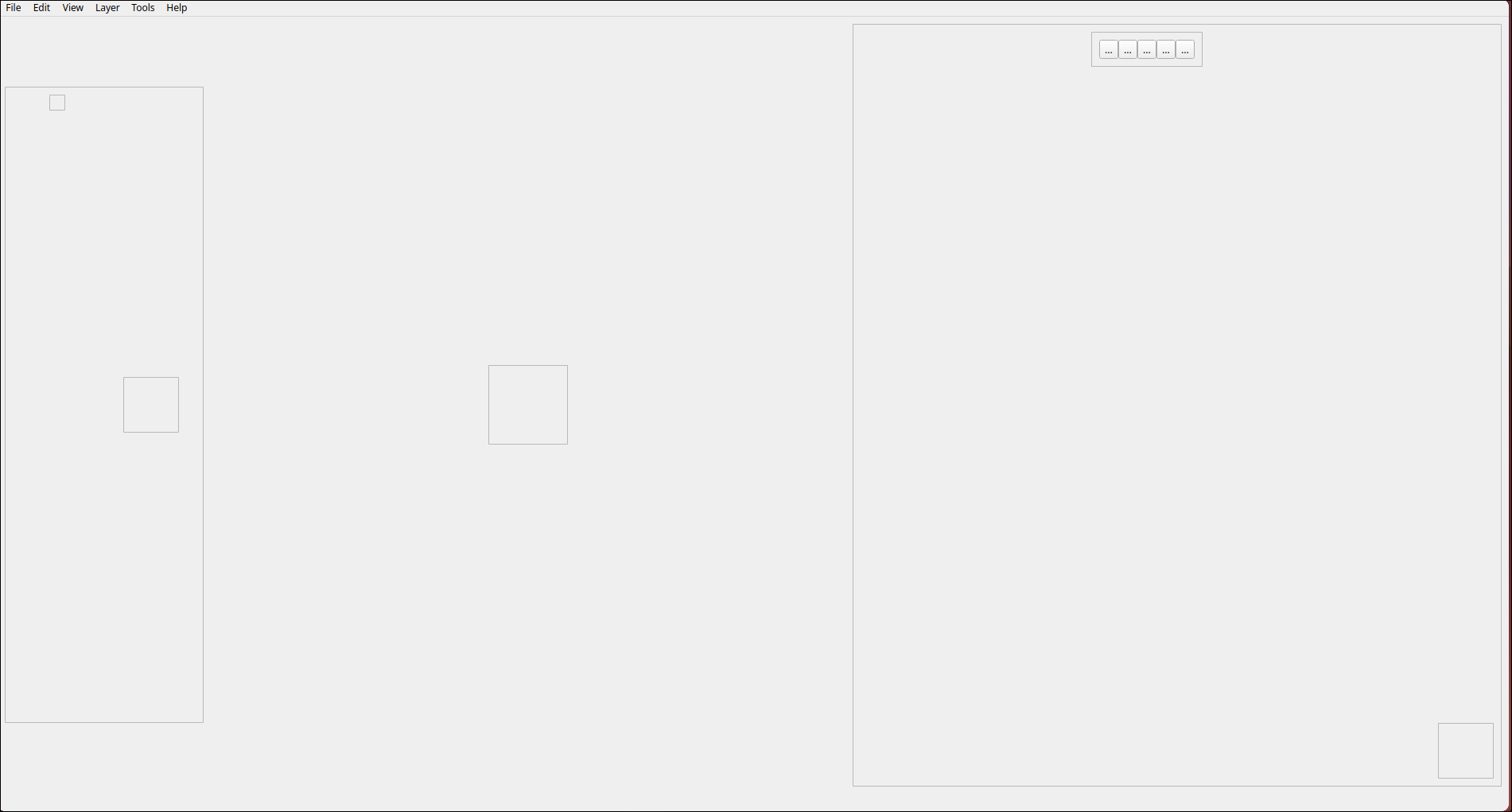
...And in order to to set a layout on thecentralwidgeton aQMainWindowin Designer you have to set it (right-click, select Lay out > item) on the parentMainWindowinstead.... Note that this brain -damaged behaviour applies only in this case.@JonB After applying a horizontal layout to the centralwidget using this method, the window behaves the same way it did before and changing the size policies to expanding, it still exhibits strange behaviour, but no longer appears to crop the ui elements
Here's how the window looks when created:
And here it is after being refreshed:
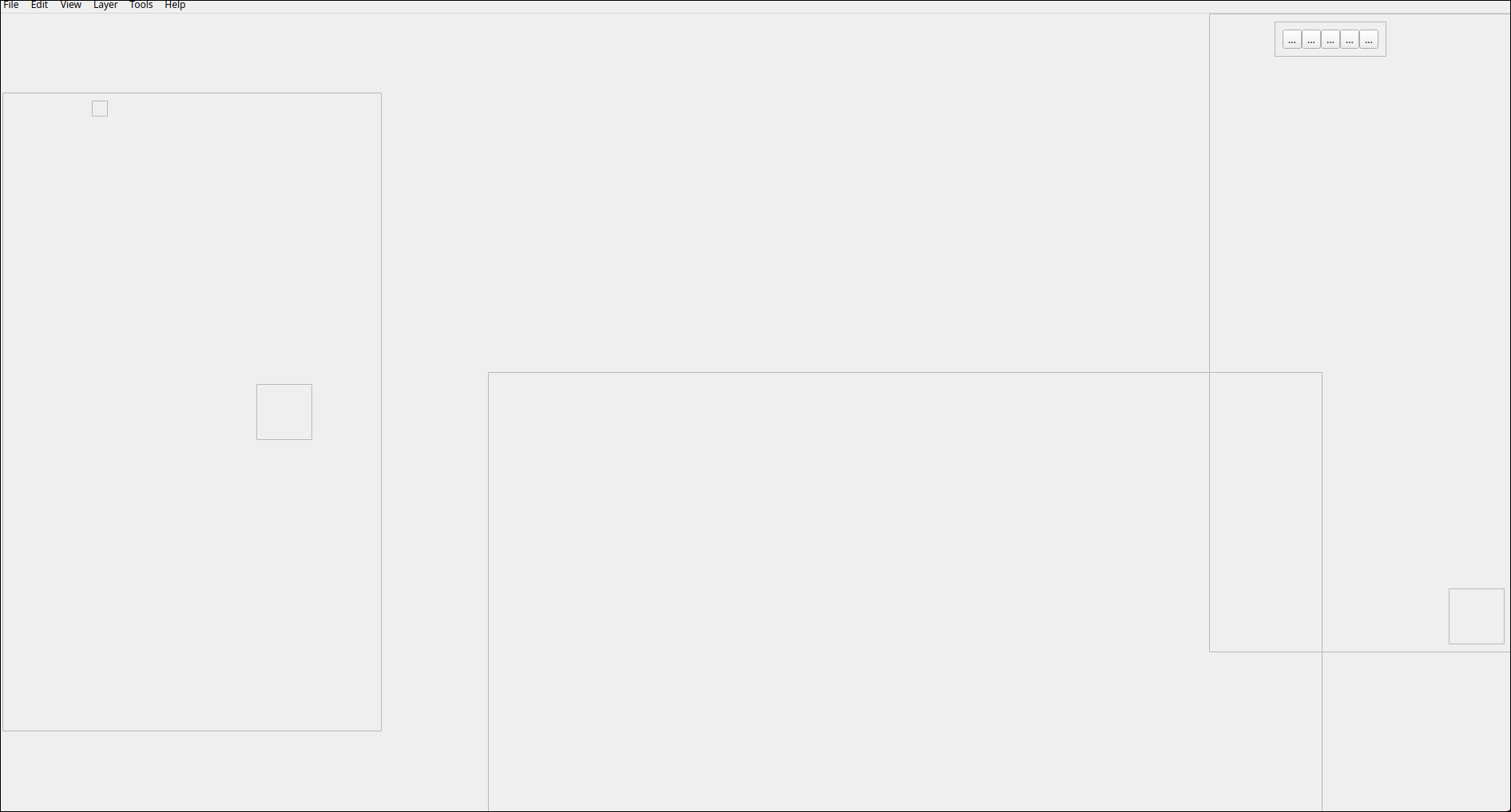
The window mostly resizes automatically now so some of the refresh function is redundant, but the size and positioning of some widgets is off -
@JonB After applying a horizontal layout to the centralwidget using this method, the window behaves the same way it did before and changing the size policies to expanding, it still exhibits strange behaviour, but no longer appears to crop the ui elements
Here's how the window looks when created:
And here it is after being refreshed:
The window mostly resizes automatically now so some of the refresh function is redundant, but the size and positioning of some widgets is off@SamuraiDestroy said in QWidget modification at runtime:
but the size and positioning of some widgets is off
Then you still miss some layouts.


