
QWidget modification at runtime
-
Hi,
Since you have a QMainWindow, is your layout applied to the central widget of your QMainWindow ? Or did you try to change the QMainWindow's own layout which is not possible.
-
@SGaist The layout is applied to the central widget and then all the ui is contained within the layout like this
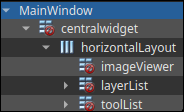
@SamuraiDestroy
The "red no entry signs" (you must ignore the one oncentralWidgetI think) indicate you have sub-widgets which do not themselves have any layout, and that may be the cause. You need to eliminate any red no entry signs you see in Designer, except I think oncentralWidgetwhich it handles weirdly. If those widgets have child widgets you can click on the parent widget and set layout from there. -
@SamuraiDestroy
The "red no entry signs" (you must ignore the one oncentralWidgetI think) indicate you have sub-widgets which do not themselves have any layout, and that may be the cause. You need to eliminate any red no entry signs you see in Designer, except I think oncentralWidgetwhich it handles weirdly. If those widgets have child widgets you can click on the parent widget and set layout from there.@JonB It looks like almost all my widgets have the red signs, despite the fact that have given them all layout alignments and size policies, so I'm not really sure what to do from here
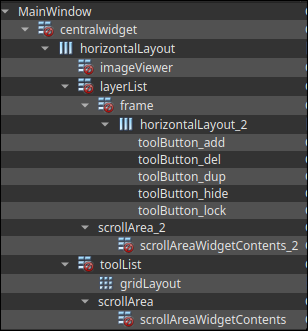
-
You have not given the widgets a layout. Instead, you have placed layouts inside the widgets. You have to right click on the widget in this list view and select the appropriate layout for the widget.
-
As I wrote earlier:
If those widgets have child widgets you can click on the parent widget and set layout from there.
(I meant right-click on the parent and there is an option like Set Layout >. Irritatingly I find this is only available on a parent as and when it has at least one child widget, something I commented on as being "non-intuitive" a decade ago :) )
-
As I wrote earlier:
If those widgets have child widgets you can click on the parent widget and set layout from there.
(I meant right-click on the parent and there is an option like Set Layout >. Irritatingly I find this is only available on a parent as and when it has at least one child widget, something I commented on as being "non-intuitive" a decade ago :) )
@JonB said in QWidget modification at runtime:
As I wrote earlier:
If those widgets have child widgets you can click on the parent widget and set layout from there.
(I meant right-click on the parent and there is an option like Set Layout >. Irritatingly I find this is only available on a parent as and when it has at least one child widget, something I commented on as being "non-intuitive" a decade ago :) )
That's why I always found writing everything by hand so much more intuitive ^^ (disclaimer: I have nothing against designer, just not my cup of tea).
-
@JonB said in QWidget modification at runtime:
As I wrote earlier:
If those widgets have child widgets you can click on the parent widget and set layout from there.
(I meant right-click on the parent and there is an option like Set Layout >. Irritatingly I find this is only available on a parent as and when it has at least one child widget, something I commented on as being "non-intuitive" a decade ago :) )
That's why I always found writing everything by hand so much more intuitive ^^ (disclaimer: I have nothing against designer, just not my cup of tea).
@SGaist said in QWidget modification at runtime:
That's why I always found writing everything by hand so much more intuitive
Totally agree. Most annoyingly, the tab order is never right when using the designer. This is especially the case when changes things in the future, like adding new widgets. You have to explicitly set the tab order. When I write the code instead of a .ui file, it is usually correct. Our software has so many dialogs that are unusable without a mouse. (I just don't like jumping between mouse and keyboard.)
@JonB said in QWidget modification at runtime:
Irritatingly I find this is only available on a parent as and when it has at least one child widget
Not just that. Have you ever tried to add a widget into an existing layout? There are a few corner cases where it is really hard to add a widget at the right spot inside an existing layout in the designer. Sometime I just break up the layout first to get new widgets in. However, the other widgets might be screwed up to a point where reapplying the layout still messes things up. And then you have to know to sometime simplify the layout to get rid of empty slots.
-
I have now correctly applied layouts to all my widgets, but the ui still does not correctly resize, however it does definitely change.
Here is how it looks once the program starts:
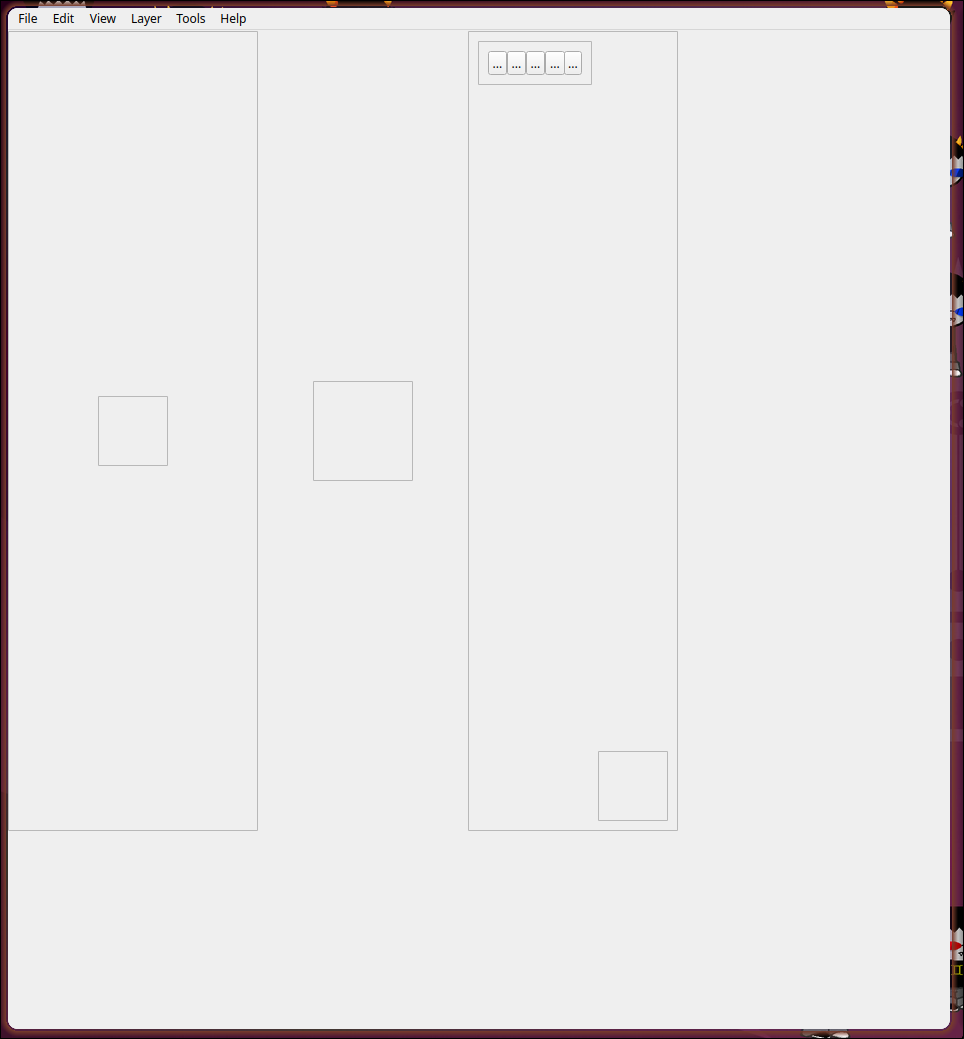
And here is how it looks when the refresh function is called manually afterwards:
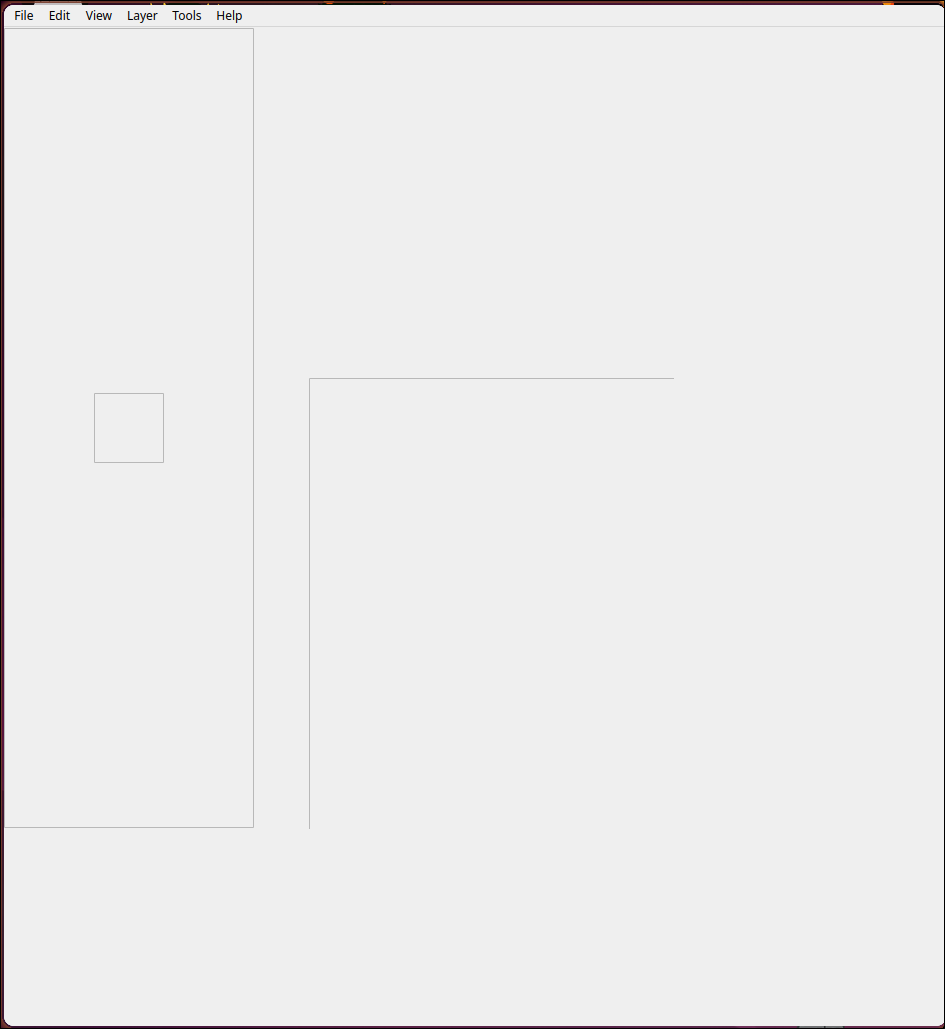
(the big box in the middle of this image is the same as the small one in the middle of the first image, for some reason part of it is obstructed)I checked and the alignments and size policies are still set how I think they should be
I also realised I wasn't resizing the central widget and that might be part of the issue but now that I am resizing it it's behaviour is unchanged -
I also realised I wasn't resizing the central widget and that might be part of the issue but now that I am resizing it it's behaviour is unchanged
The central widget should automatically resize when you resize the QMainWindow, if it does not then it has not been properly set as central widget or something else strange is at play..
-
I have now correctly applied layouts to all my widgets, but the ui still does not correctly resize, however it does definitely change.
Here is how it looks once the program starts:
And here is how it looks when the refresh function is called manually afterwards:
(the big box in the middle of this image is the same as the small one in the middle of the first image, for some reason part of it is obstructed)I checked and the alignments and size policies are still set how I think they should be
I also realised I wasn't resizing the central widget and that might be part of the issue but now that I am resizing it it's behaviour is unchanged@SamuraiDestroy
Qt widget layouts is a dark art. Everything you do in Designer is saved in (fairly) readable XML in the generated.uifile, nothing else. You can look at that to try to figure what is going on, and if you are really stuck you can paste it here and people can tell you what you need so long as they understand what you are trying to achieve.

