Skip to content
  • Categories
  • Recent
  • Tags
  • Popular
  • Users
  • Groups
  • Search
  • Get Qt
  • Unsolved
Collapse
Brand Logo
  1. Home
  2. Qt Development
  3. Qt for Python
  4. QWidget modification at runtime
Qt 6.12 LTS is out! See what's new in the release blog

QWidget modification at runtime

Scheduled Pinned Locked Moved Unsolved Qt for Python
4 Posts 3 Posters 111 Views 1 Watching
  • Oldest to Newest
  • Newest to Oldest
  • Most Votes
Reply
  • Reply as topic
Log in to reply
This topic has been deleted. Only users with topic management privileges can see it.
  • S Offline
    S Offline
    SamuraiDestroy
    wrote last edited by
    #1

    I am trying to make the ui elements of my window resize according to the window size but all the QWidgets stay the same size.
    I have them all in a Horizontal Layout with their sizePolicies set appropriately. Here is my code for resizing the window and widgets:

    monitor = screeninfo.get_monitors()[0]
    x = monitor.width
    y = monitor.height
    
    class mainWindow(QtWidgets.QMainWindow):
        def __init__(self):
            super(mainWindow, self).__init__()
            self.ui = Ui_MainWindow()
            self.ui.setupUi(self)
    
    def refreshWindow():
        # pass
        xn = window.width()
        yn = window.height() # TODO
        window.ui.toolList.resize(toolsScale * xn, toolsScale * yn)
        window.ui.imageViewer.resize(mainScale * xn, mainScale * yn)
        window.ui.layerList.resize(layersScale * xn, layersScale * yn)
        # listX = (toolsScale + mainScale) * xn
        # window.ui.layerList.move(listX, 0)
        print(window.ui.layerList.pos())
        window.ui.layerList.show()
        # Resize window and its elements to fit the screen
        window.show()
    # Function to refresh window elements
    
    global window
    if __name__ == "__main__":
        app = QtWidgets.QApplication(sys.argv)
        global window
        window = mainWindow()
        window.resize(x, y)
        refreshWindow()
        window.show()
        # Load main window
    
        sys.exit(app.exec())
    
    
    1 Reply Last reply
    0
    • SGaistS Offline
      SGaistS Offline
      SGaist
      Lifetime Qt Champion
      wrote last edited by
      #2

      Hi,

      Since you have a QMainWindow, is your layout applied to the central widget of your QMainWindow ? Or did you try to change the QMainWindow's own layout which is not possible.

      Interested in AI ? www.idiap.ch
      Please read the Qt Code of Conduct - https://forum.qt.io/topic/113070/qt-code-of-conduct

      S 1 Reply Last reply
      0
      • SGaistS SGaist

        Hi,

        Since you have a QMainWindow, is your layout applied to the central widget of your QMainWindow ? Or did you try to change the QMainWindow's own layout which is not possible.

        S Offline
        S Offline
        SamuraiDestroy
        wrote last edited by
        #3

        @SGaist The layout is applied to the central widget and then all the ui is contained within the layout like this
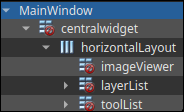
        c19edefe-ed5c-4e4a-8fbc-de84eeeba52e-image.png

        JonBJ 1 Reply Last reply
        0
        • S SamuraiDestroy

          @SGaist The layout is applied to the central widget and then all the ui is contained within the layout like this
          c19edefe-ed5c-4e4a-8fbc-de84eeeba52e-image.png

          JonBJ Offline
          JonBJ Offline
          JonB
          wrote last edited by
          #4

          @SamuraiDestroy
          The "red no entry signs" (you must ignore the one on centralWidget I think) indicate you have sub-widgets which do not themselves have any layout, and that may be the cause. You need to eliminate any red no entry signs you see in Designer, except I think on centralWidget which it handles weirdly. If those widgets have child widgets you can click on the parent widget and set layout from there.

          1 Reply Last reply
          0

          • Login

          • Login or register to search.
          • First post
            Last post
          0
          • Categories
          • Recent
          • Tags
          • Popular
          • Users
          • Groups
          • Search
          • Get Qt
          • Unsolved