Skip to content
  • Categories
  • Recent
  • Tags
  • Popular
  • Users
  • Groups
  • Search
  • Get Qt Extensions
  • Unsolved
Collapse
Brand Logo
  1. Home
  2. Qt Development
  3. General and Desktop
  4. Qt app consistently crashing on OS X Monterey (12.6)

Qt app consistently crashing on OS X Monterey (12.6)

Scheduled Pinned Locked Moved Unsolved General and Desktop
17 Posts 4 Posters 1.7k Views 1 Watching
  • Oldest to Newest
  • Newest to Oldest
  • Most Votes
Reply
  • Reply as topic
Log in to reply
This topic has been deleted. Only users with topic management privileges can see it.
  • JoeCFDJ JoeCFD

    It looks like png plugin fails. It could be system png plugin has bug. Can you try Qt png plugin:
    https://doc.qt.io/qt-5/plugins-howto.html#static-plugins

    T Offline
    T Offline
    TheFlyingMooseMan
    wrote on last edited by
    #8

    @JoeCFD Not sure how this is all to work automagically. The documentation states:

    To cause static plugins actually being linked and instantiated, Q_IMPORT_PLUGIN() macros are also needed in application code, but those are automatically generated by qmake and added to your application project.
    

    However, after recreating the project (including doing a run qmake) I don't see any references in the generated Qt code in the build directory. Am I still supposed to do a call to Q_IMPORT_PLUGIN() somewhere in my code?

    Thanks for any help or pointers.

    Roy

    1 Reply Last reply
    0
    • Z Offline
      Z Offline
      zaidmughal
      Banned
      wrote on last edited by
      #9
      This post is deleted!
      T 1 Reply Last reply
      0
      • Z zaidmughal

        This post is deleted!

        T Offline
        T Offline
        TheFlyingMooseMan
        wrote on last edited by
        #10

        @zaidmughal I am trying to. I have no idea how to accomplish this. Please see my other post about leveraging this Qt plug-in.

        1 Reply Last reply
        0
        • SGaistS Offline
          SGaistS Offline
          SGaist
          Lifetime Qt Champion
          wrote on last edited by
          #11

          Can you provide the exact Qt version you are using ?
          Can you provide a minimal compilable example that shows this behaviour ?

          Interested in AI ? www.idiap.ch
          Please read the Qt Code of Conduct - https://forum.qt.io/topic/113070/qt-code-of-conduct

          T 1 Reply Last reply
          0
          • SGaistS SGaist

            Can you provide the exact Qt version you are using ?
            Can you provide a minimal compilable example that shows this behaviour ?

            T Offline
            T Offline
            TheFlyingMooseMan
            wrote on last edited by
            #12

            @SGaist that would take a lot of time and Murphy's law (and experience) tells me that this bug won't appear again.
            I do have some questions on how to include plug-ins -- not sure if I need to call Q_IMPORT_PLUGIN somewhere in my code, and with what parameters. Unlike the documentation stated, I don't see any generated code that calles Q_IMPORT_PLUGIN anywhere.

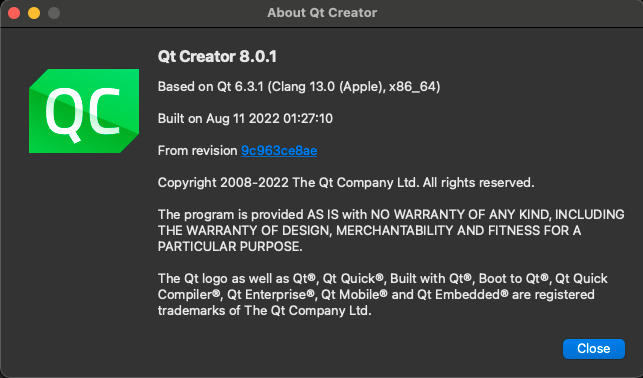
            This is the Qt version in use:
            aebbf297-8b8b-4af8-abde-c4727a8775f7-image.png

            1 Reply Last reply
            0
            • SGaistS Offline
              SGaistS Offline
              SGaist
              Lifetime Qt Champion
              wrote on last edited by SGaist
              #13

              That's the Qt Creator version. It has nothing to do with the Qt Kit you are using to build your application.

              Q_IMPORT_PLUGIN is to be used when working in a static build context.

              Interested in AI ? www.idiap.ch
              Please read the Qt Code of Conduct - https://forum.qt.io/topic/113070/qt-code-of-conduct

              T 2 Replies Last reply
              1
              • SGaistS SGaist

                That's the Qt Creator version. It has nothing to do with the Qt Kit you are using to build your application.

                Q_IMPORT_PLUGIN is to be used when working in a static build context.

                T Offline
                T Offline
                TheFlyingMooseMan
                wrote on last edited by
                #14
                This post is deleted!
                1 Reply Last reply
                0
                • SGaistS SGaist

                  That's the Qt Creator version. It has nothing to do with the Qt Kit you are using to build your application.

                  Q_IMPORT_PLUGIN is to be used when working in a static build context.

                  T Offline
                  T Offline
                  TheFlyingMooseMan
                  wrote on last edited by
                  #15

                  @SGaist Got it. Looks like 5.15.2 is used.
                  Also, I guess I am using a 'static build context' -- what is the exact parameter to be given to Q_IMPORT_PLUGIN to use the Qt PNG plugin?

                  1 Reply Last reply
                  0
                  • SGaistS Offline
                    SGaistS Offline
                    SGaist
                    Lifetime Qt Champion
                    wrote on last edited by
                    #16

                    Something like Q_IMPORT_PLUGIN(qpng).

                    Interested in AI ? www.idiap.ch
                    Please read the Qt Code of Conduct - https://forum.qt.io/topic/113070/qt-code-of-conduct

                    1 Reply Last reply
                    0
                    • T Offline
                      T Offline
                      TheFlyingMooseMan
                      wrote on last edited by
                      #17

                      @SGaist said in Qt app consistently crashing on OS X Monterey (12.6):

                      Q_IMPORT_PLUGIN(qpng)

                      Anything else I need to do?
                      Am getting link errors as follows:

                        "qt_static_plugin_qpng()", referenced from:
                            main::StaticqpngPluginInstance::StaticqpngPluginInstance() in main.o
                      ld: symbol(s) not found for architecture x86_64
                      clang: error: linker command failed with exit code 1 (use -v to see invocation)
                      

                      I am doing this in my main.cpp.
                      I also think that Qt does NOT ship with a png plugin.
                      I can't believe I am the only/first one to do something like that.

                      1 Reply Last reply
                      0

                      • Login

                      • Login or register to search.
                      • First post
                        Last post
                      0
                      • Categories
                      • Recent
                      • Tags
                      • Popular
                      • Users
                      • Groups
                      • Search
                      • Get Qt Extensions
                      • Unsolved