Skip to content
  • Categories
  • Recent
  • Tags
  • Popular
  • Users
  • Groups
  • Search
  • Get Qt
  • Unsolved
Collapse
Brand Logo
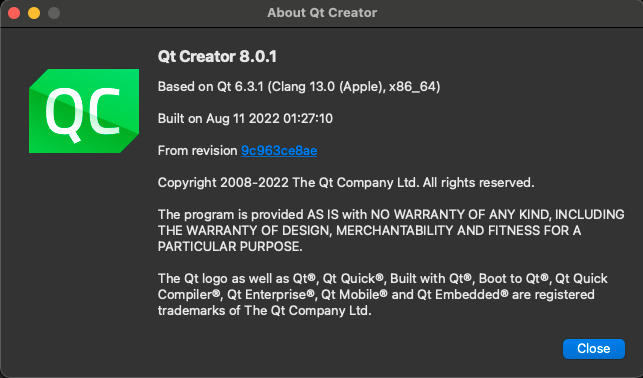
  1. Home
  2. Qt Development
  3. General and Desktop
  4. Qt app consistently crashing on OS X Monterey (12.6)
Qt 6.12 LTS is out! See what's new in the release blog

Qt app consistently crashing on OS X Monterey (12.6)

Scheduled Pinned Locked Moved Unsolved General and Desktop
17 Posts 4 Posters 3.0k Views 1 Watching
  • Oldest to Newest
  • Newest to Oldest
  • Most Votes
Reply
  • Reply as topic
Log in to reply
This topic has been deleted. Only users with topic management privileges can see it.
  • SGaistS Offline
    SGaistS Offline
    SGaist
    Lifetime Qt Champion
    wrote on last edited by
    #2

    Hi,

    Are you using a custom cursor in your application ?

    Interested in AI ? www.idiap.ch
    Please read the Qt Code of Conduct - https://forum.qt.io/topic/113070/qt-code-of-conduct

    T 1 Reply Last reply
    0
    • JoeCFDJ Offline
      JoeCFDJ Offline
      JoeCFD
      wrote on last edited by
      #3

      It looks like png plugin fails. It could be system png plugin has bug. Can you try Qt png plugin:
      https://doc.qt.io/qt-5/plugins-howto.html#static-plugins

      T 2 Replies Last reply
      0
      • SGaistS SGaist

        Hi,

        Are you using a custom cursor in your application ?

        T Offline
        T Offline
        TheFlyingMooseMan
        wrote on last edited by
        #4

        @SGaist a database cursor? Nope. Not sure what other cursors are out there.

        1 Reply Last reply
        0
        • SGaistS Offline
          SGaistS Offline
          SGaist
          Lifetime Qt Champion
          wrote on last edited by
          #5

          No, a mouse cursor.

          Interested in AI ? www.idiap.ch
          Please read the Qt Code of Conduct - https://forum.qt.io/topic/113070/qt-code-of-conduct

          T 1 Reply Last reply
          0
          • SGaistS SGaist

            No, a mouse cursor.

            T Offline
            T Offline
            TheFlyingMooseMan
            wrote on last edited by
            #6

            @SGaist Oh...! No, not using a custom mouse cursor.

            1 Reply Last reply
            0
            • JoeCFDJ JoeCFD

              It looks like png plugin fails. It could be system png plugin has bug. Can you try Qt png plugin:
              https://doc.qt.io/qt-5/plugins-howto.html#static-plugins

              T Offline
              T Offline
              TheFlyingMooseMan
              wrote on last edited by
              #7

              @JoeCFD Thanks for the suggestion -- do I follow instructions for static plugin.

              1 Reply Last reply
              0
              • JoeCFDJ JoeCFD

                It looks like png plugin fails. It could be system png plugin has bug. Can you try Qt png plugin:
                https://doc.qt.io/qt-5/plugins-howto.html#static-plugins

                T Offline
                T Offline
                TheFlyingMooseMan
                wrote on last edited by
                #8

                @JoeCFD Not sure how this is all to work automagically. The documentation states:

                To cause static plugins actually being linked and instantiated, Q_IMPORT_PLUGIN() macros are also needed in application code, but those are automatically generated by qmake and added to your application project.
                

                However, after recreating the project (including doing a run qmake) I don't see any references in the generated Qt code in the build directory. Am I still supposed to do a call to Q_IMPORT_PLUGIN() somewhere in my code?

                Thanks for any help or pointers.

                Roy

                1 Reply Last reply
                0
                • Z Offline
                  Z Offline
                  zaidmughal
                  Banned
                  wrote on last edited by
                  #9
                  This post is deleted!
                  T 1 Reply Last reply
                  0
                  • Z zaidmughal

                    This post is deleted!

                    T Offline
                    T Offline
                    TheFlyingMooseMan
                    wrote on last edited by
                    #10

                    @zaidmughal I am trying to. I have no idea how to accomplish this. Please see my other post about leveraging this Qt plug-in.

                    1 Reply Last reply
                    0
                    • SGaistS Offline
                      SGaistS Offline
                      SGaist
                      Lifetime Qt Champion
                      wrote on last edited by
                      #11

                      Can you provide the exact Qt version you are using ?
                      Can you provide a minimal compilable example that shows this behaviour ?

                      Interested in AI ? www.idiap.ch
                      Please read the Qt Code of Conduct - https://forum.qt.io/topic/113070/qt-code-of-conduct

                      T 1 Reply Last reply
                      0
                      • SGaistS SGaist

                        Can you provide the exact Qt version you are using ?
                        Can you provide a minimal compilable example that shows this behaviour ?

                        T Offline
                        T Offline
                        TheFlyingMooseMan
                        wrote on last edited by
                        #12

                        @SGaist that would take a lot of time and Murphy's law (and experience) tells me that this bug won't appear again.
                        I do have some questions on how to include plug-ins -- not sure if I need to call Q_IMPORT_PLUGIN somewhere in my code, and with what parameters. Unlike the documentation stated, I don't see any generated code that calles Q_IMPORT_PLUGIN anywhere.

                        This is the Qt version in use:
                        aebbf297-8b8b-4af8-abde-c4727a8775f7-image.png

                        1 Reply Last reply
                        0
                        • SGaistS Offline
                          SGaistS Offline
                          SGaist
                          Lifetime Qt Champion
                          wrote on last edited by SGaist
                          #13

                          That's the Qt Creator version. It has nothing to do with the Qt Kit you are using to build your application.

                          Q_IMPORT_PLUGIN is to be used when working in a static build context.

                          Interested in AI ? www.idiap.ch
                          Please read the Qt Code of Conduct - https://forum.qt.io/topic/113070/qt-code-of-conduct

                          T 2 Replies Last reply
                          1
                          • SGaistS SGaist

                            That's the Qt Creator version. It has nothing to do with the Qt Kit you are using to build your application.

                            Q_IMPORT_PLUGIN is to be used when working in a static build context.

                            T Offline
                            T Offline
                            TheFlyingMooseMan
                            wrote on last edited by
                            #14
                            This post is deleted!
                            1 Reply Last reply
                            0
                            • SGaistS SGaist

                              That's the Qt Creator version. It has nothing to do with the Qt Kit you are using to build your application.

                              Q_IMPORT_PLUGIN is to be used when working in a static build context.

                              T Offline
                              T Offline
                              TheFlyingMooseMan
                              wrote on last edited by
                              #15

                              @SGaist Got it. Looks like 5.15.2 is used.
                              Also, I guess I am using a 'static build context' -- what is the exact parameter to be given to Q_IMPORT_PLUGIN to use the Qt PNG plugin?

                              1 Reply Last reply
                              0
                              • SGaistS Offline
                                SGaistS Offline
                                SGaist
                                Lifetime Qt Champion
                                wrote on last edited by
                                #16

                                Something like Q_IMPORT_PLUGIN(qpng).

                                Interested in AI ? www.idiap.ch
                                Please read the Qt Code of Conduct - https://forum.qt.io/topic/113070/qt-code-of-conduct

                                1 Reply Last reply
                                0
                                • T Offline
                                  T Offline
                                  TheFlyingMooseMan
                                  wrote on last edited by
                                  #17

                                  @SGaist said in Qt app consistently crashing on OS X Monterey (12.6):

                                  Q_IMPORT_PLUGIN(qpng)

                                  Anything else I need to do?
                                  Am getting link errors as follows:

                                    "qt_static_plugin_qpng()", referenced from:
                                        main::StaticqpngPluginInstance::StaticqpngPluginInstance() in main.o
                                  ld: symbol(s) not found for architecture x86_64
                                  clang: error: linker command failed with exit code 1 (use -v to see invocation)
                                  

                                  I am doing this in my main.cpp.
                                  I also think that Qt does NOT ship with a png plugin.
                                  I can't believe I am the only/first one to do something like that.

                                  1 Reply Last reply
                                  0

                                  • Login

                                  • Login or register to search.
                                  • First post
                                    Last post
                                  0
                                  • Categories
                                  • Recent
                                  • Tags
                                  • Popular
                                  • Users
                                  • Groups
                                  • Search
                                  • Get Qt
                                  • Unsolved