Skip to content
  • Categories
  • Recent
  • Tags
  • Popular
  • Users
  • Groups
  • Search
  • Get Qt
  • Unsolved
Collapse
Brand Logo
  1. Home
  2. Qt Development
  3. Installation and Deployment
  4. Making a standalone Qt application on Windows
Qt 6.12 LTS is out! See what's new in the release blog

Making a standalone Qt application on Windows

Scheduled Pinned Locked Moved Unsolved Installation and Deployment
23 Posts 4 Posters 6.5k Views 3 Watching
  • Oldest to Newest
  • Newest to Oldest
  • Most Votes
Reply
  • Reply as topic
Log in to reply
This topic has been deleted. Only users with topic management privileges can see it.
  • S Sucharek

    @SGaist ok, but how do I call configure from a folder that doesn't have the configure.bat file?

    jsulmJ Offline
    jsulmJ Offline
    jsulm
    Lifetime Qt Champion
    wrote on last edited by
    #13

    @Sucharek said in Making a standalone Qt application on Windows:

    but how do I call configure from a folder that doesn't have the configure.bat file?

    By providing path to it? Either relative to your build folder or absolute path:

    ../QT_SRC_FOLDER/configure
    

    https://forum.qt.io/topic/113070/qt-code-of-conduct

    S 1 Reply Last reply
    1
    • jsulmJ jsulm

      @Sucharek said in Making a standalone Qt application on Windows:

      but how do I call configure from a folder that doesn't have the configure.bat file?

      By providing path to it? Either relative to your build folder or absolute path:

      ../QT_SRC_FOLDER/configure
      
      S Offline
      S Offline
      Sucharek
      wrote on last edited by
      #14

      Hi @jsulm, ok I'll try that.

      1 Reply Last reply
      0
      • S Offline
        S Offline
        Sucharek
        wrote on last edited by
        #15

        Hi, so I built it again, and got the same error. The error is from QLocation, to on configure can I use "-nomake qlocation", or something like that? Also, the build takes about 10 hours, so that's why I'm responding after a very long time.

        jsulmJ 1 Reply Last reply
        0
        • S Sucharek

          Hi, so I built it again, and got the same error. The error is from QLocation, to on configure can I use "-nomake qlocation", or something like that? Also, the build takes about 10 hours, so that's why I'm responding after a very long time.

          jsulmJ Offline
          jsulmJ Offline
          jsulm
          Lifetime Qt Champion
          wrote on last edited by
          #16

          @Sucharek Call "configure -h" (or --help) to get the list of parameters it understands.

          https://forum.qt.io/topic/113070/qt-code-of-conduct

          S 1 Reply Last reply
          0
          • jsulmJ jsulm

            @Sucharek Call "configure -h" (or --help) to get the list of parameters it understands.

            S Offline
            S Offline
            Sucharek
            wrote on last edited by
            #17

            Hi @jsulm, ok I'll try that. Also, I ran the mingw32-make with -i (ignore errors), and it just ignored the qlocation errors, and don't see any more of them. I don't need QLocation, so it's fine if I don't have it. If it wouldn't work, I'll try the -configure myself to see if I can clear some more thing out. After the compile is done, I'll update you if I have any more issues.

            1 Reply Last reply
            0
            • S Offline
              S Offline
              Sucharek
              wrote on last edited by Sucharek
              #18

              Hi, so it actually proceeded to build in install, but when I add it in Qt versions in Qt creator, it says "No QML utility installed".
              EDIT: The only error was the QLocation

              1 Reply Last reply
              0
              • S Offline
                S Offline
                Sucharek
                wrote on last edited by
                #19

                Hi, so I ran the installation with my own command, which took about 40 hours, installed it, but got the same error in Qt Creator. No QML utility installed. Do I need to run something else, not "mingw32-make install"?

                jsulmJ 1 Reply Last reply
                0
                • S Sucharek

                  Hi, so I ran the installation with my own command, which took about 40 hours, installed it, but got the same error in Qt Creator. No QML utility installed. Do I need to run something else, not "mingw32-make install"?

                  jsulmJ Offline
                  jsulmJ Offline
                  jsulm
                  Lifetime Qt Champion
                  wrote on last edited by
                  #20

                  @Sucharek said in Making a standalone Qt application on Windows:

                  No QML utility installed

                  I don't know what QML utility. Does it work? I mean: can you build your apps using this Qt installation?

                  https://forum.qt.io/topic/113070/qt-code-of-conduct

                  S 1 Reply Last reply
                  0
                  • jsulmJ jsulm

                    @Sucharek said in Making a standalone Qt application on Windows:

                    No QML utility installed

                    I don't know what QML utility. Does it work? I mean: can you build your apps using this Qt installation?

                    S Offline
                    S Offline
                    Sucharek
                    wrote on last edited by
                    #21

                    Hi @jsulm, when I include the static installation in Qt Creator, it says the No QML utility installed, and it doesn't let me build it from it.

                    1 Reply Last reply
                    0
                    • S Offline
                      S Offline
                      Sucharek
                      wrote on last edited by
                      #22

                      Hi, I've discovered a new thing. So when I initialize the static Qt version in Qt Creator, it still says "No QML utility installed", but when I add it as a kit, it works, builds, but it's not static. It needs the dlls. I don't know if it's the QML thing or something. Here's the config command I used:

                      C:\Qt\pre-static\configure -release -opensource -static -skip qt3d -skip qtdatavis3d -skip qtgamepad -skip qtcharts -skip qtlocation -skip qtlottie -skip qtmacextras -skip qtandroidextras -skip qtnetworkauth -skip qtpurchasing -skip qtquick3d -skip qtspeech -skip qttranslations -skip qtvirtualkeyboard -skip qtwebengine -skip qtwebglplugin -skip qtwebchannel -skip qtwebsockets -skip qtwebview -skip qtconnectivity -nomake examples -nomake tests -nomake tools -accessibility -platform win32-g++ -confirm-license -opengl desktop -prefix C:\Qt\5.15.2-static
                      
                      1 Reply Last reply
                      0
                      • S Offline
                        S Offline
                        Sucharek
                        wrote on last edited by
                        #23

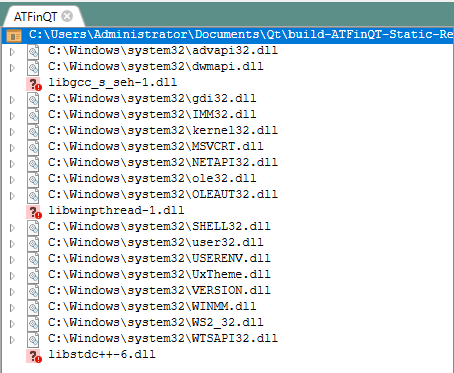
                        Hi, so I've found another thing. I open up dependencies to look for the dll files that need to be added, and the only ones are not the "critical" Qt files. I only need to add 3, but that still doesn't make it standalone. Do I need to type in something else when I'm configuring the installation?
                        58842cc8-7407-4e64-b2ac-c6e3d10ffd3e-image.png

                        1 Reply Last reply
                        0

                        • Login

                        • Login or register to search.
                        • First post
                          Last post
                        0
                        • Categories
                        • Recent
                        • Tags
                        • Popular
                        • Users
                        • Groups
                        • Search
                        • Get Qt
                        • Unsolved