Skip to content
  • Categories
  • Recent
  • Tags
  • Popular
  • Users
  • Groups
  • Search
  • Get Qt Extensions
  • Unsolved
Collapse
Brand Logo
  1. Home
  2. Qt Development
  3. Installation and Deployment
  4. Making a standalone Qt application on Windows
Qt 6.11 is out! See what's new in the release blog

Making a standalone Qt application on Windows

Scheduled Pinned Locked Moved Unsolved Installation and Deployment
23 Posts 4 Posters 6.2k Views 3 Watching
  • Oldest to Newest
  • Newest to Oldest
  • Most Votes
Reply
  • Reply as topic
Log in to reply
This topic has been deleted. Only users with topic management privileges can see it.
  • SGaistS Offline
    SGaistS Offline
    SGaist
    Lifetime Qt Champion
    wrote on last edited by
    #6

    Where did you get Qt's sources from ?

    Interested in AI ? www.idiap.ch
    Please read the Qt Code of Conduct - https://forum.qt.io/topic/113070/qt-code-of-conduct

    S 1 Reply Last reply
    0
    • SGaistS SGaist

      Where did you get Qt's sources from ?

      S Offline
      S Offline
      Sucharek
      wrote on last edited by
      #7

      Hi @SGaist, I got them from here: https://download.qt.io/official_releases/qt/5.15/5.15.2/single/qt-everywhere-src-5.15.2.zip

      1 Reply Last reply
      0
      • SGaistS Offline
        SGaistS Offline
        SGaist
        Lifetime Qt Champion
        wrote on last edited by
        #8

        Your error looks odd.

        I would nuke that build and extract the sources again.

        Also, please use an out of source build so you don't pollute the source tree and can restart more easily.

        Interested in AI ? www.idiap.ch
        Please read the Qt Code of Conduct - https://forum.qt.io/topic/113070/qt-code-of-conduct

        S 1 Reply Last reply
        1
        • SGaistS SGaist

          Your error looks odd.

          I would nuke that build and extract the sources again.

          Also, please use an out of source build so you don't pollute the source tree and can restart more easily.

          S Offline
          S Offline
          Sucharek
          wrote on last edited by
          #9

          Hi @SGaist, ok, I will build it again, but what do you mean by "please use an out of source build so you don't pollute the source tree and can restart more easily"?

          1 Reply Last reply
          0
          • SGaistS Offline
            SGaistS Offline
            SGaist
            Lifetime Qt Champion
            wrote on last edited by
            #10

            Literally what is written: call configure from a folder outside of the sources.

            Interested in AI ? www.idiap.ch
            Please read the Qt Code of Conduct - https://forum.qt.io/topic/113070/qt-code-of-conduct

            S 2 Replies Last reply
            1
            • SGaistS SGaist

              Literally what is written: call configure from a folder outside of the sources.

              S Offline
              S Offline
              Sucharek
              wrote on last edited by
              #11
              This post is deleted!
              1 Reply Last reply
              0
              • SGaistS SGaist

                Literally what is written: call configure from a folder outside of the sources.

                S Offline
                S Offline
                Sucharek
                wrote on last edited by Sucharek
                #12

                @SGaist ok, but how do I call configure from a folder that doesn't have the configure.bat file?

                jsulmJ 1 Reply Last reply
                0
                • S Sucharek

                  @SGaist ok, but how do I call configure from a folder that doesn't have the configure.bat file?

                  jsulmJ Offline
                  jsulmJ Offline
                  jsulm
                  Lifetime Qt Champion
                  wrote on last edited by
                  #13

                  @Sucharek said in Making a standalone Qt application on Windows:

                  but how do I call configure from a folder that doesn't have the configure.bat file?

                  By providing path to it? Either relative to your build folder or absolute path:

                  ../QT_SRC_FOLDER/configure
                  

                  https://forum.qt.io/topic/113070/qt-code-of-conduct

                  S 1 Reply Last reply
                  1
                  • jsulmJ jsulm

                    @Sucharek said in Making a standalone Qt application on Windows:

                    but how do I call configure from a folder that doesn't have the configure.bat file?

                    By providing path to it? Either relative to your build folder or absolute path:

                    ../QT_SRC_FOLDER/configure
                    
                    S Offline
                    S Offline
                    Sucharek
                    wrote on last edited by
                    #14

                    Hi @jsulm, ok I'll try that.

                    1 Reply Last reply
                    0
                    • S Offline
                      S Offline
                      Sucharek
                      wrote on last edited by
                      #15

                      Hi, so I built it again, and got the same error. The error is from QLocation, to on configure can I use "-nomake qlocation", or something like that? Also, the build takes about 10 hours, so that's why I'm responding after a very long time.

                      jsulmJ 1 Reply Last reply
                      0
                      • S Sucharek

                        Hi, so I built it again, and got the same error. The error is from QLocation, to on configure can I use "-nomake qlocation", or something like that? Also, the build takes about 10 hours, so that's why I'm responding after a very long time.

                        jsulmJ Offline
                        jsulmJ Offline
                        jsulm
                        Lifetime Qt Champion
                        wrote on last edited by
                        #16

                        @Sucharek Call "configure -h" (or --help) to get the list of parameters it understands.

                        https://forum.qt.io/topic/113070/qt-code-of-conduct

                        S 1 Reply Last reply
                        0
                        • jsulmJ jsulm

                          @Sucharek Call "configure -h" (or --help) to get the list of parameters it understands.

                          S Offline
                          S Offline
                          Sucharek
                          wrote on last edited by
                          #17

                          Hi @jsulm, ok I'll try that. Also, I ran the mingw32-make with -i (ignore errors), and it just ignored the qlocation errors, and don't see any more of them. I don't need QLocation, so it's fine if I don't have it. If it wouldn't work, I'll try the -configure myself to see if I can clear some more thing out. After the compile is done, I'll update you if I have any more issues.

                          1 Reply Last reply
                          0
                          • S Offline
                            S Offline
                            Sucharek
                            wrote on last edited by Sucharek
                            #18

                            Hi, so it actually proceeded to build in install, but when I add it in Qt versions in Qt creator, it says "No QML utility installed".
                            EDIT: The only error was the QLocation

                            1 Reply Last reply
                            0
                            • S Offline
                              S Offline
                              Sucharek
                              wrote on last edited by
                              #19

                              Hi, so I ran the installation with my own command, which took about 40 hours, installed it, but got the same error in Qt Creator. No QML utility installed. Do I need to run something else, not "mingw32-make install"?

                              jsulmJ 1 Reply Last reply
                              0
                              • S Sucharek

                                Hi, so I ran the installation with my own command, which took about 40 hours, installed it, but got the same error in Qt Creator. No QML utility installed. Do I need to run something else, not "mingw32-make install"?

                                jsulmJ Offline
                                jsulmJ Offline
                                jsulm
                                Lifetime Qt Champion
                                wrote on last edited by
                                #20

                                @Sucharek said in Making a standalone Qt application on Windows:

                                No QML utility installed

                                I don't know what QML utility. Does it work? I mean: can you build your apps using this Qt installation?

                                https://forum.qt.io/topic/113070/qt-code-of-conduct

                                S 1 Reply Last reply
                                0
                                • jsulmJ jsulm

                                  @Sucharek said in Making a standalone Qt application on Windows:

                                  No QML utility installed

                                  I don't know what QML utility. Does it work? I mean: can you build your apps using this Qt installation?

                                  S Offline
                                  S Offline
                                  Sucharek
                                  wrote on last edited by
                                  #21

                                  Hi @jsulm, when I include the static installation in Qt Creator, it says the No QML utility installed, and it doesn't let me build it from it.

                                  1 Reply Last reply
                                  0
                                  • S Offline
                                    S Offline
                                    Sucharek
                                    wrote on last edited by
                                    #22

                                    Hi, I've discovered a new thing. So when I initialize the static Qt version in Qt Creator, it still says "No QML utility installed", but when I add it as a kit, it works, builds, but it's not static. It needs the dlls. I don't know if it's the QML thing or something. Here's the config command I used:

                                    C:\Qt\pre-static\configure -release -opensource -static -skip qt3d -skip qtdatavis3d -skip qtgamepad -skip qtcharts -skip qtlocation -skip qtlottie -skip qtmacextras -skip qtandroidextras -skip qtnetworkauth -skip qtpurchasing -skip qtquick3d -skip qtspeech -skip qttranslations -skip qtvirtualkeyboard -skip qtwebengine -skip qtwebglplugin -skip qtwebchannel -skip qtwebsockets -skip qtwebview -skip qtconnectivity -nomake examples -nomake tests -nomake tools -accessibility -platform win32-g++ -confirm-license -opengl desktop -prefix C:\Qt\5.15.2-static
                                    
                                    1 Reply Last reply
                                    0
                                    • S Offline
                                      S Offline
                                      Sucharek
                                      wrote on last edited by
                                      #23

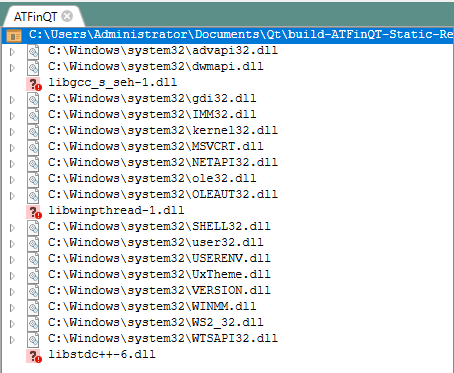
                                      Hi, so I've found another thing. I open up dependencies to look for the dll files that need to be added, and the only ones are not the "critical" Qt files. I only need to add 3, but that still doesn't make it standalone. Do I need to type in something else when I'm configuring the installation?
                                      58842cc8-7407-4e64-b2ac-c6e3d10ffd3e-image.png

                                      1 Reply Last reply
                                      0

                                      • Login

                                      • Login or register to search.
                                      • First post
                                        Last post
                                      0
                                      • Categories
                                      • Recent
                                      • Tags
                                      • Popular
                                      • Users
                                      • Groups
                                      • Search
                                      • Get Qt Extensions
                                      • Unsolved