Skip to content
  • Categories
  • Recent
  • Tags
  • Popular
  • Users
  • Groups
  • Search
  • Get Qt Extensions
  • Unsolved
Collapse
Brand Logo
  1. Home
  2. Qt Development
  3. Mobile and Embedded
  4. Trying to build QMsgPack lib for Android 6.2.0 Clang arm64-v8a
Qt 6.11 is out! See what's new in the release blog

Trying to build QMsgPack lib for Android 6.2.0 Clang arm64-v8a

Scheduled Pinned Locked Moved Solved Mobile and Embedded
48 Posts 2 Posters 10.3k Views 1 Watching
  • Oldest to Newest
  • Newest to Oldest
  • Most Votes
Reply
  • Reply as topic
Log in to reply
This topic has been deleted. Only users with topic management privileges can see it.
  • K Offline
    K Offline
    Kris Revi
    wrote on last edited by
    #24

    im still at a loss here :/ any help would be awsome!

    1 Reply Last reply
    0
    • SGaistS Offline
      SGaistS Offline
      SGaist
      Lifetime Qt Champion
      wrote on last edited by
      #25

      Put back the tests.

      TEMPLATE = subdirs
      
      SUBDIRS += \
          src \
          tests
      
      tests.depends = src
      

      And select a test as build target.

      Interested in AI ? www.idiap.ch
      Please read the Qt Code of Conduct - https://forum.qt.io/topic/113070/qt-code-of-conduct

      K 1 Reply Last reply
      0
      • SGaistS SGaist

        Put back the tests.

        TEMPLATE = subdirs
        
        SUBDIRS += \
            src \
            tests
        
        tests.depends = src
        

        And select a test as build target.

        K Offline
        K Offline
        Kris Revi
        wrote on last edited by
        #26

        @SGaist "And select a test as build target." ? :S how do i do that?

        1 Reply Last reply
        0
        • SGaistS Offline
          SGaistS Offline
          SGaist
          Lifetime Qt Champion
          wrote on last edited by
          #27

          On the left of Qt Creator, the target selection part.

          Interested in AI ? www.idiap.ch
          Please read the Qt Code of Conduct - https://forum.qt.io/topic/113070/qt-code-of-conduct

          K 2 Replies Last reply
          1
          • SGaistS SGaist

            On the left of Qt Creator, the target selection part.

            K Offline
            K Offline
            Kris Revi
            wrote on last edited by
            #28

            @SGaist aaah i found it :)

            1 Reply Last reply
            0
            • SGaistS SGaist

              On the left of Qt Creator, the target selection part.

              K Offline
              K Offline
              Kris Revi
              wrote on last edited by
              #29

              @SGaist 731b093a-281a-41ce-b362-0e8d49c59d9e-image.png

              1 Reply Last reply
              0
              • SGaistS Offline
                SGaistS Offline
                SGaist
                Lifetime Qt Champion
                wrote on last edited by
                #30

                Did you check the content of the build folder ?

                Interested in AI ? www.idiap.ch
                Please read the Qt Code of Conduct - https://forum.qt.io/topic/113070/qt-code-of-conduct

                K 1 Reply Last reply
                0
                • SGaistS SGaist

                  Did you check the content of the build folder ?

                  K Offline
                  K Offline
                  Kris Revi
                  wrote on last edited by Kris Revi
                  #31

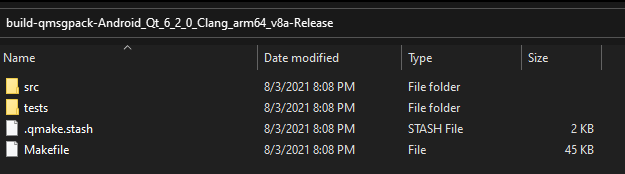
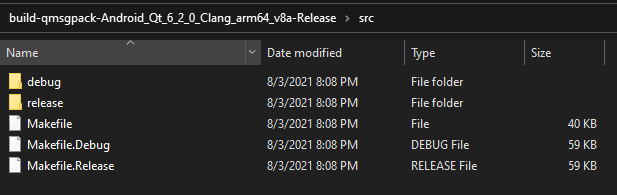
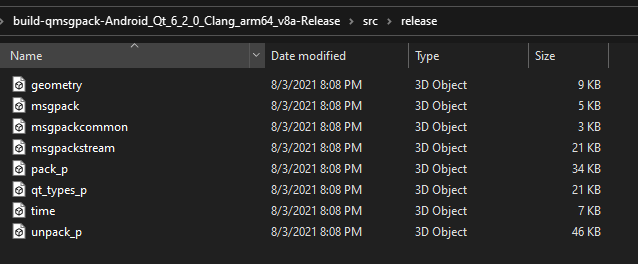
                  @SGaist

                  Build Folder
                  1bd81df0-2187-46d2-ab81-cd5537fe574f-image.png

                  src folder
                  06734440-8564-4591-b890-261fb307beca-image.png

                  release folder
                  199002e5-1904-4a3f-9513-85aedc4977f8-image.png

                  1 Reply Last reply
                  0
                  • SGaistS Offline
                    SGaistS Offline
                    SGaist
                    Lifetime Qt Champion
                    wrote on last edited by
                    #32

                    There are several folders, what's in them ?
                    Do you have any library ?
                    If memory serves well, there should be a bin folder somewhere.

                    Interested in AI ? www.idiap.ch
                    Please read the Qt Code of Conduct - https://forum.qt.io/topic/113070/qt-code-of-conduct

                    K 1 Reply Last reply
                    0
                    • SGaistS SGaist

                      There are several folders, what's in them ?
                      Do you have any library ?
                      If memory serves well, there should be a bin folder somewhere.

                      K Offline
                      K Offline
                      Kris Revi
                      wrote on last edited by
                      #33

                      @SGaist i posted 2 more pictures above btw!

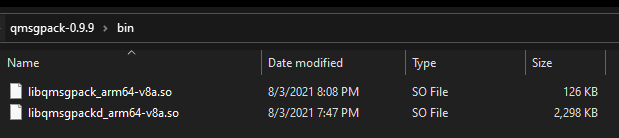
                      this is the bin folder
                      b9c8092a-6268-4815-8182-e961a0e36884-image.png

                      no libs :/

                      1 Reply Last reply
                      0
                      • SGaistS Offline
                        SGaistS Offline
                        SGaist
                        Lifetime Qt Champion
                        wrote on last edited by
                        #34

                        On the contrary, you have two libraries !

                        They have their architecture as part of their name, hence the linker does not find them to link to the test.

                        If your rename them both without the arm64_v8a part, it should work.

                        Interested in AI ? www.idiap.ch
                        Please read the Qt Code of Conduct - https://forum.qt.io/topic/113070/qt-code-of-conduct

                        K 1 Reply Last reply
                        0
                        • SGaistS SGaist

                          On the contrary, you have two libraries !

                          They have their architecture as part of their name, hence the linker does not find them to link to the test.

                          If your rename them both without the arm64_v8a part, it should work.

                          K Offline
                          K Offline
                          Kris Revi
                          wrote on last edited by
                          #35

                          @SGaist now i got a diff error
                          ca454a28-1b35-460e-a0c1-41df23032a53-image.png

                          1 Reply Last reply
                          0
                          • SGaistS Offline
                            SGaistS Offline
                            SGaist
                            Lifetime Qt Champion
                            wrote on last edited by
                            #36

                            In the absolute, you can ignore that as the libraries were built so you can use them in your main application.

                            Otherwise, you can add a dummy application in a separate subdirs project to "finalize" things.

                            Interested in AI ? www.idiap.ch
                            Please read the Qt Code of Conduct - https://forum.qt.io/topic/113070/qt-code-of-conduct

                            K 1 Reply Last reply
                            0
                            • SGaistS SGaist

                              In the absolute, you can ignore that as the libraries were built so you can use them in your main application.

                              Otherwise, you can add a dummy application in a separate subdirs project to "finalize" things.

                              K Offline
                              K Offline
                              Kris Revi
                              wrote on last edited by
                              #37

                              @SGaist 4ac9eed6-446f-4a01-86e8-cae3d7ce95ef-image.png

                              what do i pick when adding a lib to my main project? :S

                              1 Reply Last reply
                              0
                              • SGaistS Offline
                                SGaistS Offline
                                SGaist
                                Lifetime Qt Champion
                                wrote on last edited by
                                #38

                                You do the same as in the tests.

                                So you should get automatic selection of the debug or release build of the library.

                                Interested in AI ? www.idiap.ch
                                Please read the Qt Code of Conduct - https://forum.qt.io/topic/113070/qt-code-of-conduct

                                K 1 Reply Last reply
                                0
                                • SGaistS SGaist

                                  You do the same as in the tests.

                                  So you should get automatic selection of the debug or release build of the library.

                                  K Offline
                                  K Offline
                                  Kris Revi
                                  wrote on last edited by
                                  #39

                                  @SGaist hmm so my app just keeps crashing with

                                  E AndroidRuntime: FATAL EXCEPTION: qtMainLoopThread
                                  E AndroidRuntime: Process: org.qtproject.example.MythicalNeonController2022, PID: 26459
                                  E AndroidRuntime: java.lang.UnsatisfiedLinkError: dlopen failed: library "libqmsgpack_arm64-v8a.so" not found: needed by /data/app/~~LJNNcupsrVLUgmF_dlRnOQ==/org.qtproject.example.MythicalNeonController2022-wsptj5r7HC3hbU6jwxMthw==/lib/arm64/libMythicalNeonController2022_arm64-v8a.so in namespace classloader-namespace
                                  E AndroidRuntime: 	at java.lang.Runtime.load0(Runtime.java:939)
                                  E AndroidRuntime: 	at java.lang.System.load(System.java:1628)
                                  E AndroidRuntime: 	at org.qtproject.qt.android.QtNative$4.run(QtNative.java:511)
                                  E AndroidRuntime: 	at org.qtproject.qt.android.QtThread$2.run(QtThread.java:87)
                                  E AndroidRuntime: 	at org.qtproject.qt.android.QtThread$1.run(QtThread.java:61)
                                  E AndroidRuntime: 	at java.lang.Thread.run(Thread.java:923)
                                  
                                  1 Reply Last reply
                                  0
                                  • SGaistS Offline
                                    SGaistS Offline
                                    SGaist
                                    Lifetime Qt Champion
                                    wrote on last edited by
                                    #40

                                    You need to deploy it as well. See here for more information about that matter.

                                    Interested in AI ? www.idiap.ch
                                    Please read the Qt Code of Conduct - https://forum.qt.io/topic/113070/qt-code-of-conduct

                                    K 1 Reply Last reply
                                    0
                                    • SGaistS SGaist

                                      You need to deploy it as well. See here for more information about that matter.

                                      K Offline
                                      K Offline
                                      Kris Revi
                                      wrote on last edited by
                                      #41

                                      @SGaist my .pro has

                                      win32:CONFIG(release, debug|release): LIBS += -LC:/build-qmsgpack-Android_Qt_6_2_0_Clang_arm64_v8a-Release/android-build/libs/arm64-v8a/release/ -lqmsgpack_arm64-v8a
                                      else:win32:CONFIG(debug, debug|release): LIBS += -LC:/build-qmsgpack-Android_Qt_6_2_0_Clang_arm64_v8a-Release/android-build/libs/arm64-v8a/debug/ -lqmsgpack_arm64-v8a
                                      else:unix: LIBS += -LC:/build-qmsgpack-Android_Qt_6_2_0_Clang_arm64_v8a-Release/android-build/libs/arm64-v8a/ -lqmsgpack_arm64-v8a
                                      
                                      INCLUDEPATH += C:/build-qmsgpack-Android_Qt_6_2_0_Clang_arm64_v8a-Release/android-build/libs/arm64-v8a
                                      DEPENDPATH += C:/build-qmsgpack-Android_Qt_6_2_0_Clang_arm64_v8a-Release/android-build/libs/arm64-v8a
                                      

                                      that should be enough? :S

                                      1 Reply Last reply
                                      0
                                      • SGaistS Offline
                                        SGaistS Offline
                                        SGaist
                                        Lifetime Qt Champion
                                        wrote on last edited by
                                        #42

                                        Did you read the documentation I linked to ?

                                        There's a difference between building and deploying.

                                        Interested in AI ? www.idiap.ch
                                        Please read the Qt Code of Conduct - https://forum.qt.io/topic/113070/qt-code-of-conduct

                                        K 1 Reply Last reply
                                        0
                                        • SGaistS SGaist

                                          Did you read the documentation I linked to ?

                                          There's a difference between building and deploying.
                                          K Offline
                                          K Offline
                                          Kris Revi
                                          wrote on last edited by
                                          #43

                                          @SGaist so im not deploying when i press "Run" i Qt Creator? :S

                                          1 Reply Last reply
                                          0

                                          • Login

                                          • Login or register to search.
                                          • First post
                                            Last post
                                          0
                                          • Categories
                                          • Recent
                                          • Tags
                                          • Popular
                                          • Users
                                          • Groups
                                          • Search
                                          • Get Qt Extensions
                                          • Unsolved