Skip to content
  • Categories
  • Recent
  • Tags
  • Popular
  • Users
  • Groups
  • Search
  • Get Qt Extensions
  • Unsolved
Collapse
Brand Logo
  1. Home
  2. Qt Development
  3. Mobile and Embedded
  4. Trying to build QMsgPack lib for Android 6.2.0 Clang arm64-v8a
Qt 6.11 is out! See what's new in the release blog

Trying to build QMsgPack lib for Android 6.2.0 Clang arm64-v8a

Scheduled Pinned Locked Moved Solved Mobile and Embedded
48 Posts 2 Posters 10.2k Views 1 Watching
  • Oldest to Newest
  • Newest to Oldest
  • Most Votes
Reply
  • Reply as topic
Log in to reply
This topic has been deleted. Only users with topic management privileges can see it.
  • SGaistS Offline
    SGaistS Offline
    SGaist
    Lifetime Qt Champion
    wrote on last edited by
    #14

    No, modify the qmsgpack.pro file content.

    Interested in AI ? www.idiap.ch
    Please read the Qt Code of Conduct - https://forum.qt.io/topic/113070/qt-code-of-conduct

    K 1 Reply Last reply
    0
    • SGaistS SGaist

      No, modify the qmsgpack.pro file content.

      K Offline
      K Offline
      Kris Revi
      wrote on last edited by
      #15

      @SGaist this is the entire content for qmsgpack.pro

      TEMPLATE = subdirs
      
      SUBDIRS += \
          src \
          tests
      
      
      1 Reply Last reply
      0
      • SGaistS Offline
        SGaistS Offline
        SGaist
        Lifetime Qt Champion
        wrote on last edited by
        #16

        I know, and that's the one you need to modify in order to ensure that src is built before tests following the instructions in the wiki I linked in my previous message.

        The alternative is to comment out tests and the backslash after src but you won't have the tests built.

        Interested in AI ? www.idiap.ch
        Please read the Qt Code of Conduct - https://forum.qt.io/topic/113070/qt-code-of-conduct

        K 1 Reply Last reply
        0
        • SGaistS SGaist

          I know, and that's the one you need to modify in order to ensure that src is built before tests following the instructions in the wiki I linked in my previous message.

          The alternative is to comment out tests and the backslash after src but you won't have the tests built.

          K Offline
          K Offline
          Kris Revi
          wrote on last edited by
          #17

          @SGaist do i even need the tests? :S

          1 Reply Last reply
          0
          • SGaistS Offline
            SGaistS Offline
            SGaist
            Lifetime Qt Champion
            wrote on last edited by
            #18

            Technically it ensures that the library is working properly if they run.

            Interested in AI ? www.idiap.ch
            Please read the Qt Code of Conduct - https://forum.qt.io/topic/113070/qt-code-of-conduct

            K 1 Reply Last reply
            0
            • SGaistS SGaist

              Technically it ensures that the library is working properly if they run.

              K Offline
              K Offline
              Kris Revi
              wrote on last edited by
              #19

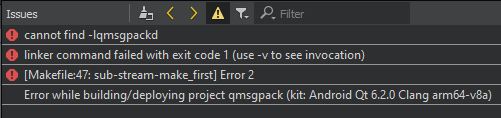
              @SGaist ah, cause i tested now with "tests" commented out and all i got wasa8c25b78-bdc3-4ba4-b76b-9365998a58dc-image.png

              1 Reply Last reply
              0
              • SGaistS Offline
                SGaistS Offline
                SGaist
                Lifetime Qt Champion
                wrote on last edited by
                #20

                Did you also comment out the \ as suggested ?

                Interested in AI ? www.idiap.ch
                Please read the Qt Code of Conduct - https://forum.qt.io/topic/113070/qt-code-of-conduct

                K 1 Reply Last reply
                0
                • SGaistS SGaist

                  Did you also comment out the \ as suggested ?

                  K Offline
                  K Offline
                  Kris Revi
                  wrote on last edited by Kris Revi
                  #21

                  @SGaist i did it like this

                  TEMPLATE = subdirs
                  
                  SUBDIRS += \
                      src
                      #tests
                  
                  1 Reply Last reply
                  0
                  • SGaistS Offline
                    SGaistS Offline
                    SGaist
                    Lifetime Qt Champion
                    wrote on last edited by
                    #22

                    Did you do a full rebuild ? Meaning, nuking the build folder completely.

                    Interested in AI ? www.idiap.ch
                    Please read the Qt Code of Conduct - https://forum.qt.io/topic/113070/qt-code-of-conduct

                    K 1 Reply Last reply
                    0
                    • SGaistS SGaist

                      Did you do a full rebuild ? Meaning, nuking the build folder completely.

                      K Offline
                      K Offline
                      Kris Revi
                      wrote on last edited by
                      #23

                      @SGaist yupp! deleted it and the rebuild it

                      1 Reply Last reply
                      0
                      • K Offline
                        K Offline
                        Kris Revi
                        wrote on last edited by
                        #24

                        im still at a loss here :/ any help would be awsome!

                        1 Reply Last reply
                        0
                        • SGaistS Offline
                          SGaistS Offline
                          SGaist
                          Lifetime Qt Champion
                          wrote on last edited by
                          #25

                          Put back the tests.

                          TEMPLATE = subdirs
                          
                          SUBDIRS += \
                              src \
                              tests
                          
                          tests.depends = src
                          

                          And select a test as build target.

                          Interested in AI ? www.idiap.ch
                          Please read the Qt Code of Conduct - https://forum.qt.io/topic/113070/qt-code-of-conduct

                          K 1 Reply Last reply
                          0
                          • SGaistS SGaist

                            Put back the tests.

                            TEMPLATE = subdirs
                            
                            SUBDIRS += \
                                src \
                                tests
                            
                            tests.depends = src
                            

                            And select a test as build target.

                            K Offline
                            K Offline
                            Kris Revi
                            wrote on last edited by
                            #26

                            @SGaist "And select a test as build target." ? :S how do i do that?

                            1 Reply Last reply
                            0
                            • SGaistS Offline
                              SGaistS Offline
                              SGaist
                              Lifetime Qt Champion
                              wrote on last edited by
                              #27

                              On the left of Qt Creator, the target selection part.

                              Interested in AI ? www.idiap.ch
                              Please read the Qt Code of Conduct - https://forum.qt.io/topic/113070/qt-code-of-conduct

                              K 2 Replies Last reply
                              1
                              • SGaistS SGaist

                                On the left of Qt Creator, the target selection part.

                                K Offline
                                K Offline
                                Kris Revi
                                wrote on last edited by
                                #28

                                @SGaist aaah i found it :)

                                1 Reply Last reply
                                0
                                • SGaistS SGaist

                                  On the left of Qt Creator, the target selection part.

                                  K Offline
                                  K Offline
                                  Kris Revi
                                  wrote on last edited by
                                  #29

                                  @SGaist 731b093a-281a-41ce-b362-0e8d49c59d9e-image.png

                                  1 Reply Last reply
                                  0
                                  • SGaistS Offline
                                    SGaistS Offline
                                    SGaist
                                    Lifetime Qt Champion
                                    wrote on last edited by
                                    #30

                                    Did you check the content of the build folder ?

                                    Interested in AI ? www.idiap.ch
                                    Please read the Qt Code of Conduct - https://forum.qt.io/topic/113070/qt-code-of-conduct

                                    K 1 Reply Last reply
                                    0
                                    • SGaistS SGaist

                                      Did you check the content of the build folder ?

                                      K Offline
                                      K Offline
                                      Kris Revi
                                      wrote on last edited by Kris Revi
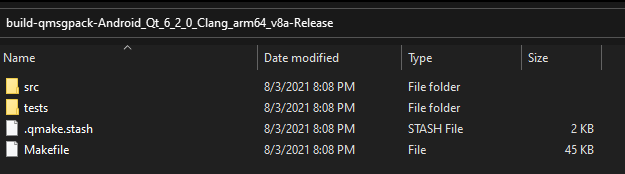
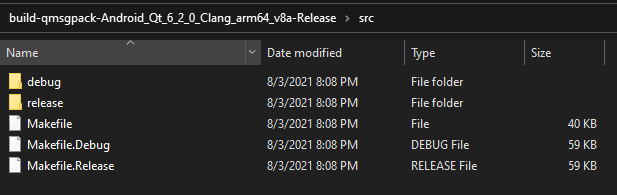
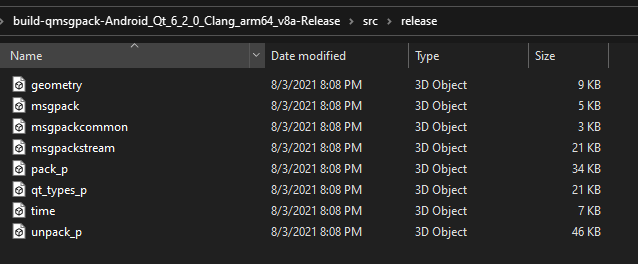
                                      #31

                                      @SGaist

                                      Build Folder
                                      1bd81df0-2187-46d2-ab81-cd5537fe574f-image.png

                                      src folder
                                      06734440-8564-4591-b890-261fb307beca-image.png

                                      release folder
                                      199002e5-1904-4a3f-9513-85aedc4977f8-image.png

                                      1 Reply Last reply
                                      0
                                      • SGaistS Offline
                                        SGaistS Offline
                                        SGaist
                                        Lifetime Qt Champion
                                        wrote on last edited by
                                        #32

                                        There are several folders, what's in them ?
                                        Do you have any library ?
                                        If memory serves well, there should be a bin folder somewhere.

                                        Interested in AI ? www.idiap.ch
                                        Please read the Qt Code of Conduct - https://forum.qt.io/topic/113070/qt-code-of-conduct

                                        K 1 Reply Last reply
                                        0
                                        • SGaistS SGaist

                                          There are several folders, what's in them ?
                                          Do you have any library ?
                                          If memory serves well, there should be a bin folder somewhere.

                                          K Offline
                                          K Offline
                                          Kris Revi
                                          wrote on last edited by
                                          #33

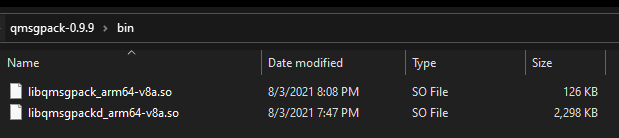
                                          @SGaist i posted 2 more pictures above btw!

                                          this is the bin folder
                                          b9c8092a-6268-4815-8182-e961a0e36884-image.png

                                          no libs :/

                                          1 Reply Last reply
                                          0

                                          • Login

                                          • Login or register to search.
                                          • First post
                                            Last post
                                          0
                                          • Categories
                                          • Recent
                                          • Tags
                                          • Popular
                                          • Users
                                          • Groups
                                          • Search
                                          • Get Qt Extensions
                                          • Unsolved