
Skip to content
  • Categories
  • Recent
  • Tags
  • Popular
  • Users
  • Groups
  • Search
  • Get Qt
  • Unsolved
Collapse
qtws26_logo

The Qt Event of the Year: Qt World Summit 2026

Save Your Spot >
Brand Logo
  1. Home
  2. Qt Development
  3. General and Desktop
  4. Help with how to do something...
Qt 6.12 LTS is out! See what's new in the release blog

Help with how to do something...

Scheduled Pinned Locked Moved Solved General and Desktop
22 Posts 4 Posters 6.9k Views 3 Watching
  • Oldest to Newest
  • Newest to Oldest
  • Most Votes
Reply
  • Reply as topic
Log in to reply
This topic has been deleted. Only users with topic management privileges can see it.
  • SPlattenS SPlatten

    @VRonin , before I dive in and rip out the code I currently have, what I want to achieve is have a scrollable list of rows where each row as on the left a label and on the right an input widget, one of the following either text entry, combo box or drop down.

    I don't want a row highlight just a scrollbar if necessary. Will the QTableView be suitable for this?

    VRoninV Offline
    VRoninV Offline
    VRonin
    wrote on last edited by
    #11

    @SPlatten said in Help with how to do something...:

    Will the QTableView be suitable for this?

    You will just need some styling of the tableview, nothing major

    "La mort n'est rien, mais vivre vaincu et sans gloire, c'est mourir tous les jours"
    ~Napoleon Bonaparte

    On a crusade to banish setIndexWidget() from the holy land of Qt

    SPlattenS 2 Replies Last reply
    0
    • VRoninV VRonin

      @SPlatten said in Help with how to do something...:

      Will the QTableView be suitable for this?

      You will just need some styling of the tableview, nothing major

      SPlattenS Offline
      SPlattenS Offline
      SPlatten
      wrote on last edited by
      #12

      @VRonin , thank you, I'm up against time and need to get this implemented...

      Kind Regards,
      Sy

      1 Reply Last reply
      0
      • VRoninV VRonin

        @SPlatten said in Help with how to do something...:

        Will the QTableView be suitable for this?

        You will just need some styling of the tableview, nothing major

        SPlattenS Offline
        SPlattenS Offline
        SPlatten
        wrote on last edited by
        #13

        @VRonin , to be honest, this is a bigger learning curve than I have time for, all I need is a scrollable area with a label and input widget on each row. I don't want something that looks like a spreadsheet, just a standard dialog look and feel with a scrollbar if required.

        If I drag and drop the widgets using Qt Creator I can create what I want in the WYSIWYG editor, but I can't use this, I have to create the same in code.

        Kind Regards,
        Sy

        1 Reply Last reply
        1
        • mrjjM Offline
          mrjjM Offline
          mrjj
          Lifetime Qt Champion
          wrote on last edited by
          #14

          Hi
          I think the code your shown is missing something from the scroll area setup. like settings its content widget.
          https://doc.qt.io/qt-5/qscrollarea.html#setWidget

          Just to be clear. you are looking for something like this
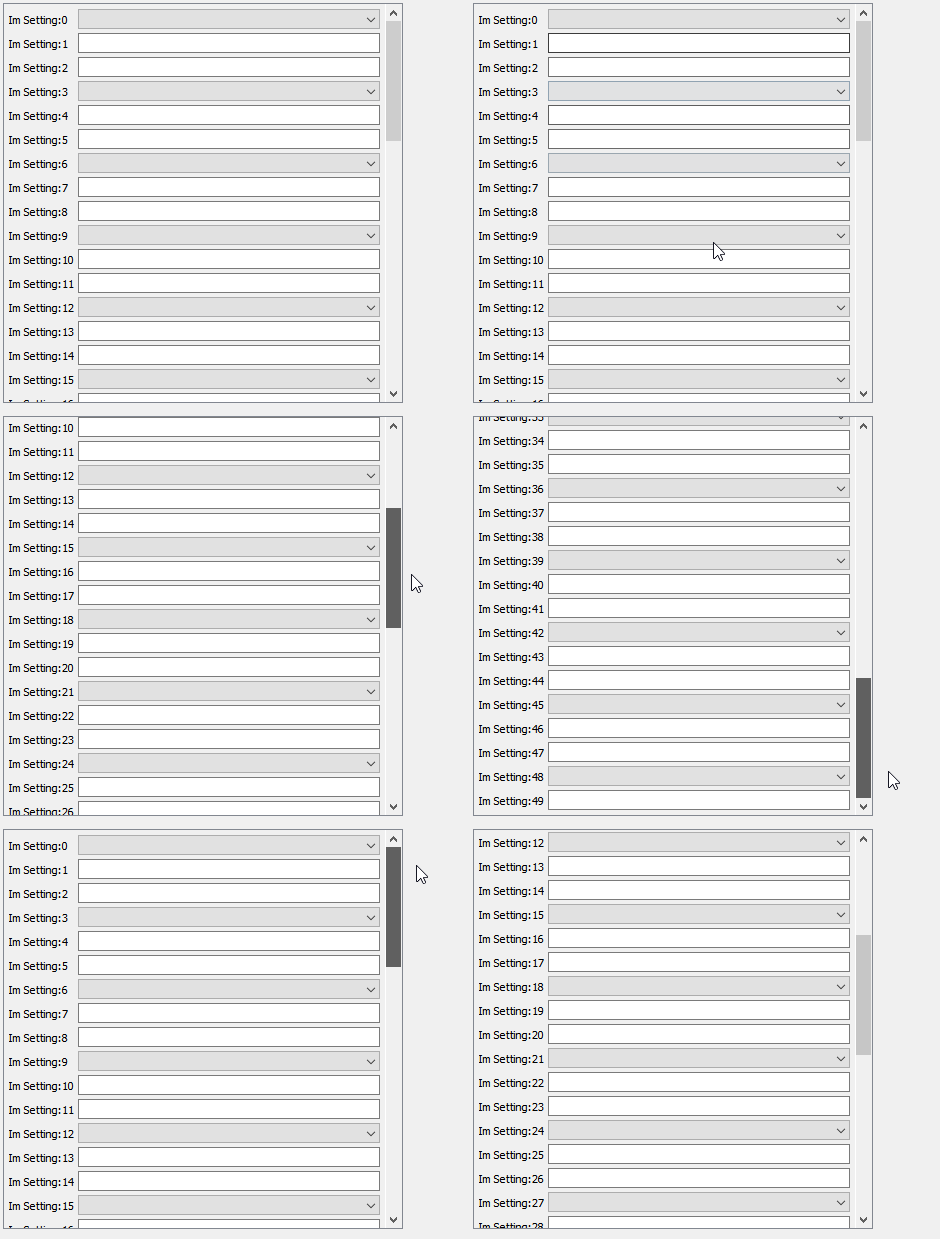
          alt text

            auto scrollArea = new QScrollArea(centralWidget());
              scrollArea ->move(10, 10);
              scrollArea ->resize(400, 400); // you dont need this as you should put it in a layout in your dialog
              scrollArea->setVerticalScrollBarPolicy(Qt::ScrollBarAsNeeded);
              scrollArea->setHorizontalScrollBarPolicy(Qt::ScrollBarAsNeeded);
              scrollArea->setWidgetResizable(true);
              // set up its center widget as docs tells
              auto scrollAreaWidgetContents = new QWidget();
              auto verticalLayout = new QVBoxLayout(scrollAreaWidgetContents);
              verticalLayout->setSpacing(4);
              verticalLayout->setContentsMargins(4, 4, 4, 4);
              // setup the "row" handler widget using  a from layout
              auto rowHandlerwidget = new QWidget(scrollAreaWidgetContents);
              auto formLayout = new QFormLayout(rowHandlerwidget);
              formLayout->setSpacing(4);
              formLayout->setContentsMargins(1, 1, 1, 1);
              // add some "rows!
              for (int numRows = 0; numRows < 50; ++numRows) {
                  auto label = new QLabel(rowHandlerwidget);
                  label ->setText( "Im Setting:" + QString::number(numRows));
                  formLayout->setWidget(numRows, QFormLayout::LabelRole, label);
                  if ( numRows % 3 ) {
                      auto lineEdit = new QLineEdit(rowHandlerwidget);
                      formLayout->setWidget(numRows, QFormLayout::FieldRole, lineEdit);
                  } else {
                      auto combo = new QComboBox(rowHandlerwidget);
                       formLayout->setWidget(numRows, QFormLayout::FieldRole, combo);
                  }
              }
              // assign row hander widget
              verticalLayout->addWidget(rowHandlerwidget);
              // assign scrollsbox widget
              scrollArea->setWidget(scrollAreaWidgetContents); // do you have this one ?
          
          SPlattenS 1 Reply Last reply
          3
          • SPlattenS Offline
            SPlattenS Offline
            SPlatten
            wrote on last edited by
            #15

            A little progress, to see if I could figure out what was going wrong I set the background colour of the widget in the tab to red:
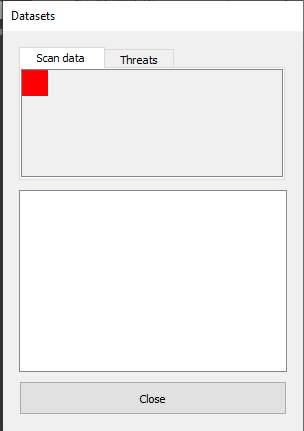
            cba64054-f05b-4192-a0b3-ca83c64dee24-image.png cid:image002.jpg@01D7433C.78A4BD40

            Why is the widget so small? It was added to the tab with:

            psaTab->setWidget(pPage); //psaTab = pointer to QScrollArea
            mpTabs->addTab(psaTab, strTab); // mpTabs = member pointer to QTabsWidget
            

            I thought the page would fill the area of the tab ?

            Kind Regards,
            Sy

            1 Reply Last reply
            0
            • mrjjM mrjj

              Hi
              I think the code your shown is missing something from the scroll area setup. like settings its content widget.
              https://doc.qt.io/qt-5/qscrollarea.html#setWidget

              Just to be clear. you are looking for something like this

              alt text

                auto scrollArea = new QScrollArea(centralWidget());
                  scrollArea ->move(10, 10);
                  scrollArea ->resize(400, 400); // you dont need this as you should put it in a layout in your dialog
                  scrollArea->setVerticalScrollBarPolicy(Qt::ScrollBarAsNeeded);
                  scrollArea->setHorizontalScrollBarPolicy(Qt::ScrollBarAsNeeded);
                  scrollArea->setWidgetResizable(true);
                  // set up its center widget as docs tells
                  auto scrollAreaWidgetContents = new QWidget();
                  auto verticalLayout = new QVBoxLayout(scrollAreaWidgetContents);
                  verticalLayout->setSpacing(4);
                  verticalLayout->setContentsMargins(4, 4, 4, 4);
                  // setup the "row" handler widget using  a from layout
                  auto rowHandlerwidget = new QWidget(scrollAreaWidgetContents);
                  auto formLayout = new QFormLayout(rowHandlerwidget);
                  formLayout->setSpacing(4);
                  formLayout->setContentsMargins(1, 1, 1, 1);
                  // add some "rows!
                  for (int numRows = 0; numRows < 50; ++numRows) {
                      auto label = new QLabel(rowHandlerwidget);
                      label ->setText( "Im Setting:" + QString::number(numRows));
                      formLayout->setWidget(numRows, QFormLayout::LabelRole, label);
                      if ( numRows % 3 ) {
                          auto lineEdit = new QLineEdit(rowHandlerwidget);
                          formLayout->setWidget(numRows, QFormLayout::FieldRole, lineEdit);
                      } else {
                          auto combo = new QComboBox(rowHandlerwidget);
                           formLayout->setWidget(numRows, QFormLayout::FieldRole, combo);
                      }
                  }
                  // assign row hander widget
                  verticalLayout->addWidget(rowHandlerwidget);
                  // assign scrollsbox widget
                  scrollArea->setWidget(scrollAreaWidgetContents); // do you have this one ?
              
              SPlattenS Offline
              SPlattenS Offline
              SPlatten
              wrote on last edited by
              #16

              @mrjj , thank you thats exactly the kind of thing I am looking for, all the examples I've seen online just add the QScrollArea to the tab, what do I need to do to get it to fill the tab area?

              Kind Regards,
              Sy

              mrjjM 1 Reply Last reply
              0
              • SPlattenS SPlatten

                @mrjj , thank you thats exactly the kind of thing I am looking for, all the examples I've seen online just add the QScrollArea to the tab, what do I need to do to get it to fill the tab area?

                mrjjM Offline
                mrjjM Offline
                mrjj
                Lifetime Qt Champion
                wrote on last edited by
                #17

                @SPlatten
                Hi
                you assign a layout to the tabpage to which you add the scroll area.
                then layout will make it use all space.

                SPlattenS 1 Reply Last reply
                2
                • mrjjM mrjj

                  @SPlatten
                  Hi
                  you assign a layout to the tabpage to which you add the scroll area.
                  then layout will make it use all space.

                  SPlattenS Offline
                  SPlattenS Offline
                  SPlatten
                  wrote on last edited by SPlatten
                  #18

                  @mrjj , if you see the code I pasted earlier:

                  QScrollArea* psaTab = new QScrollArea();
                  QGridLayout* pgrdLayout = new QGridLayout();
                  QWidget* pPage = new QWidget();
                  pPage->setLayout(pgrdLayout);
                  psaTab->setWidget(pPage);
                  mpTabs->addTab(psaTab, strTab);
                  

                  Kind Regards,
                  Sy

                  mrjjM 1 Reply Last reply
                  0
                  • SPlattenS SPlatten

                    @mrjj , if you see the code I pasted earlier:

                    QScrollArea* psaTab = new QScrollArea();
                    QGridLayout* pgrdLayout = new QGridLayout();
                    QWidget* pPage = new QWidget();
                    pPage->setLayout(pgrdLayout);
                    psaTab->setWidget(pPage);
                    mpTabs->addTab(psaTab, strTab);
                    
                    mrjjM Offline
                    mrjjM Offline
                    mrjj
                    Lifetime Qt Champion
                    wrote on last edited by mrjj
                    #19

                    @SPlatten

                    Hmm so you use the scroll area directly as a "page" for the tab control?
                    That should make it cover all area.

                    alt text

                    SPlattenS 1 Reply Last reply
                    0
                    • mrjjM mrjj

                      @SPlatten

                      Hmm so you use the scroll area directly as a "page" for the tab control?
                      That should make it cover all area.

                      alt text

                      SPlattenS Offline
                      SPlattenS Offline
                      SPlatten
                      wrote on last edited by
                      #20

                      @mrjj , they're obviously something I've done wrong.

                      Kind Regards,
                      Sy

                      mrjjM 1 Reply Last reply
                      0
                      • SPlattenS SPlatten

                        @mrjj , they're obviously something I've done wrong.

                        mrjjM Offline
                        mrjjM Offline
                        mrjj
                        Lifetime Qt Champion
                        wrote on last edited by
                        #21

                        @SPlatten
                        Hi
                        well might not be wrong. just forgotten.
                        do you have
                        scroll->setWidgetResizable(true);

                        SPlattenS 1 Reply Last reply
                        2
                        • mrjjM mrjj

                          @SPlatten
                          Hi
                          well might not be wrong. just forgotten.
                          do you have
                          scroll->setWidgetResizable(true);

                          SPlattenS Offline
                          SPlattenS Offline
                          SPlatten
                          wrote on last edited by
                          #22

                          @mrjj , thank you so much, one line and that was it!

                          Kind Regards,
                          Sy

                          1 Reply Last reply
                          2

                          • Login

                          • Login or register to search.
                          • First post
                            Last post
                          0
                          • Categories
                          • Recent
                          • Tags
                          • Popular
                          • Users
                          • Groups
                          • Search
                          • Get Qt
                          • Unsolved