
Skip to content
  • Categories
  • Recent
  • Tags
  • Popular
  • Users
  • Groups
  • Search
  • Get Qt Extensions
  • Unsolved
Collapse
Brand Logo
  1. Home
  2. Qt Development
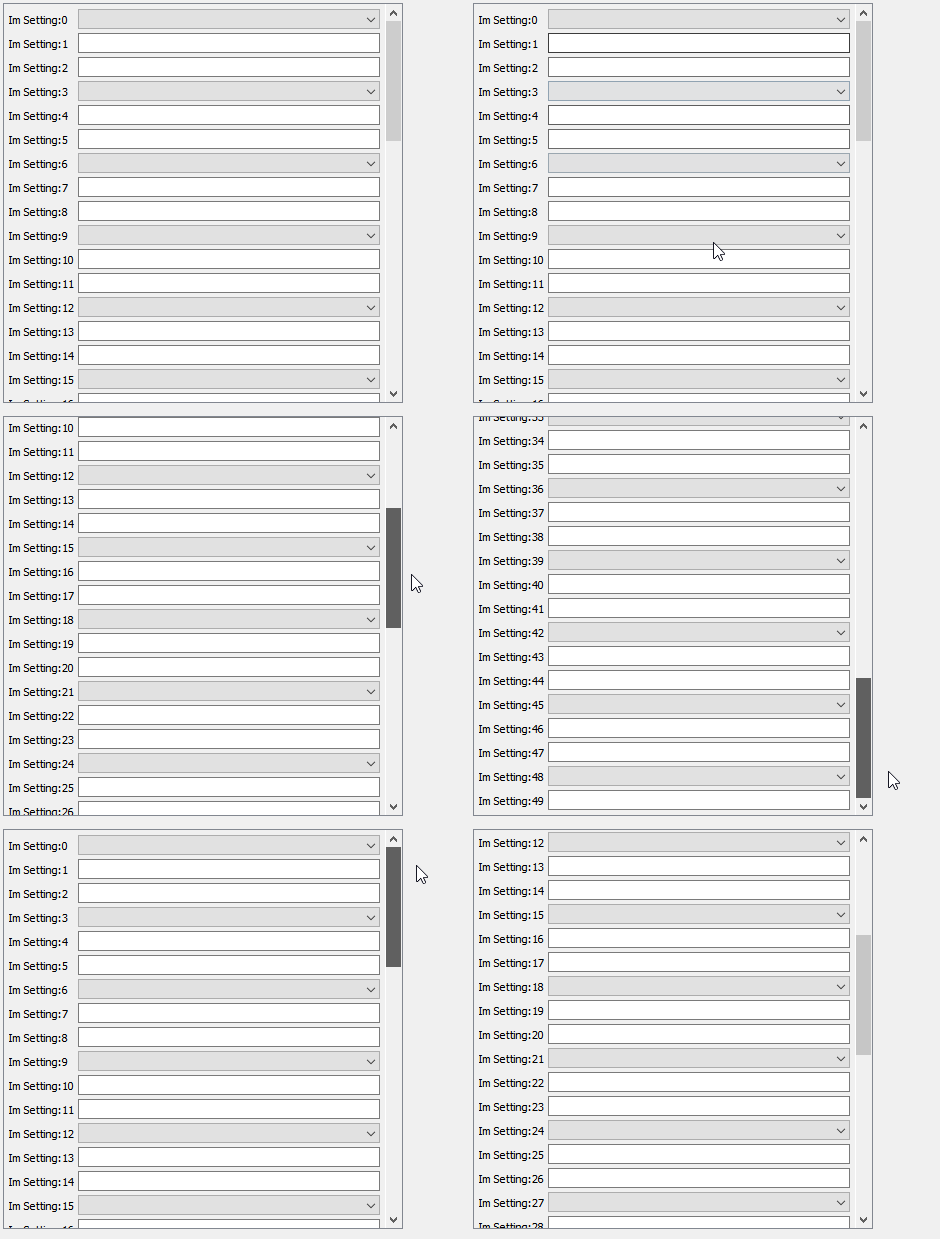
  3. General and Desktop
  4. Help with how to do something...
Qt 6.11 is out! See what's new in the release blog

Help with how to do something...

Scheduled Pinned Locked Moved Solved General and Desktop
22 Posts 4 Posters 3.5k Views 3 Watching
  • Oldest to Newest
  • Newest to Oldest
  • Most Votes
Reply
  • Reply as topic
Log in to reply
This topic has been deleted. Only users with topic management privileges can see it.
  • SPlattenS SPlatten

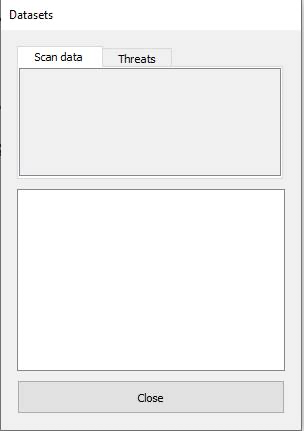
    I know what I want but I'm not sure how to achieve it with Qt. I have a dialog containing a QVBoxLayout, into this I have a QTabWidget, under the QTabWidget is a QListView and under that a QPushButton.

    In each tab I want a scrollable area that will contain a number of rows, the number of rows is configurable depending on the database content.

    Each row will have a label and to the right of the label a control which will be either a drop down list or a text entry.

    So far:
    6dc4152d-1c55-4609-87ce-75fa654b4221-image.png

    The question is how do I create a scrollable area inside each tab area?

    VRoninV Offline
    VRoninV Offline
    VRonin
    wrote on last edited by
    #4

    @SPlatten said in Help with how to do something...:

    Each row will have a label and to the right of the label a control which will be either a drop down list or a text entry.

    Sounds like a QTableView with a custom delegate to me

    "La mort n'est rien, mais vivre vaincu et sans gloire, c'est mourir tous les jours"
    ~Napoleon Bonaparte

    On a crusade to banish setIndexWidget() from the holy land of Qt

    SPlattenS 1 Reply Last reply
    0
    • VRoninV VRonin

      @SPlatten said in Help with how to do something...:

      Each row will have a label and to the right of the label a control which will be either a drop down list or a text entry.

      Sounds like a QTableView with a custom delegate to me

      SPlattenS Offline
      SPlattenS Offline
      SPlatten
      wrote on last edited by
      #5

      @VRonin , please tell me more.

      Kind Regards,
      Sy

      1 Reply Last reply
      0
      • VRoninV Offline
        VRoninV Offline
        VRonin
        wrote on last edited by VRonin
        #6

        You can use QTableView+QStandardItemModel

        QStandardItemModel* model = new QStandardItemModel;
        model->insertColumns(0,2);
        model->insertRows(0, rowCount);
        for(int i=0;i<rowCount;++i){
        QStandardItem* item = new QStandardItem;
        item->setData(tr("Label %1").arg(i+1),Qt::EditRole);
        item->setFlags(item->flags() & ~Qt::ItemIsEditable);
        model->setItem(i,0,item);
        }
        tableview->setModel(model);
        

        The text entry you get for free (it's the default editor) for the dropdown list you have 2 ways:

        • subclass QItemEditorFactory and in createEditor decide to return the default lineedit or a combobox
        • subclass QStyledItemDelegate and reimplement createEditor/setEditorData/setModelData

        The latter is a tiny bit more involved but it gives you more control. It really depends on how you determine whether to show a lineedit or a combobox

        "La mort n'est rien, mais vivre vaincu et sans gloire, c'est mourir tous les jours"
        ~Napoleon Bonaparte

        On a crusade to banish setIndexWidget() from the holy land of Qt

        1 Reply Last reply
        3
        • mrjjM Offline
          mrjjM Offline
          mrjj
          Lifetime Qt Champion
          wrote on last edited by
          #7

          Hi
          Adding to @VRonin
          You can get a delegate from here
          https://wiki.qt.io/Combo_Boxes_in_Item_Views

          1 Reply Last reply
          1
          • SPlattenS Offline
            SPlattenS Offline
            SPlatten
            wrote on last edited by
            #8

            @VRonin , thank you, I will look into this, can I drop in the QTableView to replace the QScrollArea?

            Can you help me with where it would go in the structure I have?

            Kind Regards,
            Sy

            VRoninV 1 Reply Last reply
            0
            • SPlattenS SPlatten

              @VRonin , thank you, I will look into this, can I drop in the QTableView to replace the QScrollArea?

              Can you help me with where it would go in the structure I have?

              VRoninV Offline
              VRoninV Offline
              VRonin
              wrote on last edited by
              #9

              @SPlatten said in Help with how to do something...:

              can I drop in the QTableView to replace the QScrollArea?

              QTableView inherits QScrollArea so yes, it's a straight replacement

              "La mort n'est rien, mais vivre vaincu et sans gloire, c'est mourir tous les jours"
              ~Napoleon Bonaparte

              On a crusade to banish setIndexWidget() from the holy land of Qt

              SPlattenS 1 Reply Last reply
              0
              • VRoninV VRonin

                @SPlatten said in Help with how to do something...:

                can I drop in the QTableView to replace the QScrollArea?

                QTableView inherits QScrollArea so yes, it's a straight replacement

                SPlattenS Offline
                SPlattenS Offline
                SPlatten
                wrote on last edited by SPlatten
                #10

                @VRonin , before I dive in and rip out the code I currently have, what I want to achieve is have a scrollable list of rows where each row as on the left a label and on the right an input widget, one of the following either text entry, combo box or drop down.

                I don't want a row highlight just a scrollbar if necessary. Will the QTableView be suitable for this?

                Kind Regards,
                Sy

                VRoninV 1 Reply Last reply
                0
                • SPlattenS SPlatten

                  @VRonin , before I dive in and rip out the code I currently have, what I want to achieve is have a scrollable list of rows where each row as on the left a label and on the right an input widget, one of the following either text entry, combo box or drop down.

                  I don't want a row highlight just a scrollbar if necessary. Will the QTableView be suitable for this?

                  VRoninV Offline
                  VRoninV Offline
                  VRonin
                  wrote on last edited by
                  #11

                  @SPlatten said in Help with how to do something...:

                  Will the QTableView be suitable for this?

                  You will just need some styling of the tableview, nothing major

                  "La mort n'est rien, mais vivre vaincu et sans gloire, c'est mourir tous les jours"
                  ~Napoleon Bonaparte

                  On a crusade to banish setIndexWidget() from the holy land of Qt

                  SPlattenS 2 Replies Last reply
                  0
                  • VRoninV VRonin

                    @SPlatten said in Help with how to do something...:

                    Will the QTableView be suitable for this?

                    You will just need some styling of the tableview, nothing major

                    SPlattenS Offline
                    SPlattenS Offline
                    SPlatten
                    wrote on last edited by
                    #12

                    @VRonin , thank you, I'm up against time and need to get this implemented...

                    Kind Regards,
                    Sy

                    1 Reply Last reply
                    0
                    • VRoninV VRonin

                      @SPlatten said in Help with how to do something...:

                      Will the QTableView be suitable for this?

                      You will just need some styling of the tableview, nothing major

                      SPlattenS Offline
                      SPlattenS Offline
                      SPlatten
                      wrote on last edited by
                      #13

                      @VRonin , to be honest, this is a bigger learning curve than I have time for, all I need is a scrollable area with a label and input widget on each row. I don't want something that looks like a spreadsheet, just a standard dialog look and feel with a scrollbar if required.

                      If I drag and drop the widgets using Qt Creator I can create what I want in the WYSIWYG editor, but I can't use this, I have to create the same in code.

                      Kind Regards,
                      Sy

                      1 Reply Last reply
                      1
                      • mrjjM Offline
                        mrjjM Offline
                        mrjj
                        Lifetime Qt Champion
                        wrote on last edited by
                        #14

                        Hi
                        I think the code your shown is missing something from the scroll area setup. like settings its content widget.
                        https://doc.qt.io/qt-5/qscrollarea.html#setWidget

                        Just to be clear. you are looking for something like this
                        alt text

                          auto scrollArea = new QScrollArea(centralWidget());
                            scrollArea ->move(10, 10);
                            scrollArea ->resize(400, 400); // you dont need this as you should put it in a layout in your dialog
                            scrollArea->setVerticalScrollBarPolicy(Qt::ScrollBarAsNeeded);
                            scrollArea->setHorizontalScrollBarPolicy(Qt::ScrollBarAsNeeded);
                            scrollArea->setWidgetResizable(true);
                            // set up its center widget as docs tells
                            auto scrollAreaWidgetContents = new QWidget();
                            auto verticalLayout = new QVBoxLayout(scrollAreaWidgetContents);
                            verticalLayout->setSpacing(4);
                            verticalLayout->setContentsMargins(4, 4, 4, 4);
                            // setup the "row" handler widget using  a from layout
                            auto rowHandlerwidget = new QWidget(scrollAreaWidgetContents);
                            auto formLayout = new QFormLayout(rowHandlerwidget);
                            formLayout->setSpacing(4);
                            formLayout->setContentsMargins(1, 1, 1, 1);
                            // add some "rows!
                            for (int numRows = 0; numRows < 50; ++numRows) {
                                auto label = new QLabel(rowHandlerwidget);
                                label ->setText( "Im Setting:" + QString::number(numRows));
                                formLayout->setWidget(numRows, QFormLayout::LabelRole, label);
                                if ( numRows % 3 ) {
                                    auto lineEdit = new QLineEdit(rowHandlerwidget);
                                    formLayout->setWidget(numRows, QFormLayout::FieldRole, lineEdit);
                                } else {
                                    auto combo = new QComboBox(rowHandlerwidget);
                                     formLayout->setWidget(numRows, QFormLayout::FieldRole, combo);
                                }
                            }
                            // assign row hander widget
                            verticalLayout->addWidget(rowHandlerwidget);
                            // assign scrollsbox widget
                            scrollArea->setWidget(scrollAreaWidgetContents); // do you have this one ?
                        
                        SPlattenS 1 Reply Last reply
                        3
                        • SPlattenS Offline
                          SPlattenS Offline
                          SPlatten
                          wrote on last edited by
                          #15

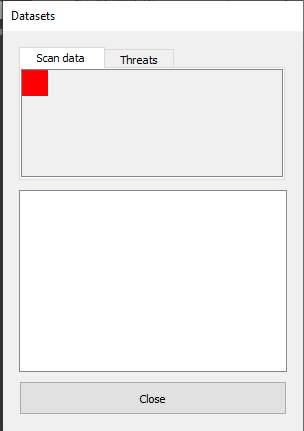
                          A little progress, to see if I could figure out what was going wrong I set the background colour of the widget in the tab to red:
                          cba64054-f05b-4192-a0b3-ca83c64dee24-image.png cid:image002.jpg@01D7433C.78A4BD40

                          Why is the widget so small? It was added to the tab with:

                          psaTab->setWidget(pPage); //psaTab = pointer to QScrollArea
                          mpTabs->addTab(psaTab, strTab); // mpTabs = member pointer to QTabsWidget
                          

                          I thought the page would fill the area of the tab ?

                          Kind Regards,
                          Sy

                          1 Reply Last reply
                          0
                          • mrjjM mrjj

                            Hi
                            I think the code your shown is missing something from the scroll area setup. like settings its content widget.
                            https://doc.qt.io/qt-5/qscrollarea.html#setWidget

                            Just to be clear. you are looking for something like this

                            alt text

                              auto scrollArea = new QScrollArea(centralWidget());
                                scrollArea ->move(10, 10);
                                scrollArea ->resize(400, 400); // you dont need this as you should put it in a layout in your dialog
                                scrollArea->setVerticalScrollBarPolicy(Qt::ScrollBarAsNeeded);
                                scrollArea->setHorizontalScrollBarPolicy(Qt::ScrollBarAsNeeded);
                                scrollArea->setWidgetResizable(true);
                                // set up its center widget as docs tells
                                auto scrollAreaWidgetContents = new QWidget();
                                auto verticalLayout = new QVBoxLayout(scrollAreaWidgetContents);
                                verticalLayout->setSpacing(4);
                                verticalLayout->setContentsMargins(4, 4, 4, 4);
                                // setup the "row" handler widget using  a from layout
                                auto rowHandlerwidget = new QWidget(scrollAreaWidgetContents);
                                auto formLayout = new QFormLayout(rowHandlerwidget);
                                formLayout->setSpacing(4);
                                formLayout->setContentsMargins(1, 1, 1, 1);
                                // add some "rows!
                                for (int numRows = 0; numRows < 50; ++numRows) {
                                    auto label = new QLabel(rowHandlerwidget);
                                    label ->setText( "Im Setting:" + QString::number(numRows));
                                    formLayout->setWidget(numRows, QFormLayout::LabelRole, label);
                                    if ( numRows % 3 ) {
                                        auto lineEdit = new QLineEdit(rowHandlerwidget);
                                        formLayout->setWidget(numRows, QFormLayout::FieldRole, lineEdit);
                                    } else {
                                        auto combo = new QComboBox(rowHandlerwidget);
                                         formLayout->setWidget(numRows, QFormLayout::FieldRole, combo);
                                    }
                                }
                                // assign row hander widget
                                verticalLayout->addWidget(rowHandlerwidget);
                                // assign scrollsbox widget
                                scrollArea->setWidget(scrollAreaWidgetContents); // do you have this one ?
                            
                            SPlattenS Offline
                            SPlattenS Offline
                            SPlatten
                            wrote on last edited by
                            #16

                            @mrjj , thank you thats exactly the kind of thing I am looking for, all the examples I've seen online just add the QScrollArea to the tab, what do I need to do to get it to fill the tab area?

                            Kind Regards,
                            Sy

                            mrjjM 1 Reply Last reply
                            0
                            • SPlattenS SPlatten

                              @mrjj , thank you thats exactly the kind of thing I am looking for, all the examples I've seen online just add the QScrollArea to the tab, what do I need to do to get it to fill the tab area?

                              mrjjM Offline
                              mrjjM Offline
                              mrjj
                              Lifetime Qt Champion
                              wrote on last edited by
                              #17

                              @SPlatten
                              Hi
                              you assign a layout to the tabpage to which you add the scroll area.
                              then layout will make it use all space.

                              SPlattenS 1 Reply Last reply
                              2
                              • mrjjM mrjj

                                @SPlatten
                                Hi
                                you assign a layout to the tabpage to which you add the scroll area.
                                then layout will make it use all space.

                                SPlattenS Offline
                                SPlattenS Offline
                                SPlatten
                                wrote on last edited by SPlatten
                                #18

                                @mrjj , if you see the code I pasted earlier:

                                QScrollArea* psaTab = new QScrollArea();
                                QGridLayout* pgrdLayout = new QGridLayout();
                                QWidget* pPage = new QWidget();
                                pPage->setLayout(pgrdLayout);
                                psaTab->setWidget(pPage);
                                mpTabs->addTab(psaTab, strTab);
                                

                                Kind Regards,
                                Sy

                                mrjjM 1 Reply Last reply
                                0
                                • SPlattenS SPlatten

                                  @mrjj , if you see the code I pasted earlier:

                                  QScrollArea* psaTab = new QScrollArea();
                                  QGridLayout* pgrdLayout = new QGridLayout();
                                  QWidget* pPage = new QWidget();
                                  pPage->setLayout(pgrdLayout);
                                  psaTab->setWidget(pPage);
                                  mpTabs->addTab(psaTab, strTab);
                                  
                                  mrjjM Offline
                                  mrjjM Offline
                                  mrjj
                                  Lifetime Qt Champion
                                  wrote on last edited by mrjj
                                  #19

                                  @SPlatten

                                  Hmm so you use the scroll area directly as a "page" for the tab control?
                                  That should make it cover all area.

                                  alt text

                                  SPlattenS 1 Reply Last reply
                                  0
                                  • mrjjM mrjj

                                    @SPlatten

                                    Hmm so you use the scroll area directly as a "page" for the tab control?
                                    That should make it cover all area.

                                    alt text

                                    SPlattenS Offline
                                    SPlattenS Offline
                                    SPlatten
                                    wrote on last edited by
                                    #20

                                    @mrjj , they're obviously something I've done wrong.

                                    Kind Regards,
                                    Sy

                                    mrjjM 1 Reply Last reply
                                    0
                                    • SPlattenS SPlatten

                                      @mrjj , they're obviously something I've done wrong.

                                      mrjjM Offline
                                      mrjjM Offline
                                      mrjj
                                      Lifetime Qt Champion
                                      wrote on last edited by
                                      #21

                                      @SPlatten
                                      Hi
                                      well might not be wrong. just forgotten.
                                      do you have
                                      scroll->setWidgetResizable(true);

                                      SPlattenS 1 Reply Last reply
                                      2
                                      • mrjjM mrjj

                                        @SPlatten
                                        Hi
                                        well might not be wrong. just forgotten.
                                        do you have
                                        scroll->setWidgetResizable(true);

                                        SPlattenS Offline
                                        SPlattenS Offline
                                        SPlatten
                                        wrote on last edited by
                                        #22

                                        @mrjj , thank you so much, one line and that was it!

                                        Kind Regards,
                                        Sy

                                        1 Reply Last reply
                                        2

                                        • Login

                                        • Login or register to search.
                                        • First post
                                          Last post
                                        0
                                        • Categories
                                        • Recent
                                        • Tags
                                        • Popular
                                        • Users
                                        • Groups
                                        • Search
                                        • Get Qt Extensions
                                        • Unsolved