
Skip to content
  • Categories
  • Recent
  • Tags
  • Popular
  • Users
  • Groups
  • Search
  • Get Qt Extensions
  • Unsolved
Collapse
Brand Logo
  1. Home
  2. Qt Development
  3. General and Desktop
  4. Debugging in Qt Creator 5.15.0 doesn't work :

Debugging in Qt Creator 5.15.0 doesn't work :

Scheduled Pinned Locked Moved Unsolved General and Desktop
15 Posts 5 Posters 4.6k Views
  • Oldest to Newest
  • Newest to Oldest
  • Most Votes
Reply
  • Reply as topic
Log in to reply
This topic has been deleted. Only users with topic management privileges can see it.
  • jsulmJ jsulm

    @dahu74fr Strange.
    I can't reproduce this issue on my machine.
    Does this GDB work (I mean does it start in a terminal?)?

    D Offline
    D Offline
    dahu74fr
    wrote on last edited by
    #5

    @jsulm
    No. No terminal window. Only this message :
    ac5c957c-5ff3-4fe7-8fb4-55bdb2b43618-image.png

    jsulmJ 1 Reply Last reply
    0
    • D dahu74fr

      @jsulm
      No. No terminal window. Only this message :
      ac5c957c-5ff3-4fe7-8fb4-55bdb2b43618-image.png

      jsulmJ Offline
      jsulmJ Offline
      jsulm
      Lifetime Qt Champion
      wrote on last edited by
      #6

      @dahu74fr I mean open a terminal and start GDB there to see whether it works.

      https://forum.qt.io/topic/113070/qt-code-of-conduct

      D 1 Reply Last reply
      1
      • jsulmJ jsulm

        @dahu74fr I mean open a terminal and start GDB there to see whether it works.

        D Offline
        D Offline
        dahu74fr
        wrote on last edited by
        #7

        @jsulm
        I started a terminal window in administrator and launch gdb.exe.
        I have nothing that appear in the screen.
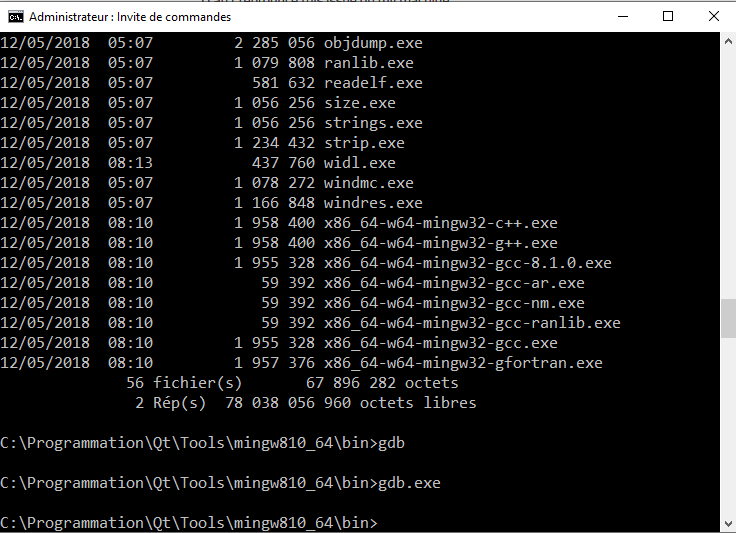
        274f0f8e-3aea-4af7-b14b-6d62e7452498-image.png

        jsulmJ 1 Reply Last reply
        0
        • D dahu74fr

          @jsulm
          I started a terminal window in administrator and launch gdb.exe.
          I have nothing that appear in the screen.
          274f0f8e-3aea-4af7-b14b-6d62e7452498-image.png

          jsulmJ Offline
          jsulmJ Offline
          jsulm
          Lifetime Qt Champion
          wrote on last edited by
          #8

          @dahu74fr Looks like either gdb.exe is corrupted or your anti-virus application is blocking it.

          https://forum.qt.io/topic/113070/qt-code-of-conduct

          D 1 Reply Last reply
          1
          • jsulmJ jsulm

            @dahu74fr Looks like either gdb.exe is corrupted or your anti-virus application is blocking it.

            D Offline
            D Offline
            dahu74fr
            wrote on last edited by
            #9

            @jsulm
            The Antivirus is the installed by Windows 10 64 bits version. Not an installed Antivirus.

            jsulmJ 1 Reply Last reply
            0
            • D dahu74fr

              @jsulm
              The Antivirus is the installed by Windows 10 64 bits version. Not an installed Antivirus.

              jsulmJ Offline
              jsulmJ Offline
              jsulm
              Lifetime Qt Champion
              wrote on last edited by
              #10

              @dahu74fr You could try to remove MinGW and then install it again.

              https://forum.qt.io/topic/113070/qt-code-of-conduct

              D 2 Replies Last reply
              0
              • jsulmJ jsulm

                @dahu74fr You could try to remove MinGW and then install it again.

                D Offline
                D Offline
                dahu74fr
                wrote on last edited by
                #11

                @jsulm
                OK.
                I will try tomorrow.
                But i don't how to, because MingGW was installed by Qt install.

                1 Reply Last reply
                0
                • jsulmJ jsulm

                  @dahu74fr You could try to remove MinGW and then install it again.

                  D Offline
                  D Offline
                  dahu74fr
                  wrote on last edited by dahu74fr
                  #12

                  @jsulm
                  I tried to remove MinGW and install it.
                  Same result.
                  I uninstalled Qt and installed an offline later version (5.12.9).
                  Same result.
                  I don't what to do !
                  Perhaps a config that is not set ?
                  For information, i work on Windows 10 64 bits and installed Qt with "qt-unified-windows-x86-3.2.3-online.exe".
                  601d6185-b1ad-49f3-9263-5e79acacd2c9-image.png
                  c4bbb3cc-93f5-460c-8895-f15bd52e06af-image.png
                  e7546de0-ea17-4026-b850-cec4bea7a6ac-image.png
                  11609b83-f1ae-4754-b83a-63e585876676-image.png
                  0e4378e8-bb3f-4ceb-a6dc-5b125373e944-image.png

                  1 Reply Last reply
                  0
                  • P Offline
                    P Offline
                    PhilC 0
                    wrote on last edited by
                    #13

                    Did you get this going?

                    I wonder if you have selected the 32bit compiler rather than 64 bit?

                    Phil

                    1 Reply Last reply
                    0
                    • S Offline
                      S Offline
                      sdeel
                      wrote on last edited by
                      #14

                      I had a similar issue here with Qt installed in a non-standard location on a system with various Python's. The solution that seems to have worked is to clear the path before starting Creator. For example, by using a batch file:

                      set path=""
                      python --version 
                      C:\Qt\Tools\QtCreator\bin\qtcreator.exe
                      

                      of course the python command fails, but it removes the red exclamation mark and "could not determine debugger type" error from the Creator dbg interface discussed above.

                      M 1 Reply Last reply
                      0
                      • S sdeel

                        I had a similar issue here with Qt installed in a non-standard location on a system with various Python's. The solution that seems to have worked is to clear the path before starting Creator. For example, by using a batch file:

                        set path=""
                        python --version 
                        C:\Qt\Tools\QtCreator\bin\qtcreator.exe
                        

                        of course the python command fails, but it removes the red exclamation mark and "could not determine debugger type" error from the Creator dbg interface discussed above.

                        M Offline
                        M Offline
                        mengbing
                        wrote on last edited by mengbing
                        #15

                        @sdeel I have the same problem, and this method works for me, @jsulm Is it a bug for Qt Creator?
                        b5f45efa-c783-480a-9411-ab632aa2922c-image.png
                        66759304-d2d6-4d1d-a4be-9140afb48c70-image.png
                        d3439c52-e984-4420-8157-76d3164da4d7-image.png
                        34e09e8b-65f0-42b6-b353-e8388da599f5-image.png
                        61333669-29b5-4ce3-9967-7bf4b00d0c4b-image.png

                        1 Reply Last reply
                        0

                        • Login

                        • Login or register to search.
                        • First post
                          Last post
                        0
                        • Categories
                        • Recent
                        • Tags
                        • Popular
                        • Users
                        • Groups
                        • Search
                        • Get Qt Extensions
                        • Unsolved