Skip to content
  • Categories
  • Recent
  • Tags
  • Popular
  • Users
  • Groups
  • Search
  • Get Qt Extensions
  • Unsolved
Collapse
Brand Logo
  1. Home
  2. Qt Development
  3. General and Desktop
  4. Pdf paper size problem between win computers?!
Qt 6.11 is out! See what's new in the release blog

Pdf paper size problem between win computers?!

Scheduled Pinned Locked Moved Unsolved General and Desktop
20 Posts 4 Posters 6.1k Views 3 Watching
  • Oldest to Newest
  • Newest to Oldest
  • Most Votes
Reply
  • Reply as topic
Log in to reply
This topic has been deleted. Only users with topic management privileges can see it.
  • SGaistS SGaist

    Hi,

    Are you using any special fonts ?
    How are you generating the table ?
    What is the size difference ?
    What are you using to print the PDF ?

    MucipM Offline
    MucipM Offline
    Mucip
    wrote on last edited by
    #4

    Dear @SGaist ,
    Same compiled code but working on different machines. And I did not use any special font...

    Regards,
    Mucip:)

    1 Reply Last reply
    0
    • mrjjM Offline
      mrjjM Offline
      mrjj
      Lifetime Qt Champion
      wrote on last edited by
      #5

      Hi
      If you compare them at the same zoom level, are font same size etc ?

      MucipM 1 Reply Last reply
      0
      • mrjjM mrjj

        Hi
        If you compare them at the same zoom level, are font same size etc ?

        MucipM Offline
        MucipM Offline
        Mucip
        wrote on last edited by
        #6

        Hi @mrjj ,
        Everything is the completely same. And same compiled exe program is working from shared location...

        Very strange!...

        Regards,
        Mucip:)

        1 Reply Last reply
        0
        • mrjjM Offline
          mrjjM Offline
          mrjj
          Lifetime Qt Champion
          wrote on last edited by
          #7

          Hi
          Ok so at same zoom level, the texts start at same positions and generally look the same size?
          The page itself is just smaller or what is the actual difference?

          Your code does fine. i see nothing alarming.
          Just as a note, there is really no need to new the QPainter. it only makes it
          possible to forget to delete it.

          1 Reply Last reply
          0
          • JonBJ Offline
            JonBJ Offline
            JonB
            wrote on last edited by JonB
            #8

            The pages are not "exactly the same". For example, compare where the column containing En (m) :0,80 starts/ends relative to the word Isletmeciligi at the top. Or the heights of the bar code. And other things on the pages.

            Do the multiple machines have the same default printer? I can't recall, but the preview may be affected by what the default/current printer is....

            The obvious first question is are these different PCs really both outputting A4 size? Or, are they both at the same zoom level (it's difficult to see because you've chopped it off, but it looks to me that the top one is at 126% while the bottom one is at 100%...). Is the difference only in the "PDF preview", or is it really there if you print it out?

            You might want to try with a simpler content, e.g. nothing but the page rectangle outline so that you can see where you are starting out from....

            MucipM 2 Replies Last reply
            1
            • JonBJ JonB

              The pages are not "exactly the same". For example, compare where the column containing En (m) :0,80 starts/ends relative to the word Isletmeciligi at the top. Or the heights of the bar code. And other things on the pages.

              Do the multiple machines have the same default printer? I can't recall, but the preview may be affected by what the default/current printer is....

              The obvious first question is are these different PCs really both outputting A4 size? Or, are they both at the same zoom level (it's difficult to see because you've chopped it off, but it looks to me that the top one is at 126% while the bottom one is at 100%...). Is the difference only in the "PDF preview", or is it really there if you print it out?

              You might want to try with a simpler content, e.g. nothing but the page rectangle outline so that you can see where you are starting out from....

              MucipM Offline
              MucipM Offline
              Mucip
              wrote on last edited by
              #9

              Hi @JonB,
              It's really strange situation! Every machine run the code from same shared folder location.

              I guess it should be relevant about default printer but I set the pdf size to A4... And A4 size must be same on every printer...

              Really strange!... :(

              Regards,
              Mucip:)

              mrjjM 1 Reply Last reply
              0
              • MucipM Mucip

                Hi @JonB,
                It's really strange situation! Every machine run the code from same shared folder location.

                I guess it should be relevant about default printer but I set the pdf size to A4... And A4 size must be same on every printer...

                Really strange!... :(

                Regards,
                Mucip:)

                mrjjM Offline
                mrjjM Offline
                mrjj
                Lifetime Qt Champion
                wrote on last edited by
                #10

                @Mucip
                Hi
                I would try to dump page size on the "wrong" pc and see if you really get A4.
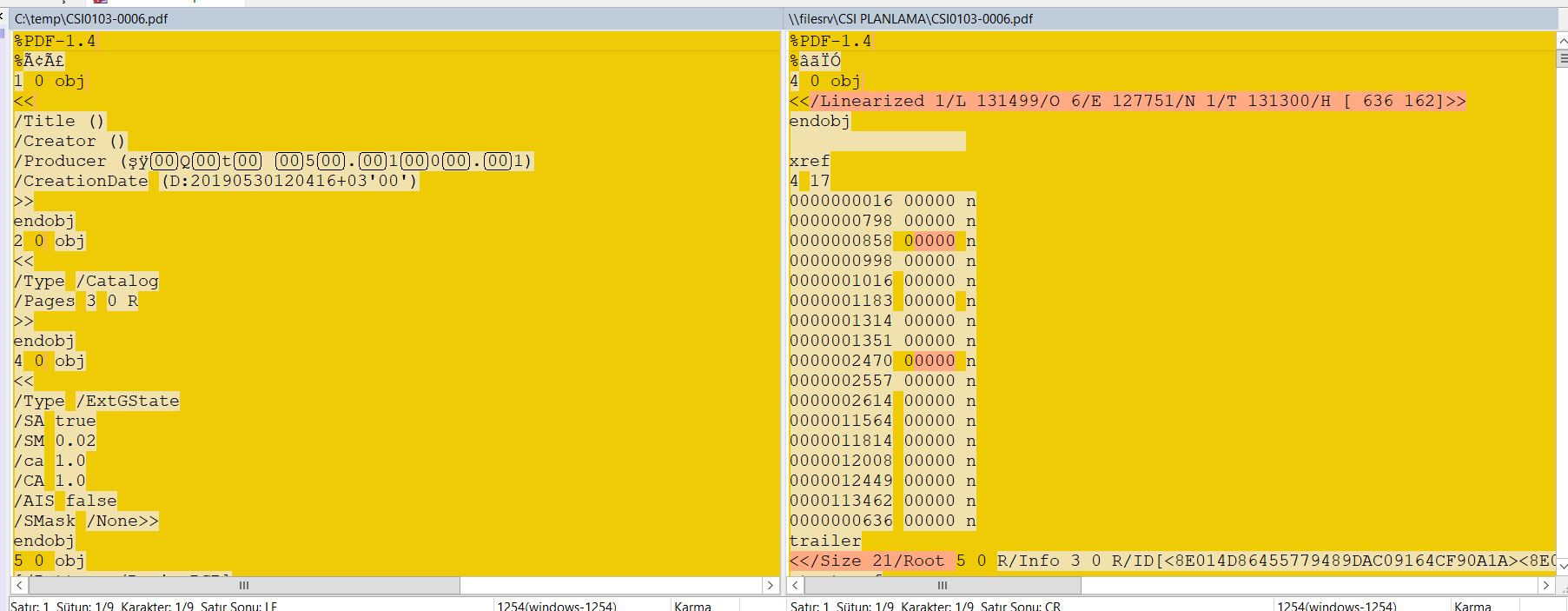
                Also, did you compare the resulting PDF files in something like
                http://winmerge.org/?lang=en
                to see if you can spot anything ?

                MucipM 1 Reply Last reply
                1
                • JonBJ JonB

                  The pages are not "exactly the same". For example, compare where the column containing En (m) :0,80 starts/ends relative to the word Isletmeciligi at the top. Or the heights of the bar code. And other things on the pages.

                  Do the multiple machines have the same default printer? I can't recall, but the preview may be affected by what the default/current printer is....

                  The obvious first question is are these different PCs really both outputting A4 size? Or, are they both at the same zoom level (it's difficult to see because you've chopped it off, but it looks to me that the top one is at 126% while the bottom one is at 100%...). Is the difference only in the "PDF preview", or is it really there if you print it out?

                  You might want to try with a simpler content, e.g. nothing but the page rectangle outline so that you can see where you are starting out from....

                  MucipM Offline
                  MucipM Offline
                  Mucip
                  wrote on last edited by
                  #11

                  Hi @JonB,
                  I realized, it makes same problem on the computers which is connected local printer. But the computers which use use shared network printer has no problem?!...

                  I'm still searching...

                  Regards,
                  Mucip:)

                  JonBJ 1 Reply Last reply
                  0
                  • MucipM Mucip

                    Hi @JonB,
                    I realized, it makes same problem on the computers which is connected local printer. But the computers which use use shared network printer has no problem?!...

                    I'm still searching...

                    Regards,
                    Mucip:)

                    JonBJ Offline
                    JonBJ Offline
                    JonB
                    wrote on last edited by JonB
                    #12

                    @Mucip
                    Like I said, in some shape or form I think whatever the default/current printer is may have an effect on the output PDF (you could check by comparing as per @mrjj's suggestion) or it may have an effect on the preview only (yes, A4 should be A4 everywhere), but if it thinks your printer cannot print A4 correctly that may affect preview? As I also said, you might check what it actually prints if it's only the preview which shows differently?

                    MucipM 1 Reply Last reply
                    1
                    • mrjjM mrjj

                      @Mucip
                      Hi
                      I would try to dump page size on the "wrong" pc and see if you really get A4.
                      Also, did you compare the resulting PDF files in something like
                      http://winmerge.org/?lang=en
                      to see if you can spot anything ?

                      MucipM Offline
                      MucipM Offline
                      Mucip
                      wrote on last edited by
                      #13

                      @mrjj ,
                      It's really diffiult to understand differnce unfortunately... :(

                      0_1559211635504_A4 Error.JPG

                      Regards,
                      Mucip:)

                      mrjjM 1 Reply Last reply
                      0
                      • JonBJ JonB

                        @Mucip
                        Like I said, in some shape or form I think whatever the default/current printer is may have an effect on the output PDF (you could check by comparing as per @mrjj's suggestion) or it may have an effect on the preview only (yes, A4 should be A4 everywhere), but if it thinks your printer cannot print A4 correctly that may affect preview? As I also said, you might check what it actually prints if it's only the preview which shows differently?

                        MucipM Offline
                        MucipM Offline
                        Mucip
                        wrote on last edited by
                        #14

                        @JonB ,
                        Not only the prewiev! print outes real page is also cutted!... :(

                        Regards,
                        Mucip:)

                        1 Reply Last reply
                        0
                        • MucipM Mucip

                          @mrjj ,
                          It's really diffiult to understand differnce unfortunately... :(

                          0_1559211635504_A4 Error.JPG

                          Regards,
                          Mucip:)

                          mrjjM Offline
                          mrjjM Offline
                          mrjj
                          Lifetime Qt Champion
                          wrote on last edited by
                          #15

                          @Mucip
                          Look for page size tag. I know postscript is a bit hard to read. :)

                          MucipM 1 Reply Last reply
                          0
                          • mrjjM mrjj

                            @Mucip
                            Look for page size tag. I know postscript is a bit hard to read. :)

                            MucipM Offline
                            MucipM Offline
                            Mucip
                            wrote on last edited by
                            #16

                            @mrjj ,
                            Page size tag?...

                            Regards,
                            Mucip:)

                            mrjjM 1 Reply Last reply
                            0
                            • MucipM Mucip

                              @mrjj ,
                              Page size tag?...

                              Regards,
                              Mucip:)

                              mrjjM Offline
                              mrjjM Offline
                              mrjj
                              Lifetime Qt Champion
                              wrote on last edited by
                              #17

                              @Mucip
                              well a postscript tag.
                              Should look something like
                              << /PageSize [842 595] >> setpagedevice

                              MucipM 1 Reply Last reply
                              0
                              • mrjjM mrjj

                                @Mucip
                                well a postscript tag.
                                Should look something like
                                << /PageSize [842 595] >> setpagedevice

                                MucipM Offline
                                MucipM Offline
                                Mucip
                                wrote on last edited by
                                #18

                                @mrjj ,
                                There isn't like PageSize or setpagedevice unfortunatelly.

                                Regards,
                                Mucip:)

                                mrjjM 1 Reply Last reply
                                0
                                • MucipM Mucip

                                  @mrjj ,
                                  There isn't like PageSize or setpagedevice unfortunatelly.

                                  Regards,
                                  Mucip:)

                                  mrjjM Offline
                                  mrjjM Offline
                                  mrjj
                                  Lifetime Qt Champion
                                  wrote on last edited by
                                  #19

                                  @Mucip
                                  Ok. worth a shot.
                                  Im not sure what goes wrong. maybe its not really A4.

                                  1 Reply Last reply
                                  0
                                  • SGaistS Offline
                                    SGaistS Offline
                                    SGaist
                                    Lifetime Qt Champion
                                    wrote on last edited by SGaist
                                    #20

                                    Check your system defaults for print paper size, maybe you have something like US set somewhere rather than A4.

                                    Interested in AI ? www.idiap.ch
                                    Please read the Qt Code of Conduct - https://forum.qt.io/topic/113070/qt-code-of-conduct

                                    1 Reply Last reply
                                    0

                                    • Login

                                    • Login or register to search.
                                    • First post
                                      Last post
                                    0
                                    • Categories
                                    • Recent
                                    • Tags
                                    • Popular
                                    • Users
                                    • Groups
                                    • Search
                                    • Get Qt Extensions
                                    • Unsolved