Skip to content
  • Categories
  • Recent
  • Tags
  • Popular
  • Users
  • Groups
  • Search
  • Get Qt Extensions
  • Unsolved
Collapse
Brand Logo
  1. Home
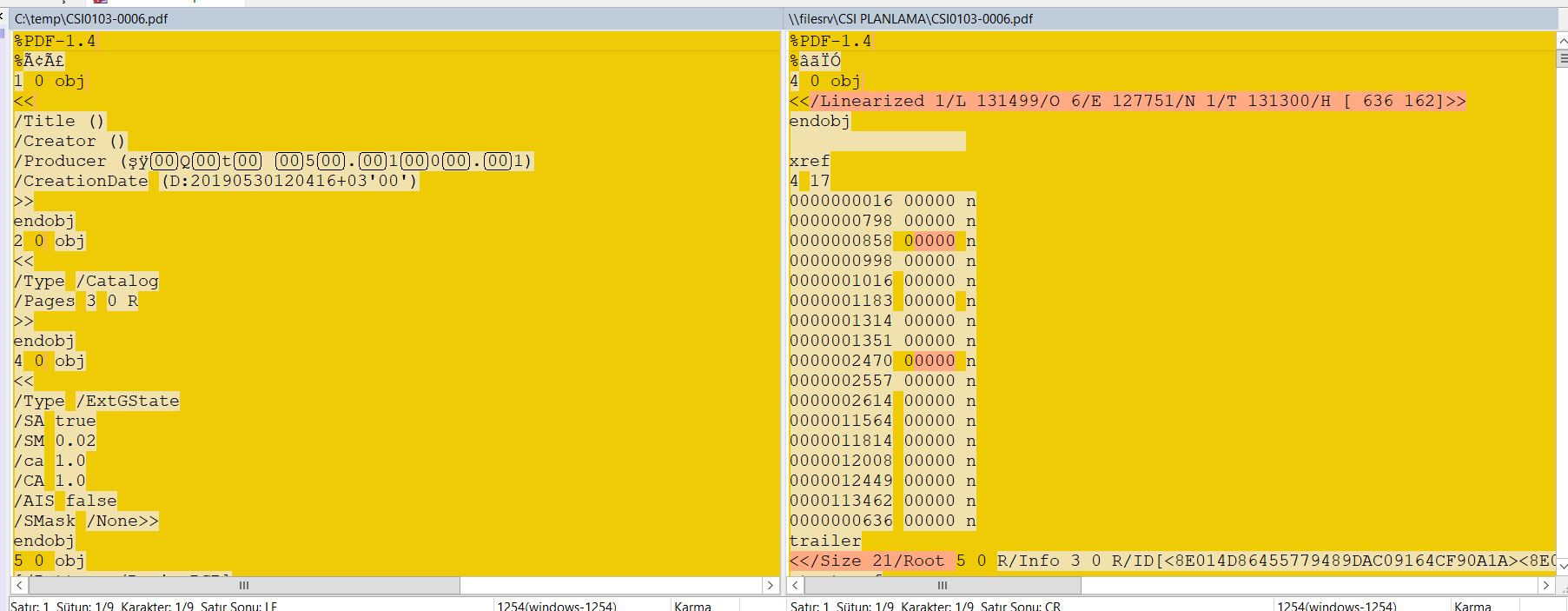
  2. Qt Development
  3. General and Desktop
  4. Pdf paper size problem between win computers?!
Qt 6.11 is out! See what's new in the release blog

Pdf paper size problem between win computers?!

Scheduled Pinned Locked Moved Unsolved General and Desktop
20 Posts 4 Posters 4.5k Views 3 Watching
  • Oldest to Newest
  • Newest to Oldest
  • Most Votes
Reply
  • Reply as topic
Log in to reply
This topic has been deleted. Only users with topic management privileges can see it.
  • SGaistS SGaist

    Hi,

    Are you using any special fonts ?
    How are you generating the table ?
    What is the size difference ?
    What are you using to print the PDF ?

    MucipM Offline
    MucipM Offline
    Mucip
    wrote on last edited by
    #3

    Hi @SGaist ,
    Well, complete pdf generator code is below,

    void PaketGiris::on_actionPDF_Yap_triggered()
    {
    
         //PDFYap...


        QProcess process;
    
        connect(&process, &QProcess::errorOccurred, [=](QProcess::ProcessError error)
        {
            //qDebug() << "error enum val = " << error << endl;
    
            QMessageBox::critical(this, "Hata!", "Barkod oluşturulamadı!");
        });


        QString hedef = QDir::tempPath() + "/barkod.png";
        
    
        process.start("zint.exe", QStringList() << "-o" << hedef << "-d" << "'" + ui->comboTesis->currentText() + "-" + baglanti::sifirEkle(ui->lEPaketNo->text().toInt(),4)+"'");
        process.waitForFinished();


        QPixmap  *logoCsi;
        logoCsi = new QPixmap;
        logoCsi->load(":/resimler/csi.png");
    
        QPixmap  *barkod;
        barkod = new QPixmap;
        barkod->load(hedef);
    
        //Pdf yapılıyor...
        QPrinter *printer;
        printer = new QPrinter;
        printer->setPaperSize(QSize(210, 297), QPrinter::Millimeter);
    
        QPainter *painter;
        painter = new QPainter;


        QString pdfDosyaYol = QDir::tempPath() + "/" + ui->comboTesis->currentText() + "-" + baglanti::sifirEkle(ui->lEPaketNo->text().toInt(),4) + ".pdf";
    
        QFile takas(pdfDosyaYol);
    
        if (takas.open(QIODevice::WriteOnly)){
            printer->setOutputFormat(QPrinter::PdfFormat);
            printer->setPaperSize(QPrinter::A4);
            printer->setOutputFileName(pdfDosyaYol);
            //fileName2=fileName;
        } else{
            QMessageBox::critical(this, "Hata",
                "Önce Pdf dosyayı kapatmalısınız!", QMessageBox::Ok);
            return;
        }
    
        takas.close();
        /*
    
        QFontMetrics fm = fontMetrics();
        int lh = fm.lineSpacing() * 2;
        int currentHeight = lh * 5;
        */
    
        painter->begin(printer);
    
        QPen *pen;
        pen = new QPen;
        pen->setWidth(2);
        painter->setPen(*pen);


        QFont font( "Courier" ); //Arial
        font.setPointSize( 6 );
        font.setWeight( QFont::Normal );
        font.setItalic(false);
        font.setLetterSpacing(QFont::PercentageSpacing, 100);
        painter->setFont(font);
    
        //Önce dış çerçeveyi çizelim
        QRect rect(15, 15, 940,1350);
        painter->drawRect(rect);
    
        //Logo geliyor
        painter->drawPixmap(QRect(25, 22, 100, 55), *logoCsi);
    
        // Barkod geliyor
        painter->drawPixmap(QRect(650, 22, 250, 60), *barkod);
    
    
        //Ana başlık
        font.setPointSize(12);
        painter->setFont(font);
        painter->drawText(170,40,"Çukurova Silo İşletmeciliği");
        painter->drawText(240,65,"Paket Fişi");
        //Üst bilgiler
        font.setPointSize(8);
        painter->setFont(font);
    
        painter->drawText(20,100, 470, 15, Qt::AlignLeft, "Sıra No  :" + ui->lESiraNo->text());
        painter->drawText(20,115, 470, 15, Qt::AlignLeft, "Tesis No :" + ui->comboTesis->currentText());
        painter->drawText(20,130, 470, 15, Qt::AlignLeft, "Paket No :" + baglanti::sifirEkle(ui->lEPaketNo->text().toInt(),4));
        painter->drawText(20,145, 470, 15, Qt::AlignLeft, "Müşteri  :" + musteriBul(ui->comboTesis->currentText()));
    
    
        painter->drawText(350,100, 470, 15, Qt::AlignLeft, "En (m)   :" + ui->spinEn->text());
        painter->drawText(350,115, 470, 15, Qt::AlignLeft, "Boy (m   :" + ui->spinBoy->text());
        painter->drawText(350,130, 470, 15, Qt::AlignLeft, "Yük.(m)  :" + ui->spinYukseklik->text());
        painter->drawText(350,145, 470, 15, Qt::AlignLeft, "Hacim(m³):" + ui->lEHacim->text());
    
    
        painter->drawText(550,100, 470, 15, Qt::AlignLeft, "Fiş Tarihi      :" + ui->datePaketleme->dateTime().toString("yyyy-MM-dd"));
        painter->drawText(550,115, 470, 15, Qt::AlignLeft, "Yazdırma tarihi :" + QDateTime::currentDateTime().toString("yyyy-MM-dd HH:mm"));
        painter->drawText(550,130, 470, 15, Qt::AlignLeft, "Ağırlık (kg)    :" + ui->spinYukseklik->text());


        painter->drawText(20,170, 470, 15, Qt::AlignLeft, "Stok Kod" );
        painter->drawText(200,170, 470, 15, Qt::AlignLeft, "Stok Ad" );
        painter->drawText(900,170, 100, 15, Qt::AlignLeft, "Adet" );


        pen->setWidth(1);
        painter->setPen(*pen);
    
        int satir = 170, satir2 = 189;
    
        for(int i=0;i<(modelDetay->rowCount() + 2);i++)
        {
            painter->drawText(20,satir2, 470, 15, Qt::AlignLeft, modelDetay->data(modelDetay->index(i, 0), Qt::DisplayRole).toString());
            painter->drawText(200,satir2, 680, 15, Qt::AlignLeft, modelDetay->data(modelDetay->index(i, 1), Qt::DisplayRole).toString());
            painter->drawText(840,satir2, 100, 15, Qt::AlignRight, modelDetay->data(modelDetay->index(i, 2), Qt::DisplayRole).toString());
    
            painter->drawLine(QPoint(15, satir),QPoint(955, satir));
    
            satir = satir +19;
            satir2 = satir2 +19;
        }
    
    
        if(ui->plainAciklama->toPlainText().length()!=0)
            painter->drawText(25,satir, 1000, 200, Qt::AlignJustify, "Açıklama :" + ui->plainAciklama->toPlainText());


        painter->end();
    
        delete logoCsi;
        delete barkod;
        delete painter;
        delete printer;
    
        baglanti::dosyaAc(pdfDosyaYol);
    
    
    }
    

    Regards,
    Mucip:)

    1 Reply Last reply
    0
    • SGaistS SGaist

      Hi,

      Are you using any special fonts ?
      How are you generating the table ?
      What is the size difference ?
      What are you using to print the PDF ?

      MucipM Offline
      MucipM Offline
      Mucip
      wrote on last edited by
      #4

      Dear @SGaist ,
      Same compiled code but working on different machines. And I did not use any special font...

      Regards,
      Mucip:)

      1 Reply Last reply
      0
      • mrjjM Offline
        mrjjM Offline
        mrjj
        Lifetime Qt Champion
        wrote on last edited by
        #5

        Hi
        If you compare them at the same zoom level, are font same size etc ?

        MucipM 1 Reply Last reply
        0
        • mrjjM mrjj

          Hi
          If you compare them at the same zoom level, are font same size etc ?

          MucipM Offline
          MucipM Offline
          Mucip
          wrote on last edited by
          #6

          Hi @mrjj ,
          Everything is the completely same. And same compiled exe program is working from shared location...

          Very strange!...

          Regards,
          Mucip:)

          1 Reply Last reply
          0
          • mrjjM Offline
            mrjjM Offline
            mrjj
            Lifetime Qt Champion
            wrote on last edited by
            #7

            Hi
            Ok so at same zoom level, the texts start at same positions and generally look the same size?
            The page itself is just smaller or what is the actual difference?

            Your code does fine. i see nothing alarming.
            Just as a note, there is really no need to new the QPainter. it only makes it
            possible to forget to delete it.

            1 Reply Last reply
            0
            • JonBJ Offline
              JonBJ Offline
              JonB
              wrote on last edited by JonB
              #8

              The pages are not "exactly the same". For example, compare where the column containing En (m) :0,80 starts/ends relative to the word Isletmeciligi at the top. Or the heights of the bar code. And other things on the pages.

              Do the multiple machines have the same default printer? I can't recall, but the preview may be affected by what the default/current printer is....

              The obvious first question is are these different PCs really both outputting A4 size? Or, are they both at the same zoom level (it's difficult to see because you've chopped it off, but it looks to me that the top one is at 126% while the bottom one is at 100%...). Is the difference only in the "PDF preview", or is it really there if you print it out?

              You might want to try with a simpler content, e.g. nothing but the page rectangle outline so that you can see where you are starting out from....

              MucipM 2 Replies Last reply
              1
              • JonBJ JonB

                The pages are not "exactly the same". For example, compare where the column containing En (m) :0,80 starts/ends relative to the word Isletmeciligi at the top. Or the heights of the bar code. And other things on the pages.

                Do the multiple machines have the same default printer? I can't recall, but the preview may be affected by what the default/current printer is....

                The obvious first question is are these different PCs really both outputting A4 size? Or, are they both at the same zoom level (it's difficult to see because you've chopped it off, but it looks to me that the top one is at 126% while the bottom one is at 100%...). Is the difference only in the "PDF preview", or is it really there if you print it out?

                You might want to try with a simpler content, e.g. nothing but the page rectangle outline so that you can see where you are starting out from....

                MucipM Offline
                MucipM Offline
                Mucip
                wrote on last edited by
                #9

                Hi @JonB,
                It's really strange situation! Every machine run the code from same shared folder location.

                I guess it should be relevant about default printer but I set the pdf size to A4... And A4 size must be same on every printer...

                Really strange!... :(

                Regards,
                Mucip:)

                mrjjM 1 Reply Last reply
                0
                • MucipM Mucip

                  Hi @JonB,
                  It's really strange situation! Every machine run the code from same shared folder location.

                  I guess it should be relevant about default printer but I set the pdf size to A4... And A4 size must be same on every printer...

                  Really strange!... :(

                  Regards,
                  Mucip:)

                  mrjjM Offline
                  mrjjM Offline
                  mrjj
                  Lifetime Qt Champion
                  wrote on last edited by
                  #10

                  @Mucip
                  Hi
                  I would try to dump page size on the "wrong" pc and see if you really get A4.
                  Also, did you compare the resulting PDF files in something like
                  http://winmerge.org/?lang=en
                  to see if you can spot anything ?

                  MucipM 1 Reply Last reply
                  1
                  • JonBJ JonB

                    The pages are not "exactly the same". For example, compare where the column containing En (m) :0,80 starts/ends relative to the word Isletmeciligi at the top. Or the heights of the bar code. And other things on the pages.

                    Do the multiple machines have the same default printer? I can't recall, but the preview may be affected by what the default/current printer is....

                    The obvious first question is are these different PCs really both outputting A4 size? Or, are they both at the same zoom level (it's difficult to see because you've chopped it off, but it looks to me that the top one is at 126% while the bottom one is at 100%...). Is the difference only in the "PDF preview", or is it really there if you print it out?

                    You might want to try with a simpler content, e.g. nothing but the page rectangle outline so that you can see where you are starting out from....

                    MucipM Offline
                    MucipM Offline
                    Mucip
                    wrote on last edited by
                    #11

                    Hi @JonB,
                    I realized, it makes same problem on the computers which is connected local printer. But the computers which use use shared network printer has no problem?!...

                    I'm still searching...

                    Regards,
                    Mucip:)

                    JonBJ 1 Reply Last reply
                    0
                    • MucipM Mucip

                      Hi @JonB,
                      I realized, it makes same problem on the computers which is connected local printer. But the computers which use use shared network printer has no problem?!...

                      I'm still searching...

                      Regards,
                      Mucip:)

                      JonBJ Offline
                      JonBJ Offline
                      JonB
                      wrote on last edited by JonB
                      #12

                      @Mucip
                      Like I said, in some shape or form I think whatever the default/current printer is may have an effect on the output PDF (you could check by comparing as per @mrjj's suggestion) or it may have an effect on the preview only (yes, A4 should be A4 everywhere), but if it thinks your printer cannot print A4 correctly that may affect preview? As I also said, you might check what it actually prints if it's only the preview which shows differently?

                      MucipM 1 Reply Last reply
                      1
                      • mrjjM mrjj

                        @Mucip
                        Hi
                        I would try to dump page size on the "wrong" pc and see if you really get A4.
                        Also, did you compare the resulting PDF files in something like
                        http://winmerge.org/?lang=en
                        to see if you can spot anything ?

                        MucipM Offline
                        MucipM Offline
                        Mucip
                        wrote on last edited by
                        #13

                        @mrjj ,
                        It's really diffiult to understand differnce unfortunately... :(

                        0_1559211635504_A4 Error.JPG

                        Regards,
                        Mucip:)

                        mrjjM 1 Reply Last reply
                        0
                        • JonBJ JonB

                          @Mucip
                          Like I said, in some shape or form I think whatever the default/current printer is may have an effect on the output PDF (you could check by comparing as per @mrjj's suggestion) or it may have an effect on the preview only (yes, A4 should be A4 everywhere), but if it thinks your printer cannot print A4 correctly that may affect preview? As I also said, you might check what it actually prints if it's only the preview which shows differently?

                          MucipM Offline
                          MucipM Offline
                          Mucip
                          wrote on last edited by
                          #14

                          @JonB ,
                          Not only the prewiev! print outes real page is also cutted!... :(

                          Regards,
                          Mucip:)

                          1 Reply Last reply
                          0
                          • MucipM Mucip

                            @mrjj ,
                            It's really diffiult to understand differnce unfortunately... :(

                            0_1559211635504_A4 Error.JPG

                            Regards,
                            Mucip:)

                            mrjjM Offline
                            mrjjM Offline
                            mrjj
                            Lifetime Qt Champion
                            wrote on last edited by
                            #15

                            @Mucip
                            Look for page size tag. I know postscript is a bit hard to read. :)

                            MucipM 1 Reply Last reply
                            0
                            • mrjjM mrjj

                              @Mucip
                              Look for page size tag. I know postscript is a bit hard to read. :)

                              MucipM Offline
                              MucipM Offline
                              Mucip
                              wrote on last edited by
                              #16

                              @mrjj ,
                              Page size tag?...

                              Regards,
                              Mucip:)

                              mrjjM 1 Reply Last reply
                              0
                              • MucipM Mucip

                                @mrjj ,
                                Page size tag?...

                                Regards,
                                Mucip:)

                                mrjjM Offline
                                mrjjM Offline
                                mrjj
                                Lifetime Qt Champion
                                wrote on last edited by
                                #17

                                @Mucip
                                well a postscript tag.
                                Should look something like
                                << /PageSize [842 595] >> setpagedevice

                                MucipM 1 Reply Last reply
                                0
                                • mrjjM mrjj

                                  @Mucip
                                  well a postscript tag.
                                  Should look something like
                                  << /PageSize [842 595] >> setpagedevice

                                  MucipM Offline
                                  MucipM Offline
                                  Mucip
                                  wrote on last edited by
                                  #18

                                  @mrjj ,
                                  There isn't like PageSize or setpagedevice unfortunatelly.

                                  Regards,
                                  Mucip:)

                                  mrjjM 1 Reply Last reply
                                  0
                                  • MucipM Mucip

                                    @mrjj ,
                                    There isn't like PageSize or setpagedevice unfortunatelly.

                                    Regards,
                                    Mucip:)

                                    mrjjM Offline
                                    mrjjM Offline
                                    mrjj
                                    Lifetime Qt Champion
                                    wrote on last edited by
                                    #19

                                    @Mucip
                                    Ok. worth a shot.
                                    Im not sure what goes wrong. maybe its not really A4.

                                    1 Reply Last reply
                                    0
                                    • SGaistS Offline
                                      SGaistS Offline
                                      SGaist
                                      Lifetime Qt Champion
                                      wrote on last edited by SGaist
                                      #20

                                      Check your system defaults for print paper size, maybe you have something like US set somewhere rather than A4.

                                      Interested in AI ? www.idiap.ch
                                      Please read the Qt Code of Conduct - https://forum.qt.io/topic/113070/qt-code-of-conduct

                                      1 Reply Last reply
                                      0

                                      • Login

                                      • Login or register to search.
                                      • First post
                                        Last post
                                      0
                                      • Categories
                                      • Recent
                                      • Tags
                                      • Popular
                                      • Users
                                      • Groups
                                      • Search
                                      • Get Qt Extensions
                                      • Unsolved