Skip to content
  • Categories
  • Recent
  • Tags
  • Popular
  • Users
  • Groups
  • Search
  • Get Qt
  • Unsolved
Collapse
Brand Logo
  1. Home
  2. Qt Development
  3. General and Desktop
  4. Create a PDF from Qt Creator
Qt 6.12 LTS is out! See what's new in the release blog

Create a PDF from Qt Creator

Scheduled Pinned Locked Moved Solved General and Desktop
26 Posts 7 Posters 16.8k Views 4 Watching
  • Oldest to Newest
  • Newest to Oldest
  • Most Votes
Reply
  • Reply as topic
Log in to reply
This topic has been deleted. Only users with topic management privileges can see it.
  • mrjjM mrjj

    @TheCipo76
    Yep and i get a e:/test.pdf so not really sure why you dont get any.
    does it try to print to real printer ?

    Can you try

    void printv3() {
    
      QPrinter printer(QPrinter::HighResolution);
      printer.setOrientation(QPrinter::Landscape);
      printer.setOutputFormat(QPrinter::PdfFormat);
      printer.setPaperSize(QPrinter::A4);
      printer.setOutputFileName("test.pdf");
    
      QPainter painter;
      painter.begin(&printer);
    
      painter.drawText( 200,200, "HELLO" );
      painter.end();
    
    }


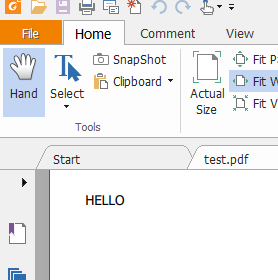
    That give me a test.pdf in the build folder
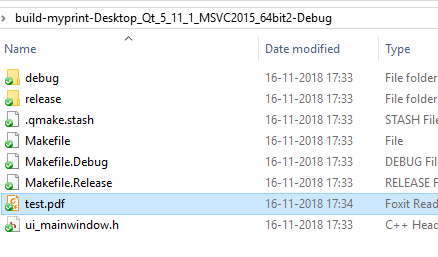
    alt text

    and expected result
    alt text

    TheCipo76T Offline
    TheCipo76T Offline
    TheCipo76
    wrote on last edited by
    #14

    @mrjj i've tried with no luck

    test.pdf was not created..

    mrjjM 1 Reply Last reply
    0
    • TheCipo76T TheCipo76

      @mrjj i've tried with no luck

      test.pdf was not created..

      mrjjM Offline
      mrjjM Offline
      mrjj
      Lifetime Qt Champion
      wrote on last edited by
      #15

      @TheCipo76
      Really odd. I cant guess sorry. Sample works here.
      You use the code directly as is ?

      TheCipo76T 1 Reply Last reply
      0
      • mrjjM mrjj

        @TheCipo76
        Really odd. I cant guess sorry. Sample works here.
        You use the code directly as is ?

        TheCipo76T Offline
        TheCipo76T Offline
        TheCipo76
        wrote on last edited by TheCipo76
        #16

        @mrjj Yes, copied and pasted

        QPrinter printer(QPrinter::HighResolution);
              printer.setOrientation(QPrinter::Landscape);
              printer.setOutputFormat(QPrinter::PdfFormat);
              printer.setPaperSize(QPrinter::A4);
              printer.setOutputFileName("test.pdf");
        
              QPainter painter;
              painter.begin(&printer);
        
              painter.drawText( 200,200, "HELLO" );
              painter.end();
        
        1 Reply Last reply
        0
        • mrjjM Offline
          mrjjM Offline
          mrjj
          Lifetime Qt Champion
          wrote on last edited by
          #17

          and you also searched for test.pdf to make sure
          its not created any where else ?

          TheCipo76T 1 Reply Last reply
          0
          • mrjjM mrjj

            and you also searched for test.pdf to make sure
            its not created any where else ?

            TheCipo76T Offline
            TheCipo76T Offline
            TheCipo76
            wrote on last edited by
            #18

            @mrjj 0_1542387108242_Schermata 2018-11-16 alle 17.51.36.png

            mrjjM 1 Reply Last reply
            0
            • TheCipo76T TheCipo76

              @mrjj 0_1542387108242_Schermata 2018-11-16 alle 17.51.36.png

              mrjjM Offline
              mrjjM Offline
              mrjj
              Lifetime Qt Champion
              wrote on last edited by
              #19

              @TheCipo76
              Very odd.
              Can you try this code. it let u select save location
              if that dont work. something up with your Qt.

              void printv4() {
                QPrinter printer(QPrinter::HighResolution);
                printer.setOrientation(QPrinter::Landscape);
                printer.setOutputFormat(QPrinter::PdfFormat);
                printer.setPaperSize(QPrinter::A4);
                QString fileName = QFileDialog::getSaveFileName(0,"file", "c:\\", "pdf (*.pdf)");
                printer.setOutputFileName(fileName);
              
                QPainter painter;
                painter.begin(&printer);
              
                painter.drawText( 200,200, "HELLO" );
                painter.end();
              
              }
              
              TheCipo76T 1 Reply Last reply
              2
              • mrjjM mrjj

                @TheCipo76
                Very odd.
                Can you try this code. it let u select save location
                if that dont work. something up with your Qt.

                void printv4() {
                  QPrinter printer(QPrinter::HighResolution);
                  printer.setOrientation(QPrinter::Landscape);
                  printer.setOutputFormat(QPrinter::PdfFormat);
                  printer.setPaperSize(QPrinter::A4);
                  QString fileName = QFileDialog::getSaveFileName(0,"file", "c:\\", "pdf (*.pdf)");
                  printer.setOutputFileName(fileName);
                
                  QPainter painter;
                  painter.begin(&printer);
                
                  painter.drawText( 200,200, "HELLO" );
                  painter.end();
                
                }
                
                TheCipo76T Offline
                TheCipo76T Offline
                TheCipo76
                wrote on last edited by
                #20

                @mrjj

                0_1542387477878_Schermata 2018-11-16 alle 17.57.19.png 0_1542387485333_Schermata 2018-11-16 alle 17.57.30.png

                Finally works!!!!!! Great!!!
                I don't know why but Works!!!!

                Thank you very much!!

                TheCipo76T 1 Reply Last reply
                1
                • TheCipo76T TheCipo76

                  @mrjj

                  0_1542387477878_Schermata 2018-11-16 alle 17.57.19.png 0_1542387485333_Schermata 2018-11-16 alle 17.57.30.png

                  Finally works!!!!!! Great!!!
                  I don't know why but Works!!!!

                  Thank you very much!!

                  TheCipo76T Offline
                  TheCipo76T Offline
                  TheCipo76
                  wrote on last edited by
                  #21
                  This post is deleted!
                  1 Reply Last reply
                  0
                  • mrjjM Offline
                    mrjjM Offline
                    mrjj
                    Lifetime Qt Champion
                    wrote on last edited by
                    #22

                    Super :)
                    So on mac it seems the file go somewhere else
                    if no path. maybe a read only place.
                    So when we tell the exact location , it does work :)

                    J.HilkJ 1 Reply Last reply
                    0
                    • M Offline
                      M Offline
                      mpergand
                      wrote on last edited by mpergand
                      #23

                      @TheCipo76 said in Create a PDF from Qt Creator:

                      printer.setOutputFileName("PrimoPDF.pdf");

                      When launched from QtCreator, the default working directory is set to:
                      MyApp/Contents/MacOS/

                      When launched from the finder, the path is usely the user directory, but actualy it is the root directory (/) and obviously nothing is written (wrong permissions)

                      1 Reply Last reply
                      2
                      • mrjjM mrjj

                        Super :)
                        So on mac it seems the file go somewhere else
                        if no path. maybe a read only place.
                        So when we tell the exact location , it does work :)

                        J.HilkJ Offline
                        J.HilkJ Offline
                        J.Hilk
                        Moderators
                        wrote on last edited by J.Hilk
                        #24

                        @mrjj said in Create a PDF from Qt Creator:

                        Super :)
                        So on mac it seems the file go somewhere else if no path

                        IIRC the standard path is

                        /Users/yourUserName/Library/Application Support


                        Be aware of the Qt Code of Conduct, when posting : https://forum.qt.io/topic/113070/qt-code-of-conduct


                        Q: What's that?
                        A: It's blue light.
                        Q: What does it do?
                        A: It turns blue.

                        1 Reply Last reply
                        0
                        • D Offline
                          D Offline
                          dan1973
                          wrote on last edited by
                          #25

                          Hi,

                          I was following your comments and conversation. I need to know how to draw lines in PDF document using Qt.

                          jsulmJ 1 Reply Last reply
                          0
                          • D dan1973

                            Hi,

                            I was following your comments and conversation. I need to know how to draw lines in PDF document using Qt.

                            jsulmJ Offline
                            jsulmJ Offline
                            jsulm
                            Lifetime Qt Champion
                            wrote on last edited by
                            #26

                            @dan1973 said in Create a PDF from Qt Creator:

                            I need to know how to draw lines in PDF document using Qt

                            https://doc.qt.io/qt-5/qpainter.html#drawLine-2

                            https://forum.qt.io/topic/113070/qt-code-of-conduct

                            1 Reply Last reply
                            1

                            • Login

                            • Login or register to search.
                            • First post
                              Last post
                            0
                            • Categories
                            • Recent
                            • Tags
                            • Popular
                            • Users
                            • Groups
                            • Search
                            • Get Qt
                            • Unsolved