Skip to content
  • Categories
  • Recent
  • Tags
  • Popular
  • Users
  • Groups
  • Search
  • Get Qt Extensions
  • Unsolved
Collapse
Brand Logo
  1. Home
  2. Qt Development
  3. General and Desktop
  4. Create a PDF from Qt Creator

Create a PDF from Qt Creator

Scheduled Pinned Locked Moved Solved General and Desktop
26 Posts 7 Posters 10.9k Views 4 Watching
  • Oldest to Newest
  • Newest to Oldest
  • Most Votes
Reply
  • Reply as topic
Log in to reply
This topic has been deleted. Only users with topic management privileges can see it.
  • TheCipo76T TheCipo76

    @Asperamanca
    No, i've followed a Video Tutorial and copy the same code
    (https://www.youtube.com/watch?v=lA5D8b_QPxo)

    the only differences is that i've done it in a Dialog and not in MainWindows

    i've already tried to create a new project and do it in MainWindows but the result is the same..

    No PDf was Created

    mrjjM Offline
    mrjjM Offline
    mrjj
    Lifetime Qt Champion
    wrote on last edited by
    #6

    @TheCipo76
    Hi
    Code does look fine.
    Could you try this sample ?
    https://wiki.qt.io/Exporting_a_document_to_PDF
    and see if you get pdf from that ?

    TheCipo76T 1 Reply Last reply
    0
    • mrjjM mrjj

      @TheCipo76
      Hi
      Code does look fine.
      Could you try this sample ?
      https://wiki.qt.io/Exporting_a_document_to_PDF
      and see if you get pdf from that ?

      TheCipo76T Offline
      TheCipo76T Offline
      TheCipo76
      wrote on last edited by
      #7

      @mrjj Yes,
      with this code PDF was created

      1 Reply Last reply
      0
      • TheCipo76T TheCipo76

        @Asperamanca
        No, i've followed a Video Tutorial and copy the same code
        (https://www.youtube.com/watch?v=lA5D8b_QPxo)

        the only differences is that i've done it in a Dialog and not in MainWindows

        i've already tried to create a new project and do it in MainWindows but the result is the same..

        No PDf was Created

        TheCipo76T Offline
        TheCipo76T Offline
        TheCipo76
        wrote on last edited by
        #8

        @TheCipo76

        when i launch pdf print in Application Output i saw this message:

        QPainter::begin(): Returned false
        QPainter::setPen: Painter not active
        QPainter::end: Painter not active, aborted

        Any suggestion to fix it??

        mrjjM 1 Reply Last reply
        0
        • TheCipo76T TheCipo76

          @TheCipo76

          when i launch pdf print in Application Output i saw this message:

          QPainter::begin(): Returned false
          QPainter::setPen: Painter not active
          QPainter::end: Painter not active, aborted

          Any suggestion to fix it??

          mrjjM Offline
          mrjjM Offline
          mrjj
          Lifetime Qt Champion
          wrote on last edited by
          #9

          @TheCipo76
          Hi
          My guess would be that printer object goes out of scope ?

          TheCipo76T 1 Reply Last reply
          0
          • mrjjM mrjj

            @TheCipo76
            Hi
            My guess would be that printer object goes out of scope ?

            TheCipo76T Offline
            TheCipo76T Offline
            TheCipo76
            wrote on last edited by TheCipo76
            #10

            @mrjj i've tried with this code:

            qreal top=20, left=15, right=15, bottom=20;
                QPrinter printer(QPrinter::PrinterResolution);
                QPrintDialog dialog(&printer, this);
                if(dialog.exec() == QDialog::Accepted){
                    QPrinterInfo pinfo(printer);
                    qDebug() << "Printer valid: " << printer.isValid();
                    qDebug() << "Printer Name: " << printer.printerName();
                    qDebug() << "Printer program: " << printer.printProgram();
                    qDebug() << "Is printer null: " << pinfo.isNull();
                    qDebug() << "Printer State: " << pinfo.state();
                    qDebug() << "Is printer default: " << pinfo.isDefault();
                    qDebug() << "Is printer remote: " << pinfo.isRemote();
                }
                printer.setPaperSize(QPrinter::A4);
                printer.setPageMargins(left, top, right, bottom, QPrinter::Millimeter);
                printer.setOutputFormat(QPrinter::PdfFormat);
                printer.setOutputFileName("PrimoPDF.pdf");
            
                QPainter painter;
                if (! painter.begin(&printer)) { // failed to open file
                    qWarning("failed to open file, is it writable?");
                    return;
                }
                painter.drawText(10, 10, "Primo PDF Creato!");
                painter.drawText(10, 30, "Test 1");
                if (! printer.newPage()) {
                    qWarning("failed in flushing page to disk, disk full?");
                    return;
                }
                painter.drawText(10, 10, "Test 2");
                painter.end();
            

            and this is the result:

            Printer valid: true
            Printer Name: "Samsung_CLP_620_Series__SEC001599489B1A_"
            Printer program: ""
            Is printer null: false
            Printer State: 0
            Is printer default: true
            Is printer remote: false

            Printer seem to be OK

            now the previous message about QPainter were not showed..

            mrjjM 1 Reply Last reply
            0
            • TheCipo76T TheCipo76

              @mrjj i've tried with this code:

              qreal top=20, left=15, right=15, bottom=20;
                  QPrinter printer(QPrinter::PrinterResolution);
                  QPrintDialog dialog(&printer, this);
                  if(dialog.exec() == QDialog::Accepted){
                      QPrinterInfo pinfo(printer);
                      qDebug() << "Printer valid: " << printer.isValid();
                      qDebug() << "Printer Name: " << printer.printerName();
                      qDebug() << "Printer program: " << printer.printProgram();
                      qDebug() << "Is printer null: " << pinfo.isNull();
                      qDebug() << "Printer State: " << pinfo.state();
                      qDebug() << "Is printer default: " << pinfo.isDefault();
                      qDebug() << "Is printer remote: " << pinfo.isRemote();
                  }
                  printer.setPaperSize(QPrinter::A4);
                  printer.setPageMargins(left, top, right, bottom, QPrinter::Millimeter);
                  printer.setOutputFormat(QPrinter::PdfFormat);
                  printer.setOutputFileName("PrimoPDF.pdf");
              
                  QPainter painter;
                  if (! painter.begin(&printer)) { // failed to open file
                      qWarning("failed to open file, is it writable?");
                      return;
                  }
                  painter.drawText(10, 10, "Primo PDF Creato!");
                  painter.drawText(10, 30, "Test 1");
                  if (! printer.newPage()) {
                      qWarning("failed in flushing page to disk, disk full?");
                      return;
                  }
                  painter.drawText(10, 10, "Test 2");
                  painter.end();
              

              and this is the result:

              Printer valid: true
              Printer Name: "Samsung_CLP_620_Series__SEC001599489B1A_"
              Printer program: ""
              Is printer null: false
              Printer State: 0
              Is printer default: true
              Is printer remote: false

              Printer seem to be OK

              now the previous message about QPainter were not showed..

              mrjjM Offline
              mrjjM Offline
              mrjj
              Lifetime Qt Champion
              wrote on last edited by
              #11

              @TheCipo76
              That looks very ok.
              But no PDF (PrimoPDF.pdf) is produced ?

              Have a look at this code. it prints screen shots.
              Looks very similar to yours.

              void printv2(QPixmap& pix) {
              
                QPrinter printer(QPrinter::HighResolution);
                printer.setOrientation(QPrinter::Landscape);
                printer.setOutputFormat(QPrinter::PdfFormat);
                printer.setPaperSize(QPrinter::A4);
                printer.setOutputFileName("e:/test.pdf");
              
                QPainter painter;
                painter.begin(&printer);
              
                double xscale = printer.pageRect().width() / double(pix.width());
                double yscale = printer.pageRect().height() / double(pix.height());
                double scale = qMin(xscale, yscale);
                painter.translate(printer.paperRect().x() + printer.pageRect().width() / 2,
                                  printer.paperRect().y() + printer.pageRect().height() / 2);
                painter.scale(scale, scale);
                painter.translate(-pix.width() / 2, -pix.height() / 2);
                painter.drawPixmap(0, 0, pix);
                painter.end();
              
              }
              
              
              void MainWindow::on_pushButton_released() {
              
                QPixmap pix = QPixmap::grabWindow(QApplication::desktop()->winId());
                printv2(pix);
              
              }
              
              
              TheCipo76T 1 Reply Last reply
              0
              • mrjjM mrjj

                @TheCipo76
                That looks very ok.
                But no PDF (PrimoPDF.pdf) is produced ?

                Have a look at this code. it prints screen shots.
                Looks very similar to yours.

                void printv2(QPixmap& pix) {
                
                  QPrinter printer(QPrinter::HighResolution);
                  printer.setOrientation(QPrinter::Landscape);
                  printer.setOutputFormat(QPrinter::PdfFormat);
                  printer.setPaperSize(QPrinter::A4);
                  printer.setOutputFileName("e:/test.pdf");
                
                  QPainter painter;
                  painter.begin(&printer);
                
                  double xscale = printer.pageRect().width() / double(pix.width());
                  double yscale = printer.pageRect().height() / double(pix.height());
                  double scale = qMin(xscale, yscale);
                  painter.translate(printer.paperRect().x() + printer.pageRect().width() / 2,
                                    printer.paperRect().y() + printer.pageRect().height() / 2);
                  painter.scale(scale, scale);
                  painter.translate(-pix.width() / 2, -pix.height() / 2);
                  painter.drawPixmap(0, 0, pix);
                  painter.end();
                
                }
                
                
                void MainWindow::on_pushButton_released() {
                
                  QPixmap pix = QPixmap::grabWindow(QApplication::desktop()->winId());
                  printv2(pix);
                
                }
                
                
                TheCipo76T Offline
                TheCipo76T Offline
                TheCipo76
                wrote on last edited by
                #12

                @mrjj No, "PrimoPDF.pdf" wasn't created..

                the code you have posted is very similar..

                mrjjM 1 Reply Last reply
                0
                • TheCipo76T TheCipo76

                  @mrjj No, "PrimoPDF.pdf" wasn't created..

                  the code you have posted is very similar..

                  mrjjM Offline
                  mrjjM Offline
                  mrjj
                  Lifetime Qt Champion
                  wrote on last edited by mrjj
                  #13

                  @TheCipo76
                  Yep and i get a e:/test.pdf so not really sure why you dont get any.
                  does it try to print to real printer ?

                  Can you try

                  void printv3() {
                  
                    QPrinter printer(QPrinter::HighResolution);
                    printer.setOrientation(QPrinter::Landscape);
                    printer.setOutputFormat(QPrinter::PdfFormat);
                    printer.setPaperSize(QPrinter::A4);
                    printer.setOutputFileName("test.pdf");
                  
                    QPainter painter;
                    painter.begin(&printer);
                  
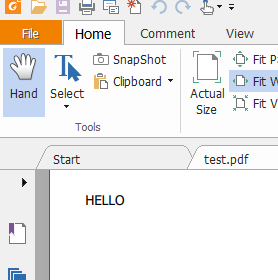
                    painter.drawText( 200,200, "HELLO" );
                    painter.end();
                  
                  }


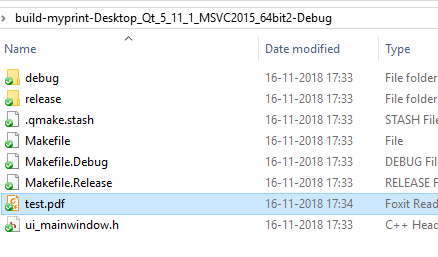
                  That give me a test.pdf in the build folder
                  alt text

                  and expected result
                  alt text

                  TheCipo76T 1 Reply Last reply
                  0
                  • mrjjM mrjj

                    @TheCipo76
                    Yep and i get a e:/test.pdf so not really sure why you dont get any.
                    does it try to print to real printer ?

                    Can you try

                    void printv3() {
                    
                      QPrinter printer(QPrinter::HighResolution);
                      printer.setOrientation(QPrinter::Landscape);
                      printer.setOutputFormat(QPrinter::PdfFormat);
                      printer.setPaperSize(QPrinter::A4);
                      printer.setOutputFileName("test.pdf");
                    
                      QPainter painter;
                      painter.begin(&printer);
                    
                      painter.drawText( 200,200, "HELLO" );
                      painter.end();
                    
                    }


                    That give me a test.pdf in the build folder
                    alt text

                    and expected result
                    alt text

                    TheCipo76T Offline
                    TheCipo76T Offline
                    TheCipo76
                    wrote on last edited by
                    #14

                    @mrjj i've tried with no luck

                    test.pdf was not created..

                    mrjjM 1 Reply Last reply
                    0
                    • TheCipo76T TheCipo76

                      @mrjj i've tried with no luck

                      test.pdf was not created..

                      mrjjM Offline
                      mrjjM Offline
                      mrjj
                      Lifetime Qt Champion
                      wrote on last edited by
                      #15

                      @TheCipo76
                      Really odd. I cant guess sorry. Sample works here.
                      You use the code directly as is ?

                      TheCipo76T 1 Reply Last reply
                      0
                      • mrjjM mrjj

                        @TheCipo76
                        Really odd. I cant guess sorry. Sample works here.
                        You use the code directly as is ?

                        TheCipo76T Offline
                        TheCipo76T Offline
                        TheCipo76
                        wrote on last edited by TheCipo76
                        #16

                        @mrjj Yes, copied and pasted

                        QPrinter printer(QPrinter::HighResolution);
                              printer.setOrientation(QPrinter::Landscape);
                              printer.setOutputFormat(QPrinter::PdfFormat);
                              printer.setPaperSize(QPrinter::A4);
                              printer.setOutputFileName("test.pdf");
                        
                              QPainter painter;
                              painter.begin(&printer);
                        
                              painter.drawText( 200,200, "HELLO" );
                              painter.end();
                        
                        1 Reply Last reply
                        0
                        • mrjjM Offline
                          mrjjM Offline
                          mrjj
                          Lifetime Qt Champion
                          wrote on last edited by
                          #17

                          and you also searched for test.pdf to make sure
                          its not created any where else ?

                          TheCipo76T 1 Reply Last reply
                          0
                          • mrjjM mrjj

                            and you also searched for test.pdf to make sure
                            its not created any where else ?

                            TheCipo76T Offline
                            TheCipo76T Offline
                            TheCipo76
                            wrote on last edited by
                            #18

                            @mrjj 0_1542387108242_Schermata 2018-11-16 alle 17.51.36.png

                            mrjjM 1 Reply Last reply
                            0
                            • TheCipo76T TheCipo76

                              @mrjj 0_1542387108242_Schermata 2018-11-16 alle 17.51.36.png

                              mrjjM Offline
                              mrjjM Offline
                              mrjj
                              Lifetime Qt Champion
                              wrote on last edited by
                              #19

                              @TheCipo76
                              Very odd.
                              Can you try this code. it let u select save location
                              if that dont work. something up with your Qt.

                              void printv4() {
                                QPrinter printer(QPrinter::HighResolution);
                                printer.setOrientation(QPrinter::Landscape);
                                printer.setOutputFormat(QPrinter::PdfFormat);
                                printer.setPaperSize(QPrinter::A4);
                                QString fileName = QFileDialog::getSaveFileName(0,"file", "c:\\", "pdf (*.pdf)");
                                printer.setOutputFileName(fileName);
                              
                                QPainter painter;
                                painter.begin(&printer);
                              
                                painter.drawText( 200,200, "HELLO" );
                                painter.end();
                              
                              }
                              
                              TheCipo76T 1 Reply Last reply
                              2
                              • mrjjM mrjj

                                @TheCipo76
                                Very odd.
                                Can you try this code. it let u select save location
                                if that dont work. something up with your Qt.

                                void printv4() {
                                  QPrinter printer(QPrinter::HighResolution);
                                  printer.setOrientation(QPrinter::Landscape);
                                  printer.setOutputFormat(QPrinter::PdfFormat);
                                  printer.setPaperSize(QPrinter::A4);
                                  QString fileName = QFileDialog::getSaveFileName(0,"file", "c:\\", "pdf (*.pdf)");
                                  printer.setOutputFileName(fileName);
                                
                                  QPainter painter;
                                  painter.begin(&printer);
                                
                                  painter.drawText( 200,200, "HELLO" );
                                  painter.end();
                                
                                }
                                
                                TheCipo76T Offline
                                TheCipo76T Offline
                                TheCipo76
                                wrote on last edited by
                                #20

                                @mrjj

                                0_1542387477878_Schermata 2018-11-16 alle 17.57.19.png 0_1542387485333_Schermata 2018-11-16 alle 17.57.30.png

                                Finally works!!!!!! Great!!!
                                I don't know why but Works!!!!

                                Thank you very much!!

                                TheCipo76T 1 Reply Last reply
                                1
                                • TheCipo76T TheCipo76

                                  @mrjj

                                  0_1542387477878_Schermata 2018-11-16 alle 17.57.19.png 0_1542387485333_Schermata 2018-11-16 alle 17.57.30.png

                                  Finally works!!!!!! Great!!!
                                  I don't know why but Works!!!!

                                  Thank you very much!!

                                  TheCipo76T Offline
                                  TheCipo76T Offline
                                  TheCipo76
                                  wrote on last edited by
                                  #21
                                  This post is deleted!
                                  1 Reply Last reply
                                  0
                                  • mrjjM Offline
                                    mrjjM Offline
                                    mrjj
                                    Lifetime Qt Champion
                                    wrote on last edited by
                                    #22

                                    Super :)
                                    So on mac it seems the file go somewhere else
                                    if no path. maybe a read only place.
                                    So when we tell the exact location , it does work :)

                                    J.HilkJ 1 Reply Last reply
                                    0
                                    • M Offline
                                      M Offline
                                      mpergand
                                      wrote on last edited by mpergand
                                      #23

                                      @TheCipo76 said in Create a PDF from Qt Creator:

                                      printer.setOutputFileName("PrimoPDF.pdf");

                                      When launched from QtCreator, the default working directory is set to:
                                      MyApp/Contents/MacOS/

                                      When launched from the finder, the path is usely the user directory, but actualy it is the root directory (/) and obviously nothing is written (wrong permissions)

                                      1 Reply Last reply
                                      2
                                      • mrjjM mrjj

                                        Super :)
                                        So on mac it seems the file go somewhere else
                                        if no path. maybe a read only place.
                                        So when we tell the exact location , it does work :)

                                        J.HilkJ Offline
                                        J.HilkJ Offline
                                        J.Hilk
                                        Moderators
                                        wrote on last edited by J.Hilk
                                        #24

                                        @mrjj said in Create a PDF from Qt Creator:

                                        Super :)
                                        So on mac it seems the file go somewhere else if no path

                                        IIRC the standard path is

                                        /Users/yourUserName/Library/Application Support


                                        Be aware of the Qt Code of Conduct, when posting : https://forum.qt.io/topic/113070/qt-code-of-conduct


                                        Q: What's that?
                                        A: It's blue light.
                                        Q: What does it do?
                                        A: It turns blue.

                                        1 Reply Last reply
                                        0
                                        • D Offline
                                          D Offline
                                          dan1973
                                          wrote on last edited by
                                          #25

                                          Hi,

                                          I was following your comments and conversation. I need to know how to draw lines in PDF document using Qt.

                                          jsulmJ 1 Reply Last reply
                                          0

                                          • Login

                                          • Login or register to search.
                                          • First post
                                            Last post
                                          0
                                          • Categories
                                          • Recent
                                          • Tags
                                          • Popular
                                          • Users
                                          • Groups
                                          • Search
                                          • Get Qt Extensions
                                          • Unsolved