Skip to content
  • Categories
  • Recent
  • Tags
  • Popular
  • Users
  • Groups
  • Search
  • Get Qt Extensions
  • Unsolved
Collapse
Brand Logo
  1. Home
  2. Qt Development
  3. General and Desktop
  4. Enabling and Disabling Window Widgets?
Qt 6.11 is out! See what's new in the release blog

Enabling and Disabling Window Widgets?

Scheduled Pinned Locked Moved Solved General and Desktop
30 Posts 5 Posters 22.2k Views 3 Watching
  • Oldest to Newest
  • Newest to Oldest
  • Most Votes
Reply
  • Reply as topic
Log in to reply
This topic has been deleted. Only users with topic management privileges can see it.
  • SPlattenS Offline
    SPlattenS Offline
    SPlatten
    wrote on last edited by
    #3

    I'll try tonight when I have access to my system...it isn't difficult to replicate, presently I'm modifying the window flags to disable window widgets, but it doesn't seem to work.

    Kind Regards,
    Sy

    J.HilkJ 1 Reply Last reply
    0
    • SPlattenS SPlatten

      I'll try tonight when I have access to my system...it isn't difficult to replicate, presently I'm modifying the window flags to disable window widgets, but it doesn't seem to work.

      J.HilkJ Offline
      J.HilkJ Offline
      J.Hilk
      Moderators
      wrote on last edited by
      #4

      @SPlatten
      you can try the Qt::MSWindowsFixedSizeDialogHint window flag together with setSizeGripEnabled(false)

      the flag is obviously for Windows only, I'm unsure what the equivalent is for MacOS.

      This however should prevent the user from resizing the the (standalone) window without removing the buttons or borders all together.

      This is what I think you're trying to do. Correct my if I'm wrong.


      Be aware of the Qt Code of Conduct, when posting : https://forum.qt.io/topic/113070/qt-code-of-conduct


      Q: What's that?
      A: It's blue light.
      Q: What does it do?
      A: It turns blue.

      1 Reply Last reply
      0
      • SPlattenS Offline
        SPlattenS Offline
        SPlatten
        wrote on last edited by SPlatten
        #5

        Thank you, I am looking for a method of programmatically enabling and disabling any of the widgets (close/minimize/maximize/context help/title/system menu). Also the solution needs to be compatible with Windows, Linux and iOS.

        Kind Regards,
        Sy

        1 Reply Last reply
        0
        • SPlattenS Offline
          SPlattenS Offline
          SPlatten
          wrote on last edited by SPlatten
          #6

          Here is the code I use to set the window flags:

                      if ( strPropName.compare(clsXMLnode::mscszPropertyClose) == 0 ) {
                          if ( strPropValue.compare(clsXMLnode::mscszTrue) == 0 ) {
                              pobjWidget->setWindowFlags((pobjWidget->windowFlags() | Qt::CustomizeWindowHint)
                                                                                    | Qt::WindowCloseButtonHint);
                          } else {
                              pobjWidget->setWindowFlags((pobjWidget->windowFlags() | Qt::CustomizeWindowHint)
                                                                                    & ~Qt::WindowCloseButtonHint);
                          }
                      } else if ( strPropName.compare(clsXMLnode::mscszPropertyFrameless) == 0 ) {
                          if ( strPropValue.compare(clsXMLnode::mscszTrue) == 0 ) {
                              pobjWidget->setWindowFlags((pobjWidget->windowFlags() | Qt::CustomizeWindowHint)
                                                                                    & ~Qt::FramelessWindowHint);
                          } else {
                              pobjWidget->setWindowFlags((pobjWidget->windowFlags() | Qt::CustomizeWindowHint)
                                                                                    | Qt::FramelessWindowHint);
                          }
                      } else if ( strPropName.compare(clsXMLnode::mscszPropertyMaxmize) == 0 ) {
                          if ( strPropValue.compare(clsXMLnode::mscszTrue) == 0 ) {
                              pobjWidget->setWindowFlags((pobjWidget->windowFlags() | Qt::CustomizeWindowHint)
                                                                                    | Qt::WindowMaximizeButtonHint);
                          } else {
                              pobjWidget->setWindowFlags((pobjWidget->windowFlags() | Qt::CustomizeWindowHint)
                                                                                    & ~Qt::WindowMaximizeButtonHint);
                          }
                      } else if ( strPropName.compare(clsXMLnode::mscszPropertyMinMax) == 0 ) {
                          if ( strPropValue.compare(clsXMLnode::mscszTrue) == 0 ) {
                              pobjWidget->setWindowFlags((pobjWidget->windowFlags() | Qt::CustomizeWindowHint)
                                                                                    | Qt::WindowMinMaxButtonsHint);
                          } else {
                              pobjWidget->setWindowFlags((pobjWidget->windowFlags() | Qt::CustomizeWindowHint)
                                                                                    & ~(Qt::WindowMinMaxButtonsHint
                                                                                      | Qt::WindowMinimizeButtonHint
                                                                                      | Qt::WindowMaximizeButtonHint));
                          }
                      } else if ( strPropName.compare(clsXMLnode::mscszPropertyMinimize) == 0 ) {
                          if ( strPropValue.compare(clsXMLnode::mscszTrue) == 0 ) {
                              pobjWidget->setWindowFlags((pobjWidget->windowFlags() | Qt::CustomizeWindowHint)
                                                                                    | Qt::WindowMinimizeButtonHint);
                          } else {
                              pobjWidget->setWindowFlags((pobjWidget->windowFlags() | Qt::CustomizeWindowHint)
                                                                                    & ~Qt::WindowMinimizeButtonHint);
                          }
                      }
          

          The above is typical for all flags. pobjWidget:

          if ( strNodeName.compare(clsXMLnode::mscszNodeWindow) == 0 ) {
                  pobjWidget = static_cast<QWidget*>(pobjCtrl);        
          }
          

          In the above example pobjCtrl will be a pointer to the window widget. This works for the minimise widget, it doesn't work for the close and maximise / restore widgets.

          [Edit] Found some posts online which detail how to disable resizing:

           setSizeGripEnabled(false);
          

          I would have expected that since flags exist for these to work, they don't. This won't solve my problem as the method is part of QStatusBar, my window doesn't have a status bar and shouldn't need it to disable sizing.

          QWindow has a method called setFlags, is this the same as calling the setWindowFlags on the widget?

          @J.Hilk, Just reading your post again, yes your solution is for windows only. How do I do this for Windows, iOS and Linux, I would have thought this would be handled by Qt.

          @SGaist, is the code I've posted sufficient?

          Kind Regards,
          Sy

          1 Reply Last reply
          0
          • SPlattenS Offline
            SPlattenS Offline
            SPlatten
            wrote on last edited by
            #7

            I tried:

                            pobjWidget->setWindowFlags((pobjWidget->windowFlags() | Qt::CustomizeWindowHint)
                                                                                  & ~Qt::WindowMaximizeButtonHint);
                            QRect rctGeom = pobjWidget->geometry();
                            pobjWidget->setFixedSize(rctGeom.width(), rctGeom.height());
            

            Didn't work widget still accessible.

            Kind Regards,
            Sy

            1 Reply Last reply
            0
            • SGaistS Offline
              SGaistS Offline
              SGaist
              Lifetime Qt Champion
              wrote on last edited by
              #8

              @SPlatten said in Enabling and Disabling Window Widgets?:

              @SGaist, is the code I've posted sufficient?

              No it's not, it doesn't allow anybody to easily reproduce what you are doing.

              Interested in AI ? www.idiap.ch
              Please read the Qt Code of Conduct - https://forum.qt.io/topic/113070/qt-code-of-conduct

              1 Reply Last reply
              1
              • mrjjM Offline
                mrjjM Offline
                mrjj
                Lifetime Qt Champion
                wrote on last edited by
                #9

                Hi
                If i may suggest a different approach.
                Try running
                http://doc.qt.io/qt-5/qtwidgets-widgets-windowflags-example.html
                on your platform(s) and see what the combinations gives/shows.

                1 Reply Last reply
                2
                • SPlattenS Offline
                  SPlattenS Offline
                  SPlatten
                  wrote on last edited by
                  #10

                  @mrjj , Thank you, I'll try this tonight, 7:40 am now, I'm not back at my system until 18:00 tonight.

                  Kind Regards,
                  Sy

                  1 Reply Last reply
                  0
                  • SPlattenS Offline
                    SPlattenS Offline
                    SPlatten
                    wrote on last edited by SPlatten
                    #11

                    @mrjj, I downloaded all the files and built the demo, just to recap, the version of OSX I'm running on my macBook Pro is High Sierra version 10.13.6.

                    The version of Qt is 5.11.2 (Clang 8.0 (Apple) 64 bit). I would love to say the application worked and has solved all my problems, I was planning to debug it and then replicate how it works, sadly its no better than my code.

                    This is what I've done, launch the application, the default settings are:

                    Radio buttons, Window selected and Preview child window displayed.
                    All checkboxes unchecked.

                    Here is what happens:

                    MS Windows fixed size dialog
                    unchecked, I can resize the preview window
                    checked, no effect on preview window, I can still do everything I could without it checked

                    Frameless window
                    unchecked, window title and widgets visible
                    checked, window title and widgets removed

                    No drop shadow
                    unchecked, window has drop shadow
                    checked, window doesn't have drop shadow

                    Window title, unchecked or checked, no effect
                    Window system menu, unchecked or checked, no effect
                    Customize window, seems to have same effect as Frameless window
                    Window minimize button, unchecked or checked, no effect
                    Window maximise button, unchecked or checked, no effect
                    Window close button, unchecked or checked, no effect
                    Window context help button, unchecked or checked, no effect
                    Window shade button, unchecked or checked, no effect

                    Window stays on top
                    unchecked, window doesn't stay on top
                    checked, window stays on top

                    Window stays on bottom, unchecked or checked, no effect

                    Overall very disappointing it seems that most of the hints have no effect at all, surely this is a bug that needs attention ?

                    Kind Regards,
                    Sy

                    1 Reply Last reply
                    0
                    • SGaistS Offline
                      SGaistS Offline
                      SGaist
                      Lifetime Qt Champion
                      wrote on last edited by
                      #12

                      Just to be sure we are on the same page: are you trying to develop a desktop like application for iOS ?

                      Interested in AI ? www.idiap.ch
                      Please read the Qt Code of Conduct - https://forum.qt.io/topic/113070/qt-code-of-conduct

                      1 Reply Last reply
                      0
                      • SPlattenS Offline
                        SPlattenS Offline
                        SPlatten
                        wrote on last edited by SPlatten
                        #13

                        @SGaist, I'm trying to develop a desktop application that ultimately can be run on any OS supported by Qt, including Windows, iOS and Linux.

                        Kind Regards,
                        Sy

                        1 Reply Last reply
                        0
                        • SGaistS Offline
                          SGaistS Offline
                          SGaist
                          Lifetime Qt Champion
                          wrote on last edited by
                          #14

                          You have to take into account that iOS and Android don't offer the same kind of window management as the desktop OSs and that's nothing Qt can do about. For example, on mobile OSs you usually have one full screen application where you can have some dialogs but it's not comparable to what Linux, macOS or others have for you through e.g. Xorg or wayland.

                          Interested in AI ? www.idiap.ch
                          Please read the Qt Code of Conduct - https://forum.qt.io/topic/113070/qt-code-of-conduct

                          1 Reply Last reply
                          0
                          • SPlattenS Offline
                            SPlattenS Offline
                            SPlatten
                            wrote on last edited by SPlatten
                            #15

                            Sorry, I forgot to add OSX to the list and thats what my tests have been on my MacBook Pro running OSX High Sierra version 10.13.6

                            I accept what you are saying with respect to Android and iOS, but the isn't one of those.

                            Please download the same example code as posted in the link by mrjj, report back with OS version and Qt version if you find anything different...

                            Kind Regards,
                            Sy

                            mrjjM 1 Reply Last reply
                            0
                            • SPlattenS SPlatten

                              Sorry, I forgot to add OSX to the list and thats what my tests have been on my MacBook Pro running OSX High Sierra version 10.13.6

                              I accept what you are saying with respect to Android and iOS, but the isn't one of those.

                              Please download the same example code as posted in the link by mrjj, report back with OS version and Qt version if you find anything different...

                              mrjjM Offline
                              mrjjM Offline
                              mrjj
                              Lifetime Qt Champion
                              wrote on last edited by
                              #16

                              @SPlatten
                              Hi
                              Sorry should have mentioned it.
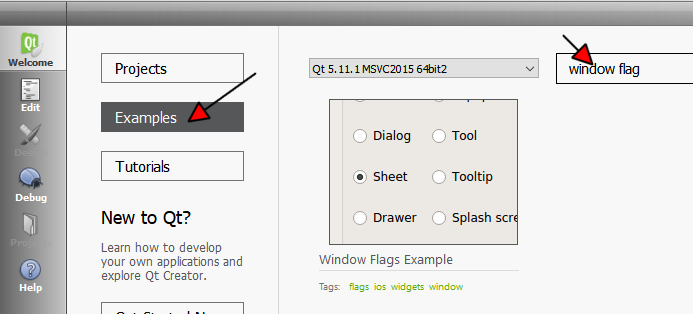
                              The samples are directly available in Creator with a normal install.
                              alt text

                              Sadly i cant help testing as i have no access to any Macs.

                              1 Reply Last reply
                              0
                              • SPlattenS Offline
                                SPlattenS Offline
                                SPlatten
                                wrote on last edited by
                                #17

                                The point is Qt is supposed to be multi-platform, I don't have a Windows PC or Linux, only Mac's and clearly it doesn't appear to work.

                                Kind Regards,
                                Sy

                                mrjjM 1 Reply Last reply
                                0
                                • SPlattenS SPlatten

                                  The point is Qt is supposed to be multi-platform, I don't have a Windows PC or Linux, only Mac's and clearly it doesn't appear to work.

                                  mrjjM Offline
                                  mrjjM Offline
                                  mrjj
                                  Lifetime Qt Champion
                                  wrote on last edited by mrjj
                                  #18

                                  @SPlatten
                                  Well not all hints are supported on all platforms.
                                  The name is often a give away
                                  like Qt::MSWindowsFixedSizeDialogHint
                                  Note the MS in front.
                                  or like X11BypassWindowManagerHint which is for linux / X11
                                  Its mention here.
                                  http://doc.qt.io/qt-5/qt.html#WindowType-enum

                                  The MSWindowsFixedSizeDialogHint do work on Windows.
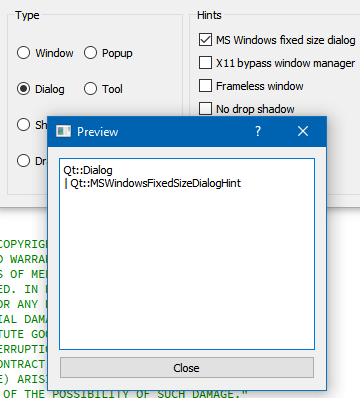
                                  alt text

                                  1 Reply Last reply
                                  1
                                  • SPlattenS Offline
                                    SPlattenS Offline
                                    SPlatten
                                    wrote on last edited by
                                    #19

                                    Sorry, for a product as mature as Qt this isn't what I would expect, I know this kind of thing is perfectly possible, just Qt doesn't currently work correctly.

                                    Kind Regards,
                                    Sy

                                    mrjjM 1 Reply Last reply
                                    0
                                    • SPlattenS SPlatten

                                      Sorry, for a product as mature as Qt this isn't what I would expect, I know this kind of thing is perfectly possible, just Qt doesn't currently work correctly.

                                      mrjjM Offline
                                      mrjjM Offline
                                      mrjj
                                      Lifetime Qt Champion
                                      wrote on last edited by
                                      #20

                                      @SPlatten
                                      Well it depends on platform and the Windows manger in use.
                                      Some combinations are not possible in Windows either.
                                      Also some windows mangers on linux also ignore certain Hints.
                                      You are aware that Qt does not draw the decorations by its self ?
                                      Its handled by the OS and might not offer any way to apply it
                                      and Qt would have to resort to custom drawn decorations.

                                      1 Reply Last reply
                                      1
                                      • SPlattenS Offline
                                        SPlattenS Offline
                                        SPlatten
                                        wrote on last edited by SPlatten
                                        #21

                                        The fact that it can be done using Xcode means its very possible go do, if Qt didn't rush out quite so many versions, the quality control would be better and the releases more functional.

                                        I'm a big fan of Qt and have used licensed versions of Qt for defence applications, licenses are not cheap and considering the money involved i would be a seriously disappointed by this show stopping lack of functionality.

                                        In less than 2 years I've seen Qt go from 5.1 to 5.11 and still going, releases seem to come out very frequently, which is good in one sense but at what cost?

                                        Kind Regards,
                                        Sy

                                        mrjjM 1 Reply Last reply
                                        0
                                        • SPlattenS SPlatten

                                          The fact that it can be done using Xcode means its very possible go do, if Qt didn't rush out quite so many versions, the quality control would be better and the releases more functional.

                                          I'm a big fan of Qt and have used licensed versions of Qt for defence applications, licenses are not cheap and considering the money involved i would be a seriously disappointed by this show stopping lack of functionality.

                                          In less than 2 years I've seen Qt go from 5.1 to 5.11 and still going, releases seem to come out very frequently, which is good in one sense but at what cost?

                                          mrjjM Offline
                                          mrjjM Offline
                                          mrjj
                                          Lifetime Qt Champion
                                          wrote on last edited by
                                          #22

                                          Well i can relate to that. Personally i would rather have more
                                          QWidgets/Desktop than 3D and QML/Mobile but
                                          the commercial side of Qt must try to focus on the marked
                                          trends.

                                          1 Reply Last reply
                                          0

                                          • Login

                                          • Login or register to search.
                                          • First post
                                            Last post
                                          0
                                          • Categories
                                          • Recent
                                          • Tags
                                          • Popular
                                          • Users
                                          • Groups
                                          • Search
                                          • Get Qt Extensions
                                          • Unsolved