Skip to content
  • Categories
  • Recent
  • Tags
  • Popular
  • Users
  • Groups
  • Search
  • Get Qt Extensions
  • Unsolved
Collapse
Brand Logo
  1. Home
  2. Qt Development
  3. Mobile and Embedded
  4. Qt iOS kit configuration trouble
Forum Updated to NodeBB v4.3 + New Features

Qt iOS kit configuration trouble

Scheduled Pinned Locked Moved Solved Mobile and Embedded
10 Posts 4 Posters 2.3k Views
  • Oldest to Newest
  • Newest to Oldest
  • Most Votes
Reply
  • Reply as topic
Log in to reply
This topic has been deleted. Only users with topic management privileges can see it.
  • O Offline
    O Offline
    Ovidiu Vasilca
    wrote on last edited by
    #1

    Hi!

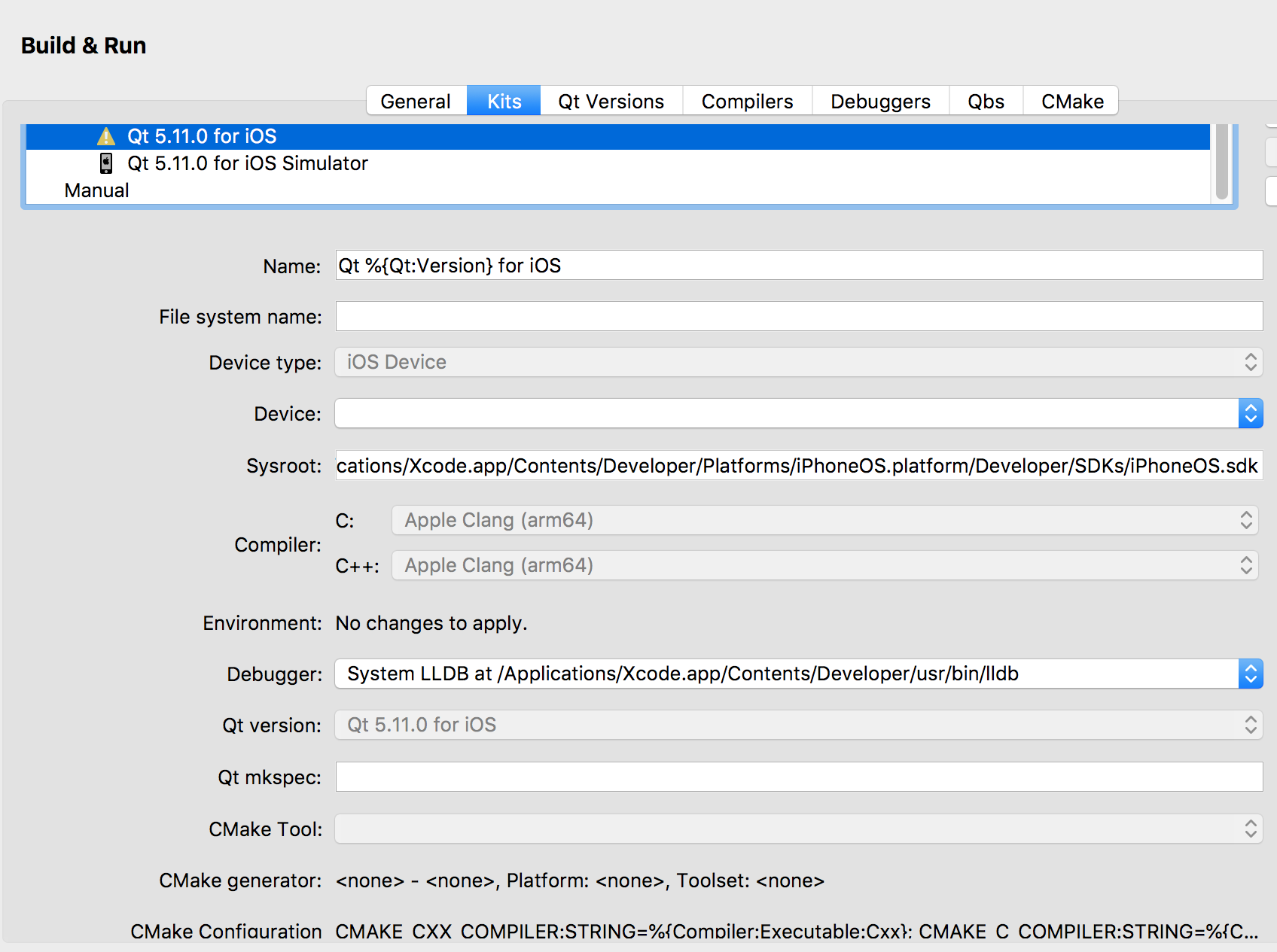
    I have problems with building apps for ios devices. I think my ios kit isn't configured properly.
    Thanks in advance !
    0_1528961925318_ios_config.png 0_1528962036616_config.png

    jsulmJ J.HilkJ 2 Replies Last reply
    0
    • O Ovidiu Vasilca

      Hi!

      I have problems with building apps for ios devices. I think my ios kit isn't configured properly.
      Thanks in advance !

      0_1528961925318_ios_config.png 0_1528962036616_config.png

      jsulmJ Offline
      jsulmJ Offline
      jsulm
      Lifetime Qt Champion
      wrote on last edited by
      #2

      @Ovidiu-Vasilca What exact problems do you have?
      You did not configure the device in this Kit.

      https://forum.qt.io/topic/113070/qt-code-of-conduct

      1 Reply Last reply
      0
      • O Ovidiu Vasilca

        Hi!

        I have problems with building apps for ios devices. I think my ios kit isn't configured properly.
        Thanks in advance !

        0_1528961925318_ios_config.png 0_1528962036616_config.png

        J.HilkJ Offline
        J.HilkJ Offline
        J.Hilk
        Moderators
        wrote on last edited by
        #3

        @Ovidiu-Vasilca qt doesn't do the device configuration for.
        IIRC you'll have to register and configure your device in the AppleDeveloper portal. Or via Xcode, that one has an API to the portal.


        Be aware of the Qt Code of Conduct, when posting : https://forum.qt.io/topic/113070/qt-code-of-conduct


        Q: What's that?
        A: It's blue light.
        Q: What does it do?
        A: It turns blue.

        1 Reply Last reply
        1
        • O Offline
          O Offline
          Ovidiu Vasilca
          wrote on last edited by
          #4

          True that, but there is no device that can be selected (dropdown list is empty).

          1 Reply Last reply
          0
          • O Offline
            O Offline
            Ovidiu Vasilca
            wrote on last edited by
            #5

            When is try to build an app, i have the following logs:

            ** BUILD FAILED **

            The following build commands failed:
            Check dependencies
            (1 failure)
            make: *** [xcodebuild-debug-device] Error 65
            The process "/usr/bin/make" exited with code 2.
            Error while building/deploying project Confirm (kit: Qt 5.11.0 for iOS)
            The kit Qt 5.11.0 for iOS has configuration issues which might be the root cause for this problem.
            When executing step "Make"

            jsulmJ 1 Reply Last reply
            0
            • O Ovidiu Vasilca

              When is try to build an app, i have the following logs:

              ** BUILD FAILED **

              The following build commands failed:
              Check dependencies
              (1 failure)
              make: *** [xcodebuild-debug-device] Error 65
              The process "/usr/bin/make" exited with code 2.
              Error while building/deploying project Confirm (kit: Qt 5.11.0 for iOS)
              The kit Qt 5.11.0 for iOS has configuration issues which might be the root cause for this problem.
              When executing step "Make"

              jsulmJ Offline
              jsulmJ Offline
              jsulm
              Lifetime Qt Champion
              wrote on last edited by
              #6

              @Ovidiu-Vasilca said in Qt iOS kit configuration trouble:

              ** BUILD FAILED **

              What is before this line? What you posted does not contain the actual error.

              https://forum.qt.io/topic/113070/qt-code-of-conduct

              1 Reply Last reply
              0
              • O Offline
                O Offline
                Ovidiu Vasilca
                wrote on last edited by
                #7

                @jsulm
                I think these lines you requested:

                === BUILD TARGET 40Q OF PROJECT 40Q WITH CONFIGURATION Debug ===

                Check dependencies
                Code Signing Error: No profiles for 'com.yourcompany.-0Q' were found: Xcode couldn't find any iOS App Development provisioning profiles matching 'com.yourcompany.-0Q'. Automatic signing is disabled and unable to generate a profile. To enable automatic signing, pass -allowProvisioningUpdates to xcodebuild.
                Code Signing Error: Code signing is required for product type 'Application' in SDK 'iOS 11.4'

                jsulmJ 1 Reply Last reply
                0
                • O Ovidiu Vasilca

                  @jsulm
                  I think these lines you requested:

                  === BUILD TARGET 40Q OF PROJECT 40Q WITH CONFIGURATION Debug ===

                  Check dependencies
                  Code Signing Error: No profiles for 'com.yourcompany.-0Q' were found: Xcode couldn't find any iOS App Development provisioning profiles matching 'com.yourcompany.-0Q'. Automatic signing is disabled and unable to generate a profile. To enable automatic signing, pass -allowProvisioningUpdates to xcodebuild.
                  Code Signing Error: Code signing is required for product type 'Application' in SDK 'iOS 11.4'

                  jsulmJ Offline
                  jsulmJ Offline
                  jsulm
                  Lifetime Qt Champion
                  wrote on last edited by
                  #8

                  @Ovidiu-Vasilca I guess you need to do what @J-Hilk suggested

                  https://forum.qt.io/topic/113070/qt-code-of-conduct

                  1 Reply Last reply
                  0
                  • O Offline
                    O Offline
                    Ovidiu Vasilca
                    wrote on last edited by
                    #9

                    [SOLVED]
                    I did what @J-Hilk suggested and that solved my problems.

                    1 Reply Last reply
                    0
                    • K Offline
                      K Offline
                      kburak
                      wrote on last edited by kburak
                      #10

                      Hi @Ovidiu-Vasilca,

                      I have the same problem for iOS kit. There is an exclamation mark. I use the QT 5.9.7 version on my MacBook for one of our old projects because of some reasons. The platforms' versions like below:

                      MacOS : Big Sur (version 11.3.1)
                      QT version : version 5.9.7
                      QT Creator : version 4.7.1
                      Xcode : version 11.0 (11A420a)

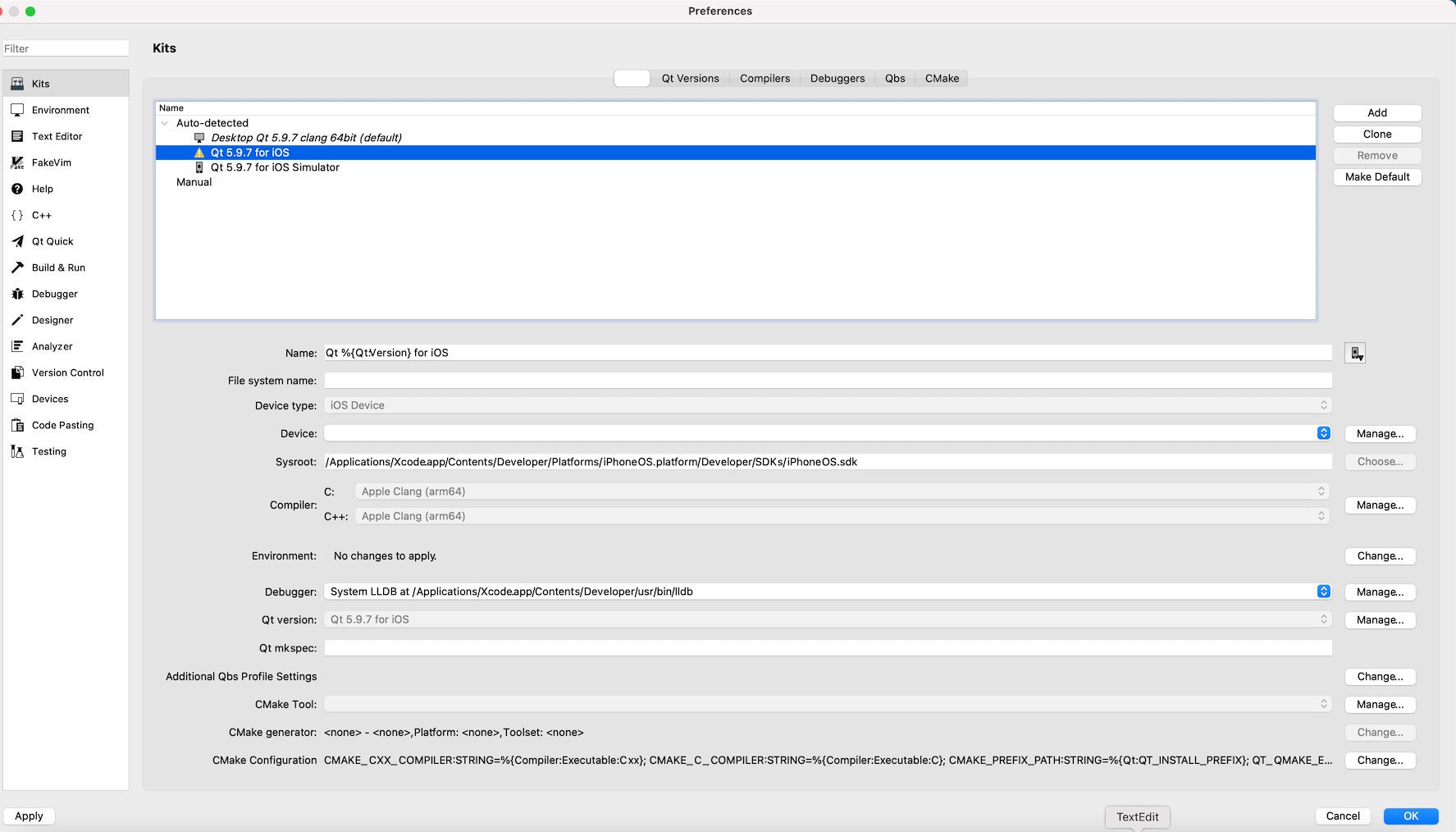
                      My QT Kit screen is like this:

                      ioscopy.png

                      And Comoliers tab is like below :

                      icop2.png

                      Could you tell me how could you register and configure your device in the AppleDeveloper portal?
                      What does it mean "your device"? It means "your MacBook"?

                      Could you give me some a hand?

                      Thanks in advance.

                      Kerem

                      1 Reply Last reply
                      0

                      • Login

                      • Login or register to search.
                      • First post
                        Last post
                      0
                      • Categories
                      • Recent
                      • Tags
                      • Popular
                      • Users
                      • Groups
                      • Search
                      • Get Qt Extensions
                      • Unsolved