
Still trying to Deploy... using windeployqt.exe
-
Hi,
I have used windeployqt.exe to deploy my app.My probleme was, when i run my application nothing happends ... no error message. It is not visible in Process Explorer. It just doesn't run.
-please see my previous 'Topic' : https://forum.qt.io/topic/87600/windeployqt-exe-vs-depends-exe : ~SOLVEDNow, as added 2 or 3 mlissing dlls, my applications starts correctly !
But i still have a probleme : it only starts correctly on my PC (where i have Qt install etc ...), if i copy my app to another PC, i still have not running application, no error message, nothing..
Can someone help me please ?
-
@LeLev Have you checked
Windows Event Viewerto see if any errors are reported there?I have had instances where Qt applications fail to start on other machines - usually, the solution comes from either installing Microsoft Visual C++ Runtime or ensuring that I have the
platforms\qwindows.dllfiles in the application directory. -
@LeLev Have you checked
Windows Event Viewerto see if any errors are reported there?I have had instances where Qt applications fail to start on other machines - usually, the solution comes from either installing Microsoft Visual C++ Runtime or ensuring that I have the
platforms\qwindows.dllfiles in the application directory. -
@webzoid Thx,I haven't thought about Windows Event Viewer.. , I will check then give you a feedback tomorrow.
@LeLev Which "2 or 3" dll's are missing then? are they always the same one or is a random thing?
how do you run windeployqt and how do your build paths look in relation to it when you run it?
As @LeLev says you may need to copy MVC runtime dll and any other stuff that windeployqt does not now about. -
If I understand correctly, when you run the app on windows no error message or no UI comes. It means that your application is running and UI does not come up. Most probably Qt 'platforms' plugins could be missing in the new box. Just ensure that your copy these platforms plugin directory also.
-
Thank you for answers
@webzoid unfortunately nothing interesting in Windows Event Viewer.
@kenchan So with windeployqt.exe i had :
bearer / iconengines / imageformats platforminputcontexts / platforms / qmltooling / styles / translations
D3Dcompiler_47.dll / libEGL.dll / libgcc_s_dw2-1.dll / libGLESV2.dll / libstdc++-6.dll / libwinpthread-1.dll / opengl32sw.dll /Qt5Core.dll / Qt5Gui.dll / Qt5Network.dll / Qt5Qml.dll / Qt5Quick.dll / Qt5Svg.dll / Qt5Widgets.dll / myApp.exeWith this my application was not running (and no error message ) even on my developpement pc
I sorted, now i have :
bearer / iconengines / imageformats platforminputcontexts / platforms / qmltooling / styles / translations
libstdc++-6.dll / Qt5Core.dll / Qt5Gui.dll / Qt5Network.dll / Qt5Quick.dll / Qt5QuickControls2.dll /Qt5QuickTemplates2.dll / myApp.exeand now my app starts correctly, but only on my dev pc
@dheerendra said in Still trying to Deploy... using windeployqt.exe:
It means that your application is running and UI does not come up
As i said application is not visible in Process Explorer, so is it possible ?
and inside platforms there are : qwindows.dll/qwebgl.dll/qoffscreen.dll/qminimal.dllThx
-
Thank you for answers
@webzoid unfortunately nothing interesting in Windows Event Viewer.
@kenchan So with windeployqt.exe i had :
bearer / iconengines / imageformats platforminputcontexts / platforms / qmltooling / styles / translations
D3Dcompiler_47.dll / libEGL.dll / libgcc_s_dw2-1.dll / libGLESV2.dll / libstdc++-6.dll / libwinpthread-1.dll / opengl32sw.dll /Qt5Core.dll / Qt5Gui.dll / Qt5Network.dll / Qt5Qml.dll / Qt5Quick.dll / Qt5Svg.dll / Qt5Widgets.dll / myApp.exeWith this my application was not running (and no error message ) even on my developpement pc
I sorted, now i have :
bearer / iconengines / imageformats platforminputcontexts / platforms / qmltooling / styles / translations
libstdc++-6.dll / Qt5Core.dll / Qt5Gui.dll / Qt5Network.dll / Qt5Quick.dll / Qt5QuickControls2.dll /Qt5QuickTemplates2.dll / myApp.exeand now my app starts correctly, but only on my dev pc
@dheerendra said in Still trying to Deploy... using windeployqt.exe:
It means that your application is running and UI does not come up
As i said application is not visible in Process Explorer, so is it possible ?
and inside platforms there are : qwindows.dll/qwebgl.dll/qoffscreen.dll/qminimal.dllThx
-
@LeLev have you tried running procmon with your app? it might give you a clue as what it is doing an when it dies.
https://technet.microsoft.com/sysinternals/processmonitor.aspx@kenchan THX.
There are more than 1000 operations about my application when i run procmon and then try to run my app.Most of time result is SUCCESS
But i have this :
OPERATION : CreateFile
PATH :C:\Users\lev\Desktop\winDep\QtQuick.2.8
RESULT: NAME NOT FOUND Desired Access: Read
OPERATION :CreateFile
PATH : C:\Users\lev\Desktop\winDep\qml\QtQuick.2.8
RESULT : PATH NOT FOUND Desired Access: Read Attributes
OPERATION: CreateFile
PATH : C:\Users\lev\Desktop\winDep\QtQuick.2 NAME NOT FOUND Desired Access: Read Attributes,
OPERATION: CreateFile
PATH : C:\Users\lev\Desktop\winDep\QtQuick\Window.2.2 PATH NOT FOUNDI have PATH NOT FOUND on every Qt module and even my Classes
in my code i have
qmlRegisterType<ClientCN16K>("com.Meca.ua.cn16k",1,0,"MecaUAClient");
qmlRegisterType<Machine>("com.Meca.ua.cn16k",1,0,"Machine");
and procmon says :
OPERATION : CreateFile
PATH: C:\Users\lev\Desktop\winDep\com\Meca\ua\cn16k.1.0
RESULT : PATH NOT FOUND Desired Access: Read Attributes, Disposition: Open, Options: Open Reparse Point, Attributes: n/a, ShareMode: Read, Write, Delete, AllocationSize: n/aOPERATION CreateFile
PATH :C:\Users\lev\Desktop\winDep\com\Meca\ua\cn16k.1.0
RESULT : ATH NOT FOUND Desired Access: Read Attributes, Disposition: Open, Options: Open Reparse Point, Attributes: n/a, ShareMode: Read, Write, Delete, AllocationSize: n/aOPERATION CreateFile
PATH :C:\Users\lev\Desktop\winDep\com\Meca\ua.1.0\cn16k
RESULT : PATH NOT FOUND Desired Access: Read Attributes, Disposition: Open, Options: Open Reparse Point, Attributes: n/a, ShareMode: Read, Write, Delete, AllocationSize: n/a...
-
@kenchan THX.
There are more than 1000 operations about my application when i run procmon and then try to run my app.Most of time result is SUCCESS
But i have this :
OPERATION : CreateFile
PATH :C:\Users\lev\Desktop\winDep\QtQuick.2.8
RESULT: NAME NOT FOUND Desired Access: Read
OPERATION :CreateFile
PATH : C:\Users\lev\Desktop\winDep\qml\QtQuick.2.8
RESULT : PATH NOT FOUND Desired Access: Read Attributes
OPERATION: CreateFile
PATH : C:\Users\lev\Desktop\winDep\QtQuick.2 NAME NOT FOUND Desired Access: Read Attributes,
OPERATION: CreateFile
PATH : C:\Users\lev\Desktop\winDep\QtQuick\Window.2.2 PATH NOT FOUNDI have PATH NOT FOUND on every Qt module and even my Classes
in my code i have
qmlRegisterType<ClientCN16K>("com.Meca.ua.cn16k",1,0,"MecaUAClient");
qmlRegisterType<Machine>("com.Meca.ua.cn16k",1,0,"Machine");
and procmon says :
OPERATION : CreateFile
PATH: C:\Users\lev\Desktop\winDep\com\Meca\ua\cn16k.1.0
RESULT : PATH NOT FOUND Desired Access: Read Attributes, Disposition: Open, Options: Open Reparse Point, Attributes: n/a, ShareMode: Read, Write, Delete, AllocationSize: n/aOPERATION CreateFile
PATH :C:\Users\lev\Desktop\winDep\com\Meca\ua\cn16k.1.0
RESULT : ATH NOT FOUND Desired Access: Read Attributes, Disposition: Open, Options: Open Reparse Point, Attributes: n/a, ShareMode: Read, Write, Delete, AllocationSize: n/aOPERATION CreateFile
PATH :C:\Users\lev\Desktop\winDep\com\Meca\ua.1.0\cn16k
RESULT : PATH NOT FOUND Desired Access: Read Attributes, Disposition: Open, Options: Open Reparse Point, Attributes: n/a, ShareMode: Read, Write, Delete, AllocationSize: n/a...
-
To add my 2 cent,
Recently I had some issues with
windeployqtturned out, that all needed files were copied, but from the wrong directory.I ended up replacing all files and folders manualy, than the application worked.
-
windeployqt helps but it isn't a solution.
You should use qt.conf to setup where the qt app should search the plugins.
If you need a plugin that requires a specia qt dll, windeployqt can't help you. If you are using qml, the qml subfolder has to be added manually.
Please have a look at my qt apps, just to have an idea on how I share it.
http://www.denisgottardello.it/QtComPort/index.php
I normally add all the dlls and the plugins to prevent problems.Need programmers to hire?
www.labcsp.com
www.denisgottardello.it
GMT+1
Skype: mrdebug -
windeployqt helps but it isn't a solution.
You should use qt.conf to setup where the qt app should search the plugins.
If you need a plugin that requires a specia qt dll, windeployqt can't help you. If you are using qml, the qml subfolder has to be added manually.
Please have a look at my qt apps, just to have an idea on how I share it.
http://www.denisgottardello.it/QtComPort/index.php
I normally add all the dlls and the plugins to prevent problems.@mrdebug said in Still trying to Deploy... using windeployqt.exe:
If you are using qml, the qml subfolder has to be added manually.
Thx @mrdebug ! i just addes qml subfolder + qt.conf file
http://www.tripleboot.org/?p=536 //nice article Here
//qt.conf
[Paths]
Plugins=pluginsNow its workink perfectly!
Thank you very much everybody !
-
Hi,
Out of curiosity, which version of Qt and
windeployqtare you using ?Interested in AI ? www.idiap.ch
Please read the Qt Code of Conduct - https://forum.qt.io/topic/113070/qt-code-of-conduct -
@SGaist hello,
Im using Qt 5.10.0 MinGW32bit2
windeployqt 5.10.0.0Can someone tell me how to add 'Line number information' to get it in procmon please ?
Thanks
@LeLev
FYI, I found this tool quite useful when I first triedwindeployqt:
https://github.com/lucasg/Dependencies
This is a modern, open source version of the now obsoleteDependency Walker.Just open your .exe file (the one in your deployment folder) in it.
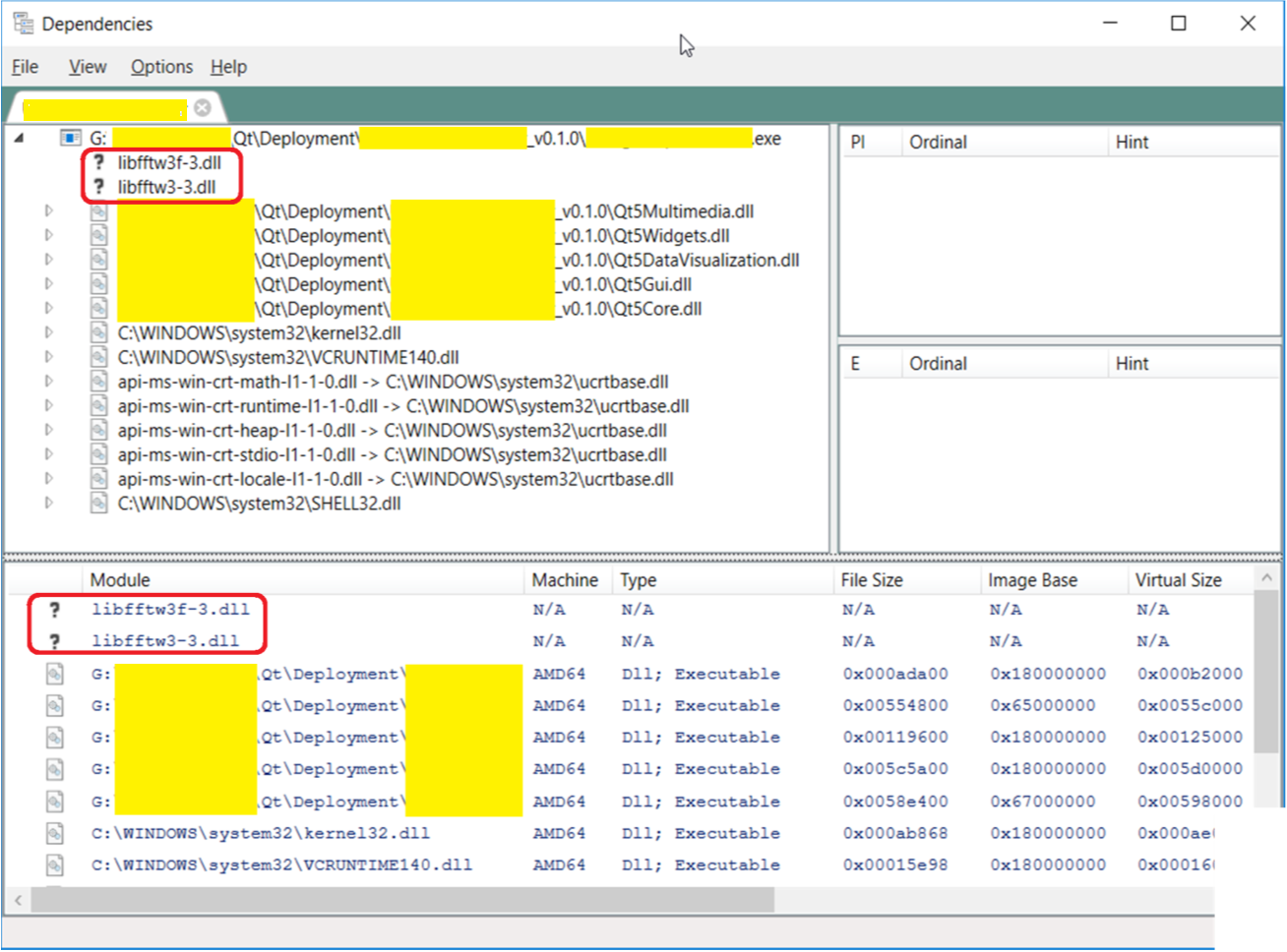
It showed that I forgot to copy my fftw dlls to my deployment folder... and shows the other system dll's it requires.
-
@LeLev
FYI, I found this tool quite useful when I first triedwindeployqt:
https://github.com/lucasg/Dependencies
This is a modern, open source version of the now obsoleteDependency Walker.Just open your .exe file (the one in your deployment folder) in it.
It showed that I forgot to copy my fftw dlls to my deployment folder... and shows the other system dll's it requires.
@Diracsbracket Thx. I will check that tool.
-
It's 2025 and I have the same problem with Windows 10 and Qt6.10. I really do wish this were automated in Qtcreator. I can't understand why that would be hard because, after all, Qtcreator must know where all the required dll files are or it couldn't run the user-developed app either. Why can't qtcreator perform the copying of the required dependencies automatically?
I gave up on windeployqt and now I just set the Windows path to enable the apps to find the dependencies. -
It's 2025 and I have the same problem with Windows 10 and Qt6.10. I really do wish this were automated in Qtcreator. I can't understand why that would be hard because, after all, Qtcreator must know where all the required dll files are or it couldn't run the user-developed app either. Why can't qtcreator perform the copying of the required dependencies automatically?
I gave up on windeployqt and now I just set the Windows path to enable the apps to find the dependencies.@montanaviking said in Still trying to Deploy... using windeployqt.exe:
It's 2025 and I have the same problem with Windows 10 and Qt6.10
I really do wish this were automated in QtcreatorCan Visual Studio or VSCode or any other IDE do this?!
Qtcreator must know where all the required dll files are or it couldn't run the user-developed app either.
QtC only knows if the paths were set beforehand... This is what your "kit" does.
If you mis-configure your kit... QtC knows nothing... how should it know?!


