Skip to content
  • Categories
  • Recent
  • Tags
  • Popular
  • Users
  • Groups
  • Search
  • Get Qt Extensions
  • Unsolved
Collapse
Brand Logo
  1. Home
  2. Qt Development
  3. General and Desktop
  4. A double buffering project
Qt 6.11 is out! See what's new in the release blog

A double buffering project

Scheduled Pinned Locked Moved Unsolved General and Desktop
14 Posts 3 Posters 5.0k Views 2 Watching
  • Oldest to Newest
  • Newest to Oldest
  • Most Votes
Reply
  • Reply as topic
Log in to reply
This topic has been deleted. Only users with topic management privileges can see it.
  • mrjjM Offline
    mrjjM Offline
    mrjj
    Lifetime Qt Champion
    wrote on last edited by mrjj
    #2

    Hi
    You could create a normal GUI project with mainwindow (using the wizard)
    The "Add New" option, you get clicking on a project top, then allows
    you to add .h and .cpp for a custom widget automatically.
    ( which plotter seems to be)
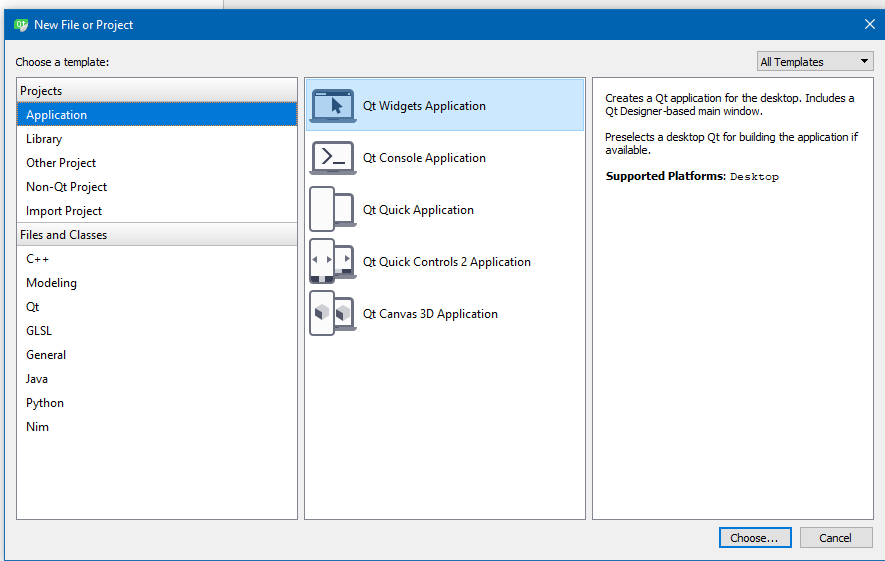
    alt text

    and then after getting the default project ( right click top of project )
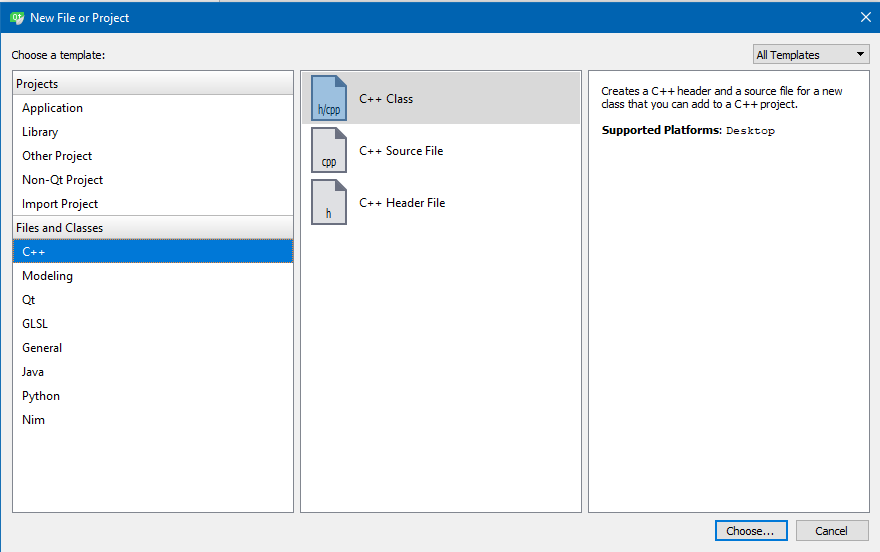
    alt text

    alt text

    For

    • We also reimplement minimumSizeHint() and sizeHint() from QWidget".

    You know from the base class you use for the custom widget.
    Anything marked virtual can be "reimplemented"

    tomyT 1 Reply Last reply
    3
    • tomyT tomy

      Hi,

      In this double buffering example, I've created the project this way:
      Creating a Plotter.h and writing its code onto it. Then adding another file Plotter.cpp to the corresponding project. The rest is adding the main.cpp file and running qMake for creating the .pro file. And finally running the project.

      I think it's not the way you would create that project and it's old-fashioned and also has problems (like not being able for the project to know the Qt built-in classes/functions).

      What is the way you use for creating projects like this?

      Another question is: below the first code on that link, it says: "We also reimplement minimumSizeHint() and sizeHint() from QWidget".
      How do we know if there is a built-in function like minimumSizeHint() or sizeHint() here, to use the word 'reimplementation' for that?

      Thanks.

      jsulmJ Offline
      jsulmJ Offline
      jsulm
      Lifetime Qt Champion
      wrote on last edited by
      #3

      @tomy said in A double buffering project:

      How do we know if there is a built-in function like minimumSizeHint() or sizeHint() here, to use the word 'reimplementation' for that?

      From Qt documentation

      https://forum.qt.io/topic/113070/qt-code-of-conduct

      1 Reply Last reply
      2
      • mrjjM mrjj

        Hi
        You could create a normal GUI project with mainwindow (using the wizard)
        The "Add New" option, you get clicking on a project top, then allows
        you to add .h and .cpp for a custom widget automatically.
        ( which plotter seems to be)

        alt text

        and then after getting the default project ( right click top of project )
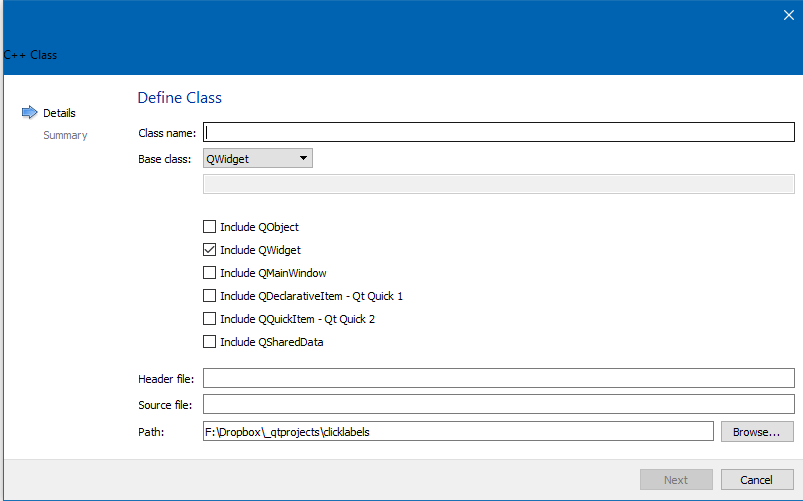
        alt text

        alt text

        For

        • We also reimplement minimumSizeHint() and sizeHint() from QWidget".

        You know from the base class you use for the custom widget.
        Anything marked virtual can be "reimplemented"

        tomyT Offline
        tomyT Offline
        tomy
        wrote on last edited by tomy
        #4

        @mrjj
        Hi,

        My base class wasn't QMainWindow. My class name was Plotter and the base class was QWidget, so I chose this in the Class Information window as the base class. There are three as base classes: QMainWindow, QWidget and QDialog. But what if a project's base class isn't any of them? Is the solution modifying the code afterwards?

        I unchecked the check box Generate form and Next and Finish. Now I have the following. Is it also a right way for creating that project in your opinion please?

        0_1511360804908_Capture.PNG

        You know from the base class you use for the custom widget.

        I went for Protected Functions section of QWidget (my base class in this example) on Help, and saw neither minimumSizeHint() nor sizeHint()! :(

        Anything marked virtual can be "reimplemented"

        As well as, neither of those two are under protected scope, but public, as shown above.

        jsulmJ 1 Reply Last reply
        0
        • tomyT tomy

          @mrjj
          Hi,

          My base class wasn't QMainWindow. My class name was Plotter and the base class was QWidget, so I chose this in the Class Information window as the base class. There are three as base classes: QMainWindow, QWidget and QDialog. But what if a project's base class isn't any of them? Is the solution modifying the code afterwards?

          I unchecked the check box Generate form and Next and Finish. Now I have the following. Is it also a right way for creating that project in your opinion please?

          0_1511360804908_Capture.PNG

          You know from the base class you use for the custom widget.

          I went for Protected Functions section of QWidget (my base class in this example) on Help, and saw neither minimumSizeHint() nor sizeHint()! :(

          Anything marked virtual can be "reimplemented"

          As well as, neither of those two are under protected scope, but public, as shown above.

          jsulmJ Offline
          jsulmJ Offline
          jsulm
          Lifetime Qt Champion
          wrote on last edited by
          #5

          @tomy said in A double buffering project:

          I went for Protected Functions section of QWidget (my base class in this example) on Help, and saw neither minimumSizeHint() nor sizeHint()! :(

          Really?
          Here it is: http://doc.qt.io/qt-5/qwidget.html#minimumSizeHint-prop and http://doc.qt.io/qt-5/qwidget.html#sizeHint-prop

          https://forum.qt.io/topic/113070/qt-code-of-conduct

          tomyT 1 Reply Last reply
          1
          • mrjjM Offline
            mrjjM Offline
            mrjj
            Lifetime Qt Champion
            wrote on last edited by
            #6

            Hi
            yes, its fine way.
            Besides those u can select in drop down, you can write a custom
            name in edit just below.
            However, if often better to use QWidget and just change classname 2 places if
            its not QWidget as else the constructor is not fully created. ( with custom name)

            1 Reply Last reply
            1
            • jsulmJ jsulm

              @tomy said in A double buffering project:

              I went for Protected Functions section of QWidget (my base class in this example) on Help, and saw neither minimumSizeHint() nor sizeHint()! :(

              Really?
              Here it is: http://doc.qt.io/qt-5/qwidget.html#minimumSizeHint-prop and http://doc.qt.io/qt-5/qwidget.html#sizeHint-prop

              tomyT Offline
              tomyT Offline
              tomy
              wrote on last edited by
              #7

              @jsulm

              Really?

              Yes.

              0_1511366182763_1.PNG

              0_1511366204987_2.PNG

              So why aren't they on the Help menu!?

              mrjjM 1 Reply Last reply
              0
              • tomyT tomy

                @jsulm

                Really?

                Yes.

                0_1511366182763_1.PNG

                0_1511366204987_2.PNG

                So why aren't they on the Help menu!?

                mrjjM Offline
                mrjjM Offline
                mrjj
                Lifetime Qt Champion
                wrote on last edited by
                #8

                @tomy
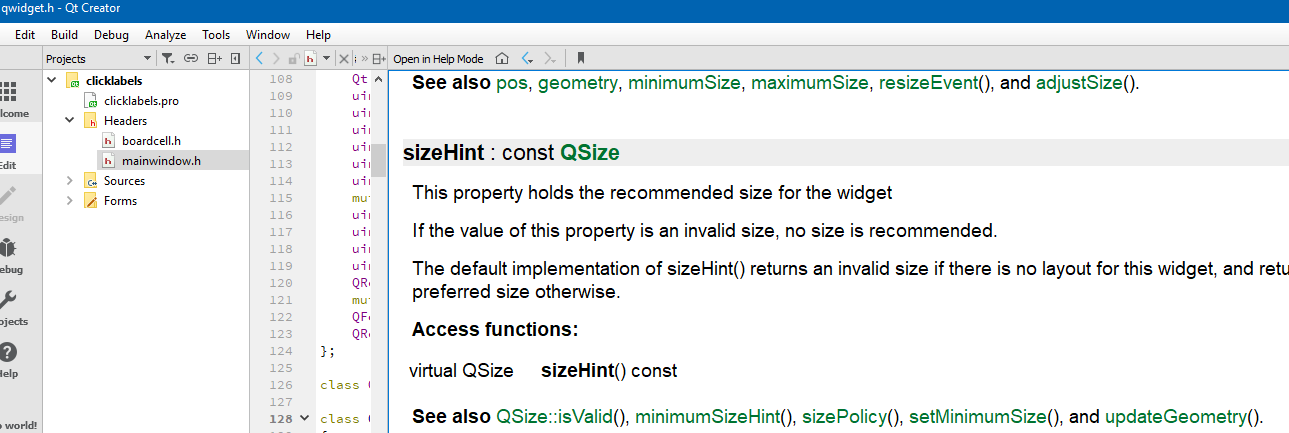
                But they are ?!
                alt text

                tomyT 1 Reply Last reply
                0
                • mrjjM mrjj

                  @tomy
                  But they are ?!
                  alt text

                  tomyT Offline
                  tomyT Offline
                  tomy
                  wrote on last edited by tomy
                  #9

                  @mrjj
                  Would you Open it in Help mode?
                  I pressed F1 on QWidget.

                  EDITED:

                  I found them. They are on Public functions (not Protected!) :(
                  So we can re-implement public functions too!

                  mrjjM 1 Reply Last reply
                  0
                  • tomyT tomy

                    @mrjj
                    Would you Open it in Help mode?
                    I pressed F1 on QWidget.

                    EDITED:

                    I found them. They are on Public functions (not Protected!) :(
                    So we can re-implement public functions too!

                    mrjjM Offline
                    mrjjM Offline
                    mrjj
                    Lifetime Qt Champion
                    wrote on last edited by
                    #10

                    @tomy
                    Yes, its not important if placed under public, protected, private.
                    Its the virtual keyword that is important.
                    That is a key feature of c++.
                    It allows polymorphism.
                    http://www.cplusplus.com/doc/tutorial/polymorphism/

                    tomyT 1 Reply Last reply
                    3
                    • mrjjM mrjj

                      @tomy
                      Yes, its not important if placed under public, protected, private.
                      Its the virtual keyword that is important.
                      That is a key feature of c++.
                      It allows polymorphism.
                      http://www.cplusplus.com/doc/tutorial/polymorphism/

                      tomyT Offline
                      tomyT Offline
                      tomy
                      wrote on last edited by
                      #11

                      @mrjj
                      OK, thanks.

                      mrjjM 1 Reply Last reply
                      0
                      • tomyT tomy

                        @mrjj
                        OK, thanks.

                        mrjjM Offline
                        mrjjM Offline
                        mrjj
                        Lifetime Qt Champion
                        wrote on last edited by
                        #12

                        @tomy
                        Its a good concept to master.
                        It allows to have many types and have them in a list mixed.
                        and instead of having to do to

                        if ( current.type == TypeX )
                        call TypeX_Something
                        if ( current.type == TypeY )
                        call TypeY_Something
                        ...

                        the compiler will do that for you and you can just call

                        TypeX->Something

                        and compiler have made sure its correct type you actually call on.

                        So its used in many cases to achieve good design.

                        tomyT 1 Reply Last reply
                        0
                        • mrjjM mrjj

                          @tomy
                          Its a good concept to master.
                          It allows to have many types and have them in a list mixed.
                          and instead of having to do to

                          if ( current.type == TypeX )
                          call TypeX_Something
                          if ( current.type == TypeY )
                          call TypeY_Something
                          ...

                          the compiler will do that for you and you can just call

                          TypeX->Something

                          and compiler have made sure its correct type you actually call on.

                          So its used in many cases to achieve good design.

                          tomyT Offline
                          tomyT Offline
                          tomy
                          wrote on last edited by tomy
                          #13

                          @mrjj
                          Thanks mrjj, but unfortunately I couldn't understand that good concept.
                          Are you talking about virtual functions?

                          mrjjM 1 Reply Last reply
                          0
                          • tomyT tomy

                            @mrjj
                            Thanks mrjj, but unfortunately I couldn't understand that good concept.
                            Are you talking about virtual functions?

                            mrjjM Offline
                            mrjjM Offline
                            mrjj
                            Lifetime Qt Champion
                            wrote on last edited by
                            #14

                            @tomy
                            Yes, virtual function are a way to archive polymorphism.

                            1 Reply Last reply
                            1

                            • Login

                            • Login or register to search.
                            • First post
                              Last post
                            0
                            • Categories
                            • Recent
                            • Tags
                            • Popular
                            • Users
                            • Groups
                            • Search
                            • Get Qt Extensions
                            • Unsolved