
Skip to content
  • Categories
  • Recent
  • Tags
  • Popular
  • Users
  • Groups
  • Search
  • Get Qt Extensions
  • Unsolved
Collapse
Brand Logo
  1. Home
  2. Qt Development
  3. Qt for Python
  4. Allowed areas for QDockWidgets
Qt 6.11 is out! See what's new in the release blog

Allowed areas for QDockWidgets

Scheduled Pinned Locked Moved Unsolved Qt for Python
7 Posts 2 Posters 1.6k Views 1 Watching
  • Oldest to Newest
  • Newest to Oldest
  • Most Votes
Reply
  • Reply as topic
Log in to reply
This topic has been deleted. Only users with topic management privileges can see it.
  • M Offline
    M Offline
    MakiMH3
    wrote on last edited by
    #1

    Hello,

    I have a main window composed of several other main windows. Each of these main windows has at least one dock. I am wondering how to manage the distribution of the docks inside a specific main window. Specifically, I want to be able to distribute them flexibly, placing a dock at the top, bottom, left, or right, without binding it to a specific position, allowing for dynamic positioning in any of these four locations.

    1 Reply Last reply
    0
    • SGaistS Offline
      SGaistS Offline
      SGaist
      Lifetime Qt Champion
      wrote on last edited by
      #2

      Hi and welcome to devnet,

      The default value of the allowedAreas property of QDockWidget is AllDockWidgetAreas so it should already cover your needs.

      Interested in AI ? www.idiap.ch
      Please read the Qt Code of Conduct - https://forum.qt.io/topic/113070/qt-code-of-conduct

      1 Reply Last reply
      0
      • M Offline
        M Offline
        MakiMH3
        wrote on last edited by MakiMH3
        #3

        Hi,

        First of all thank you for taking the time to answer my question, but... When I add the Dock to the main window, am I not forced to choose an area when calling the 'addDockWidget' method?

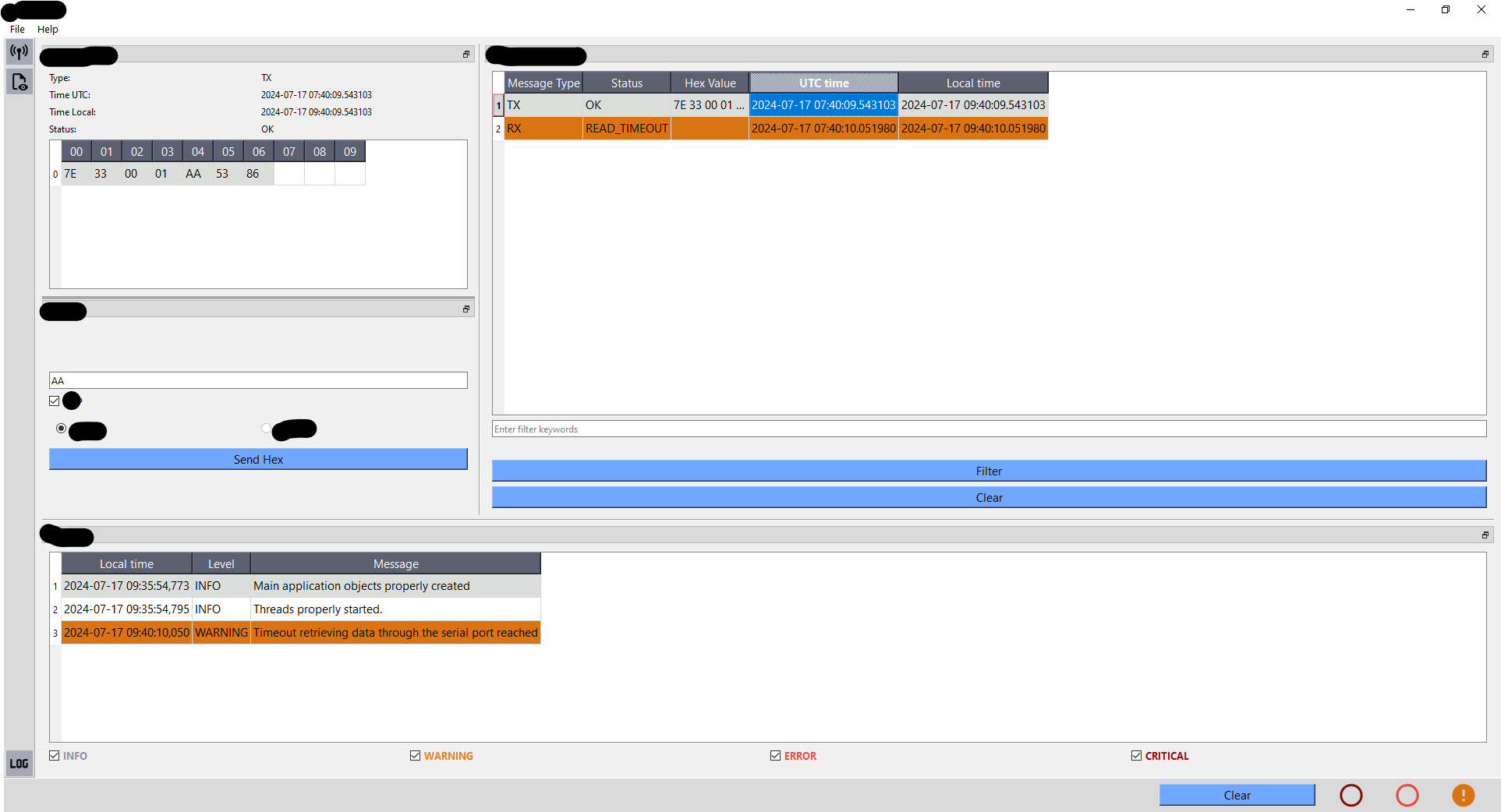
        This is a picture of my main window. It consists of a number of main windows, one at the bottom and two more at the top, one on the left and the other on the right. Right now I have 2 docks on the left main window and I want to be able to position them wherever I want within that main window. For example, I would like to move the dock containing the small table so that it is located to the left of the dock with the 'Send Hex' button and then being able to relocate that dock to the bottom of the other and then to the right... I am not sure if i'm being able to explain it clearly...
        7d15f89a-a835-4263-b557-d08dec3f39fd-image.png

        1 Reply Last reply
        0
        • SGaistS Offline
          SGaistS Offline
          SGaist
          Lifetime Qt Champion
          wrote on last edited by
          #4

          Yes you have to set the initial area, but nothing stops you from changing it afterward. You can even have several docks in the same area, they will be tabified.

          Interested in AI ? www.idiap.ch
          Please read the Qt Code of Conduct - https://forum.qt.io/topic/113070/qt-code-of-conduct

          1 Reply Last reply
          0
          • M Offline
            M Offline
            MakiMH3
            wrote on last edited by MakiMH3
            #5

            It appears I may be doing something incorrectly. I can change the position of the dock widgets, but they are constrained to either top/bottom or left/right orientations. For instance, I am unable to move a widget from the top position to the left position.

            ba33be29-bdc2-4e31-ae99-9655e8d90b01-image.png

            I have created a custom QMainWindow class to perform additional functions my code requires, which is why it may appear different than usual. When I add the docks to the main window and launch the application, they are initially positioned top/bottom. I can then change their position to left/right, but I cannot reposition them to be one above the other. The only time they are displayed this way is at the initial launch of the application.

            I have tried a lot of things but nothing seems to work. It is not a requirement for the docks can move to all position, but it would be pretty nice to have that.

            Thanks again :)

            1 Reply Last reply
            0
            • SGaistS Offline
              SGaistS Offline
              SGaist
              Lifetime Qt Champion
              wrote on last edited by
              #6

              You might want to check KDAB's KDDockWidgets. It's more flexible and might better suit your plans.

              Interested in AI ? www.idiap.ch
              Please read the Qt Code of Conduct - https://forum.qt.io/topic/113070/qt-code-of-conduct

              1 Reply Last reply
              0
              • M Offline
                M Offline
                MakiMH3
                wrote on last edited by
                #7

                I will check on it, thank you! :)

                1 Reply Last reply
                0

                • Login

                • Login or register to search.
                • First post
                  Last post
                0
                • Categories
                • Recent
                • Tags
                • Popular
                • Users
                • Groups
                • Search
                • Get Qt Extensions
                • Unsolved