Skip to content
  • Categories
  • Recent
  • Tags
  • Popular
  • Users
  • Groups
  • Search
  • Get Qt Extensions
  • Unsolved
Collapse
Brand Logo
  1. Home
  2. Qt Development
  3. General and Desktop
  4. Widget breaking at runtime
Forum Updated to NodeBB v4.3 + New Features

Widget breaking at runtime

Scheduled Pinned Locked Moved Solved General and Desktop
20 Posts 3 Posters 1.4k Views 1 Watching
  • Oldest to Newest
  • Newest to Oldest
  • Most Votes
Reply
  • Reply as topic
Log in to reply
This topic has been deleted. Only users with topic management privileges can see it.
  • benjysugiB Offline
    benjysugiB Offline
    benjysugi
    wrote on last edited by
    #1

    Hi,

    I've got a widget that I'm trying to display in a DockWidget but it's breaking at runtime but looks fine in the editor

    The widget:
    b0bdc565-8789-4485-b888-5b9e1043862f-image.png

    The way I'm displaying it:
    b69ba430-44dd-4693-aff2-0cbd2acafbf7-image.png

    How it looks at runtime:
    f39124ea-8c2f-4b39-8386-178734f6d232-image.png

    I'm very new to Qt as a whole so I might be doing this completely wrong.

    Thanks in advance

    1 Reply Last reply
    0
    • C Offline
      C Offline
      ChrisW67
      wrote on last edited by
      #19

      If the other buttons look "normal" and got that way because you applied a style sheet then it seems entirely likely that either:

      • that stylesheet has not been applied to this widget, or
      • the stylesshet has been applied but the selectors do not match this widget's buttons.
      benjysugiB 1 Reply Last reply
      2
      • SGaistS Offline
        SGaistS Offline
        SGaist
        Lifetime Qt Champion
        wrote on last edited by
        #2

        Hi and welcome to devnet,

        Why are you putting your custom widget in a QDockWidget to then put it as central widget ?
        I would remove that intermediate QDockWidget since it does not provide any benefit the way you use it.

        Interested in AI ? www.idiap.ch
        Please read the Qt Code of Conduct - https://forum.qt.io/topic/113070/qt-code-of-conduct

        benjysugiB 1 Reply Last reply
        0
        • SGaistS SGaist

          Hi and welcome to devnet,

          Why are you putting your custom widget in a QDockWidget to then put it as central widget ?
          I would remove that intermediate QDockWidget since it does not provide any benefit the way you use it.

          benjysugiB Offline
          benjysugiB Offline
          benjysugi
          wrote on last edited by
          #3

          @SGaist How would I go about doing that while still retaining the title bar like the rest of the dock widgets?

          1 Reply Last reply
          0
          • SGaistS Offline
            SGaistS Offline
            SGaist
            Lifetime Qt Champion
            wrote on last edited by
            #4

            Ok, it's a look you want for your application.

            Then let's start debugging:

            • does your widget show properly if you just show it alone ? i.e. you create it in your main.cpp ?
            • does it show properly if you just put it in a QDockWidget ?

            Interested in AI ? www.idiap.ch
            Please read the Qt Code of Conduct - https://forum.qt.io/topic/113070/qt-code-of-conduct

            benjysugiB 1 Reply Last reply
            0
            • SGaistS SGaist

              Ok, it's a look you want for your application.

              Then let's start debugging:

              • does your widget show properly if you just show it alone ? i.e. you create it in your main.cpp ?
              • does it show properly if you just put it in a QDockWidget ?
              benjysugiB Offline
              benjysugiB Offline
              benjysugi
              wrote on last edited by
              #5

              @SGaist

              It doesn't work properly if I show it alone
              f0d59c86-e416-4e0e-b0fb-de4cc17fce07-image.png

              1 Reply Last reply
              0
              • SGaistS Offline
                SGaistS Offline
                SGaist
                Lifetime Qt Champion
                wrote on last edited by
                #6

                So it's not related to your use of QDockWidget.

                It seems that all the images are missing.

                What is their paths ?

                Interested in AI ? www.idiap.ch
                Please read the Qt Code of Conduct - https://forum.qt.io/topic/113070/qt-code-of-conduct

                benjysugiB 1 Reply Last reply
                0
                • SGaistS SGaist

                  So it's not related to your use of QDockWidget.

                  It seems that all the images are missing.

                  What is their paths ?

                  benjysugiB Offline
                  benjysugiB Offline
                  benjysugi
                  wrote on last edited by
                  #7

                  @SGaist I've fixed the image problem, but it's still broken

                  75231760-1249-4551-b000-2005324549a4-image.png

                  1 Reply Last reply
                  0
                  • SGaistS Offline
                    SGaistS Offline
                    SGaist
                    Lifetime Qt Champion
                    wrote on last edited by
                    #8

                    Are you using layouts properly ?

                    Interested in AI ? www.idiap.ch
                    Please read the Qt Code of Conduct - https://forum.qt.io/topic/113070/qt-code-of-conduct

                    benjysugiB 1 Reply Last reply
                    0
                    • SGaistS SGaist

                      Are you using layouts properly ?

                      benjysugiB Offline
                      benjysugiB Offline
                      benjysugi
                      wrote on last edited by
                      #9

                      @SGaist I'm not sure, should I send the .ui file or something?
                      I'm also not sure why it looks like classic theme instead of how it looks in the designer

                      1 Reply Last reply
                      0
                      • SGaistS Offline
                        SGaistS Offline
                        SGaist
                        Lifetime Qt Champion
                        wrote on last edited by
                        #10

                        Which version of Qt are you using ?
                        On which platform ?

                        You can post the .ui file content here. Don't forget to use coding tags.

                        Interested in AI ? www.idiap.ch
                        Please read the Qt Code of Conduct - https://forum.qt.io/topic/113070/qt-code-of-conduct

                        benjysugiB 1 Reply Last reply
                        0
                        • SGaistS SGaist

                          Which version of Qt are you using ?
                          On which platform ?

                          You can post the .ui file content here. Don't forget to use coding tags.

                          benjysugiB Offline
                          benjysugiB Offline
                          benjysugi
                          wrote on last edited by
                          #11

                          @SGaist Qt 6.4.0 on Windows currently

                          <?xml version="1.0" encoding="UTF-8"?>
                          <ui version="4.0">
                           <class>viewport</class>
                           <widget class="QWidget" name="viewport">
                            <property name="geometry">
                             <rect>
                              <x>0</x>
                              <y>0</y>
                              <width>800</width>
                              <height>600</height>
                             </rect>
                            </property>
                            <property name="windowTitle">
                             <string>Form</string>
                            </property>
                            <property name="styleSheet">
                             <string notr="true"/>
                            </property>
                            <widget class="QWidget" name="horizontalLayoutWidget_2">
                             <property name="geometry">
                              <rect>
                               <x>0</x>
                               <y>0</y>
                               <width>802</width>
                               <height>80</height>
                              </rect>
                             </property>
                             <layout class="QHBoxLayout" name="horizontalLayout_2">
                              <item>
                               <layout class="QHBoxLayout" name="horizontalLayout_4">
                                <item>
                                 <layout class="QVBoxLayout" name="verticalLayout_2">
                                  <item>
                                   <layout class="QHBoxLayout" name="horizontalLayout_6">
                                    <item>
                                     <widget class="QToolButton" name="toolButton_6">
                                      <property name="text">
                                       <string>Perspective</string>
                                      </property>
                                     </widget>
                                    </item>
                                    <item>
                                     <widget class="QToolButton" name="toolButton">
                                      <property name="text">
                                       <string>Orthro</string>
                                      </property>
                                     </widget>
                                    </item>
                                    <item>
                                     <widget class="QToolButton" name="toolButton_7">
                                      <property name="text">
                                       <string>Persp SVw</string>
                                      </property>
                                     </widget>
                                    </item>
                                    <item>
                                     <widget class="QToolButton" name="toolButton_8">
                                      <property name="text">
                                       <string>Orthro SVw</string>
                                      </property>
                                     </widget>
                                    </item>
                                   </layout>
                                  </item>
                                  <item>
                                   <layout class="QHBoxLayout" name="horizontalLayout_5">
                                    <item>
                                     <layout class="QHBoxLayout" name="horizontalLayout_7">
                                      <item>
                                       <layout class="QHBoxLayout" name="horizontalLayout">
                                        <item>
                                         <widget class="QToolButton" name="toolButton_5">
                                          <property name="text">
                                           <string>...</string>
                                          </property>
                                          <property name="icon">
                                           <iconset resource="ats_styles.qrc">
                                            <normaloff>:/images/cursor-default (1).png</normaloff>:/images/cursor-default (1).png</iconset>
                                          </property>
                                         </widget>
                                        </item>
                                        <item>
                                         <widget class="QToolButton" name="toolButton_4">
                                          <property name="text">
                                           <string>...</string>
                                          </property>
                                          <property name="icon">
                                           <iconset resource="ats_styles.qrc">
                                            <normaloff>:/images/cursor-move.png</normaloff>:/images/cursor-move.png</iconset>
                                          </property>
                                         </widget>
                                        </item>
                                        <item>
                                         <widget class="QToolButton" name="toolButton_2">
                                          <property name="text">
                                           <string>...</string>
                                          </property>
                                          <property name="icon">
                                           <iconset resource="ats_styles.qrc">
                                            <normaloff>:/images/reload.png</normaloff>:/images/reload.png</iconset>
                                          </property>
                                         </widget>
                                        </item>
                                        <item>
                                         <widget class="QToolButton" name="toolButton_3">
                                          <property name="text">
                                           <string>...</string>
                                          </property>
                                          <property name="icon">
                                           <iconset resource="ats_styles.qrc">
                                            <normaloff>:/images/resize (1).png</normaloff>:/images/resize (1).png</iconset>
                                          </property>
                                         </widget>
                                        </item>
                                       </layout>
                                      </item>
                                      <item>
                                       <layout class="QHBoxLayout" name="horizontalLayout_8">
                                        <item>
                                         <layout class="QHBoxLayout" name="horizontalLayout_9">
                                          <item>
                                           <widget class="QToolButton" name="toolButton_12">
                                            <property name="text">
                                             <string>...</string>
                                            </property>
                                            <property name="icon">
                                             <iconset resource="ats_styles.qrc">
                                              <normaloff>:/images/axis-arrow-lock.png</normaloff>:/images/axis-arrow-lock.png</iconset>
                                            </property>
                                           </widget>
                                          </item>
                                          <item>
                                           <widget class="QToolButton" name="toolButton_14">
                                            <property name="text">
                                             <string>...</string>
                                            </property>
                                            <property name="icon">
                                             <iconset resource="ats_styles.qrc">
                                              <normaloff>:/images/arrow-left-bold.png</normaloff>:/images/arrow-left-bold.png</iconset>
                                            </property>
                                           </widget>
                                          </item>
                                          <item>
                                           <widget class="QToolButton" name="toolButton_13">
                                            <property name="text">
                                             <string>...</string>
                                            </property>
                                            <property name="icon">
                                             <iconset resource="ats_styles.qrc">
                                              <normaloff>:/images/arrow-right-bold.png</normaloff>:/images/arrow-right-bold.png</iconset>
                                            </property>
                                           </widget>
                                          </item>
                                          <item>
                                           <widget class="QToolButton" name="toolButton_10">
                                            <property name="text">
                                             <string>...</string>
                                            </property>
                                            <property name="icon">
                                             <iconset resource="ats_styles.qrc">
                                              <normaloff>:/images/film.png</normaloff>:/images/film.png</iconset>
                                            </property>
                                           </widget>
                                          </item>
                                          <item>
                                           <widget class="QToolButton" name="toolButton_11">
                                            <property name="text">
                                             <string>...</string>
                                            </property>
                                            <property name="icon">
                                             <iconset resource="ats_styles.qrc">
                                              <normaloff>:/images/magnify-plus-outline.png</normaloff>:/images/magnify-plus-outline.png</iconset>
                                            </property>
                                           </widget>
                                          </item>
                                          <item>
                                           <widget class="QToolButton" name="toolButton_9">
                                            <property name="text">
                                             <string>...</string>
                                            </property>
                                            <property name="icon">
                                             <iconset resource="ats_styles.qrc">
                                              <normaloff>:/images/magnify-minus-outline.png</normaloff>:/images/magnify-minus-outline.png</iconset>
                                            </property>
                                           </widget>
                                          </item>
                                         </layout>
                                        </item>
                                       </layout>
                                      </item>
                                     </layout>
                                    </item>
                                   </layout>
                                  </item>
                                 </layout>
                                </item>
                               </layout>
                              </item>
                              <item>
                               <layout class="QVBoxLayout" name="verticalLayout_3">
                                <item>
                                 <layout class="QVBoxLayout" name="verticalLayout_4">
                                  <item>
                                   <layout class="QHBoxLayout" name="horizontalLayout_11">
                                    <item>
                                     <widget class="QToolButton" name="toolButton_15">
                                      <property name="text">
                                       <string>AVisible</string>
                                      </property>
                                     </widget>
                                    </item>
                                    <item>
                                     <widget class="QToolButton" name="toolButton_16">
                                      <property name="text">
                                       <string>AInvisible</string>
                                      </property>
                                     </widget>
                                    </item>
                                    <item>
                                     <widget class="QComboBox" name="comboBox"/>
                                    </item>
                                   </layout>
                                  </item>
                                  <item>
                                   <layout class="QHBoxLayout" name="horizontalLayout_10">
                                    <item>
                                     <widget class="QToolButton" name="toolButton_18">
                                      <property name="text">
                                       <string>...</string>
                                      </property>
                                      <property name="icon">
                                       <iconset resource="ats_styles.qrc">
                                        <normaloff>:/images/skip-backward.png</normaloff>:/images/skip-backward.png</iconset>
                                      </property>
                                     </widget>
                                    </item>
                                    <item>
                                     <widget class="QToolButton" name="toolButton_19">
                                      <property name="text">
                                       <string>...</string>
                                      </property>
                                      <property name="icon">
                                       <iconset resource="ats_styles.qrc">
                                        <normaloff>:/images/rewind.png</normaloff>:/images/rewind.png</iconset>
                                      </property>
                                     </widget>
                                    </item>
                                    <item>
                                     <widget class="QToolButton" name="toolButton_20">
                                      <property name="text">
                                       <string>...</string>
                                      </property>
                                      <property name="icon">
                                       <iconset resource="ats_styles.qrc">
                                        <normaloff>:/images/play.png</normaloff>:/images/play.png</iconset>
                                      </property>
                                     </widget>
                                    </item>
                                    <item>
                                     <widget class="QToolButton" name="toolButton_21">
                                      <property name="text">
                                       <string>...</string>
                                      </property>
                                      <property name="icon">
                                       <iconset resource="ats_styles.qrc">
                                        <normaloff>:/images/pause.png</normaloff>:/images/pause.png</iconset>
                                      </property>
                                     </widget>
                                    </item>
                                    <item>
                                     <widget class="QToolButton" name="toolButton_22">
                                      <property name="text">
                                       <string>...</string>
                                      </property>
                                      <property name="icon">
                                       <iconset resource="ats_styles.qrc">
                                        <normaloff>:/images/fast-forward.png</normaloff>:/images/fast-forward.png</iconset>
                                      </property>
                                     </widget>
                                    </item>
                                    <item>
                                     <widget class="QToolButton" name="toolButton_23">
                                      <property name="text">
                                       <string>...</string>
                                      </property>
                                      <property name="icon">
                                       <iconset resource="ats_styles.qrc">
                                        <normaloff>:/images/skip-forward.png</normaloff>:/images/skip-forward.png</iconset>
                                      </property>
                                     </widget>
                                    </item>
                                    <item>
                                     <widget class="QLCDNumber" name="lcdNumber"/>
                                    </item>
                                   </layout>
                                  </item>
                                 </layout>
                                </item>
                               </layout>
                              </item>
                              <item>
                               <layout class="QVBoxLayout" name="verticalLayout_5">
                                <item>
                                 <layout class="QHBoxLayout" name="horizontalLayout_13"/>
                                </item>
                                <item>
                                 <layout class="QHBoxLayout" name="horizontalLayout_12">
                                  <item>
                                   <widget class="QToolButton" name="toolButton_26">
                                    <property name="text">
                                     <string>...</string>
                                    </property>
                                    <property name="icon">
                                     <iconset resource="ats_styles.qrc">
                                      <normaloff>:/images/camera-plus.png</normaloff>:/images/camera-plus.png</iconset>
                                    </property>
                                   </widget>
                                  </item>
                                  <item>
                                   <widget class="QToolButton" name="toolButton_30">
                                    <property name="text">
                                     <string>...</string>
                                    </property>
                                    <property name="icon">
                                     <iconset resource="ats_styles.qrc">
                                      <normaloff>:/images/lightbulb.png</normaloff>:/images/lightbulb.png</iconset>
                                    </property>
                                   </widget>
                                  </item>
                                  <item>
                                   <widget class="QToolButton" name="toolButton_29">
                                    <property name="text">
                                     <string>...</string>
                                    </property>
                                    <property name="icon">
                                     <iconset resource="ats_styles.qrc">
                                      <normaloff>:/images/account.png</normaloff>:/images/account.png</iconset>
                                    </property>
                                   </widget>
                                  </item>
                                  <item>
                                   <widget class="QToolButton" name="toolButton_28">
                                    <property name="text">
                                     <string>...</string>
                                    </property>
                                    <property name="icon">
                                     <iconset resource="ats_styles.qrc">
                                      <normaloff>:/images/chart-timeline-variant.png</normaloff>:/images/chart-timeline-variant.png</iconset>
                                    </property>
                                   </widget>
                                  </item>
                                  <item>
                                   <widget class="QToolButton" name="toolButton_27">
                                    <property name="text">
                                     <string>...</string>
                                    </property>
                                    <property name="icon">
                                     <iconset resource="ats_styles.qrc">
                                      <normaloff>:/images/import.png</normaloff>:/images/import.png</iconset>
                                    </property>
                                   </widget>
                                  </item>
                                  <item>
                                   <spacer name="horizontalSpacer">
                                    <property name="orientation">
                                     <enum>Qt::Horizontal</enum>
                                    </property>
                                    <property name="sizeHint" stdset="0">
                                     <size>
                                      <width>40</width>
                                      <height>20</height>
                                     </size>
                                    </property>
                                   </spacer>
                                  </item>
                                 </layout>
                                </item>
                               </layout>
                              </item>
                             </layout>
                            </widget>
                           </widget>
                           <resources>
                            <include location="ats_styles.qrc"/>
                           </resources>
                           <connections/>
                          </ui>
                          

                          a3f2556d-14c9-4955-ace1-8f6b2eb3ccc7-image.png

                          I can also provide the stylesheet if that helps

                          1 Reply Last reply
                          0
                          • C Offline
                            C Offline
                            ChrisW67
                            wrote on last edited by ChrisW67
                            #12

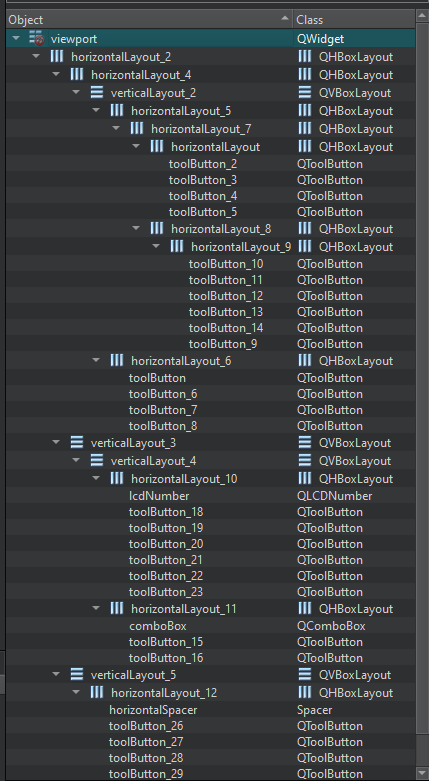
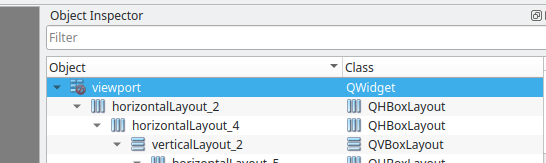
                            @benjysugi Your top level widget in that UI file does not have a layout. See the red symbol on the viewport item.
                            8b48ad71-0c2e-4b14-ab52-8d21a53d3cff-image.png

                            Assuming that you also want the groups of buttons to line up horizontally I would suggest a grid layout. The current collection of nested horizontal and vertical layouts can be simplified, rearranged within the grid, and alignment improved.

                            benjysugiB 1 Reply Last reply
                            1
                            • C ChrisW67

                              @benjysugi Your top level widget in that UI file does not have a layout. See the red symbol on the viewport item.

                              8b48ad71-0c2e-4b14-ab52-8d21a53d3cff-image.png

                              Assuming that you also want the groups of buttons to line up horizontally I would suggest a grid layout. The current collection of nested horizontal and vertical layouts can be simplified, rearranged within the grid, and alignment improved.

                              benjysugiB Offline
                              benjysugiB Offline
                              benjysugi
                              wrote on last edited by
                              #13

                              @ChrisW67 How do I do that?

                              1 Reply Last reply
                              0
                              • C Offline
                                C Offline
                                ChrisW67
                                wrote on last edited by
                                #14

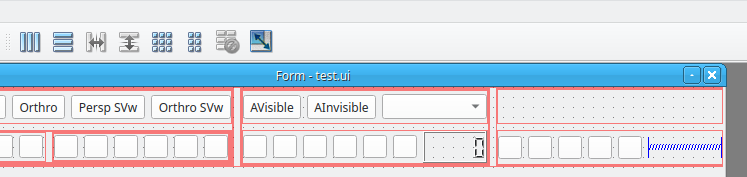
                                Use one of the tool buttons here:
                                62acbd2d-6f13-411c-bb6b-67c83ce0320c-image.png

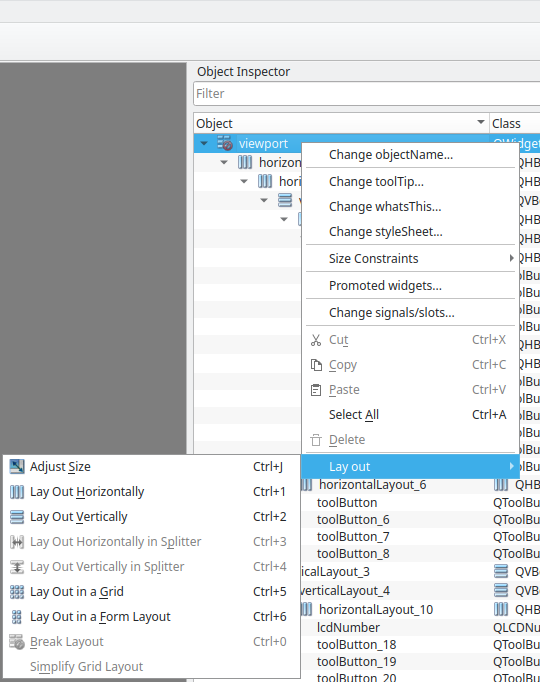
                                or select a layout from the right-click context menu:
                                1a6aec0a-c3bc-4b54-8a33-40fbacc40601-image.png

                                benjysugiB 2 Replies Last reply
                                0
                                • C ChrisW67

                                  Use one of the tool buttons here:
                                  62acbd2d-6f13-411c-bb6b-67c83ce0320c-image.png

                                  or select a layout from the right-click context menu:
                                  1a6aec0a-c3bc-4b54-8a33-40fbacc40601-image.png

                                  benjysugiB Offline
                                  benjysugiB Offline
                                  benjysugi
                                  wrote on last edited by
                                  #15
                                  This post is deleted!
                                  1 Reply Last reply
                                  0
                                  • C ChrisW67

                                    Use one of the tool buttons here:
                                    62acbd2d-6f13-411c-bb6b-67c83ce0320c-image.png

                                    or select a layout from the right-click context menu:
                                    1a6aec0a-c3bc-4b54-8a33-40fbacc40601-image.png

                                    benjysugiB Offline
                                    benjysugiB Offline
                                    benjysugi
                                    wrote on last edited by
                                    #16

                                    @ChrisW67 I've fixed the positioning. It still has the issue of it looking like classic theme though

                                    684193e2-4058-4632-836e-a505a79fda3c-image.png

                                    C 1 Reply Last reply
                                    0
                                    • benjysugiB benjysugi

                                      @ChrisW67 I've fixed the positioning. It still has the issue of it looking like classic theme though

                                      684193e2-4058-4632-836e-a505a79fda3c-image.png

                                      C Offline
                                      C Offline
                                      ChrisW67
                                      wrote on last edited by
                                      #17

                                      @benjysugi I do not see what part of "looking like classic theme" is an issue. The icons are what you set, the widgets are as you and the layout place them, and the fonts are as set.

                                      benjysugiB 1 Reply Last reply
                                      0
                                      • C ChrisW67

                                        @benjysugi I do not see what part of "looking like classic theme" is an issue. The icons are what you set, the widgets are as you and the layout place them, and the fonts are as set.

                                        benjysugiB Offline
                                        benjysugiB Offline
                                        benjysugi
                                        wrote on last edited by benjysugi
                                        #18

                                        @ChrisW67 I don't know why it's doing that when everything else in the application looks nomal. I don't think it's an issue with the stylesheet either. I'm not talking about the icons, but rather the buttons

                                        For example, this is what other buttons look like but the widget isn't reflecting that
                                        b670813e-b6d1-4733-ae38-1496a457397b-image.png

                                        1 Reply Last reply
                                        0
                                        • C Offline
                                          C Offline
                                          ChrisW67
                                          wrote on last edited by
                                          #19

                                          If the other buttons look "normal" and got that way because you applied a style sheet then it seems entirely likely that either:

                                          • that stylesheet has not been applied to this widget, or
                                          • the stylesshet has been applied but the selectors do not match this widget's buttons.
                                          benjysugiB 1 Reply Last reply
                                          2
                                          • C ChrisW67

                                            If the other buttons look "normal" and got that way because you applied a style sheet then it seems entirely likely that either:

                                            • that stylesheet has not been applied to this widget, or
                                            • the stylesshet has been applied but the selectors do not match this widget's buttons.
                                            benjysugiB Offline
                                            benjysugiB Offline
                                            benjysugi
                                            wrote on last edited by
                                            #20

                                            @ChrisW67 said in Widget breaking at runtime:

                                            If the other buttons look "normal" and got that way because you applied a style sheet then it seems entirely likely that either:

                                            • that stylesheet has not been applied to this widget, or
                                            • the stylesshet has been applied but the selectors do not match this widget's buttons.

                                            Thanks, that fixed it

                                            1 Reply Last reply
                                            0

                                            • Login

                                            • Login or register to search.
                                            • First post
                                              Last post
                                            0
                                            • Categories
                                            • Recent
                                            • Tags
                                            • Popular
                                            • Users
                                            • Groups
                                            • Search
                                            • Get Qt Extensions
                                            • Unsolved