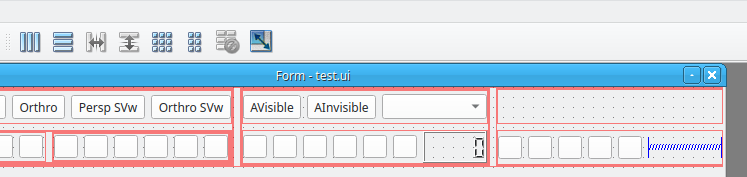
Widget breaking at runtime
-
So it's not related to your use of QDockWidget.
It seems that all the images are missing.
What is their paths ?
Interested in AI ? www.idiap.ch
Please read the Qt Code of Conduct - https://forum.qt.io/topic/113070/qt-code-of-conduct -
So it's not related to your use of QDockWidget.
It seems that all the images are missing.
What is their paths ?
-
Are you using layouts properly ?
Interested in AI ? www.idiap.ch
Please read the Qt Code of Conduct - https://forum.qt.io/topic/113070/qt-code-of-conduct -
Which version of Qt are you using ?
On which platform ?You can post the .ui file content here. Don't forget to use coding tags.
Interested in AI ? www.idiap.ch
Please read the Qt Code of Conduct - https://forum.qt.io/topic/113070/qt-code-of-conduct -
Which version of Qt are you using ?
On which platform ?You can post the .ui file content here. Don't forget to use coding tags.
@SGaist Qt 6.4.0 on Windows currently
<?xml version="1.0" encoding="UTF-8"?>
<ui version="4.0">
 <class>viewport</class>
 <widget class="QWidget" name="viewport">
  <property name="geometry">
   <rect>
    <x>0</x>
    <y>0</y>
    <width>800</width>
    <height>600</height>
   </rect>
  </property>
  <property name="windowTitle">
   <string>Form</string>
  </property>
  <property name="styleSheet">
   <string notr="true"/>
  </property>
  <widget class="QWidget" name="horizontalLayoutWidget_2">
   <property name="geometry">
    <rect>
     <x>0</x>
     <y>0</y>
     <width>802</width>
     <height>80</height>
    </rect>
   </property>
   <layout class="QHBoxLayout" name="horizontalLayout_2">
    <item>
     <layout class="QHBoxLayout" name="horizontalLayout_4">
      <item>
       <layout class="QVBoxLayout" name="verticalLayout_2">
        <item>
         <layout class="QHBoxLayout" name="horizontalLayout_6">
          <item>
           <widget class="QToolButton" name="toolButton_6">
            <property name="text">
             <string>Perspective</string>
            </property>
           </widget>
          </item>
          <item>
           <widget class="QToolButton" name="toolButton">
            <property name="text">
             <string>Orthro</string>
            </property>
           </widget>
          </item>
          <item>
           <widget class="QToolButton" name="toolButton_7">
            <property name="text">
             <string>Persp SVw</string>
            </property>
           </widget>
          </item>
          <item>
           <widget class="QToolButton" name="toolButton_8">
            <property name="text">
             <string>Orthro SVw</string>
            </property>
           </widget>
          </item>
         </layout>
        </item>
        <item>
         <layout class="QHBoxLayout" name="horizontalLayout_5">
          <item>
           <layout class="QHBoxLayout" name="horizontalLayout_7">
            <item>
             <layout class="QHBoxLayout" name="horizontalLayout">
              <item>
               <widget class="QToolButton" name="toolButton_5">
                <property name="text">
                 <string>...</string>
                </property>
                <property name="icon">
                 <iconset resource="ats_styles.qrc">
                  <normaloff>:/images/cursor-default (1).png</normaloff>:/images/cursor-default (1).png</iconset>
                </property>
               </widget>
              </item>
              <item>
               <widget class="QToolButton" name="toolButton_4">
                <property name="text">
                 <string>...</string>
                </property>
                <property name="icon">
                 <iconset resource="ats_styles.qrc">
                  <normaloff>:/images/cursor-move.png</normaloff>:/images/cursor-move.png</iconset>
                </property>
               </widget>
              </item>
              <item>
               <widget class="QToolButton" name="toolButton_2">
                <property name="text">
                 <string>...</string>
                </property>
                <property name="icon">
                 <iconset resource="ats_styles.qrc">
                  <normaloff>:/images/reload.png</normaloff>:/images/reload.png</iconset>
                </property>
               </widget>
              </item>
              <item>
               <widget class="QToolButton" name="toolButton_3">
                <property name="text">
                 <string>...</string>
                </property>
                <property name="icon">
                 <iconset resource="ats_styles.qrc">
                  <normaloff>:/images/resize (1).png</normaloff>:/images/resize (1).png</iconset>
                </property>
               </widget>
              </item>
             </layout>
            </item>
            <item>
             <layout class="QHBoxLayout" name="horizontalLayout_8">
              <item>
               <layout class="QHBoxLayout" name="horizontalLayout_9">
                <item>
                 <widget class="QToolButton" name="toolButton_12">
                  <property name="text">
                   <string>...</string>
                  </property>
                  <property name="icon">
                   <iconset resource="ats_styles.qrc">
                    <normaloff>:/images/axis-arrow-lock.png</normaloff>:/images/axis-arrow-lock.png</iconset>
                  </property>
                 </widget>
                </item>
                <item>
                 <widget class="QToolButton" name="toolButton_14">
                  <property name="text">
                   <string>...</string>
                  </property>
                  <property name="icon">
                   <iconset resource="ats_styles.qrc">
                    <normaloff>:/images/arrow-left-bold.png</normaloff>:/images/arrow-left-bold.png</iconset>
                  </property>
                 </widget>
                </item>
                <item>
                 <widget class="QToolButton" name="toolButton_13">
                  <property name="text">
                   <string>...</string>
                  </property>
                  <property name="icon">
                   <iconset resource="ats_styles.qrc">
                    <normaloff>:/images/arrow-right-bold.png</normaloff>:/images/arrow-right-bold.png</iconset>
                  </property>
                 </widget>
                </item>
                <item>
                 <widget class="QToolButton" name="toolButton_10">
                  <property name="text">
                   <string>...</string>
                  </property>
                  <property name="icon">
                   <iconset resource="ats_styles.qrc">
                    <normaloff>:/images/film.png</normaloff>:/images/film.png</iconset>
                  </property>
                 </widget>
                </item>
                <item>
                 <widget class="QToolButton" name="toolButton_11">
                  <property name="text">
                   <string>...</string>
                  </property>
                  <property name="icon">
                   <iconset resource="ats_styles.qrc">
                    <normaloff>:/images/magnify-plus-outline.png</normaloff>:/images/magnify-plus-outline.png</iconset>
                  </property>
                 </widget>
                </item>
                <item>
                 <widget class="QToolButton" name="toolButton_9">
                  <property name="text">
                   <string>...</string>
                  </property>
                  <property name="icon">
                   <iconset resource="ats_styles.qrc">
                    <normaloff>:/images/magnify-minus-outline.png</normaloff>:/images/magnify-minus-outline.png</iconset>
                  </property>
                 </widget>
                </item>
               </layout>
              </item>
             </layout>
            </item>
           </layout>
          </item>
         </layout>
        </item>
       </layout>
      </item>
     </layout>
    </item>
    <item>
     <layout class="QVBoxLayout" name="verticalLayout_3">
      <item>
       <layout class="QVBoxLayout" name="verticalLayout_4">
        <item>
         <layout class="QHBoxLayout" name="horizontalLayout_11">
          <item>
           <widget class="QToolButton" name="toolButton_15">
            <property name="text">
             <string>AVisible</string>
            </property>
           </widget>
          </item>
          <item>
           <widget class="QToolButton" name="toolButton_16">
            <property name="text">
             <string>AInvisible</string>
            </property>
           </widget>
          </item>
          <item>
           <widget class="QComboBox" name="comboBox"/>
          </item>
         </layout>
        </item>
        <item>
         <layout class="QHBoxLayout" name="horizontalLayout_10">
          <item>
           <widget class="QToolButton" name="toolButton_18">
            <property name="text">
             <string>...</string>
            </property>
            <property name="icon">
             <iconset resource="ats_styles.qrc">
              <normaloff>:/images/skip-backward.png</normaloff>:/images/skip-backward.png</iconset>
            </property>
           </widget>
          </item>
          <item>
           <widget class="QToolButton" name="toolButton_19">
            <property name="text">
             <string>...</string>
            </property>
            <property name="icon">
             <iconset resource="ats_styles.qrc">
              <normaloff>:/images/rewind.png</normaloff>:/images/rewind.png</iconset>
            </property>
           </widget>
          </item>
          <item>
           <widget class="QToolButton" name="toolButton_20">
            <property name="text">
             <string>...</string>
            </property>
            <property name="icon">
             <iconset resource="ats_styles.qrc">
              <normaloff>:/images/play.png</normaloff>:/images/play.png</iconset>
            </property>
           </widget>
          </item>
          <item>
           <widget class="QToolButton" name="toolButton_21">
            <property name="text">
             <string>...</string>
            </property>
            <property name="icon">
             <iconset resource="ats_styles.qrc">
              <normaloff>:/images/pause.png</normaloff>:/images/pause.png</iconset>
            </property>
           </widget>
          </item>
          <item>
           <widget class="QToolButton" name="toolButton_22">
            <property name="text">
             <string>...</string>
            </property>
            <property name="icon">
             <iconset resource="ats_styles.qrc">
              <normaloff>:/images/fast-forward.png</normaloff>:/images/fast-forward.png</iconset>
            </property>
           </widget>
          </item>
          <item>
           <widget class="QToolButton" name="toolButton_23">
            <property name="text">
             <string>...</string>
            </property>
            <property name="icon">
             <iconset resource="ats_styles.qrc">
              <normaloff>:/images/skip-forward.png</normaloff>:/images/skip-forward.png</iconset>
            </property>
           </widget>
          </item>
          <item>
           <widget class="QLCDNumber" name="lcdNumber"/>
          </item>
         </layout>
        </item>
       </layout>
      </item>
     </layout>
    </item>
    <item>
     <layout class="QVBoxLayout" name="verticalLayout_5">
      <item>
       <layout class="QHBoxLayout" name="horizontalLayout_13"/>
      </item>
      <item>
       <layout class="QHBoxLayout" name="horizontalLayout_12">
        <item>
         <widget class="QToolButton" name="toolButton_26">
          <property name="text">
           <string>...</string>
          </property>
          <property name="icon">
           <iconset resource="ats_styles.qrc">
            <normaloff>:/images/camera-plus.png</normaloff>:/images/camera-plus.png</iconset>
          </property>
         </widget>
        </item>
        <item>
         <widget class="QToolButton" name="toolButton_30">
          <property name="text">
           <string>...</string>
          </property>
          <property name="icon">
           <iconset resource="ats_styles.qrc">
            <normaloff>:/images/lightbulb.png</normaloff>:/images/lightbulb.png</iconset>
          </property>
         </widget>
        </item>
        <item>
         <widget class="QToolButton" name="toolButton_29">
          <property name="text">
           <string>...</string>
          </property>
          <property name="icon">
           <iconset resource="ats_styles.qrc">
            <normaloff>:/images/account.png</normaloff>:/images/account.png</iconset>
          </property>
         </widget>
        </item>
        <item>
         <widget class="QToolButton" name="toolButton_28">
          <property name="text">
           <string>...</string>
          </property>
          <property name="icon">
           <iconset resource="ats_styles.qrc">
            <normaloff>:/images/chart-timeline-variant.png</normaloff>:/images/chart-timeline-variant.png</iconset>
          </property>
         </widget>
        </item>
        <item>
         <widget class="QToolButton" name="toolButton_27">
          <property name="text">
           <string>...</string>
          </property>
          <property name="icon">
           <iconset resource="ats_styles.qrc">
            <normaloff>:/images/import.png</normaloff>:/images/import.png</iconset>
          </property>
         </widget>
        </item>
        <item>
         <spacer name="horizontalSpacer">
          <property name="orientation">
           <enum>Qt::Horizontal</enum>
          </property>
          <property name="sizeHint" stdset="0">
           <size>
            <width>40</width>
            <height>20</height>
           </size>
          </property>
         </spacer>
        </item>
       </layout>
      </item>
     </layout>
    </item>
   </layout>
  </widget>
 </widget>
 <resources>
  <include location="ats_styles.qrc"/>
 </resources>
 <connections/>
</ui>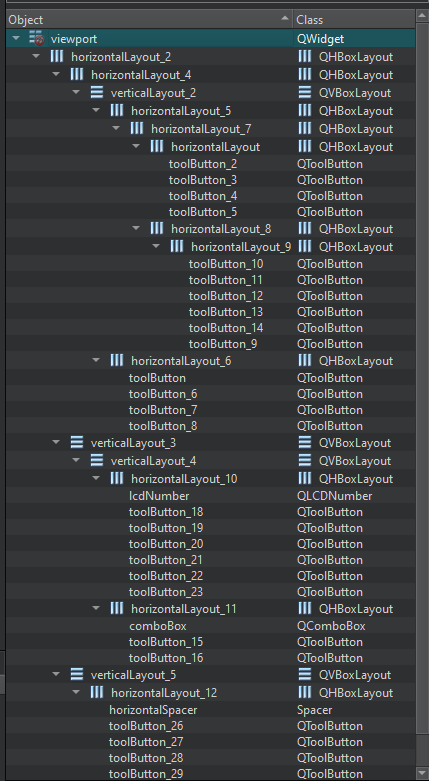
I can also provide the stylesheet if that helps
-
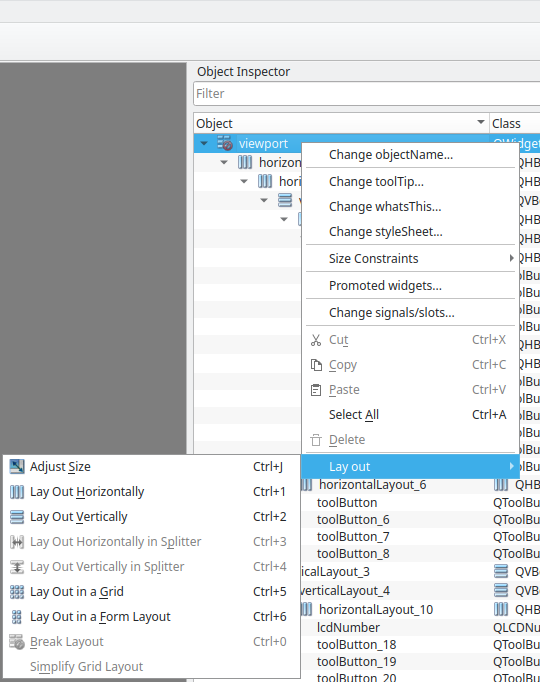
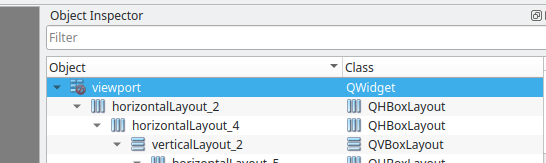
@benjysugi Your top level widget in that UI file does not have a layout. See the red symbol on the viewport item.
Assuming that you also want the groups of buttons to line up horizontally I would suggest a grid layout. The current collection of nested horizontal and vertical layouts can be simplified, rearranged within the grid, and alignment improved.
-
@benjysugi Your top level widget in that UI file does not have a layout. See the red symbol on the viewport item.
Assuming that you also want the groups of buttons to line up horizontally I would suggest a grid layout. The current collection of nested horizontal and vertical layouts can be simplified, rearranged within the grid, and alignment improved.
-
@ChrisW67 I've fixed the positioning. It still has the issue of it looking like classic theme though

-
@benjysugi I do not see what part of "looking like classic theme" is an issue. The icons are what you set, the widgets are as you and the layout place them, and the fonts are as set.
@ChrisW67 I don't know why it's doing that when everything else in the application looks nomal. I don't think it's an issue with the stylesheet either. I'm not talking about the icons, but rather the buttons
For example, this is what other buttons look like but the widget isn't reflecting that

-
If the other buttons look "normal" and got that way because you applied a style sheet then it seems entirely likely that either:
- that stylesheet has not been applied to this widget, or
- the stylesshet has been applied but the selectors do not match this widget's buttons.
-
If the other buttons look "normal" and got that way because you applied a style sheet then it seems entirely likely that either:
- that stylesheet has not been applied to this widget, or
- the stylesshet has been applied but the selectors do not match this widget's buttons.
@ChrisW67 said in Widget breaking at runtime:
If the other buttons look "normal" and got that way because you applied a style sheet then it seems entirely likely that either:
- that stylesheet has not been applied to this widget, or
- the stylesshet has been applied but the selectors do not match this widget's buttons.
Thanks, that fixed it