Skip to content
  • Categories
  • Recent
  • Tags
  • Popular
  • Users
  • Groups
  • Search
  • Get Qt Extensions
  • Unsolved
Collapse
Brand Logo
  1. Home
  2. Qt Development
  3. General and Desktop
  4. Set text in QTextDocument

Set text in QTextDocument

Scheduled Pinned Locked Moved Solved General and Desktop
5 Posts 3 Posters 525 Views 1 Watching
  • Oldest to Newest
  • Newest to Oldest
  • Most Votes
Reply
  • Reply as topic
Log in to reply
This topic has been deleted. Only users with topic management privileges can see it.
  • P Offline
    P Offline
    ppitu
    wrote on last edited by
    #1

    Hi

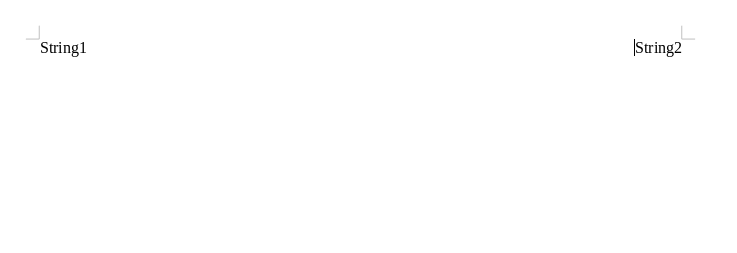
    I want to set the text as it is in the image using QTextDocument (I generate PDF from this object).

    At first I have HTML formatted text but I dont know how to set the text in this position.

    Its my text in HTML:

    QString html = "<div><div align=right>String1</div><div align=left>String2</div></div>";
    

    ff269dea-089b-4704-97b0-df5b3e874b94-image.png

    1 Reply Last reply
    0
    • cfdevC Offline
      cfdevC Offline
      cfdev
      wrote on last edited by
      #2

      @ppitu said in Set text in QTextDocument:

      QTextDocument

      How you render your textDocument ? Normally you use a Painter like this :

      textDocument.drawContents(&painter);
      

      Your html will be render into painter, and use painter to Print in PDF file.

      P 1 Reply Last reply
      1
      • cfdevC cfdev

        @ppitu said in Set text in QTextDocument:

        QTextDocument

        How you render your textDocument ? Normally you use a Painter like this :

        textDocument.drawContents(&painter);
        

        Your html will be render into painter, and use painter to Print in PDF file.

        P Offline
        P Offline
        ppitu
        wrote on last edited by
        #3

        @cfdev Yes i use this function but when i generate PDF i dont have this strings in one line only liny by line.

        1 Reply Last reply
        0
        • SGaistS Offline
          SGaistS Offline
          SGaist
          Lifetime Qt Champion
          wrote on last edited by
          #4

          Hi,

          QTextDocument does not support the full html specification especially with regard to CSS.

          If you need that then you should check the web engine module.

          Interested in AI ? www.idiap.ch
          Please read the Qt Code of Conduct - https://forum.qt.io/topic/113070/qt-code-of-conduct

          P 1 Reply Last reply
          2
          • SGaistS SGaist

            Hi,

            QTextDocument does not support the full html specification especially with regard to CSS.

            If you need that then you should check the web engine module.

            P Offline
            P Offline
            ppitu
            wrote on last edited by
            #5

            @SGaist I think its can help to solve my problem.
            Thanks for help.

            1 Reply Last reply
            0

            • Login

            • Login or register to search.
            • First post
              Last post
            0
            • Categories
            • Recent
            • Tags
            • Popular
            • Users
            • Groups
            • Search
            • Get Qt Extensions
            • Unsolved