
Skip to content
  • Categories
  • Recent
  • Tags
  • Popular
  • Users
  • Groups
  • Search
  • Get Qt Extensions
  • Unsolved
Collapse
Brand Logo
  1. Home
  2. Qt Development
  3. General and Desktop
  4. Set text in QTextDocument
Qt 6.11 is out! See what's new in the release blog

Set text in QTextDocument

Scheduled Pinned Locked Moved Solved General and Desktop
5 Posts 3 Posters 530 Views 1 Watching
  • Oldest to Newest
  • Newest to Oldest
  • Most Votes
Reply
  • Reply as topic
Log in to reply
This topic has been deleted. Only users with topic management privileges can see it.
  • P Offline
    P Offline
    ppitu
    wrote on last edited by
    #1

    Hi

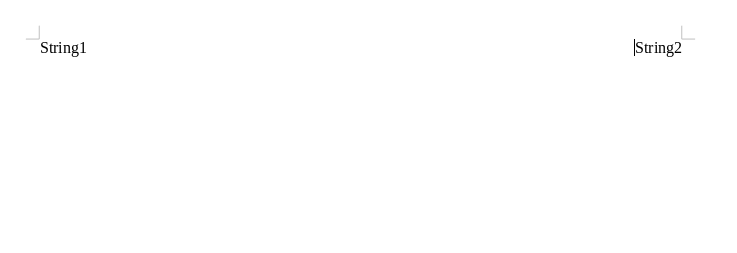
    I want to set the text as it is in the image using QTextDocument (I generate PDF from this object).

    At first I have HTML formatted text but I dont know how to set the text in this position.

    Its my text in HTML:

    QString html = "<div><div align=right>String1</div><div align=left>String2</div></div>";
    

    ff269dea-089b-4704-97b0-df5b3e874b94-image.png

    1 Reply Last reply
    0
    • cfdevC Offline
      cfdevC Offline
      cfdev
      wrote on last edited by
      #2

      @ppitu said in Set text in QTextDocument:

      QTextDocument

      How you render your textDocument ? Normally you use a Painter like this :

      textDocument.drawContents(&painter);
      

      Your html will be render into painter, and use painter to Print in PDF file.

      P 1 Reply Last reply
      1
      • cfdevC cfdev

        @ppitu said in Set text in QTextDocument:

        QTextDocument

        How you render your textDocument ? Normally you use a Painter like this :

        textDocument.drawContents(&painter);
        

        Your html will be render into painter, and use painter to Print in PDF file.

        P Offline
        P Offline
        ppitu
        wrote on last edited by
        #3

        @cfdev Yes i use this function but when i generate PDF i dont have this strings in one line only liny by line.

        1 Reply Last reply
        0
        • SGaistS Offline
          SGaistS Offline
          SGaist
          Lifetime Qt Champion
          wrote on last edited by
          #4

          Hi,

          QTextDocument does not support the full html specification especially with regard to CSS.

          If you need that then you should check the web engine module.

          Interested in AI ? www.idiap.ch
          Please read the Qt Code of Conduct - https://forum.qt.io/topic/113070/qt-code-of-conduct

          P 1 Reply Last reply
          2
          • SGaistS SGaist

            Hi,

            QTextDocument does not support the full html specification especially with regard to CSS.

            If you need that then you should check the web engine module.

            P Offline
            P Offline
            ppitu
            wrote on last edited by
            #5

            @SGaist I think its can help to solve my problem.
            Thanks for help.

            1 Reply Last reply
            0

            • Login

            • Login or register to search.
            • First post
              Last post
            0
            • Categories
            • Recent
            • Tags
            • Popular
            • Users
            • Groups
            • Search
            • Get Qt Extensions
            • Unsolved