Skip to content
  • Categories
  • Recent
  • Tags
  • Popular
  • Users
  • Groups
  • Search
  • Get Qt Extensions
  • Unsolved
Collapse
Brand Logo
  1. Home
  2. Qt Development
  3. General and Desktop
  4. QUdpSocket requires delays between writes
Forum Updated to NodeBB v4.3 + New Features

QUdpSocket requires delays between writes

Scheduled Pinned Locked Moved Solved General and Desktop
22 Posts 6 Posters 5.4k Views 4 Watching
  • Oldest to Newest
  • Newest to Oldest
  • Most Votes
Reply
  • Reply as topic
Log in to reply
This topic has been deleted. Only users with topic management privileges can see it.
  • M Offline
    M Offline
    Mwvse
    wrote on last edited by
    #1

    Hi,

    Using Qt 5.14.1.

    When I try to do immediate back to back writes on a QUdpSocket, only the first write makes it out (according to Wireshark). Both writes in the following code indicate success by returning 6 and 8, respectively.

    #include <QCoreApplication>
    #include <QUdpSocket>
    #include <QTextStream>
    #include <QThread>
    
    int main(int argc, char *argv[])
    {
    	QTextStream	cout(stdout);
    	QUdpSocket	myUdpSocket;
    
    	myUdpSocket.connectToHost("127.0.0.1", 50000);
    
    	cout << myUdpSocket.write("msg 1\n") << Qt::endl;
    	cout << myUdpSocket.write("msg two\n") << Qt::endl;
    
    	QThread::currentThread()->sleep(5);
    
    	return 0;
    }
    

    My Wireshark capture:

    "1","0.000000","127.0.0.1","127.0.0.1","UDP","58","65110 → 50000 Len=6","msg 1\n"
    

    But, if I put a delay in between the writes, both make it out (according to Wireshark).

    cout << myUdpSocket.write("msg 1\n") << Qt::endl;
    QThread::currentThread()->sleep(1);
    cout << myUdpSocket.write("msg two\n") << Qt::endl;
    

    My Wireshark capture:

    "1","0.000000","127.0.0.1","127.0.0.1","UDP","58","65110 → 50000 Len=6","msg 1\n"
    "2","1.013918","127.0.0.1","127.0.0.1","UDP","68","50504 → 50000 Len=8","msg two\n"
    

    Note: I also tried using "waitForBytesWritten(1000)" instead of sleep but that call returned false and only the first write made it out.

    cout << myUdpSocket.write("msg 1\n") << Qt::endl;
    cout << myUdpSocket.waitForBytesWritten(1000) << Qt::endl;
    cout << myUdpSocket.write("msg two\n") << Qt::endl;
    

    I am relatively inexperienced with Qt so my apologies if I am missing something obvious. Any help understanding why QUdpSocket and/or write() are behaving this way is greatly appreciated. Thank you in advance.

    1 Reply Last reply
    0
    • Christian EhrlicherC Offline
      Christian EhrlicherC Offline
      Christian Ehrlicher
      Lifetime Qt Champion
      wrote on last edited by
      #2

      @Mwvse said in QUdpSocket requires delays between writes:

      I am missing something obvious

      Yes, since QUdpSocket is async it has no time to write all the data before it gets destroyed. Use a proper eventloop + signals and slots or (but bad style) use the waitForFoo functions.

      Qt Online Installer direct download: https://download.qt.io/official_releases/online_installers/
      Visit the Qt Academy at https://academy.qt.io/catalog

      M 1 Reply Last reply
      6
      • Kent-DorfmanK Offline
        Kent-DorfmanK Offline
        Kent-Dorfman
        wrote on last edited by
        #3

        Just for grins: what happens when OP takes initial post code and treats QUdpSocket as a heap object?

        myUdpSocket=new QUdpSocket()
        // do all writes quickly and sequentialls
        // sleep()
        delete myUudpSocket

        I'm curious when the QudpSocket object goes out of scope; after last reference or truly at end of main().

        I light my way forward with the fires of all the bridges I've burned behind me.

        jsulmJ M 2 Replies Last reply
        0
        • Kent-DorfmanK Kent-Dorfman

          Just for grins: what happens when OP takes initial post code and treats QUdpSocket as a heap object?

          myUdpSocket=new QUdpSocket()
          // do all writes quickly and sequentialls
          // sleep()
          delete myUudpSocket

          I'm curious when the QudpSocket object goes out of scope; after last reference or truly at end of main().

          jsulmJ Offline
          jsulmJ Offline
          jsulm
          Lifetime Qt Champion
          wrote on last edited by
          #4

          @Kent-Dorfman said in QUdpSocket requires delays between writes:

          after last reference

          What reference do you mean? Since it's a raw pointer there are no references.
          Do you mean you put

          myUdpSocket=new QUdpSocket()
          

          inside main()? If so, the pointer goes out of scope when main finishes. The object itself is deleted when "delete" is called.

          https://forum.qt.io/topic/113070/qt-code-of-conduct

          1 Reply Last reply
          3
          • Christian EhrlicherC Christian Ehrlicher

            @Mwvse said in QUdpSocket requires delays between writes:

            I am missing something obvious

            Yes, since QUdpSocket is async it has no time to write all the data before it gets destroyed. Use a proper eventloop + signals and slots or (but bad style) use the waitForFoo functions.

            M Offline
            M Offline
            Mwvse
            wrote on last edited by
            #5

            @Christian-Ehrlicher

            Thank you for the reply.

            I am sleeping for 5 seconds before main (and thus myUdpSocket) goes out of scope.

            Both '.write()' calls return the expected number of bytes written but only the first write actually gets sent.

            The only difference between the example that works and the one that doesn't is a 1 second delay between calls. It's as if the Qt implementation has no internal buffering but yet the write() call indicates success.

            1 Reply Last reply
            0
            • SGaistS Offline
              SGaistS Offline
              SGaist
              Lifetime Qt Champion
              wrote on last edited by
              #6

              Hi,

              Since you are not using the asynchronous nature of Qt, you should at least use the synchronous API of QUdpSocket waitForBytesWritten.

              Interested in AI ? www.idiap.ch
              Please read the Qt Code of Conduct - https://forum.qt.io/topic/113070/qt-code-of-conduct

              M 1 Reply Last reply
              2
              • SGaistS SGaist

                Hi,

                Since you are not using the asynchronous nature of Qt, you should at least use the synchronous API of QUdpSocket waitForBytesWritten.

                M Offline
                M Offline
                Mwvse
                wrote on last edited by Mwvse
                #7

                @SGaist
                Thank you very much for the reply.

                I tried that but that call merely returned false and still only the first write() made it out onto the wire.

                #include <QCoreApplication>
                #include <QUdpSocket>
                #include <QTextStream>
                #include <QThread>
                #include <QHostAddress>
                
                int main(int argc, char *argv[])
                {
                	QTextStream	cout(stdout);
                	QUdpSocket	myUdpSocket;
                
                	myUdpSocket.connectToHost("127.0.0.1", 50000);
                
                	cout << myUdpSocket.write("msg 1\n") << Qt::endl;
                	cout << myUdpSocket.waitForBytesWritten(1000) << Qt::endl;
                	cout << myUdpSocket.write("msg two\n") << Qt::endl;
                
                	QThread::currentThread()->sleep(5);
                
                	return 0;
                }


                I did see the following note in the reference manual (I am, indeed, trying this under Windows at the moment):

                bool QAbstractSocket::waitForBytesWritten(int msecs = 30000)
                
                Reimplements: QIODevice::waitForBytesWritten(int msecs).
                
                ...
                
                **Note: This function may fail randomly on Windows. Consider using the event loop and the bytesWritten() signal if your software will run on Windows.**
                
                1 Reply Last reply
                0
                • SGaistS Offline
                  SGaistS Offline
                  SGaist
                  Lifetime Qt Champion
                  wrote on last edited by
                  #8

                  Out of curiosity, why are you not following the rule that you should first create a QCoreApplication before any QObject based classes ?

                  Interested in AI ? www.idiap.ch
                  Please read the Qt Code of Conduct - https://forum.qt.io/topic/113070/qt-code-of-conduct

                  M 1 Reply Last reply
                  1
                  • Kent-DorfmanK Kent-Dorfman

                    Just for grins: what happens when OP takes initial post code and treats QUdpSocket as a heap object?

                    myUdpSocket=new QUdpSocket()
                    // do all writes quickly and sequentialls
                    // sleep()
                    delete myUudpSocket

                    I'm curious when the QudpSocket object goes out of scope; after last reference or truly at end of main().

                    M Offline
                    M Offline
                    Mwvse
                    wrote on last edited by
                    #9

                    @Kent-Dorfman

                    Same result.

                    #include <QCoreApplication>
                    #include <QUdpSocket>
                    #include <QTextStream>
                    #include <QThread>
                    #include <QHostAddress>
                    
                    int main(int argc, char *argv[])
                    {
                    	QTextStream	cout(stdout);
                    	QUdpSocket*	myUdpSocket = new QUdpSocket;
                    
                    	QHostAddress	addr("127.0.0.1");
                    
                    	myUdpSocket->connectToHost("127.0.0.1", 50000);
                    
                    	cout << myUdpSocket->write("msg 1\n") << Qt::endl;
                    	cout << myUdpSocket->write("msg two\n") << Qt::endl;
                    
                    	QThread::currentThread()->sleep(5);
                    
                    	return 0;
                    }


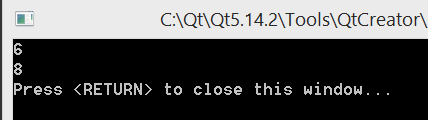
                    Console output shows number of bytes written for each is successful:
                    365f662c-7647-48e9-a639-b235d15f4431-image.png

                    And wireshark shows only the 1st write made it out:

                    85b0500d-7699-4aed-9b3d-6a8ff5a476de-image.png

                    1 Reply Last reply
                    0
                    • SGaistS SGaist

                      Out of curiosity, why are you not following the rule that you should first create a QCoreApplication before any QObject based classes ?

                      M Offline
                      M Offline
                      Mwvse
                      wrote on last edited by
                      #10

                      @SGaist

                      Because I am naive :-) ?? I was just trying to exercise these library classes/methods to study them a bit. I did try the following suggestion someone posted elsewhere, but still got the same problem result:

                      #include <QCoreApplication>
                      #include <QUdpSocket>
                      #include <QTimer>
                      #include <QObject>
                      #include <QDebug>
                      
                      class Sender: public QObject {
                      	 Q_OBJECT
                      public:
                      	 Sender(QObject *p = nullptr):
                      		  myUdpSocket(new QUdpSocket(this))    {
                      		  myUdpSocket->connectToHost("127.0.0.1", 50000);
                      
                      		  connect(myUdpSocket, &QUdpSocket::bytesWritten, this, &Sender::sentStuff);
                      
                      		  QTimer::singleShot(0, this, &Sender::sendStuff);
                      		  // ^^^ delays sending stuff until event loop is running
                      		  //     and this timer event is processed
                      	 }
                      	 ~Sender() { }
                      private slots:
                      	 void sendStuff()
                      	 {
                      		  qDebug() << myUdpSocket->write("msg 1\n");
                      		  qDebug() << myUdpSocket->write("msg two\n");
                      	 }
                      
                      	 void sentStuff(qint64 bytes)
                      	 {
                      		  qDebug() << "Bytes sent:" << bytes;
                      	 }
                      private:
                      	 QUdpSocket *myUdpSocket;
                      };
                      
                      
                      int main(int argc, char *argv[]) {
                      	 QCoreApplication app(argc, argv);  // << application object
                      	 Sender s;
                      	 return app.exec();  // << event loop
                      }
                      
                      
                      #include "main.moc"


                      Console output:
                      fe8880e1-9aa7-4ae3-bf24-14fb8004346d-image.png

                      Wireshark output:
                      e1354a9a-2977-4c7b-bd12-3e77110e30e9-image.png

                      kshegunovK 1 Reply Last reply
                      0
                      • M Mwvse

                        @SGaist

                        Because I am naive :-) ?? I was just trying to exercise these library classes/methods to study them a bit. I did try the following suggestion someone posted elsewhere, but still got the same problem result:

                        #include <QCoreApplication>
                        #include <QUdpSocket>
                        #include <QTimer>
                        #include <QObject>
                        #include <QDebug>
                        
                        class Sender: public QObject {
                        	 Q_OBJECT
                        public:
                        	 Sender(QObject *p = nullptr):
                        		  myUdpSocket(new QUdpSocket(this))    {
                        		  myUdpSocket->connectToHost("127.0.0.1", 50000);
                        
                        		  connect(myUdpSocket, &QUdpSocket::bytesWritten, this, &Sender::sentStuff);
                        
                        		  QTimer::singleShot(0, this, &Sender::sendStuff);
                        		  // ^^^ delays sending stuff until event loop is running
                        		  //     and this timer event is processed
                        	 }
                        	 ~Sender() { }
                        private slots:
                        	 void sendStuff()
                        	 {
                        		  qDebug() << myUdpSocket->write("msg 1\n");
                        		  qDebug() << myUdpSocket->write("msg two\n");
                        	 }
                        
                        	 void sentStuff(qint64 bytes)
                        	 {
                        		  qDebug() << "Bytes sent:" << bytes;
                        	 }
                        private:
                        	 QUdpSocket *myUdpSocket;
                        };
                        
                        
                        int main(int argc, char *argv[]) {
                        	 QCoreApplication app(argc, argv);  // << application object
                        	 Sender s;
                        	 return app.exec();  // << event loop
                        }
                        
                        
                        #include "main.moc"


                        Console output:
                        fe8880e1-9aa7-4ae3-bf24-14fb8004346d-image.png

                        Wireshark output:
                        e1354a9a-2977-4c7b-bd12-3e77110e30e9-image.png

                        kshegunovK Offline
                        kshegunovK Offline
                        kshegunov
                        Moderators
                        wrote on last edited by kshegunov
                        #11

                        As you have wireshark opened, could you check a couple of things:

                        1. That there's a bound receiver to that port
                        2. If there isn't, could you check if an ARP query is being done after the first datagram goes out
                        3. If there's such a query, then that's probably the answer to your question. For a detailed explanation, look here

                        Also note that sending datagrams below the FastSendDatagramThreshold value in quick succession while waiting for ARP to resolve may cause datagrams to be discarded:

                        ARP queues only one outbound IP datagram for a specified destination address while that IP address is being resolved to a media access control address. If a User Datagram Protocol (UDP)-based application sends multiple IP datagrams to a single destination address without any pauses between them, some of the datagrams may be dropped if there is no ARP cache entry already present. An application can compensate for this by calling the iphlpapi.dll routine SendArp() to establish an ARP cache entry, before sending the stream of packets.

                        Read and abide by the Qt Code of Conduct

                        M 1 Reply Last reply
                        2
                        • kshegunovK kshegunov

                          As you have wireshark opened, could you check a couple of things:

                          1. That there's a bound receiver to that port
                          2. If there isn't, could you check if an ARP query is being done after the first datagram goes out
                          3. If there's such a query, then that's probably the answer to your question. For a detailed explanation, look here

                          Also note that sending datagrams below the FastSendDatagramThreshold value in quick succession while waiting for ARP to resolve may cause datagrams to be discarded:

                          ARP queues only one outbound IP datagram for a specified destination address while that IP address is being resolved to a media access control address. If a User Datagram Protocol (UDP)-based application sends multiple IP datagrams to a single destination address without any pauses between them, some of the datagrams may be dropped if there is no ARP cache entry already present. An application can compensate for this by calling the iphlpapi.dll routine SendArp() to establish an ARP cache entry, before sending the stream of packets.

                          M Offline
                          M Offline
                          Mwvse
                          wrote on last edited by Mwvse
                          #12

                          Thank you very much @kshegunov for the reply.

                          I have tried using netcat (under Cygwin) to listen on the port (note that only "msg 1\n" datagram arrived):

                          5c2352ba-b3c0-4f35-b4f9-957927412f7c-image.png

                          Here is unfiltered packet capture around the send of the first (and only datagram). Note the time stamps around my UDP message:

                          223fc2ba-3328-48e5-88b3-0d1de3a02ade-image.png

                          I am curious about the ARP cache as I am using the loopback device "127.0.0.1".

                          kshegunovK 1 Reply Last reply
                          0
                          • M Mwvse

                            Thank you very much @kshegunov for the reply.

                            I have tried using netcat (under Cygwin) to listen on the port (note that only "msg 1\n" datagram arrived):

                            5c2352ba-b3c0-4f35-b4f9-957927412f7c-image.png

                            Here is unfiltered packet capture around the send of the first (and only datagram). Note the time stamps around my UDP message:

                            223fc2ba-3328-48e5-88b3-0d1de3a02ade-image.png

                            I am curious about the ARP cache as I am using the loopback device "127.0.0.1".

                            kshegunovK Offline
                            kshegunovK Offline
                            kshegunov
                            Moderators
                            wrote on last edited by
                            #13

                            @Mwvse said in QUdpSocket requires delays between writes:

                            Here is unfiltered packet capture around the send of the first (and only datagram). Note the time stamps around my UDP message:

                            You need to expand the Info column so you and we can see what's sent before/after the datagram. An ARP query (2 from above post) is a TCP broadcast into the subnet (I can't tell from the screenshot if that's the case here).

                            Read and abide by the Qt Code of Conduct

                            M 2 Replies Last reply
                            0
                            • kshegunovK kshegunov

                              @Mwvse said in QUdpSocket requires delays between writes:

                              Here is unfiltered packet capture around the send of the first (and only datagram). Note the time stamps around my UDP message:

                              You need to expand the Info column so you and we can see what's sent before/after the datagram. An ARP query (2 from above post) is a TCP broadcast into the subnet (I can't tell from the screenshot if that's the case here).

                              M Offline
                              M Offline
                              Mwvse
                              wrote on last edited by Mwvse
                              #14

                              @kshegunov

                              Sorry. I didn't consider it because the timestamps showed multiple seconds in between and thus weren't relevant (a potentially error-prone assumption):

                              1c176728-6e9f-4855-81ef-a9b98e271bf4-image.png

                              kshegunovK 1 Reply Last reply
                              0
                              • M Mwvse

                                @kshegunov

                                Sorry. I didn't consider it because the timestamps showed multiple seconds in between and thus weren't relevant (a potentially error-prone assumption):

                                1c176728-6e9f-4855-81ef-a9b98e271bf4-image.png

                                kshegunovK Offline
                                kshegunovK Offline
                                kshegunov
                                Moderators
                                wrote on last edited by
                                #15

                                @Mwvse said in QUdpSocket requires delays between writes:

                                Sorry. I didn't consider it because the timestamps showed multiple seconds in between and thus weren't relevant (a potentially error-prone assumption):

                                Nope, it's a red herring. I don't see anything strange. Currently I have no idea why the datagram may be discarded ... Could you try another something. Modify the slot like this:

                                void sendStuff()
                                {
                                    qDebug() << myUdpSocket->write("msg 1\n");
                                    QObject::connect(myUdpSocket, &QUdpSocket::bytesWritten, myUdpSocket, [myUdpSocket] () -> void  {
                                        qDebug() << myUdpSocket->write("msg two\n");
                                    });
                                }
                                

                                Does that work as expected?

                                Read and abide by the Qt Code of Conduct

                                M 1 Reply Last reply
                                0
                                • kshegunovK kshegunov

                                  @Mwvse said in QUdpSocket requires delays between writes:

                                  Here is unfiltered packet capture around the send of the first (and only datagram). Note the time stamps around my UDP message:

                                  You need to expand the Info column so you and we can see what's sent before/after the datagram. An ARP query (2 from above post) is a TCP broadcast into the subnet (I can't tell from the screenshot if that's the case here).

                                  M Offline
                                  M Offline
                                  Mwvse
                                  wrote on last edited by Mwvse
                                  #16

                                  @kshegunov

                                  I am curious about the ARP cache problem and being on 127.0.0.1.

                                  1 Reply Last reply
                                  1
                                  • kshegunovK kshegunov

                                    @Mwvse said in QUdpSocket requires delays between writes:

                                    Sorry. I didn't consider it because the timestamps showed multiple seconds in between and thus weren't relevant (a potentially error-prone assumption):

                                    Nope, it's a red herring. I don't see anything strange. Currently I have no idea why the datagram may be discarded ... Could you try another something. Modify the slot like this:

                                    void sendStuff()
                                    {
                                        qDebug() << myUdpSocket->write("msg 1\n");
                                        QObject::connect(myUdpSocket, &QUdpSocket::bytesWritten, myUdpSocket, [myUdpSocket] () -> void  {
                                            qDebug() << myUdpSocket->write("msg two\n");
                                        });
                                    }
                                    

                                    Does that work as expected?

                                    M Offline
                                    M Offline
                                    Mwvse
                                    wrote on last edited by kshegunov
                                    #17

                                    [Edit: Sorry I deleted your post by accident. I feel real dumb right now ~kshegunov]

                                    1 Reply Last reply
                                    0
                                    • kshegunovK Offline
                                      kshegunovK Offline
                                      kshegunov
                                      Moderators
                                      wrote on last edited by kshegunov
                                      #18

                                      Yes, my bad:

                                      void sendStuff()
                                      {
                                          QObject::connect(myUdpSocket, &QUdpSocket::bytesWritten, this, [this] () -> void  {
                                              QObject::disconnect(myUdpSocket, nullptr, this, nullptr);// To prevent looping
                                              qDebug() << myUdpSocket->write("msg two\n");
                                          });
                                          qDebug() << myUdpSocket->write("msg 1\n");
                                      }

                                      Read and abide by the Qt Code of Conduct

                                      M 1 Reply Last reply
                                      0
                                      • kshegunovK kshegunov

                                        Yes, my bad:

                                        void sendStuff()
                                        {
                                            QObject::connect(myUdpSocket, &QUdpSocket::bytesWritten, this, [this] () -> void  {
                                                QObject::disconnect(myUdpSocket, nullptr, this, nullptr);// To prevent looping
                                                qDebug() << myUdpSocket->write("msg two\n");
                                            });
                                            qDebug() << myUdpSocket->write("msg 1\n");
                                        }
                                        M Offline
                                        M Offline
                                        Mwvse
                                        wrote on last edited by
                                        #19

                                        @kshegunov

                                        Packet capture looks the same. Console output only shows first write.

                                        6a24dbd4-4a3d-435b-a812-76d1a4dadf55-image.png

                                        kshegunovK 1 Reply Last reply
                                        0
                                        • M Mwvse

                                          @kshegunov

                                          Packet capture looks the same. Console output only shows first write.

                                          6a24dbd4-4a3d-435b-a812-76d1a4dadf55-image.png

                                          kshegunovK Offline
                                          kshegunovK Offline
                                          kshegunov
                                          Moderators
                                          wrote on last edited by
                                          #20

                                          This is very strange. I'm currently out of ideas ... :|

                                          Read and abide by the Qt Code of Conduct

                                          M 1 Reply Last reply
                                          0

                                          • Login

                                          • Login or register to search.
                                          • First post
                                            Last post
                                          0
                                          • Categories
                                          • Recent
                                          • Tags
                                          • Popular
                                          • Users
                                          • Groups
                                          • Search
                                          • Get Qt Extensions
                                          • Unsolved