Skip to content
  • Categories
  • Recent
  • Tags
  • Popular
  • Users
  • Groups
  • Search
  • Get Qt Extensions
  • Unsolved
Collapse
Brand Logo
  1. Home
  2. Qt Development
  3. Mobile and Embedded
  4. Advice in creating mobile app

Advice in creating mobile app

Scheduled Pinned Locked Moved Unsolved Mobile and Embedded
9 Posts 5 Posters 1.1k Views 3 Watching
  • Oldest to Newest
  • Newest to Oldest
  • Most Votes
Reply
  • Reply as topic
Log in to reply
This topic has been deleted. Only users with topic management privileges can see it.
  • J Offline
    J Offline
    Jasur
    wrote on last edited by
    #1

    Hello all

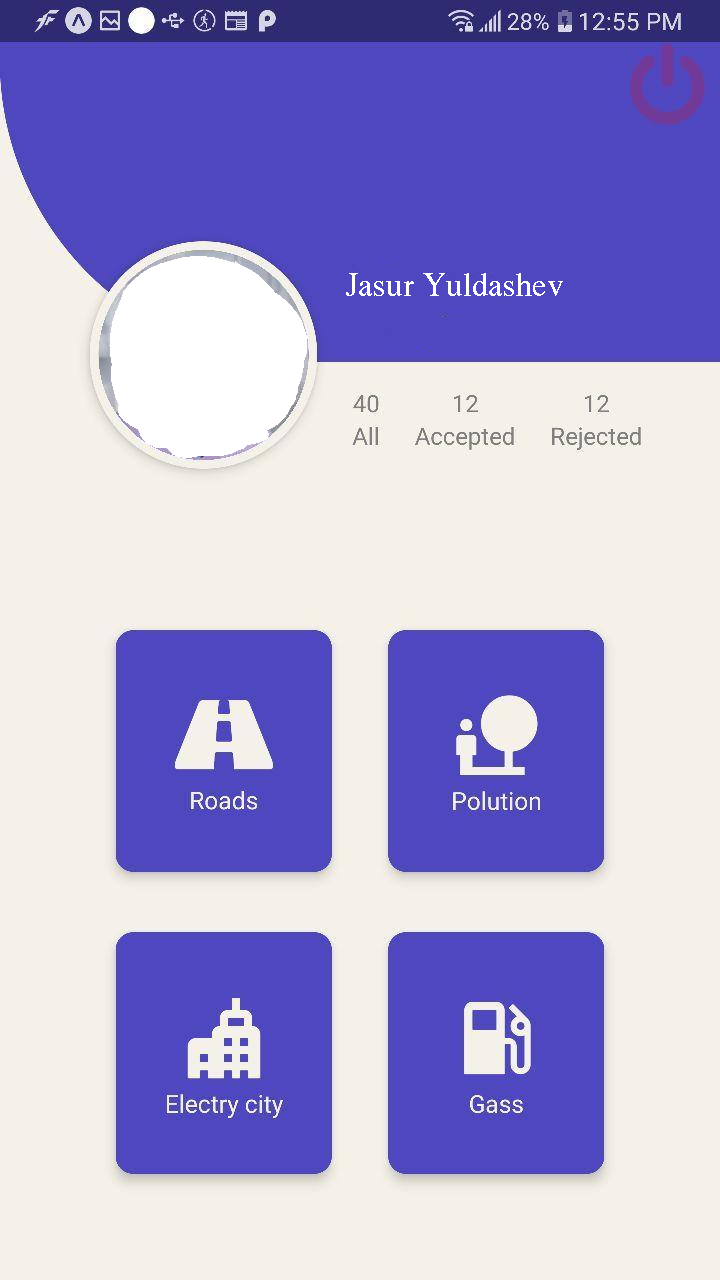
    I need to create mobile app like below. The main idea of the app is take photo of the problem and send it to the database. Depends on the problem you select category(Roads, Polution, Electricity, Gass) ,take photo of the problem,then give comment to this problem and send to the database. The data will be send in JSON format.
    My questions is:
    1)How to create such design in qml, what tools in qml to use to create such design?
    2)What books do you advice to learn qml?
    8739b527-2109-43cc-8c95-cfaec121ce77-image.png

    Regards,
    Jasur

    1 Reply Last reply
    0
    • SGaistS Offline
      SGaistS Offline
      SGaist
      Lifetime Qt Champion
      wrote on last edited by
      #2

      Hi,

      You can go through the QML Book.

      Interested in AI ? www.idiap.ch
      Please read the Qt Code of Conduct - https://forum.qt.io/topic/113070/qt-code-of-conduct

      1 Reply Last reply
      1
      • J Offline
        J Offline
        Jasur
        wrote on last edited by Jasur
        #3

        Thank you very useful book, but i have one question, how make such positioning for this 4 buttons in qml?

        Regards,
        Jasur

        mrjjM 1 Reply Last reply
        0
        • J Jasur

          Thank you very useful book, but i have one question, how make such positioning for this 4 buttons in qml?

          Regards,
          Jasur

          mrjjM Offline
          mrjjM Offline
          mrjj
          Lifetime Qt Champion
          wrote on last edited by
          #4

          @Jasur said in Advice in creating mobile app:

          Thank you very useful book, but i have one question, how make such positioning for this 4 buttons in qml?

          Try with a
          https://doc.qt.io/qt-5/qml-qtquick-layouts-gridlayout.html
          That should look like that and keep them like that if window is resized.

          1 Reply Last reply
          1
          • J Offline
            J Offline
            Jasur
            wrote on last edited by
            #5

            @mrjj My design differs from original, the screenshot was taken from TAB device
            1)How to put spacing between toolbar and gridlayout?
            2)There is a big gap between the left and right borders of the application to the buttons, how to make autoresize the gridlayout?
            And i create separate file ButtonsContainer.qml for Button widget.
            below my code for main.qml

            import QtQuick 2.12
            import QtQuick.Window 2.12
            import QtQuick.Controls.Material 2.12
            import QtQuick.Controls.Universal 2.12
            import QtQuick.Controls 2.12
            import QtQuick.Layouts 1.12
            import Qt.labs.settings 1.0
            import QtQuick.Dialogs 1.2
            import QtQuick.Controls.Styles 1.4
            ApplicationWindow {
                id: appWindowId
                visible: true
                width: 360
                height: 520
                title: qsTr("Smart City")
                
                color: "beige"
                
                Flickable{
                    width: parent.width
                    height: parent.height
                    contentHeight: gridLayoutID.implicitHeight
                    GridLayout
                    {
                        id: gridLayoutID
                        columns: 2
                        anchors.centerIn: parent
                        columnSpacing: 25
                        ButtonsContainer{
                            id: buttonGass
                            Layout.fillWidth: true
                            Layout.fillHeight: true
                            buttonText: "Gas"
                            
                        }
                        ButtonsContainer{
                            id: buttonPolution
                            Layout.fillWidth: true
                            Layout.fillHeight: true
                            buttonText: "Road"
                        }
                        ButtonsContainer{
                            id: buttonElect
                            Layout.fillWidth: true
                            Layout.fillHeight: true
                            buttonText: "Polution"
                        }
                        ButtonsContainer{
                            id: buttonRoad
                            Layout.fillWidth: true
                            Layout.fillHeight: true
                            buttonText: "Electrycity"
                        }
                    }
                }
                
                header: ToolBar{
                    Material.foreground: "white"
                    RowLayout {
                        anchors.fill: parent
                        
                        ToolButton {
                            //text: qsTr("‹")
                            icon.source:  "icons/icons/gallery/20x20/drawer.png"
                            onClicked: drawerId.open()
                        }
                        Label {
                            id: titleLabel
                            text: "Smart City"
                            font.pixelSize: 20
                            elide: Label.ElideRight
                            horizontalAlignment: Qt.AlignHCenter
                            verticalAlignment: Qt.AlignVCenter
                            Layout.fillWidth: true
                        }
                    }
                }
                
                Drawer{
                    id: drawerId
                    
                    width: Math.min(appWindowId.width, appWindowId.height)/3*2
                    height: parent.height
                    
                    ListView{
                        id: listViewId
                        
                        focus: true
                        currentIndex: -1
                        anchors.fill: parent
                        
                        delegate: ItemDelegate {
                            width: parent.width
                            text: model.text
                            highlighted: ListView.isCurrentItem
                            onClicked: {
                                //listViewId.currentIndex =index
                                //drawerId.close()
                                model.triggered()
                            }
                        }
                        
                        model: ListModel {
                            ListElement {
                                text: qsTr("Open...")
                                triggered: function(){ fileOpenDialog.open(); }
                            }
                            ListElement {
                                text: qsTr("About...")
                                triggered: function(){ aboutDialog.open(); }
                            }
                        }
                    }
                }
            }
            

            ButtonsContainer.qml

            import QtQuick 2.12
            import QtQuick.Controls 2.12
            import QtQuick.Layouts 1.12
            import QtQuick.Controls.Styles 1.4
            import QtQuick.Controls.Material 2.12
            import Qt.labs.settings 1.0
            Button  {
                id: buttonId
                property alias buttonText: textId.text
                Text {
                    id: textId
                    text: qsTr("textName")
                    //Material.foreground: "white"
                    color: "white"
                    anchors.centerIn: parent
                }
            
                background: Rectangle {
                    color: "#41cd52"
                    implicitWidth: 150
                    implicitHeight: 150
                    border.color: control.down ? "#17a81a" : "#21be2b"
                    border.width: 1
                    radius: 14
                }
            }
            

            photo_2020-04-02_19-53-41.jpg

            Regards,
            Jasur

            1 Reply Last reply
            0
            • P Offline
              P Offline
              Padlock
              wrote on last edited by
              #6

              You could stick your grid layout to an absolute position (x, y, height), or you just place something on top of it. The gaps are caused by your columnSpacing.

              J 1 Reply Last reply
              1
              • P Padlock

                You could stick your grid layout to an absolute position (x, y, height), or you just place something on top of it. The gaps are caused by your columnSpacing.

                J Offline
                J Offline
                Jasur
                wrote on last edited by
                #7

                @Padlock thank you for advice, i will trry it, and i have one more question. Is it possible to make design in FIGMA than connect with QML?

                Regards,
                Jasur

                MarkkyboyM 1 Reply Last reply
                0
                • J Jasur

                  @Padlock thank you for advice, i will trry it, and i have one more question. Is it possible to make design in FIGMA than connect with QML?

                  Regards,
                  Jasur

                  MarkkyboyM Offline
                  MarkkyboyM Offline
                  Markkyboy
                  wrote on last edited by Markkyboy
                  #8

                  @Jasur said in Advice in creating mobile app:

                  FIGMA

                  https://www.youtube.com/watch?v=I3MVJx6cCO0

                  With regard to the spacing of buttons to header, you could simply add an integer to your Flickable, as follows;

                      Flickable{
                          width: parent.width
                          height: parent.height
                          contentHeight: gridLayoutID.implicitHeight + 200


                  Don't just sit there standing around, pick up a shovel and sweep up!

                  I live by the sea, not in it.

                  J 1 Reply Last reply
                  0
                  • MarkkyboyM Markkyboy

                    @Jasur said in Advice in creating mobile app:

                    FIGMA

                    https://www.youtube.com/watch?v=I3MVJx6cCO0

                    With regard to the spacing of buttons to header, you could simply add an integer to your Flickable, as follows;

                        Flickable{
                            width: parent.width
                            height: parent.height
                            contentHeight: gridLayoutID.implicitHeight + 200
                    
                    
                    J Offline
                    J Offline
                    Jasur
                    wrote on last edited by
                    #9

                    @Markkyboy said in Advice in creating mobile app:

                    https://www.youtube.com/watch?v=I3MVJx6cCO0

                    to use Qt Design Studio's Bridge i need buy commercial version of it. is there any other option to use this Bridge with FIGMA?

                    @Markkyboy said in Advice in creating mobile app:

                    With regard to the spacing of buttons to header, you could simply add an integer to your Flickable, as follows;

                    Thank for this, it works for me.

                    Regards,
                    Jasur

                    1 Reply Last reply
                    0

                    • Login

                    • Login or register to search.
                    • First post
                      Last post
                    0
                    • Categories
                    • Recent
                    • Tags
                    • Popular
                    • Users
                    • Groups
                    • Search
                    • Get Qt Extensions
                    • Unsolved