Skip to content
  • Categories
  • Recent
  • Tags
  • Popular
  • Users
  • Groups
  • Search
  • Get Qt
  • Unsolved
Collapse
Brand Logo
  1. Home
  2. Qt Development
  3. Qt for Python
  4. PySide 6.10.0-6.10.1 upgrade changed my padding on Windows, how to restore?
Qt 6.12 LTS is out! See what's new in the release blog

PySide 6.10.0-6.10.1 upgrade changed my padding on Windows, how to restore?

Scheduled Pinned Locked Moved Unsolved Qt for Python
6 Posts 4 Posters 286 Views
  • Oldest to Newest
  • Newest to Oldest
  • Most Votes
Reply
  • Reply as topic
Log in to reply
This topic has been deleted. Only users with topic management privileges can see it.
  • A Offline
    A Offline
    axu2
    wrote last edited by axu2
    #1

    I'm not too familiar with Qt, I inherited this project.

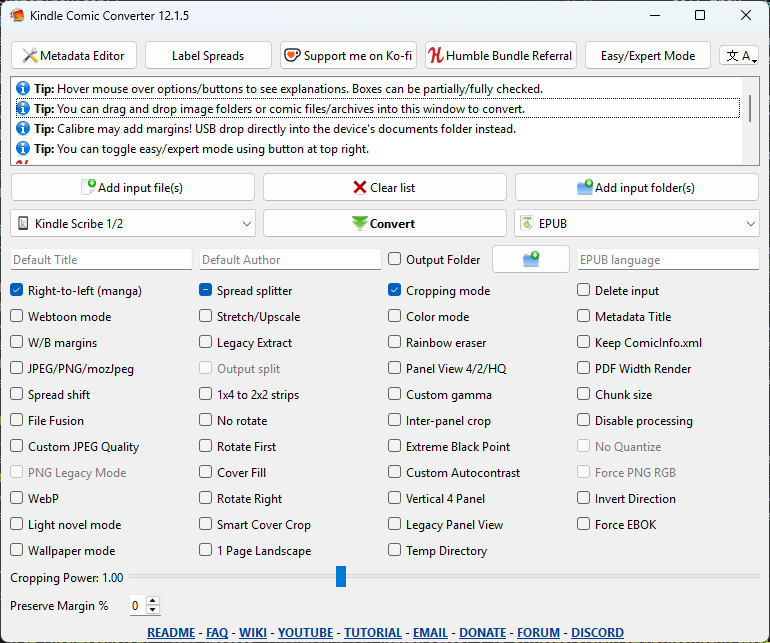
    This problem only exists on Windows, macOS/Linux is fine. If I use 6.10.0 or earlier, it looks how I expect:
    dfa8e1b2-c18e-44c3-80f9-cc22deba0e13-image.png

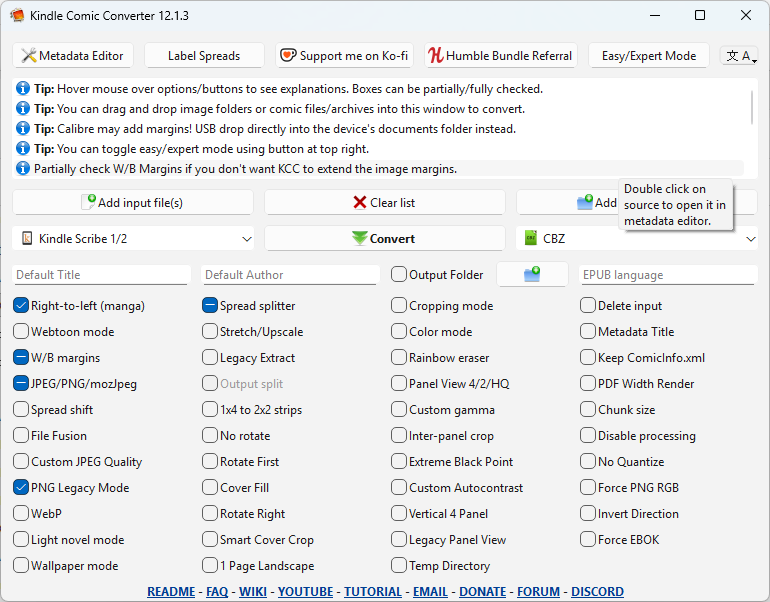
    But if I go to pyside 6.10.1 or later, including 6.12, it looks like this:
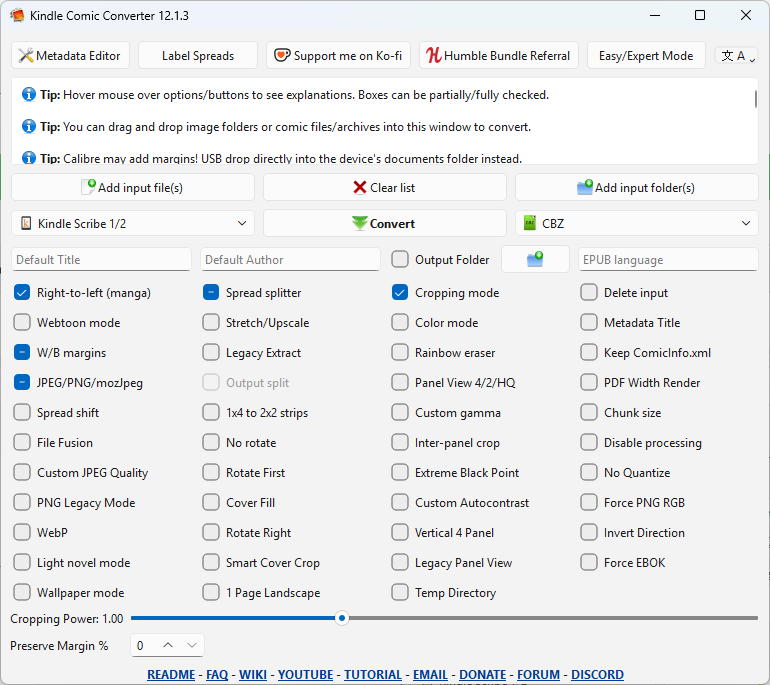
    9b28221a-90ea-4aca-918c-2fa5dbd1c524-image.png

    This is the project, in case it's useful: https://github.com/ciromattia/kcc

    The app also builds using 6.1.3 and 6.4.3 for legacy OS. So hopefully any change doesn't affect the older pyside. the app was on pyqt5 originally but I ported to pyside6.

    This is mainly because I want to use python 3.14 but that needs 6.10.1

    1 Reply Last reply
    0
    • W Offline
      W Offline
      Wladimir Leuschner
      wrote last edited by
      #2

      Could you maybe specify which UI elements and differences you mean specifically?

      1 Reply Last reply
      0
      • Christian EhrlicherC Offline
        Christian EhrlicherC Offline
        Christian Ehrlicher
        Lifetime Qt Champion
        wrote last edited by
        #3

        This was due to the non-fully ready win11 style in Qt6.10 - in 6.12 the margins are adopted to match more to the winui3 style

        Qt Online Installer direct download: https://download.qt.io/official_releases/online_installers/
        Visit the Qt Academy at https://academy.qt.io/catalog

        1 Reply Last reply
        0
        • A Offline
          A Offline
          axu2
          wrote last edited by axu2
          #4

          I still have the problem of extra padding around the check boxes and the top messages in 6.12.0.

          I probably can override this manually but I feel I shouldn't have to.

          changing the setStyle() between windows11, windowsvista, Windows, and Fusion has varying results.

          Just for reference, here's what it looks on macOS: https://forum.qt.io/topic/165221/pyside6-ui-looks-different-depending-on-which-macos-built-python

          1 Reply Last reply
          0
          • J Offline
            J Offline
            Jenny polar
            Banned
            wrote last edited by
            #5
            This post is deleted!
            1 Reply Last reply
            0
            • A Offline
              A Offline
              axu2
              wrote last edited by axu2
              #6

              I actually took a little more time and started comparing screenshots side by side.

              The padding for default theme changed in 6.10.1 and is still the same in 6.12.

              I think this is probably intentional and I shouldn't expect help.

              However, closer inspection of the windowsvista theme does have the original spacing, so I think I'll just use that when I upgrade Qt. It looks close enough I suppose. The app is from 2012 so I guess an old look is fine. I really prefer the 6.9 look but that's just a nitpick.

              Maybe I could request the 6.9 theme somehow? idk, what would it even be called, windows10?

              this is the vista theme:

              f4804f57-3057-47cb-913a-df0ccf0d2921-image.png

              1 Reply Last reply
              0

              • Login

              • Login or register to search.
              • First post
                Last post
              0
              • Categories
              • Recent
              • Tags
              • Popular
              • Users
              • Groups
              • Search
              • Get Qt
              • Unsolved