
Skip to content
  • Categories
  • Recent
  • Tags
  • Popular
  • Users
  • Groups
  • Search
  • Get Qt
  • Unsolved
Collapse
qtws26_logo

The Qt Event of the Year: Qt World Summit 2026

Save Your Spot >
Brand Logo
  1. Home
  2. Qt Development
  3. General and Desktop
  4. Model-view checkstate signal
Qt 6.12 LTS is out! See what's new in the release blog

Model-view checkstate signal

Scheduled Pinned Locked Moved Solved General and Desktop
15 Posts 5 Posters 4.6k Views 2 Watching
  • Oldest to Newest
  • Newest to Oldest
  • Most Votes
Reply
  • Reply as topic
Log in to reply
This topic has been deleted. Only users with topic management privileges can see it.
  • JonBJ JonB

    @blossomsg said in Model-view checkstate signal:

    I want the same thing from Model View

    I am not sure I understand what you mean by this.

    If you look at QAbstractButton from which QCheckBox derives there are:
    click() (slot)
    clicked() (signal)
    setChecked() (slot)
    Are any of these what you are looking for?

    Or just call LModel1.setData() with CheckStateRole?

    Be aware: your checkbox_clicked() slot is possibly a bit "limited", depending on what you want. It is called when any of the checkboxes are clicked, per each of your connect()s, without any indication which one has been clicked/changed. It just prints out Check works for any of the three which it then happens to find checked. Regardless of whether a click has actually happened (or e.g. the check has been set from code). That may be all you care about, I don't know, but if you want to know/print out which one was actually just checked/clicked you would need to use a Python lambda in your connect() statements to pass that information to the slot to use.

    Pl45m4P Offline
    Pl45m4P Offline
    Pl45m4
    wrote on last edited by
    #4

    @JonB said in Model-view checkstate signal:

    I am not sure I understand what you mean by this.

    If you look at QAbstractButton from which QCheckBox derives there are:
    click() (slot)
    clicked() (signal)
    setChecked() (slot)
    Are any of these what you are looking for?

    I think OP is looking for some kind of 1to1 connection in the model/view, between the checkable item (which is not directly a QCheckBox) and some receiver of the signal... which kinda destroys or bypasses a clean MV(C) structure...


    If debugging is the process of removing software bugs, then programming must be the process of putting them in.

    ~E. W. Dijkstra

    JonBJ 1 Reply Last reply
    1
    • Pl45m4P Pl45m4

      @JonB said in Model-view checkstate signal:

      I am not sure I understand what you mean by this.

      If you look at QAbstractButton from which QCheckBox derives there are:
      click() (slot)
      clicked() (signal)
      setChecked() (slot)
      Are any of these what you are looking for?

      I think OP is looking for some kind of 1to1 connection in the model/view, between the checkable item (which is not directly a QCheckBox) and some receiver of the signal... which kinda destroys or bypasses a clean MV(C) structure...

      JonBJ Offline
      JonBJ Offline
      JonB
      wrote on last edited by
      #5

      @Pl45m4
      I had posted mine before I saw yours. So OP already has in setData() when CheckStateRole changes: self.dataChanged.emit(index, index, [role]). He can use that, which I think is what you are saying.

      1 Reply Last reply
      0
      • blossomsgB Offline
        blossomsgB Offline
        blossomsg
        wrote on last edited by
        #6

        Hello,

        @JonB and @Pl45m4 thank you for the brief info.
        correct me if i am wrong, just rephrasing above for clarity

        @JonB said in Model-view checkstate signal:

        I am not sure I understand what you mean by this.

        what i am looking for is, how we connect QCheckBox.clicked.connect(<function>) , same logic or for something similar in MVC, whichever index i click should do something(that something would be in a function)

        This would be a bad practice if i try signaling a function.
        @Pl45m4 said in Model-view checkstate signal:

        I think OP is looking for some kind of 1to1 connection in the model/view, between the checkable item (which is not directly a QCheckBox) and some receiver of the signal... which kinda destroys or bypasses a clean MV(C) structure...

        If I need to try such a thing i can do it with dataChanged.emit in the setData, but again this would be a bad practice, correct?

        Pl45m4P 1 Reply Last reply
        0
        • blossomsgB blossomsg

          Hello,

          @JonB and @Pl45m4 thank you for the brief info.
          correct me if i am wrong, just rephrasing above for clarity

          @JonB said in Model-view checkstate signal:

          I am not sure I understand what you mean by this.

          what i am looking for is, how we connect QCheckBox.clicked.connect(<function>) , same logic or for something similar in MVC, whichever index i click should do something(that something would be in a function)

          This would be a bad practice if i try signaling a function.
          @Pl45m4 said in Model-view checkstate signal:

          I think OP is looking for some kind of 1to1 connection in the model/view, between the checkable item (which is not directly a QCheckBox) and some receiver of the signal... which kinda destroys or bypasses a clean MV(C) structure...

          If I need to try such a thing i can do it with dataChanged.emit in the setData, but again this would be a bad practice, correct?

          Pl45m4P Offline
          Pl45m4P Offline
          Pl45m4
          wrote on last edited by
          #7

          @blossomsg

          That's why I wrote:

          @Pl45m4 said in Model-view checkstate signal:

          You can't connect directly to that checkbox.
          Either you use the dataChanged(...) signal when the data is, well, changed and compare the QModelIndex (row, col) or you add your own logic when you set your data.

          So, use the dataChanged signal, which is already there and sort out the correct model index + value.


          If debugging is the process of removing software bugs, then programming must be the process of putting them in.

          ~E. W. Dijkstra

          1 Reply Last reply
          1
          • blossomsgB Offline
            blossomsgB Offline
            blossomsg
            wrote on last edited by
            #8

            noted.
            if possible can you provide a code snippet, just for understanding connections?
            It would be helpful
            Thank You.

            Pl45m4P 1 Reply Last reply
            0
            • blossomsgB blossomsg

              noted.
              if possible can you provide a code snippet, just for understanding connections?
              It would be helpful
              Thank You.

              Pl45m4P Offline
              Pl45m4P Offline
              Pl45m4
              wrote on last edited by Pl45m4
              #9

              @blossomsg said in Model-view checkstate signal:

              if possible can you provide a code snippet, just for understanding connections?

              Code for what? Who made your first (the QCheckBox) example? There you already have similar code.
              Now you just need to use your model's dataChanged(...) signal and figure out what index your checkbox has, depending on its row and column.
              Or you implement your own setData logic and emit your custom signal there


              If debugging is the process of removing software bugs, then programming must be the process of putting them in.

              ~E. W. Dijkstra

              1 Reply Last reply
              3
              • SGaistS Offline
                SGaistS Offline
                SGaist
                Lifetime Qt Champion
                wrote on last edited by
                #10

                Hi,

                A model can have multiple views and a view does not necessarily mean a QWidget.

                As my fellow already wrote: use your model.
                Rather than creating it as part of the setModel call, create it before and keep a reference to it. Then connect its dataChanged signal to the slot you want to use it with. The only thing you have to do is extract the information you want to act accordingly.

                Interested in AI ? www.idiap.ch
                Please read the Qt Code of Conduct - https://forum.qt.io/topic/113070/qt-code-of-conduct

                1 Reply Last reply
                2
                • blossomsgB Offline
                  blossomsgB Offline
                  blossomsg
                  wrote on last edited by
                  #11

                  Hello All,
                  I have tried a version as suggested to connect directly with dataChage in the model
                  getting the expected result, can you review and let me know, if there is a better way to do it.
                  I have added # NEW to those lines and functions

                  from PySide6 import QtCore, QtGui
                  
                  
                  class LModel1(QtCore.QAbstractListModel):
                      def __init__(self, data: list[str], parent=None):
                          super().__init__(parent)
                          self._data = data
                          # from ai claude and fluent python - dict Comprehensions - pg: 79
                          self._check_states = {item: QtCore.Qt.CheckState.Unchecked for item in self._data}
                  
                      def data(self, index, /, role=...):
                          if not index.isValid():
                              return None
                  
                          item = self._data[index.row()]
                  
                          if role == QtCore.Qt.ItemDataRole.DisplayRole:
                              return item
                  
                          if role == QtCore.Qt.ItemDataRole.CheckStateRole:
                              return self._check_states[item]
                  
                          if role == QtCore.Qt.ItemDataRole.DecorationRole:
                              pixmap = QtGui.QPixmap(10, 10)
                              pixmap.fill(QtCore.Qt.transparent)
                              painter = QtGui.QPainter(pixmap)
                              painter.setRenderHint(QtGui.QPainter.Antialiasing)
                              painter.setBrush(QtGui.QColor("red"))
                              painter.drawRect(pixmap.rect())
                              painter.end()
                              return QtGui.QIcon(pixmap)
                  
                          if role == QtCore.Qt.ItemDataRole.ToolTipRole:
                              return item
                  
                          if role == QtCore.Qt.ItemDataRole.FontRole:
                              font = QtGui.QFont("Cursive", 12)
                              font.bold()
                              return font
                  
                          return None
                  
                      def setData(self, index, value, /, role=...):
                          if not index.isValid():
                              return None
                  
                          item = self._data[index.row()]
                  
                          if role == QtCore.Qt.ItemDataRole.CheckStateRole:
                              self._check_states[item] = value
                              self.dataChanged.connect(self.print_something)  # NEW
                              self.dataChanged.emit(index, index, [role])
                              return True
                          return None
                  
                      def flags(self, index, /):
                          if not index.isValid():
                              return None
                  
                          return QtCore.Qt.ItemFlag.ItemIsUserCheckable | QtCore.Qt.ItemFlag.ItemIsEnabled | QtCore.Qt.ItemFlag.ItemIsSelectable
                  
                      def rowCount(self, /, parent=...):
                          return len(self._data)
                  
                      def print_something(self, index):  # NEW
                          item = self._data[index.row()]
                          if self._check_states[item] == QtCore.Qt.CheckState.Checked.value:
                              print("something")
                              return "something"
                          elif self._check_states[item] == QtCore.Qt.CheckState.Unchecked.value:
                              print("something else")
                              return "something else"
                          return None
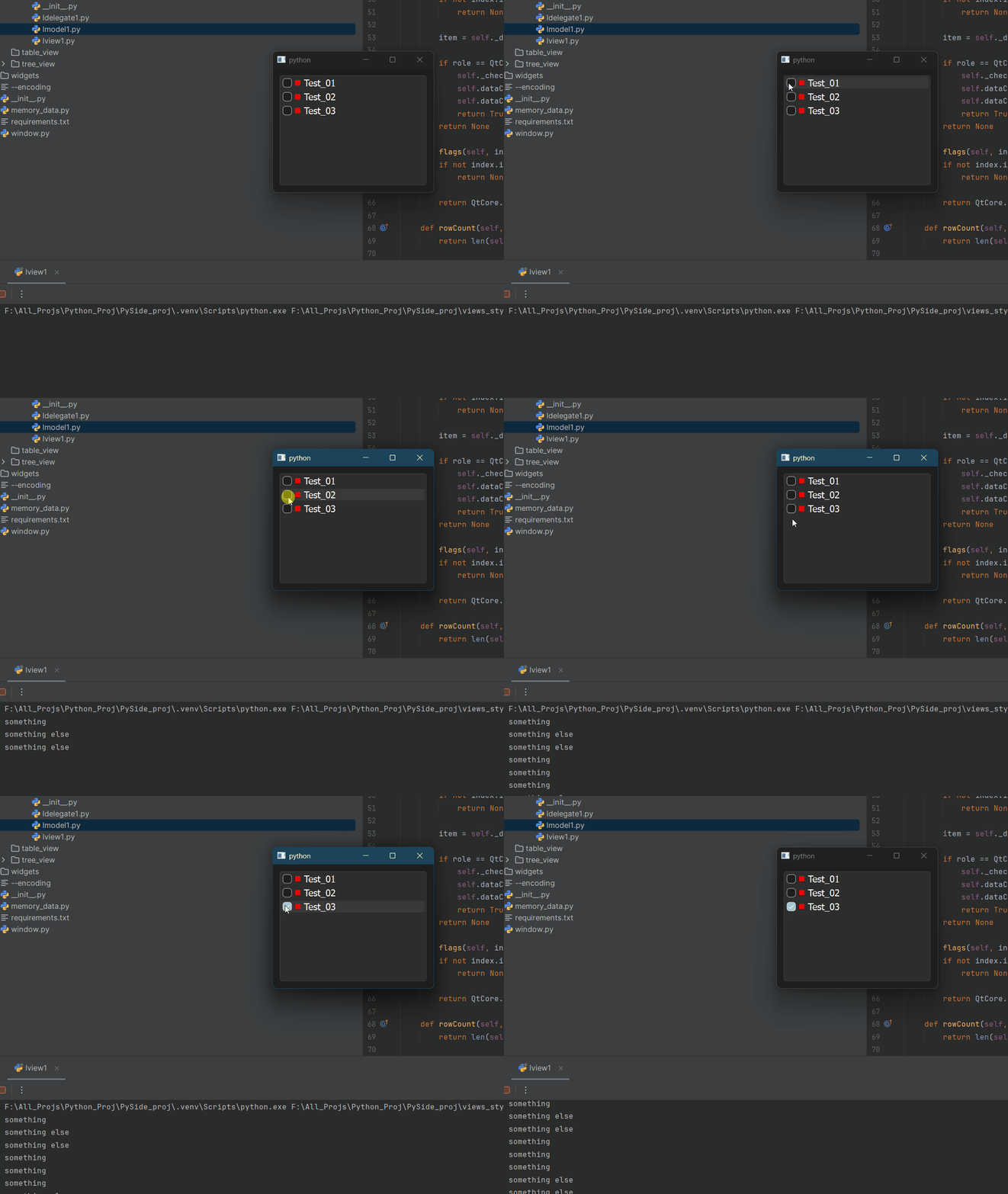
                  

                  checkstate_with_lmodel.gif

                  jsulmJ 1 Reply Last reply
                  0
                  • blossomsgB blossomsg

                    Hello All,
                    I have tried a version as suggested to connect directly with dataChage in the model
                    getting the expected result, can you review and let me know, if there is a better way to do it.
                    I have added # NEW to those lines and functions

                    from PySide6 import QtCore, QtGui
                    
                    
                    class LModel1(QtCore.QAbstractListModel):
                        def __init__(self, data: list[str], parent=None):
                            super().__init__(parent)
                            self._data = data
                            # from ai claude and fluent python - dict Comprehensions - pg: 79
                            self._check_states = {item: QtCore.Qt.CheckState.Unchecked for item in self._data}
                    
                        def data(self, index, /, role=...):
                            if not index.isValid():
                                return None
                    
                            item = self._data[index.row()]
                    
                            if role == QtCore.Qt.ItemDataRole.DisplayRole:
                                return item
                    
                            if role == QtCore.Qt.ItemDataRole.CheckStateRole:
                                return self._check_states[item]
                    
                            if role == QtCore.Qt.ItemDataRole.DecorationRole:
                                pixmap = QtGui.QPixmap(10, 10)
                                pixmap.fill(QtCore.Qt.transparent)
                                painter = QtGui.QPainter(pixmap)
                                painter.setRenderHint(QtGui.QPainter.Antialiasing)
                                painter.setBrush(QtGui.QColor("red"))
                                painter.drawRect(pixmap.rect())
                                painter.end()
                                return QtGui.QIcon(pixmap)
                    
                            if role == QtCore.Qt.ItemDataRole.ToolTipRole:
                                return item
                    
                            if role == QtCore.Qt.ItemDataRole.FontRole:
                                font = QtGui.QFont("Cursive", 12)
                                font.bold()
                                return font
                    
                            return None
                    
                        def setData(self, index, value, /, role=...):
                            if not index.isValid():
                                return None
                    
                            item = self._data[index.row()]
                    
                            if role == QtCore.Qt.ItemDataRole.CheckStateRole:
                                self._check_states[item] = value
                                self.dataChanged.connect(self.print_something)  # NEW
                                self.dataChanged.emit(index, index, [role])
                                return True
                            return None
                    
                        def flags(self, index, /):
                            if not index.isValid():
                                return None
                    
                            return QtCore.Qt.ItemFlag.ItemIsUserCheckable | QtCore.Qt.ItemFlag.ItemIsEnabled | QtCore.Qt.ItemFlag.ItemIsSelectable
                    
                        def rowCount(self, /, parent=...):
                            return len(self._data)
                    
                        def print_something(self, index):  # NEW
                            item = self._data[index.row()]
                            if self._check_states[item] == QtCore.Qt.CheckState.Checked.value:
                                print("something")
                                return "something"
                            elif self._check_states[item] == QtCore.Qt.CheckState.Unchecked.value:
                                print("something else")
                                return "something else"
                            return None
                    

                    checkstate_with_lmodel.gif

                    jsulmJ Offline
                    jsulmJ Offline
                    jsulm
                    Lifetime Qt Champion
                    wrote on last edited by
                    #12

                    @blossomsg A slot usually does not return anything

                    https://forum.qt.io/topic/113070/qt-code-of-conduct

                    1 Reply Last reply
                    1
                    • blossomsgB Offline
                      blossomsgB Offline
                      blossomsg
                      wrote on last edited by
                      #13

                      Noted. This is just for testing, if it works according to check/uncheck values(0 and 2).
                      But the end goal is to add a function which will be loading/unloading obj in autodesk maya.
                      But is this in the right direction?

                      SGaistS 1 Reply Last reply
                      0
                      • blossomsgB Offline
                        blossomsgB Offline
                        blossomsg
                        wrote on last edited by
                        #14

                        one more thing
                        I even tested on claude ai - it even suggested we can addself.model=LModel1 in class LView1 and then do the signal in the view, just curious is that okay as well?

                        1 Reply Last reply
                        0
                        • blossomsgB blossomsg

                          Noted. This is just for testing, if it works according to check/uncheck values(0 and 2).
                          But the end goal is to add a function which will be loading/unloading obj in autodesk maya.
                          But is this in the right direction?

                          SGaistS Offline
                          SGaistS Offline
                          SGaist
                          Lifetime Qt Champion
                          wrote on last edited by
                          #15

                          @blossomsg There's no reason for that slot to be in the model.

                          Depending on how you want to integrate that with Maya, create your own custom view on top of the model that will translate that information in whatever is needed for Maya.
                          A "view" does not mandatory mean a tree or a table, it's really whatever uses the model as a source of information.

                          Interested in AI ? www.idiap.ch
                          Please read the Qt Code of Conduct - https://forum.qt.io/topic/113070/qt-code-of-conduct

                          1 Reply Last reply
                          2
                          • blossomsgB blossomsg has marked this topic as solved on

                          • Login

                          • Login or register to search.
                          • First post
                            Last post
                          0
                          • Categories
                          • Recent
                          • Tags
                          • Popular
                          • Users
                          • Groups
                          • Search
                          • Get Qt
                          • Unsolved