
Model-view checkstate signal
-
Hello All,
hope you all are doing great.Below eg: code signals the checkbox from the widget
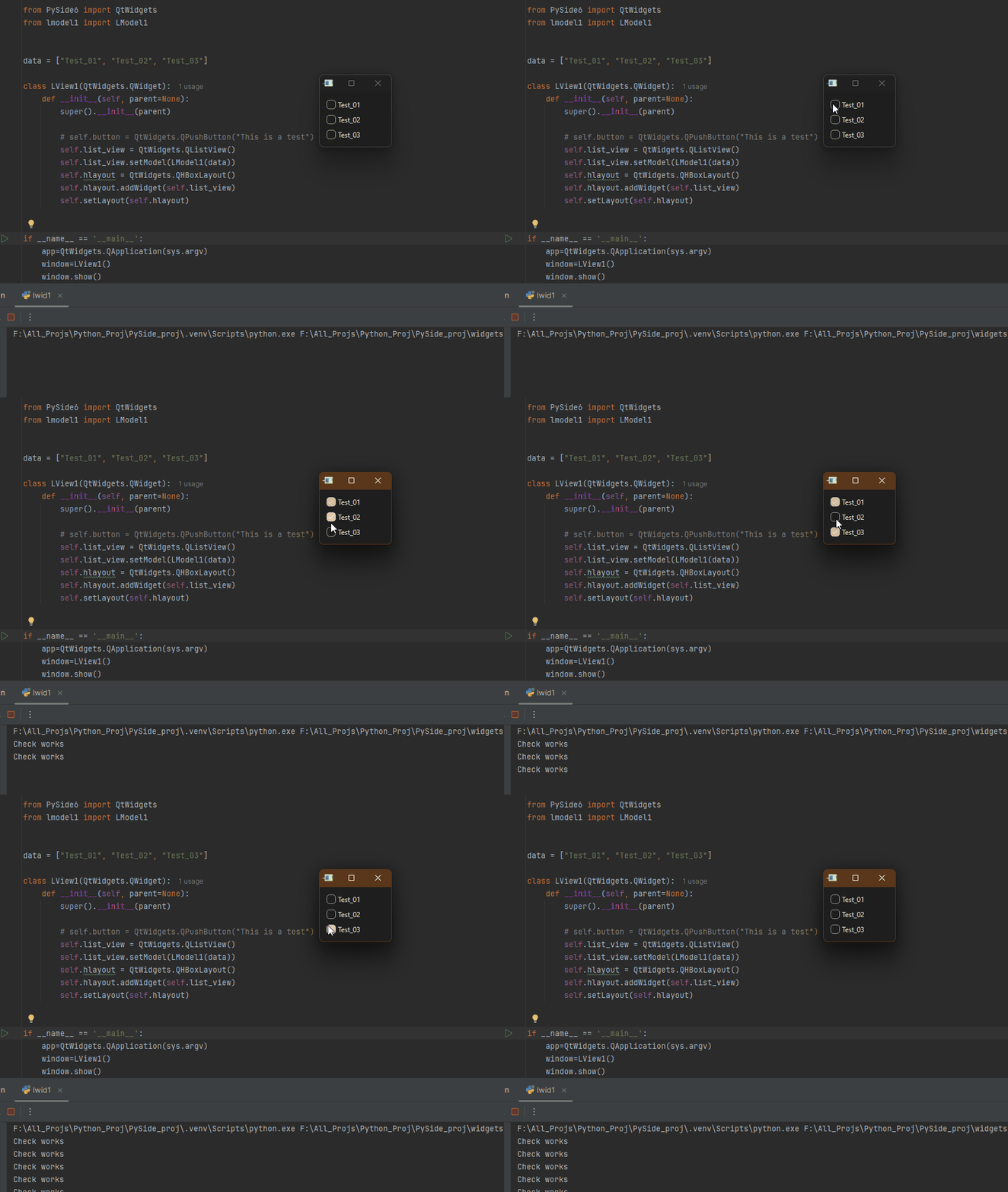
import sys

from PySide6 import QtWidgets


class LWid1(QtWidgets.QWidget):
    def __init__(self, parent=None):
        super().__init__(parent)

        self.checkbox_01 = QtWidgets.QCheckBox("Test_01")
        self.checkbox_02 = QtWidgets.QCheckBox("Test_02")
        self.checkbox_03 = QtWidgets.QCheckBox("Test_03")
        self.layout = QtWidgets.QVBoxLayout()
        self.layout.addWidget(self.checkbox_01)
        self.layout.addWidget(self.checkbox_02)
        self.layout.addWidget(self.checkbox_03)
        self.setLayout(self.layout)

        self.checkbox_01.clicked.connect(self.checkbox_clicked)
        self.checkbox_02.clicked.connect(self.checkbox_clicked)
        self.checkbox_03.clicked.connect(self.checkbox_clicked)

    def checkbox_clicked(self):
        if self.checkbox_01.isChecked():
            print("Check works")
        elif self.checkbox_02.isChecked():
            print("Check works")
        elif self.checkbox_03.isChecked():
            print("Check works")


if __name__ == "__main__":
    app = QtWidgets.QApplication(sys.argv)
    window = LWid1()
    window.show()
    sys.exit(app.exec())
I want the same thing from Model View
Modelfrom PySide6 import QtCore, QtGui class LModel1(QtCore.QAbstractListModel): def __init__(self, data: list[str], parent=None): super().__init__(parent) self._data = data # from ai claude and fluent python - dict Comprehensions - pg: 79 self._check_states = {item: QtCore.Qt.CheckState.Unchecked for item in self._data} def data(self, index, /, role=...): if not index.isValid(): return None item = self._data[index.row()] if role == QtCore.Qt.ItemDataRole.DisplayRole: return item if role == QtCore.Qt.ItemDataRole.CheckStateRole: return self._check_states[item] if role == QtCore.Qt.ItemDataRole.DecorationRole: pixmap = QtGui.QPixmap(10, 10) pixmap.fill(QtCore.Qt.transparent) painter = QtGui.QPainter(pixmap) painter.setRenderHint(QtGui.QPainter.Antialiasing) painter.setBrush(QtGui.QColor("red")) painter.drawRect(pixmap.rect()) painter.end() return QtGui.QIcon(pixmap) if role == QtCore.Qt.ItemDataRole.ToolTipRole: return item if role == QtCore.Qt.ItemDataRole.FontRole: font = QtGui.QFont("Cursive", 12) font.bold() return font return None def setData(self, index, value, /, role=...): if not index.isValid(): return None item = self._data[index.row()] if role == QtCore.Qt.ItemDataRole.CheckStateRole: self._check_states[item] = value self.dataChanged.emit(index, index, [role]) return True return None def flags(self, index, /): if not index.isValid(): return None return QtCore.Qt.ItemFlag.ItemIsUserCheckable | QtCore.Qt.ItemFlag.ItemIsEnabled | QtCore.Qt.ItemFlag.ItemIsSelectable def rowCount(self, /, parent=...): return len(self._data)View
import sys

from PySide6 import QtWidgets
from lmodel1 import LModel1


data = ["Test_01", "Test_02", "Test_03"]

class LView1(QtWidgets.QWidget):
    def __init__(self, parent=None):
        super().__init__(parent)

        # self.button = QtWidgets.QPushButton("This is a test")
        self.list_view = QtWidgets.QListView()
        self.list_view.setModel(LModel1(data))
        self.hlayout = QtWidgets.QHBoxLayout()
        self.hlayout.addWidget(self.list_view)
        self.setLayout(self.hlayout)


if __name__ == '__main__':
    app=QtWidgets.QApplication(sys.argv)
    window=LView1()
    window.show()
    sys.exit(app.exec())
Can you suggest a way to do it, couldn't find that concept in below pages, or probably i missed it.!
https://doc.qt.io/qt-6/modelview.html
https://doc.qt.io/qt-6/model-view-programming.html@blossomsg said in Model-view checkstate signal:
I want the same thing from Model View
I am not sure I understand what you mean by this.
If you look at
QAbstractButtonfrom whichQCheckBoxderives there are:
click() (slot)
clicked() (signal)
setChecked() (slot)
Are any of these what you are looking for?Or just call
LModel1.setData()withCheckStateRole?Be aware: your
checkbox_clicked()slot is possibly a bit "limited", depending on what you want. It is called when any of the checkboxes are clicked, per each of yourconnect()s, without any indication which one has been clicked/changed. It just prints outCheck worksfor any of the three which it then happens to find checked. Regardless of whether a click has actually happened (or e.g. the check has been set from code). That may be all you care about, I don't know, but if you want to know/print out which one was actually just checked/clicked you would need to use a Python lambda in yourconnect()statements to pass that information to the slot to use. -
@blossomsg said in Model-view checkstate signal:
I want the same thing from Model View
I am not sure I understand what you mean by this.
If you look at
QAbstractButtonfrom whichQCheckBoxderives there are:
click() (slot)
clicked() (signal)
setChecked() (slot)
Are any of these what you are looking for?Or just call
LModel1.setData()withCheckStateRole?Be aware: your
checkbox_clicked()slot is possibly a bit "limited", depending on what you want. It is called when any of the checkboxes are clicked, per each of yourconnect()s, without any indication which one has been clicked/changed. It just prints outCheck worksfor any of the three which it then happens to find checked. Regardless of whether a click has actually happened (or e.g. the check has been set from code). That may be all you care about, I don't know, but if you want to know/print out which one was actually just checked/clicked you would need to use a Python lambda in yourconnect()statements to pass that information to the slot to use.@JonB said in Model-view checkstate signal:
I am not sure I understand what you mean by this.
If you look at QAbstractButton from which QCheckBox derives there are:
click() (slot)
clicked() (signal)
setChecked() (slot)
Are any of these what you are looking for?I think OP is looking for some kind of 1to1 connection in the model/view, between the checkable item (which is not directly a
QCheckBox) and some receiver of the signal... which kinda destroys or bypasses a clean MV(C) structure...
If debugging is the process of removing software bugs, then programming must be the process of putting them in.
~E. W. Dijkstra
-
@JonB said in Model-view checkstate signal:
I am not sure I understand what you mean by this.
If you look at QAbstractButton from which QCheckBox derives there are:
click() (slot)
clicked() (signal)
setChecked() (slot)
Are any of these what you are looking for?I think OP is looking for some kind of 1to1 connection in the model/view, between the checkable item (which is not directly a
QCheckBox) and some receiver of the signal... which kinda destroys or bypasses a clean MV(C) structure... -
Hello,
@JonB and @Pl45m4 thank you for the brief info.
correct me if i am wrong, just rephrasing above for clarity@JonB said in Model-view checkstate signal:
I am not sure I understand what you mean by this.
what i am looking for is, how we connect
QCheckBox.clicked.connect(<function>), same logic or for something similar in MVC, whichever index i click should do something(that something would be in a function)This would be a bad practice if i try signaling a function.
@Pl45m4 said in Model-view checkstate signal:I think OP is looking for some kind of 1to1 connection in the model/view, between the checkable item (which is not directly a QCheckBox) and some receiver of the signal... which kinda destroys or bypasses a clean MV(C) structure...
If I need to try such a thing i can do it with
dataChanged.emitin thesetData, but again this would be a bad practice, correct? -
Hello,
@JonB and @Pl45m4 thank you for the brief info.
correct me if i am wrong, just rephrasing above for clarity@JonB said in Model-view checkstate signal:
I am not sure I understand what you mean by this.
what i am looking for is, how we connect
QCheckBox.clicked.connect(<function>), same logic or for something similar in MVC, whichever index i click should do something(that something would be in a function)This would be a bad practice if i try signaling a function.
@Pl45m4 said in Model-view checkstate signal:I think OP is looking for some kind of 1to1 connection in the model/view, between the checkable item (which is not directly a QCheckBox) and some receiver of the signal... which kinda destroys or bypasses a clean MV(C) structure...
If I need to try such a thing i can do it with
dataChanged.emitin thesetData, but again this would be a bad practice, correct?That's why I wrote:
@Pl45m4 said in Model-view checkstate signal:
You can't connect directly to that checkbox.
Either you use the dataChanged(...) signal when the data is, well, changed and compare the QModelIndex (row, col) or you add your own logic when you set your data.So, use the
dataChangedsignal, which is already there and sort out the correct model index + value. -
noted.
if possible can you provide a code snippet, just for understanding connections?
It would be helpful
Thank You.@blossomsg said in Model-view checkstate signal:
if possible can you provide a code snippet, just for understanding connections?
Code for what? Who made your first (the
QCheckBox) example? There you already have similar code.
Now you just need to use your model'sdataChanged(...)signal and figure out what index your checkbox has, depending on its row and column.
Or you implement your ownsetDatalogic and emit your custom signal there -
Hi,
A model can have multiple views and a view does not necessarily mean a QWidget.
As my fellow already wrote: use your model.
Rather than creating it as part of the setModel call, create it before and keep a reference to it. Then connect its dataChanged signal to the slot you want to use it with. The only thing you have to do is extract the information you want to act accordingly. -
Hello All,
I have tried a version as suggested to connect directly with dataChage in the model
getting the expected result, can you review and let me know, if there is a better way to do it.
I have added # NEW to those lines and functionsfrom PySide6 import QtCore, QtGui class LModel1(QtCore.QAbstractListModel): def __init__(self, data: list[str], parent=None): super().__init__(parent) self._data = data # from ai claude and fluent python - dict Comprehensions - pg: 79 self._check_states = {item: QtCore.Qt.CheckState.Unchecked for item in self._data} def data(self, index, /, role=...): if not index.isValid(): return None item = self._data[index.row()] if role == QtCore.Qt.ItemDataRole.DisplayRole: return item if role == QtCore.Qt.ItemDataRole.CheckStateRole: return self._check_states[item] if role == QtCore.Qt.ItemDataRole.DecorationRole: pixmap = QtGui.QPixmap(10, 10) pixmap.fill(QtCore.Qt.transparent) painter = QtGui.QPainter(pixmap) painter.setRenderHint(QtGui.QPainter.Antialiasing) painter.setBrush(QtGui.QColor("red")) painter.drawRect(pixmap.rect()) painter.end() return QtGui.QIcon(pixmap) if role == QtCore.Qt.ItemDataRole.ToolTipRole: return item if role == QtCore.Qt.ItemDataRole.FontRole: font = QtGui.QFont("Cursive", 12) font.bold() return font return None def setData(self, index, value, /, role=...): if not index.isValid(): return None item = self._data[index.row()] if role == QtCore.Qt.ItemDataRole.CheckStateRole: self._check_states[item] = value self.dataChanged.connect(self.print_something) # NEW self.dataChanged.emit(index, index, [role]) return True return None def flags(self, index, /): if not index.isValid(): return None return QtCore.Qt.ItemFlag.ItemIsUserCheckable | QtCore.Qt.ItemFlag.ItemIsEnabled | QtCore.Qt.ItemFlag.ItemIsSelectable def rowCount(self, /, parent=...): return len(self._data) def print_something(self, index): # NEW item = self._data[index.row()] if self._check_states[item] == QtCore.Qt.CheckState.Checked.value: print("something") return "something" elif self._check_states[item] == QtCore.Qt.CheckState.Unchecked.value: print("something else") return "something else" return None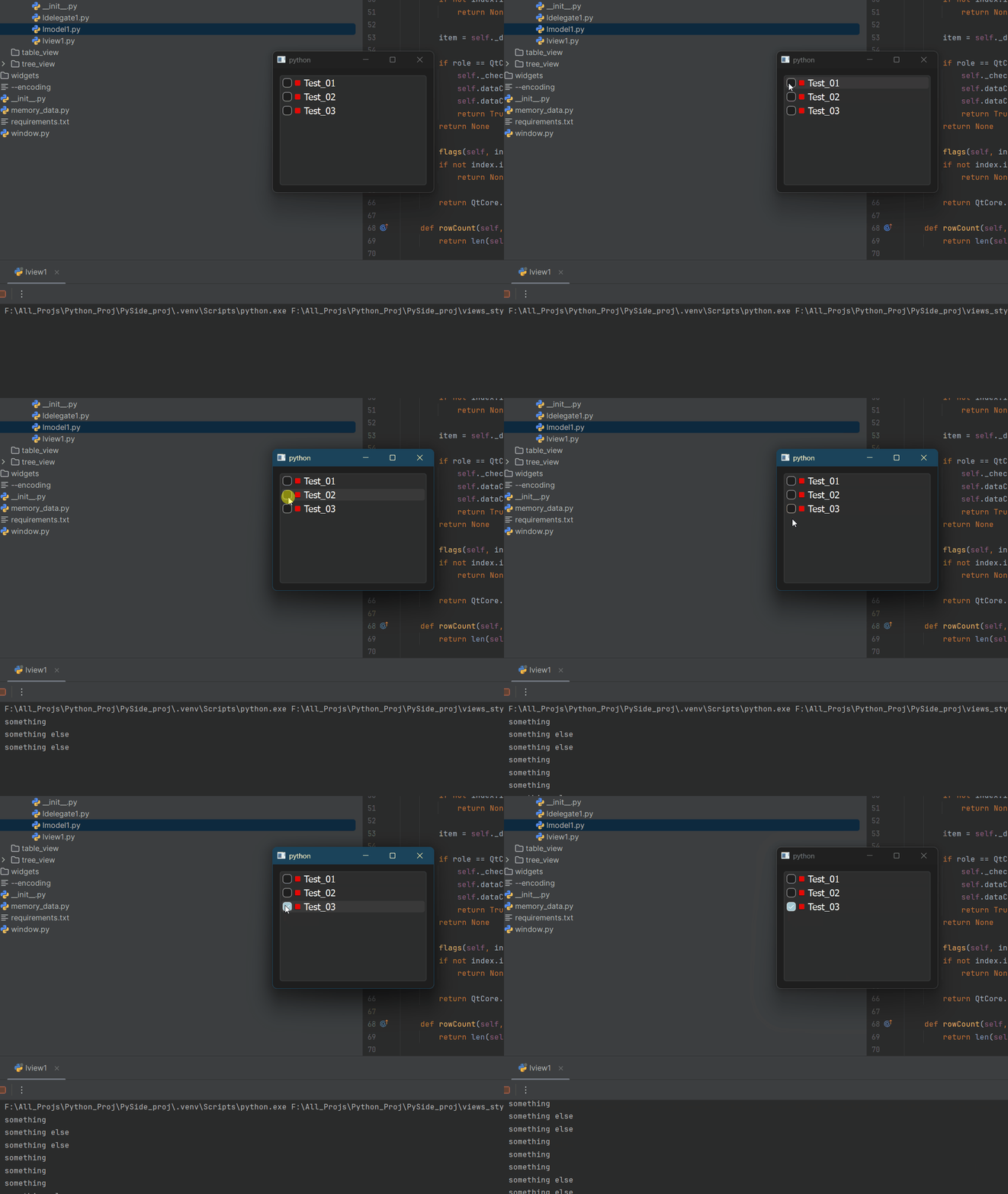
-
Hello All,
I have tried a version as suggested to connect directly with dataChage in the model
getting the expected result, can you review and let me know, if there is a better way to do it.
I have added # NEW to those lines and functionsfrom PySide6 import QtCore, QtGui class LModel1(QtCore.QAbstractListModel): def __init__(self, data: list[str], parent=None): super().__init__(parent) self._data = data # from ai claude and fluent python - dict Comprehensions - pg: 79 self._check_states = {item: QtCore.Qt.CheckState.Unchecked for item in self._data} def data(self, index, /, role=...): if not index.isValid(): return None item = self._data[index.row()] if role == QtCore.Qt.ItemDataRole.DisplayRole: return item if role == QtCore.Qt.ItemDataRole.CheckStateRole: return self._check_states[item] if role == QtCore.Qt.ItemDataRole.DecorationRole: pixmap = QtGui.QPixmap(10, 10) pixmap.fill(QtCore.Qt.transparent) painter = QtGui.QPainter(pixmap) painter.setRenderHint(QtGui.QPainter.Antialiasing) painter.setBrush(QtGui.QColor("red")) painter.drawRect(pixmap.rect()) painter.end() return QtGui.QIcon(pixmap) if role == QtCore.Qt.ItemDataRole.ToolTipRole: return item if role == QtCore.Qt.ItemDataRole.FontRole: font = QtGui.QFont("Cursive", 12) font.bold() return font return None def setData(self, index, value, /, role=...): if not index.isValid(): return None item = self._data[index.row()] if role == QtCore.Qt.ItemDataRole.CheckStateRole: self._check_states[item] = value self.dataChanged.connect(self.print_something) # NEW self.dataChanged.emit(index, index, [role]) return True return None def flags(self, index, /): if not index.isValid(): return None return QtCore.Qt.ItemFlag.ItemIsUserCheckable | QtCore.Qt.ItemFlag.ItemIsEnabled | QtCore.Qt.ItemFlag.ItemIsSelectable def rowCount(self, /, parent=...): return len(self._data) def print_something(self, index): # NEW item = self._data[index.row()] if self._check_states[item] == QtCore.Qt.CheckState.Checked.value: print("something") return "something" elif self._check_states[item] == QtCore.Qt.CheckState.Unchecked.value: print("something else") return "something else" return None@blossomsg A slot usually does not return anything
-
Noted. This is just for testing, if it works according to check/uncheck values(0 and 2).
But the end goal is to add a function which will be loading/unloading obj in autodesk maya.
But is this in the right direction?@blossomsg There's no reason for that slot to be in the model.
Depending on how you want to integrate that with Maya, create your own custom view on top of the model that will translate that information in whatever is needed for Maya.
A "view" does not mandatory mean a tree or a table, it's really whatever uses the model as a source of information. -
B blossomsg has marked this topic as solved


