
How to setup Qt Creator for android 16kb pages ?
-
I am in the same situation, i don't have find any statement from Qt;
My understanding is that we need a version of the qt libs for android compiled in 16KB (i don't know if they will still work on 4KB android system or if we will need to package the two format in the aab (in addition to the differents architectures).So two options i think :
- Rebuild ourself Qt android with 16KB support (don't sound easy);
- Wait for the 6.9.3 that should support that : https://forum.qt.io/topic/163238/qt-for-android-and-16-kb-page-size-official-roadmap-and-temporary-solutions/3
I don't know where ekkescorner find this info; but the 6.9.3 should land between the 25 and the 30 of this month : https://wiki.qt.io/Qt_6.9_Release
So... I will wait a little.
-
I am in the same situation, i don't have find any statement from Qt;
My understanding is that we need a version of the qt libs for android compiled in 16KB (i don't know if they will still work on 4KB android system or if we will need to package the two format in the aab (in addition to the differents architectures).So two options i think :
- Rebuild ourself Qt android with 16KB support (don't sound easy);
- Wait for the 6.9.3 that should support that : https://forum.qt.io/topic/163238/qt-for-android-and-16-kb-page-size-official-roadmap-and-temporary-solutions/3
I don't know where ekkescorner find this info; but the 6.9.3 should land between the 25 and the 30 of this month : https://wiki.qt.io/Qt_6.9_Release
So... I will wait a little.
I don't know where it's stated officially but the user here indirectly confirmed that this solution apparently works:
-
see https://bugreports.qt.io/browse/QTBUG-131514
Fix Version/s: 6.5.10, 6.8.6, 6.9.3, 6.10.0, 6.11.0 FF -
see https://bugreports.qt.io/browse/QTBUG-131514
Fix Version/s: 6.5.10, 6.8.6, 6.9.3, 6.10.0, 6.11.0 FF@ekkescorner Thank you :!
@Pl45m4 It's not clear to me if the cmake flag is used on a qt android app, a shared native lib, or even on a qt build itself.
I have tried it without success on my app, at launch android complains that the Qt libs are 4KB aligned.
My understanding is that only my app has been affected by the flag, and not the qt lib (still in 4KB). -
-
@ekkescorner said in How to setup Qt Creator for android 16kb pages ?:
Although this blog post essentially says "upgrade to 6.10.1 when released" xD
I have run a short script on my mac that checks my included libsfor f in ./lib/*/*.so; do if ! "/Users/<your user>/Library/Android/sdk/ndk/27.2.12479018/toolchains/llvm/prebuilt/darwin-x86_64/bin/llvm-objdump" -p "$f" | grep LOAD | grep -q "align 2\*\*14"; then printf "%s: NEEDS 16KB\n" "$f" fi donewhich outputs:
./lib/arm64-v8a/libavcodec.so: NEEDS 16KB
./lib/arm64-v8a/libavformat.so: NEEDS 16KB
./lib/arm64-v8a/libavutil.so: NEEDS 16KB
./lib/arm64-v8a/libcrypto_3.so: NEEDS 16KB
./lib/arm64-v8a/libssl_3.so: NEEDS 16KB
./lib/arm64-v8a/libswresample.so: NEEDS 16KB
./lib/arm64-v8a/libswscale.so: NEEDS 16KBfor me. I am aware that I have embedded libcrypto and libssl3 manually in my project:
set_target_properties(${PROJECT_NAME} PROPERTIES
    ...
    # SSL support for TLS backend
    QT_ANDROID_EXTRA_LIBS "${ANDROID_SDK_ROOT}/android_openssl/ssl_3/${CMAKE_ANDROID_ARCH_ABI}/libcrypto_3.so;${ANDROID_SDK_ROOT}/android_openssl/ssl_3/${CMAKE_ANDROID_ARCH_ABI}/libssl_3.so"
)
But I don't know why/where libavcodec/libavformat/libavutil and libswresample/libswscale are coming from?
Does anybody know? Or even better, how to get them to be 16kb aligned too? :D -
Hi everyone, I don't want to open a new thread for a similar issue, but I will be happy to if needed.
I'm try to sovle the 16k issue on my opensource app. I'm building my app with the fresh Qt 6.9.3 and the NDK 28.2.13676358
I also added the
android {
QMAKE_LFLAGS += -Wl,-z,max-page-size=16384 -Wl,-z,common-page-size=16384
}in my pro file but when I start the app I got this warning
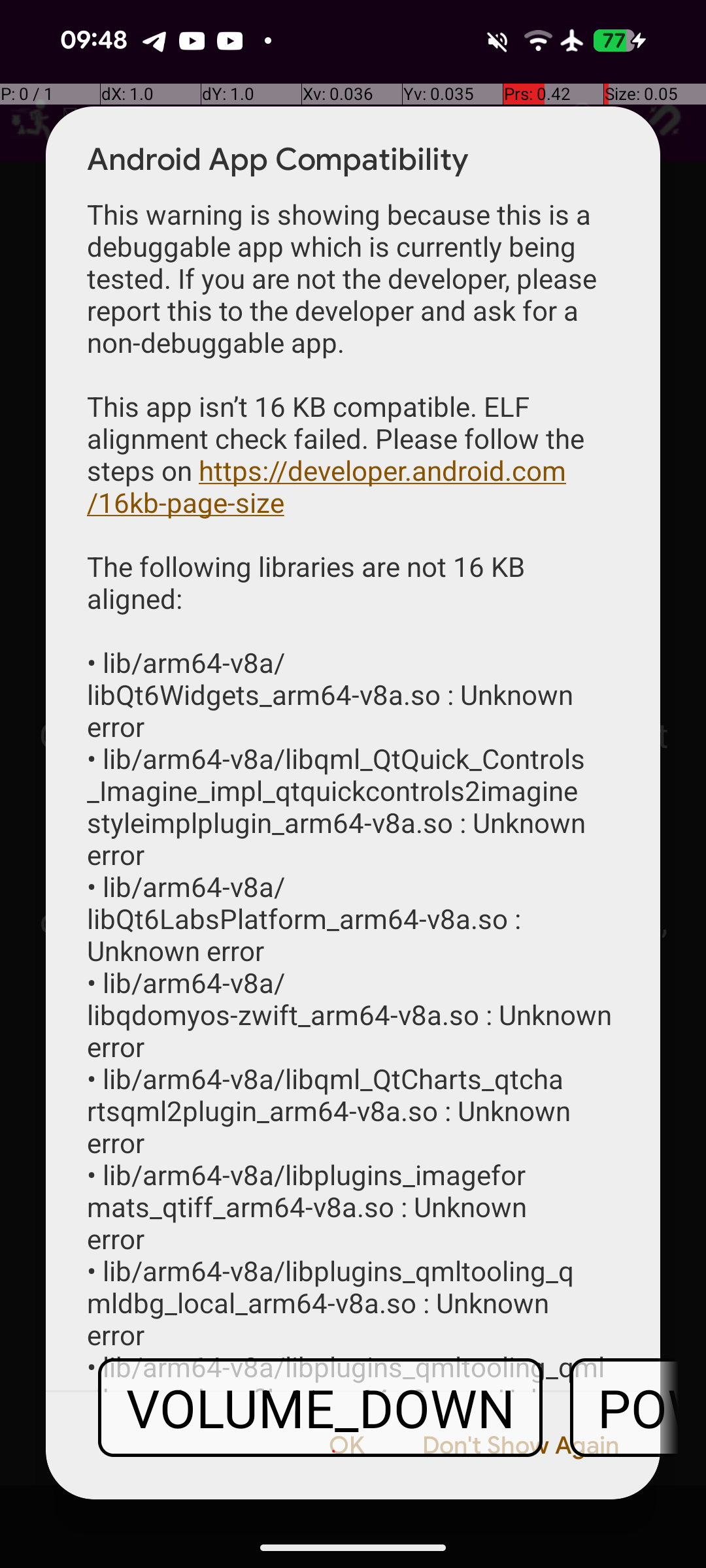
The app is 100% working, so I don't understand what I'm doing wrong. Anyone is facing the same issue?
Thanks
-
Hi all,
I have upgraded to 6.9.3 and I removed the 'multimedia' sounds features of my app to validate 16kb aligned, because of ffmpeg uncompatibility.
It's ok now. I have still 2 pending issues:- Edge to edge potential problems (google play console feedback) => obsolet API for android.view.Window.getStatusBarColor, android.view.Window.setStatusBarColor, android.view.Window.setNavigationBarColor in org.qtproject.qt.android.QtActivityDelegateBase.handleUiModeChange, org.qtproject.qt.android.QtDisplayManager.setSystemUiVisibility.
How to solve that, any idea?
Thanks by advance,
Philippe
- Edge to edge potential problems (google play console feedback) => obsolet API for android.view.Window.getStatusBarColor, android.view.Window.setStatusBarColor, android.view.Window.setNavigationBarColor in org.qtproject.qt.android.QtActivityDelegateBase.handleUiModeChange, org.qtproject.qt.android.QtDisplayManager.setSystemUiVisibility.
-
Hi all,
I have upgraded to 6.9.3 and I removed the 'multimedia' sounds features of my app to validate 16kb aligned, because of ffmpeg uncompatibility.
It's ok now. I have still 2 pending issues:- Edge to edge potential problems (google play console feedback) => obsolet API for android.view.Window.getStatusBarColor, android.view.Window.setStatusBarColor, android.view.Window.setNavigationBarColor in org.qtproject.qt.android.QtActivityDelegateBase.handleUiModeChange, org.qtproject.qt.android.QtDisplayManager.setSystemUiVisibility.
How to solve that, any idea?
Thanks by advance,
Philippe
@philmaubois said in How to setup Qt Creator for android 16kb pages ?:
Edge to edge potential problems (google play console feedback) => obsolet API
please open a bugreport
all of my current problems with Qt Safe Areas for edge-to-edge support will be solved with Qt 6.10.1, per ex. https://bugreports.qt.io/browse/QTBUG-139690 or https://bugreports.qt.io/browse/QTBUG-137248
also see discussions at https://bugreports.qt.io/browse/QTBUG-135808but I haven't tried with Google Play Console, so probably you run into another issue
- Edge to edge potential problems (google play console feedback) => obsolet API for android.view.Window.getStatusBarColor, android.view.Window.setStatusBarColor, android.view.Window.setNavigationBarColor in org.qtproject.qt.android.QtActivityDelegateBase.handleUiModeChange, org.qtproject.qt.android.QtDisplayManager.setSystemUiVisibility.
-
For me it's launching without problem on a Pixel 8 under Android 16 (with 16k alignment);
But, the same app seems to crash at startup on my Pixel 5 (android 14 and 4k alignment), this is something related to the new memory alignment ? If yes, how this will work ? The playstore will required 2 aligned versions to distribute ?
I'm a bit lost on this, but it's maybe an error in my own code, will dig in it.And thanks again for everything @ekkescorner; i use your android sharing code, it work as expected under Qt 9.10 (i have had to re-expose myself QtActivity since it is now private but the code remains mostly the same).
-
For me it's launching without problem on a Pixel 8 under Android 16 (with 16k alignment);
But, the same app seems to crash at startup on my Pixel 5 (android 14 and 4k alignment), this is something related to the new memory alignment ? If yes, how this will work ? The playstore will required 2 aligned versions to distribute ?
I'm a bit lost on this, but it's maybe an error in my own code, will dig in it.And thanks again for everything @ekkescorner; i use your android sharing code, it work as expected under Qt 9.10 (i have had to re-expose myself QtActivity since it is now private but the code remains mostly the same).
@Aldebaran said in How to setup Qt Creator for android 16kb pages ?:
And thanks again for everything @ekkescorner; i use your android sharing code, it work as expected under Qt 9.10 (i have had to re-expose myself QtActivity since it is now private but the code remains mostly the same).
thx. good to hear that my old sharing code is working for you. will test it by myself in november/december and publish new example.


