Skip to content
  • Categories
  • Recent
  • Tags
  • Popular
  • Users
  • Groups
  • Search
  • Get Qt
  • Unsolved
Collapse
Brand Logo
  1. Home
  2. Qt Development
  3. General and Desktop
  4. Horizontal text in QTabWidget
Qt 6.12 LTS is out! See what's new in the release blog

Horizontal text in QTabWidget

Scheduled Pinned Locked Moved Solved General and Desktop
25 Posts 8 Posters 29.8k Views 3 Watching
  • Oldest to Newest
  • Newest to Oldest
  • Most Votes
Reply
  • Reply as topic
Log in to reply
This topic has been deleted. Only users with topic management privileges can see it.
  • A Amine Djeddi

    @mrjj

    cool it worked well , thank you very muuuch :)))

    mrjjM Offline
    mrjjM Offline
    mrjj
    Lifetime Qt Champion
    wrote on last edited by
    #6

    @Amine-Djeddi
    np. QProxyStyle is very cool once you find the way around it.

    M 2 Replies Last reply
    0
    • mrjjM mrjj

      @Amine-Djeddi
      np. QProxyStyle is very cool once you find the way around it.

      M Offline
      M Offline
      MostafaEzzat
      wrote on last edited by
      #7

      @mrjj

      Hey ,

      i want to use this but it ends in this i want to make the tab on the left like in the picture above but it doesn't work properly
      yeah but it changed after i added the code

      this what i got

      Captureqttfd.PNG
      sadada.PNG

      1 Reply Last reply
      0
      • mrjjM mrjj

        @Amine-Djeddi
        np. QProxyStyle is very cool once you find the way around it.

        M Offline
        M Offline
        MostafaEzzat
        wrote on last edited by
        #8

        @mrjj

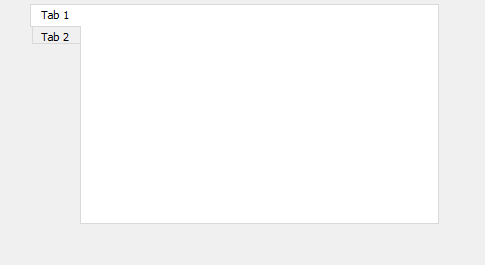
        i need exactly like this but the name of the tab vertically instead,Thanks in advance

        SbkdU.png

        1 Reply Last reply
        0
        • mrjjM Offline
          mrjjM Offline
          mrjj
          Lifetime Qt Champion
          wrote on last edited by
          #9

          Hi
          You have to set
          alt text

          then it works for a plain TabWidget

          alt text

          M S 2 Replies Last reply
          1
          • mrjjM mrjj

            Hi
            You have to set
            alt text

            then it works for a plain TabWidget

            alt text

            M Offline
            M Offline
            MostafaEzzat
            wrote on last edited by
            #10

            @mrjj

            Thanks alot

            mrjjM 1 Reply Last reply
            0
            • M MostafaEzzat

              @mrjj

              Thanks alot

              mrjjM Offline
              mrjjM Offline
              mrjj
              Lifetime Qt Champion
              wrote on last edited by
              #11

              @MostafaEzzat
              Np, that info was actually missing in the org example.

              M 1 Reply Last reply
              0
              • mrjjM mrjj

                @MostafaEzzat
                Np, that info was actually missing in the org example.

                M Offline
                M Offline
                MostafaEzzat
                wrote on last edited by MostafaEzzat
                #12

                @mrjj

                I'm sorry for opening this again but i've bunch of css code and want to use but when i add it from StyleSheet of Qt Designer The tabs became Vertical

                QTabWidget::pane { border: 1px solid lightgray; top:-1px; background: rgb(245, 245, 245);; }
                 QTabBar::tab { background: rgb(230, 230, 230); border: 1px solid lightgray; padding: 15px; } 
                QTabBar::tab:selected { background: rgb(245, 245, 245); margin-bottom: -1px; }
                

                aqrt.PNG

                1 Reply Last reply
                0
                • mrjjM mrjj

                  Hi
                  You have to set
                  alt text

                  then it works for a plain TabWidget

                  alt text

                  S Offline
                  S Offline
                  sandrayin
                  wrote on last edited by
                  #13

                  @mrjj

                  Hi,

                  i've managed to implement this but the close button does not align with the new style. What do I do?

                  bf47f75d-b1b2-49bc-aab2-fe2bde67de6e-image.png

                  jsulmJ 1 Reply Last reply
                  0
                  • S sandrayin

                    @mrjj

                    Hi,

                    i've managed to implement this but the close button does not align with the new style. What do I do?

                    bf47f75d-b1b2-49bc-aab2-fe2bde67de6e-image.png

                    jsulmJ Offline
                    jsulmJ Offline
                    jsulm
                    Lifetime Qt Champion
                    wrote on last edited by
                    #14

                    @sandrayin said in Horizontal text in QTabWidget:

                    What do I do?

                    We don't know because you do not show any code...

                    https://forum.qt.io/topic/113070/qt-code-of-conduct

                    1 Reply Last reply
                    0
                    • A Offline
                      A Offline
                      AZEDINE
                      wrote on last edited by
                      #15

                      I am trying to put the tab text in horizontal. I put the tabs in west orientation but the text appears in vertical like this picture:

                      en python : class HorizontalTabStyle(QProxyStyle):
                      def drawControl(self, element, option, painter, widget=None):
                      if element == QProxyStyle.CE_TabBarTab:
                      opt_tab = QStyleOptionTab(option)
                      # نجعل Qt يرسم النص كما لو كان في الأعلى (North) وبالتالي يكون أفقي
                      opt_tab.shape = QTabBar.RoundedNorth
                      super(HorizontalTabStyle, self).drawControl(element, opt_tab, painter, widget)
                      else:
                      super(HorizontalTabStyle, self).drawControl(element, option, painter, widget)
                      .....
                      self.tabWidgetResult.setTabPosition(QTabWidget.TabPosition.West)

                          # نطبّق الستايل المخصص على الـ tabBar
                          self.custom_style = HorizontalTabStyle(self.tabWidgetResult.style())
                          self.tabWidgetResult.tabBar().setStyle( self.custom_style)
                      
                      jsulmJ 1 Reply Last reply
                      0
                      • A AZEDINE

                        I am trying to put the tab text in horizontal. I put the tabs in west orientation but the text appears in vertical like this picture:

                        en python : class HorizontalTabStyle(QProxyStyle):
                        def drawControl(self, element, option, painter, widget=None):
                        if element == QProxyStyle.CE_TabBarTab:
                        opt_tab = QStyleOptionTab(option)
                        # نجعل Qt يرسم النص كما لو كان في الأعلى (North) وبالتالي يكون أفقي
                        opt_tab.shape = QTabBar.RoundedNorth
                        super(HorizontalTabStyle, self).drawControl(element, opt_tab, painter, widget)
                        else:
                        super(HorizontalTabStyle, self).drawControl(element, option, painter, widget)
                        .....
                        self.tabWidgetResult.setTabPosition(QTabWidget.TabPosition.West)

                            # نطبّق الستايل المخصص على الـ tabBar
                            self.custom_style = HorizontalTabStyle(self.tabWidgetResult.style())
                            self.tabWidgetResult.tabBar().setStyle( self.custom_style)
                        
                        jsulmJ Offline
                        jsulmJ Offline
                        jsulm
                        Lifetime Qt Champion
                        wrote on last edited by
                        #16

                        @AZEDINE There is no picture. And please format your code properly.

                        https://forum.qt.io/topic/113070/qt-code-of-conduct

                        A 1 Reply Last reply
                        0
                        • jsulmJ jsulm

                          @AZEDINE There is no picture. And please format your code properly.

                          A Offline
                          A Offline
                          AZEDINE
                          wrote on last edited by AZEDINE
                          #17

                          @jsulm

                          
                          self.tabWidgetResult = self.findChild(QTabWidget, "tabWidgetResult")
                                 if self.tabWidgetResult:
                                     self.tabWidgetResult.tabBar().setCursor(Qt.CursorShape.PointingHandCursor)
                          
                          
                                 self.tabWidgetResult.setStyleSheet("
                                     QTabBar::tab {
                                         width: 29px;
                                         max-width: 100px;
                                         min-width: 20px;
                                     }
                          
                                     QTabBar::tab:selected {
                                         background: #0E94A0;
                                         color: white; 
                                     }
                          
                                     QTabBar::tab {
                                         color: #000000; 
                                     }
                          
                                     QTabBar::tab::!selected {
                                         color: #0E94A0; 
                                     }
                          
                                     QTabBar::tab {
                                         font-size: 14px;
                                         font-weight: bold; 
                                         margin: 5px; 
                                         padding: 5px; 
                                         border: 2px solid #0E94A0;
                                         border-radius: 10px; 
                                     }
                          
                                     QTabBar::tab > QLabel {
                                         qproperty-alignment: AlignCenter; 
                                     transform: translate(0,10px) rotate(-90deg);
                                             
                                     }
                          
                                     QTabBar::tab:selected > QLabel {
                                         qproperty-alignment: AlignCenter; 
                                         transform: translate(0,10px) rotate(-90deg);
                                         
                                     }
                          
                                 ")


                          (Capture d'écran 2025-03-17 152926.png link url)) I am trying to put the tab text in horizontal. I put the tabs in west orientation but the text appears in vertical like this picture:

                          jsulmJ A 2 Replies Last reply
                          0
                          • A AZEDINE

                            @jsulm

                            
                            self.tabWidgetResult = self.findChild(QTabWidget, "tabWidgetResult")
                                   if self.tabWidgetResult:
                                       self.tabWidgetResult.tabBar().setCursor(Qt.CursorShape.PointingHandCursor)
                            
                            
                                   self.tabWidgetResult.setStyleSheet("
                                       QTabBar::tab {
                                           width: 29px;
                                           max-width: 100px;
                                           min-width: 20px;
                                       }
                            
                                       QTabBar::tab:selected {
                                           background: #0E94A0;
                                           color: white; 
                                       }
                            
                                       QTabBar::tab {
                                           color: #000000; 
                                       }
                            
                                       QTabBar::tab::!selected {
                                           color: #0E94A0; 
                                       }
                            
                                       QTabBar::tab {
                                           font-size: 14px;
                                           font-weight: bold; 
                                           margin: 5px; 
                                           padding: 5px; 
                                           border: 2px solid #0E94A0;
                                           border-radius: 10px; 
                                       }
                            
                                       QTabBar::tab > QLabel {
                                           qproperty-alignment: AlignCenter; 
                                       transform: translate(0,10px) rotate(-90deg);
                                               
                                       }
                            
                                       QTabBar::tab:selected > QLabel {
                                           qproperty-alignment: AlignCenter; 
                                           transform: translate(0,10px) rotate(-90deg);
                                           
                                       }
                            
                                   ")


                            (Capture d'écran 2025-03-17 152926.png link url)) I am trying to put the tab text in horizontal. I put the tabs in west orientation but the text appears in vertical like this picture:

                            jsulmJ Offline
                            jsulmJ Offline
                            jsulm
                            Lifetime Qt Champion
                            wrote on last edited by
                            #18

                            @AZEDINE said in Horizontal text in QTabWidget:

                            I put the tabs in west orientation

                            According to the picture you don't: the tabs are arranged vertically. How did you set up the QTabWidget?

                            https://forum.qt.io/topic/113070/qt-code-of-conduct

                            1 Reply Last reply
                            0
                            • A AZEDINE

                              @jsulm

                              
                              self.tabWidgetResult = self.findChild(QTabWidget, "tabWidgetResult")
                                     if self.tabWidgetResult:
                                         self.tabWidgetResult.tabBar().setCursor(Qt.CursorShape.PointingHandCursor)
                              
                              
                                     self.tabWidgetResult.setStyleSheet("
                                         QTabBar::tab {
                                             width: 29px;
                                             max-width: 100px;
                                             min-width: 20px;
                                         }
                              
                                         QTabBar::tab:selected {
                                             background: #0E94A0;
                                             color: white; 
                                         }
                              
                                         QTabBar::tab {
                                             color: #000000; 
                                         }
                              
                                         QTabBar::tab::!selected {
                                             color: #0E94A0; 
                                         }
                              
                                         QTabBar::tab {
                                             font-size: 14px;
                                             font-weight: bold; 
                                             margin: 5px; 
                                             padding: 5px; 
                                             border: 2px solid #0E94A0;
                                             border-radius: 10px; 
                                         }
                              
                                         QTabBar::tab > QLabel {
                                             qproperty-alignment: AlignCenter; 
                                         transform: translate(0,10px) rotate(-90deg);
                                                 
                                         }
                              
                                         QTabBar::tab:selected > QLabel {
                                             qproperty-alignment: AlignCenter; 
                                             transform: translate(0,10px) rotate(-90deg);
                                             
                                         }
                              
                                     ")


                              (Capture d'écran 2025-03-17 152926.png link url)) I am trying to put the tab text in horizontal. I put the tabs in west orientation but the text appears in vertical like this picture:

                              A Offline
                              A Offline
                              AZEDINE
                              wrote on last edited by
                              #19

                              @AZEDINE I am trying to put the tab text in horizontal. I put the tabs in west orientation but the text appears in vertical like this picture:

                               self.tabWidgetResult.setTabPosition(QTabWidget.West)
                              
                              1 Reply Last reply
                              0
                              • A Offline
                                A Offline
                                AZEDINE
                                wrote on last edited by
                                #20

                                image.png mon besoin comme ca en python

                                jsulmJ 1 Reply Last reply
                                0
                                • A AZEDINE

                                  image.png mon besoin comme ca en python

                                  jsulmJ Offline
                                  jsulmJ Offline
                                  jsulm
                                  Lifetime Qt Champion
                                  wrote on last edited by
                                  #21

                                  @AZEDINE Did you try what @mrjj suggested in this thread?

                                  https://forum.qt.io/topic/113070/qt-code-of-conduct

                                  A 1 Reply Last reply
                                  0
                                  • jsulmJ jsulm

                                    @AZEDINE Did you try what @mrjj suggested in this thread?

                                    A Offline
                                    A Offline
                                    AZEDINE
                                    wrote on last edited by
                                    #22

                                    @jsulm moi utilise python est ce que il ya une solition ???

                                    jsulmJ 1 Reply Last reply
                                    0
                                    • A AZEDINE

                                      @jsulm moi utilise python est ce que il ya une solition ???

                                      jsulmJ Offline
                                      jsulmJ Offline
                                      jsulm
                                      Lifetime Qt Champion
                                      wrote on last edited by
                                      #23

                                      @AZEDINE said in Horizontal text in QTabWidget:

                                      moi utilise python est ce que il ya une solition

                                      Please use English or post in French sub-forum

                                      https://forum.qt.io/topic/113070/qt-code-of-conduct

                                      1 Reply Last reply
                                      0
                                      • A Offline
                                        A Offline
                                        AZEDINE
                                        wrote on last edited by
                                        #24
                                        This post is deleted!
                                        1 Reply Last reply
                                        0
                                        • SGaistS Offline
                                          SGaistS Offline
                                          SGaist
                                          Lifetime Qt Champion
                                          wrote on last edited by
                                          #25

                                          Hi,

                                          Please provide a minimal runnable script that shows your issue.

                                          Interested in AI ? www.idiap.ch
                                          Please read the Qt Code of Conduct - https://forum.qt.io/topic/113070/qt-code-of-conduct

                                          1 Reply Last reply
                                          0

                                          • Login

                                          • Login or register to search.
                                          • First post
                                            Last post
                                          0
                                          • Categories
                                          • Recent
                                          • Tags
                                          • Popular
                                          • Users
                                          • Groups
                                          • Search
                                          • Get Qt
                                          • Unsolved