Skip to content
  • Categories
  • Recent
  • Tags
  • Popular
  • Users
  • Groups
  • Search
  • Get Qt Extensions
  • Unsolved
Collapse
Brand Logo
  1. Home
  2. Qt Development
  3. General and Desktop
  4. How to simplify syntax
Qt 6.11 is out! See what's new in the release blog

How to simplify syntax

Scheduled Pinned Locked Moved Solved General and Desktop
26 Posts 5 Posters 6.1k Views 2 Watching
  • Oldest to Newest
  • Newest to Oldest
  • Most Votes
Reply
  • Reply as topic
Log in to reply
This topic has been deleted. Only users with topic management privileges can see it.
  • J JacobNovitsky

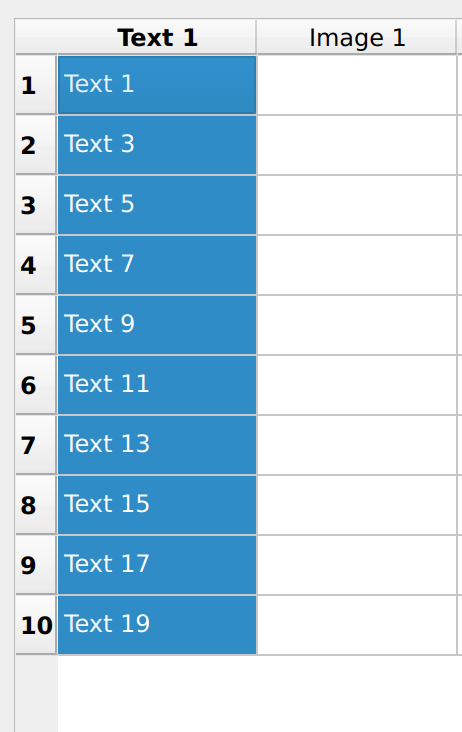
    @JacobNovitsky =Screenshot from 2024-09-18 17-42-18.png

    It looks fine, now I need to find a way to get indices for selected columns
    any advise?

    jsulmJ Offline
    jsulmJ Offline
    jsulm
    Lifetime Qt Champion
    wrote on last edited by
    #10

    @JacobNovitsky https://doc.qt.io/qt-6/qtablewidget.html#selectedItems and https://doc.qt.io/qt-6/qtablewidget.html#indexFromItem

    https://forum.qt.io/topic/113070/qt-code-of-conduct

    1 Reply Last reply
    1
    • J Offline
      J Offline
      JacobNovitsky
      wrote on last edited by JacobNovitsky
      #11

      tried to post code chunk, but output msg said it was spm
      https://justpaste.it/g6kt5

      above works, but selects all columns together with one click, I need to be able to do it one by one
      please advise

      1 Reply Last reply
      0
      • VRoninV Offline
        VRoninV Offline
        VRonin
        wrote on last edited by
        #12

        instead of calling selectedIndexes and doing manipulation, have you tried calling selectedColumns instead?

        "La mort n'est rien, mais vivre vaincu et sans gloire, c'est mourir tous les jours"
        ~Napoleon Bonaparte

        On a crusade to banish setIndexWidget() from the holy land of Qt

        1 Reply Last reply
        2
        • J Offline
          J Offline
          JacobNovitsky
          wrote on last edited by
          #13
          void MyWindow::onSelectionChanged() {
              // Fetch the currently selected columns using selectedColumns()
              QItemSelectionModel *selectionModel = tableView->selectionModel();
              QModelIndexList selectedColumns = selectionModel->selectedColumns();
          
              // Convert QModelIndexList to a list of column indices
              QList<int> selectedColumnList;
              for (const QModelIndex &index : selectedColumns) {
                  selectedColumnList.append(index.column());
              }
          
              // Sort the list of selected column indices
              std::sort(selectedColumnList.begin(), selectedColumnList.end());
          
              // Print selected column indices
              qDebug() << "Selected columns:" << selectedColumnList;
          }
          

          same result

          VRoninV 1 Reply Last reply
          0
          • J JacobNovitsky
            void MyWindow::onSelectionChanged() {
                // Fetch the currently selected columns using selectedColumns()
                QItemSelectionModel *selectionModel = tableView->selectionModel();
                QModelIndexList selectedColumns = selectionModel->selectedColumns();
            
                // Convert QModelIndexList to a list of column indices
                QList<int> selectedColumnList;
                for (const QModelIndex &index : selectedColumns) {
                    selectedColumnList.append(index.column());
                }
            
                // Sort the list of selected column indices
                std::sort(selectedColumnList.begin(), selectedColumnList.end());
            
                // Print selected column indices
                qDebug() << "Selected columns:" << selectedColumnList;
            }
            

            same result

            VRoninV Offline
            VRoninV Offline
            VRonin
            wrote on last edited by
            #14

            @JacobNovitsky said in How to simplify syntax:

            same result

            so what does qDebug() atually print there?

            "La mort n'est rien, mais vivre vaincu et sans gloire, c'est mourir tous les jours"
            ~Napoleon Bonaparte

            On a crusade to banish setIndexWidget() from the holy land of Qt

            J 1 Reply Last reply
            0
            • VRoninV VRonin

              @JacobNovitsky said in How to simplify syntax:

              same result

              so what does qDebug() atually print there?

              J Offline
              J Offline
              JacobNovitsky
              wrote on last edited by
              #15

              @VRonin it prints Selected columns: QList(0)
              but I can select only all lines with one click

              VRoninV 1 Reply Last reply
              0
              • J JacobNovitsky

                @VRonin it prints Selected columns: QList(0)
                but I can select only all lines with one click

                VRoninV Offline
                VRoninV Offline
                VRonin
                wrote on last edited by
                #16

                @JacobNovitsky said in How to simplify syntax:

                but I can select only all lines with one click

                I'm confused, what is the behaviour you would want to happen?

                "La mort n'est rien, mais vivre vaincu et sans gloire, c'est mourir tous les jours"
                ~Napoleon Bonaparte

                On a crusade to banish setIndexWidget() from the holy land of Qt

                1 Reply Last reply
                0
                • J Offline
                  J Offline
                  JacobNovitsky
                  wrote on last edited by
                  #17

                  Lets say, I selected line 1 3 and 9
                  or I selected lines 1 2 3
                  I need to 1) select only 123 out of 9 lines total
                  2) I need to get selected indices :)

                  1 Reply Last reply
                  0
                  • VRoninV Offline
                    VRoninV Offline
                    VRonin
                    wrote on last edited by VRonin
                    #18

                    In your code you have tableView->setSelectionBehavior(QAbstractItemView::SelectColumns); that makes it so when you select a cell, the entire column gets selected. I don't believe that's what you want, delete that line

                    "La mort n'est rien, mais vivre vaincu et sans gloire, c'est mourir tous les jours"
                    ~Napoleon Bonaparte

                    On a crusade to banish setIndexWidget() from the holy land of Qt

                    1 Reply Last reply
                    1
                    • J Offline
                      J Offline
                      JacobNovitsky
                      wrote on last edited by
                      #19

                      https://justpaste.it/dwq1c
                      Above is my last working code, it selects rows line by line as requested,
                      but outputs
                      Selected columns: QList()
                      with no inidices

                      I believe problem in
                      QList<int> MyWindow::getSelectedColumns()
                      Need to clarify/fix this syntax

                      JonBJ 1 Reply Last reply
                      0
                      • VRoninV Offline
                        VRoninV Offline
                        VRonin
                        wrote on last edited by
                        #20

                        Yes, you need to revert to selectedIndexes instead of selectedColumns. My suggestion above was a misunderstanding of your requirement

                        "La mort n'est rien, mais vivre vaincu et sans gloire, c'est mourir tous les jours"
                        ~Napoleon Bonaparte

                        On a crusade to banish setIndexWidget() from the holy land of Qt

                        1 Reply Last reply
                        0
                        • J JacobNovitsky

                          https://justpaste.it/dwq1c
                          Above is my last working code, it selects rows line by line as requested,
                          but outputs
                          Selected columns: QList()
                          with no inidices

                          I believe problem in
                          QList<int> MyWindow::getSelectedColumns()
                          Need to clarify/fix this syntax

                          JonBJ Offline
                          JonBJ Offline
                          JonB
                          wrote on last edited by
                          #21

                          @JacobNovitsky
                          I'm not sure I follow. If the user selects "lines" (rows) then you won't get any selected columns back? (Because whole columns are not selected, just certain columns within certain rows.) To see which columns are selected within various selected rows use QModelIndexList QItemSelectionModel::selectedIndexes() const, which gives all selected cells and then look at the column() values within that. If that is what you are looking for.

                          J 1 Reply Last reply
                          1
                          • JonBJ JonB

                            @JacobNovitsky
                            I'm not sure I follow. If the user selects "lines" (rows) then you won't get any selected columns back? (Because whole columns are not selected, just certain columns within certain rows.) To see which columns are selected within various selected rows use QModelIndexList QItemSelectionModel::selectedIndexes() const, which gives all selected cells and then look at the column() values within that. If that is what you are looking for.

                            J Offline
                            J Offline
                            JacobNovitsky
                            wrote on last edited by
                            #22

                            @JonB oh, it does indeed outputs columns selected, but I really meant rows :)
                            So I do look for the same but for rows?

                            JonBJ 1 Reply Last reply
                            0
                            • J JacobNovitsky

                              @JonB oh, it does indeed outputs columns selected, but I really meant rows :)
                              So I do look for the same but for rows?

                              JonBJ Offline
                              JonBJ Offline
                              JonB
                              wrote on last edited by
                              #23

                              @JacobNovitsky
                              Well, yes!
                              There are 3 methods to see what is selected:

                              • selectedColumns() --- just complete columns selected.
                              • selectedRows() --- just complete rows selected
                              • selectedIndexes() --- any mix of individual cells (not necessarily contiguous) selected. Always valid. Inspect each item's row() and column() to see what they are, could have any values.
                              1 Reply Last reply
                              2
                              • J JacobNovitsky has marked this topic as solved on
                              • VRoninV VRonin

                                That walks like a table, quacks like a table and swims like a table. Are you sure you don't actually want to just use QTableWidget (or QTableView + model if you want to be fancy)?

                                Pl45m4P Offline
                                Pl45m4P Offline
                                Pl45m4
                                wrote on last edited by
                                #24

                                @VRonin said in How to simplify syntax:

                                That walks like a table, quacks like a table and swims like a table

                                LMAO :D


                                If debugging is the process of removing software bugs, then programming must be the process of putting them in.

                                ~E. W. Dijkstra

                                VRoninV 1 Reply Last reply
                                0
                                • Pl45m4P Pl45m4

                                  @VRonin said in How to simplify syntax:

                                  That walks like a table, quacks like a table and swims like a table

                                  LMAO :D

                                  VRoninV Offline
                                  VRoninV Offline
                                  VRonin
                                  wrote on last edited by
                                  #25

                                  @Pl45m4 It's science: https://en.wikipedia.org/wiki/Duck_test
                                  "La mort n'est rien, mais vivre vaincu et sans gloire, c'est mourir tous les jours"
                                  ~Napoleon Bonaparte

                                  On a crusade to banish setIndexWidget() from the holy land of Qt

                                  Pl45m4P 1 Reply Last reply
                                  1
                                  • VRoninV VRonin

                                    @Pl45m4 It's science: https://en.wikipedia.org/wiki/Duck_test

                                    Pl45m4P Offline
                                    Pl45m4P Offline
                                    Pl45m4
                                    wrote on last edited by
                                    #26

                                    @VRonin

                                    Haha nice one. I know Rubberduck Debugging but this was new to me :)


                                    If debugging is the process of removing software bugs, then programming must be the process of putting them in.

                                    ~E. W. Dijkstra

                                    1 Reply Last reply
                                    0

                                    • Login

                                    • Login or register to search.
                                    • First post
                                      Last post
                                    0
                                    • Categories
                                    • Recent
                                    • Tags
                                    • Popular
                                    • Users
                                    • Groups
                                    • Search
                                    • Get Qt Extensions
                                    • Unsolved