Skip to content
  • Categories
  • Recent
  • Tags
  • Popular
  • Users
  • Groups
  • Search
  • Get Qt Extensions
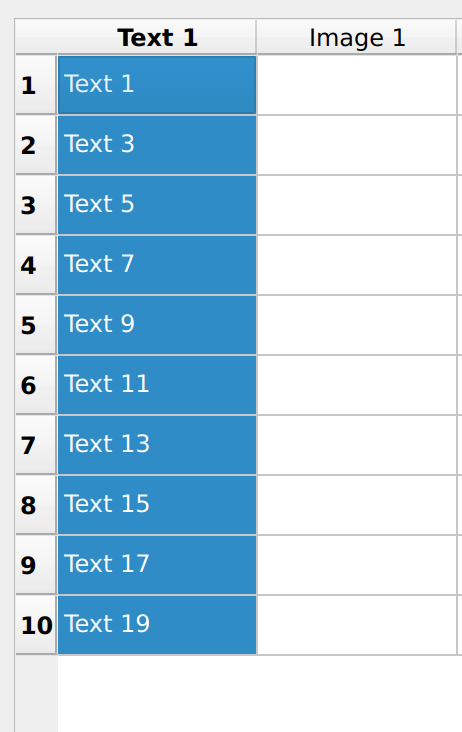
  • Unsolved
Collapse
Brand Logo
  1. Home
  2. Qt Development
  3. General and Desktop
  4. How to simplify syntax
Forum Updated to NodeBB v4.3 + New Features

How to simplify syntax

Scheduled Pinned Locked Moved Solved General and Desktop
26 Posts 5 Posters 3.1k Views 2 Watching
  • Oldest to Newest
  • Newest to Oldest
  • Most Votes
Reply
  • Reply as topic
Log in to reply
This topic has been deleted. Only users with topic management privileges can see it.
  • J JacobNovitsky

    I have Window.ui which has predefined QLabel as follow:
    QLabel QLabel QLabel QLabel
    ...
    -=- same till ned of QLabel
    Each line contains two QLabels to hold txt, two labels to hold Img
    I need to simply if some how as it feels very premature
    Kindly advise

    jsulmJ Offline
    jsulmJ Offline
    jsulm
    Lifetime Qt Champion
    wrote on last edited by jsulm
    #2

    @JacobNovitsky Why do you care how the generated code looks like (I assume you're talking about the code generated from the ui file, if not please formulate the post better, it is hard to understand)?

    https://forum.qt.io/topic/113070/qt-code-of-conduct

    1 Reply Last reply
    2
    • J JacobNovitsky

      I have Window.ui which has predefined QLabel as follow:
      QLabel QLabel QLabel QLabel
      ...
      -=- same till ned of QLabel
      Each line contains two QLabels to hold txt, two labels to hold Img
      I need to simply if some how as it feels very premature
      Kindly advise

      JonBJ Offline
      JonBJ Offline
      JonB
      wrote on last edited by JonB
      #3

      @JacobNovitsky
      If you are talking about the generated code as @jsulm asks then you cannot alter that (other than rewriting uic) and you should not care.

      If you mean something more like "I have "composite" widgets which contain a text label and an image label, I want to use them multiple times and I would like to reduce/rationalise the code for re-use" then you might create a widget containing the pairs or whatever of sub-widgets and then use Creator/Designer's Promotion facility to create a single widget out of them which can be re-used at design time.

      1 Reply Last reply
      1
      • J Offline
        J Offline
        JacobNovitsky
        wrote on last edited by VRonin
        #4

        I need something like this

         for (int i = 0; i < 10; ++i) { // Adjust the number of rows based on your needs
                QLabel* textLabel1 = new QLabel(QString("Text %1").arg(i * 2 + 1), this);
                QLabel* imgLabel1 = new QLabel(this); // Image label
                imgLabel1->setText("Image Placeholder"); // Placeholder text
        
                QLabel* textLabel2 = new QLabel(QString("Text %1").arg(i * 2 + 2), this);
                QLabel* imgLabel2 = new QLabel(this); // Image label
                imgLabel2->setText("Image Placeholder"); // Placeholder text
        
                // Add them to the grid layout
                layout->addWidget(textLabel1, i, 0);
                layout->addWidget(imgLabel1, i, 1);
                layout->addWidget(textLabel2, i, 2);
                layout->addWidget(imgLabel2, i, 3);
        
        JonBJ jsulmJ 2 Replies Last reply
        0
        • J JacobNovitsky

          I need something like this

           for (int i = 0; i < 10; ++i) { // Adjust the number of rows based on your needs
                  QLabel* textLabel1 = new QLabel(QString("Text %1").arg(i * 2 + 1), this);
                  QLabel* imgLabel1 = new QLabel(this); // Image label
                  imgLabel1->setText("Image Placeholder"); // Placeholder text
          
                  QLabel* textLabel2 = new QLabel(QString("Text %1").arg(i * 2 + 2), this);
                  QLabel* imgLabel2 = new QLabel(this); // Image label
                  imgLabel2->setText("Image Placeholder"); // Placeholder text
          
                  // Add them to the grid layout
                  layout->addWidget(textLabel1, i, 0);
                  layout->addWidget(imgLabel1, i, 1);
                  layout->addWidget(textLabel2, i, 2);
                  layout->addWidget(imgLabel2, i, 3);
          
          JonBJ Offline
          JonBJ Offline
          JonB
          wrote on last edited by
          #5

          @JacobNovitsky
          So now you want to create widgets dynamically instead of fixed as in the designed .ui file, which we would not have known. OK, so what is the problem/question? Yes you can create widgets dynamically, and put them into say a QGridLayout.

          Please use the forum's Code tags (</> button) when pasting blocks of code, it makes it easier for people to read and answer.

          1 Reply Last reply
          1
          • J JacobNovitsky

            I need something like this

             for (int i = 0; i < 10; ++i) { // Adjust the number of rows based on your needs
                    QLabel* textLabel1 = new QLabel(QString("Text %1").arg(i * 2 + 1), this);
                    QLabel* imgLabel1 = new QLabel(this); // Image label
                    imgLabel1->setText("Image Placeholder"); // Placeholder text
            
                    QLabel* textLabel2 = new QLabel(QString("Text %1").arg(i * 2 + 2), this);
                    QLabel* imgLabel2 = new QLabel(this); // Image label
                    imgLabel2->setText("Image Placeholder"); // Placeholder text
            
                    // Add them to the grid layout
                    layout->addWidget(textLabel1, i, 0);
                    layout->addWidget(imgLabel1, i, 1);
                    layout->addWidget(textLabel2, i, 2);
                    layout->addWidget(imgLabel2, i, 3);
            
            jsulmJ Offline
            jsulmJ Offline
            jsulm
            Lifetime Qt Champion
            wrote on last edited by
            #6

            @JacobNovitsky said in How to simplify syntax:

            I need something like this

            Then write it. What is the problem?

            https://forum.qt.io/topic/113070/qt-code-of-conduct

            1 Reply Last reply
            0
            • VRoninV Offline
              VRoninV Offline
              VRonin
              wrote on last edited by
              #7

              That walks like a table, quacks like a table and swims like a table. Are you sure you don't actually want to just use QTableWidget (or QTableView + model if you want to be fancy)?

              "La mort n'est rien, mais vivre vaincu et sans gloire, c'est mourir tous les jours"
              ~Napoleon Bonaparte

              On a crusade to banish setIndexWidget() from the holy land of Qt

              J Pl45m4P 2 Replies Last reply
              4
              • VRoninV VRonin

                That walks like a table, quacks like a table and swims like a table. Are you sure you don't actually want to just use QTableWidget (or QTableView + model if you want to be fancy)?

                J Offline
                J Offline
                JacobNovitsky
                wrote on last edited by JacobNovitsky
                #8

                @VRonin You're a devil in disguise!
                Yes, I'm going to try tableView

                J 1 Reply Last reply
                0
                • J JacobNovitsky

                  @VRonin You're a devil in disguise!
                  Yes, I'm going to try tableView

                  J Offline
                  J Offline
                  JacobNovitsky
                  wrote on last edited by
                  #9

                  @JacobNovitsky =Screenshot from 2024-09-18 17-42-18.png

                  It looks fine, now I need to find a way to get indices for selected columns
                  any advise?

                  jsulmJ 1 Reply Last reply
                  0
                  • J JacobNovitsky

                    @JacobNovitsky =Screenshot from 2024-09-18 17-42-18.png

                    It looks fine, now I need to find a way to get indices for selected columns
                    any advise?

                    jsulmJ Offline
                    jsulmJ Offline
                    jsulm
                    Lifetime Qt Champion
                    wrote on last edited by
                    #10

                    @JacobNovitsky https://doc.qt.io/qt-6/qtablewidget.html#selectedItems and https://doc.qt.io/qt-6/qtablewidget.html#indexFromItem

                    https://forum.qt.io/topic/113070/qt-code-of-conduct

                    1 Reply Last reply
                    1
                    • J Offline
                      J Offline
                      JacobNovitsky
                      wrote on last edited by JacobNovitsky
                      #11

                      tried to post code chunk, but output msg said it was spm
                      https://justpaste.it/g6kt5

                      above works, but selects all columns together with one click, I need to be able to do it one by one
                      please advise

                      1 Reply Last reply
                      0
                      • VRoninV Offline
                        VRoninV Offline
                        VRonin
                        wrote on last edited by
                        #12

                        instead of calling selectedIndexes and doing manipulation, have you tried calling selectedColumns instead?

                        "La mort n'est rien, mais vivre vaincu et sans gloire, c'est mourir tous les jours"
                        ~Napoleon Bonaparte

                        On a crusade to banish setIndexWidget() from the holy land of Qt

                        1 Reply Last reply
                        2
                        • J Offline
                          J Offline
                          JacobNovitsky
                          wrote on last edited by
                          #13
                          void MyWindow::onSelectionChanged() {
                              // Fetch the currently selected columns using selectedColumns()
                              QItemSelectionModel *selectionModel = tableView->selectionModel();
                              QModelIndexList selectedColumns = selectionModel->selectedColumns();
                          
                              // Convert QModelIndexList to a list of column indices
                              QList<int> selectedColumnList;
                              for (const QModelIndex &index : selectedColumns) {
                                  selectedColumnList.append(index.column());
                              }
                          
                              // Sort the list of selected column indices
                              std::sort(selectedColumnList.begin(), selectedColumnList.end());
                          
                              // Print selected column indices
                              qDebug() << "Selected columns:" << selectedColumnList;
                          }
                          

                          same result

                          VRoninV 1 Reply Last reply
                          0
                          • J JacobNovitsky
                            void MyWindow::onSelectionChanged() {
                                // Fetch the currently selected columns using selectedColumns()
                                QItemSelectionModel *selectionModel = tableView->selectionModel();
                                QModelIndexList selectedColumns = selectionModel->selectedColumns();
                            
                                // Convert QModelIndexList to a list of column indices
                                QList<int> selectedColumnList;
                                for (const QModelIndex &index : selectedColumns) {
                                    selectedColumnList.append(index.column());
                                }
                            
                                // Sort the list of selected column indices
                                std::sort(selectedColumnList.begin(), selectedColumnList.end());
                            
                                // Print selected column indices
                                qDebug() << "Selected columns:" << selectedColumnList;
                            }
                            

                            same result

                            VRoninV Offline
                            VRoninV Offline
                            VRonin
                            wrote on last edited by
                            #14

                            @JacobNovitsky said in How to simplify syntax:

                            same result

                            so what does qDebug() atually print there?

                            "La mort n'est rien, mais vivre vaincu et sans gloire, c'est mourir tous les jours"
                            ~Napoleon Bonaparte

                            On a crusade to banish setIndexWidget() from the holy land of Qt

                            J 1 Reply Last reply
                            0
                            • VRoninV VRonin

                              @JacobNovitsky said in How to simplify syntax:

                              same result

                              so what does qDebug() atually print there?

                              J Offline
                              J Offline
                              JacobNovitsky
                              wrote on last edited by
                              #15

                              @VRonin it prints Selected columns: QList(0)
                              but I can select only all lines with one click

                              VRoninV 1 Reply Last reply
                              0
                              • J JacobNovitsky

                                @VRonin it prints Selected columns: QList(0)
                                but I can select only all lines with one click

                                VRoninV Offline
                                VRoninV Offline
                                VRonin
                                wrote on last edited by
                                #16

                                @JacobNovitsky said in How to simplify syntax:

                                but I can select only all lines with one click

                                I'm confused, what is the behaviour you would want to happen?

                                "La mort n'est rien, mais vivre vaincu et sans gloire, c'est mourir tous les jours"
                                ~Napoleon Bonaparte

                                On a crusade to banish setIndexWidget() from the holy land of Qt

                                1 Reply Last reply
                                0
                                • J Offline
                                  J Offline
                                  JacobNovitsky
                                  wrote on last edited by
                                  #17

                                  Lets say, I selected line 1 3 and 9
                                  or I selected lines 1 2 3
                                  I need to 1) select only 123 out of 9 lines total
                                  2) I need to get selected indices :)

                                  1 Reply Last reply
                                  0
                                  • VRoninV Offline
                                    VRoninV Offline
                                    VRonin
                                    wrote on last edited by VRonin
                                    #18

                                    In your code you have tableView->setSelectionBehavior(QAbstractItemView::SelectColumns); that makes it so when you select a cell, the entire column gets selected. I don't believe that's what you want, delete that line

                                    "La mort n'est rien, mais vivre vaincu et sans gloire, c'est mourir tous les jours"
                                    ~Napoleon Bonaparte

                                    On a crusade to banish setIndexWidget() from the holy land of Qt

                                    1 Reply Last reply
                                    1
                                    • J Offline
                                      J Offline
                                      JacobNovitsky
                                      wrote on last edited by
                                      #19

                                      https://justpaste.it/dwq1c
                                      Above is my last working code, it selects rows line by line as requested,
                                      but outputs
                                      Selected columns: QList()
                                      with no inidices

                                      I believe problem in
                                      QList<int> MyWindow::getSelectedColumns()
                                      Need to clarify/fix this syntax

                                      JonBJ 1 Reply Last reply
                                      0
                                      • VRoninV Offline
                                        VRoninV Offline
                                        VRonin
                                        wrote on last edited by
                                        #20

                                        Yes, you need to revert to selectedIndexes instead of selectedColumns. My suggestion above was a misunderstanding of your requirement

                                        "La mort n'est rien, mais vivre vaincu et sans gloire, c'est mourir tous les jours"
                                        ~Napoleon Bonaparte

                                        On a crusade to banish setIndexWidget() from the holy land of Qt

                                        1 Reply Last reply
                                        0
                                        • J JacobNovitsky

                                          https://justpaste.it/dwq1c
                                          Above is my last working code, it selects rows line by line as requested,
                                          but outputs
                                          Selected columns: QList()
                                          with no inidices

                                          I believe problem in
                                          QList<int> MyWindow::getSelectedColumns()
                                          Need to clarify/fix this syntax

                                          JonBJ Offline
                                          JonBJ Offline
                                          JonB
                                          wrote on last edited by
                                          #21

                                          @JacobNovitsky
                                          I'm not sure I follow. If the user selects "lines" (rows) then you won't get any selected columns back? (Because whole columns are not selected, just certain columns within certain rows.) To see which columns are selected within various selected rows use QModelIndexList QItemSelectionModel::selectedIndexes() const, which gives all selected cells and then look at the column() values within that. If that is what you are looking for.

                                          J 1 Reply Last reply
                                          1

                                          • Login

                                          • Login or register to search.
                                          • First post
                                            Last post
                                          0
                                          • Categories
                                          • Recent
                                          • Tags
                                          • Popular
                                          • Users
                                          • Groups
                                          • Search
                                          • Get Qt Extensions
                                          • Unsolved