
Expand printed area in a PDF
-
Hi all
I am using HTML and a QPrinter to generate a PDF.
the code:QTextDocument document; document.setHtml(html); QPrinter printer(QPrinter::PrinterResolution); printer.setOutputFormat(QPrinter::PdfFormat); printer.setPageSize(QPageSize(QPageSize::A4)); printer.setPageMargins(QMarginsF(0,0,0,0)); printer.setOutputFileName(QCoreApplication::applicationDirPath() + "/test.pdf"); document.print(&printer);still leaves a large frame of unprinted area around the printed details. How can I improve that?

-
Hi all
I am using HTML and a QPrinter to generate a PDF.
the code:QTextDocument document; document.setHtml(html); QPrinter printer(QPrinter::PrinterResolution); printer.setOutputFormat(QPrinter::PdfFormat); printer.setPageSize(QPageSize(QPageSize::A4)); printer.setPageMargins(QMarginsF(0,0,0,0)); printer.setOutputFileName(QCoreApplication::applicationDirPath() + "/test.pdf"); document.print(&printer);still leaves a large frame of unprinted area around the printed details. How can I improve that?
@Thomas-63 by manipulating the print parameters (margin, etc) in the same way you'd do it using print preview/setup dialog when printing from the text editor. You have exactly same options.
100% page coverage will never be possible with a regular printer due to technical limitations of the home/office printers.
EDIT/ADD: take a look here https://doc.qt.io/qt-6/qprinter.html#setFullPage and start from that onwards. Read the docs, it's quite well explained.
Also, lots depends on the driver (obviously) but also on the OS you are using (since many printer companies can't write a proper driver).For more information please re-read.
Kind Regards,
Artur -
@Thomas-63 by manipulating the print parameters (margin, etc) in the same way you'd do it using print preview/setup dialog when printing from the text editor. You have exactly same options.
100% page coverage will never be possible with a regular printer due to technical limitations of the home/office printers.
EDIT/ADD: take a look here https://doc.qt.io/qt-6/qprinter.html#setFullPage and start from that onwards. Read the docs, it's quite well explained.
Also, lots depends on the driver (obviously) but also on the OS you are using (since many printer companies can't write a proper driver).@artwaw said in Expand printed area in a PDF:
100% page coverage will never be possible with a regular printer due to technical limitations of the home/office printers.
Even though it's true, this doesn't seem to apply here.
AFAICS @Thomas-63 is printing to PDF file only, where in theory you should be able to fill the whole page.
All depends on your settings (layout, content etc.) of course.@Thomas-63 maybe you can explain better what you expect.
We see a large colored rectangle in the middle, covering like 80% of the page... but in the bottom-right corner there is a "1"?!
What are your "printed details"? The rect? The number? Both?!
If you don't mind, add the HTML of what you are printing to your post.
If debugging is the process of removing software bugs, then programming must be the process of putting them in.
~E. W. Dijkstra
-
@artwaw said in Expand printed area in a PDF:
100% page coverage will never be possible with a regular printer due to technical limitations of the home/office printers.
Even though it's true, this doesn't seem to apply here.
AFAICS @Thomas-63 is printing to PDF file only, where in theory you should be able to fill the whole page.
All depends on your settings (layout, content etc.) of course.@Thomas-63 maybe you can explain better what you expect.
We see a large colored rectangle in the middle, covering like 80% of the page... but in the bottom-right corner there is a "1"?!
What are your "printed details"? The rect? The number? Both?!
If you don't mind, add the HTML of what you are printing to your post.@Pl45m4 agreed but even printing to pdf suffers from the limitations of QPrinter (mind you, I don't know what the virtual driver for that has inside but I bet it would not allow much). Okay, granted, does a few good things too.
If indeed only PDF output is needed I think (but that needs checking) QPdfWriter would remove some limitations?
-
Hello guys, thanks for your answers.
My problem is that the way I do it, the printer adds a non-removable margin of 20mm around the printing area.
some of the code of my HTML is:<!DOCTYPE html> <html> <head> <meta charset="utf-8"> <meta name="viewport" content="width=device-width, initial-scale=1"> <title></title> <style type="text/css"> h1, h2, h3 { margin:0; padding:0; font-weight:normal; font-style:normal; } a { color:#5D5D9E; } a:visited { color:#5D5D9E; } a:active { color:#5C615E; } a:hover { color:#B2B3B4; } #table_4bfff64d th { border: 1px solid #000000; } #table_4bfff64d td { border: 1px solid #000000; } #table_5d6e8fc5 th { border: 1px solid #8C8C8C; } #table_5d6e8fc5 td { border: 1px solid #8C8C8C; } #table_2a63c6c8 th { border: 1px solid #8C8C8C; } #table_2a63c6c8 td { border: 1px solid #8C8C8C; } #table_3003ed18 th { border: 1px solid #8C8C8C; } #table_3003ed18 td { border: 1px solid #8C8C8C; } #table_12299969 th { border: 1px solid #8C8C8C; } #table_12299969 td { border: 1px solid #8C8C8C; } #table_9038ba th { border: 1px solid #8C8C8C; } #table_9038ba td { border: 1px solid #8C8C8C; } </style> </head> <body style="background-color:#FFFFFF; padding:0; margin: 0;"> <div style="text-align:left;"> <h1 style="vertical-align: bottom; position:relative; display: inline-block; width:749px; background:none; font-size:14pt; font-family:Arial, Helvetica, sans-serif; color:#000000; text-align:left; " id="heading_62cf37c8">Datenblatt {pumpentyp}</h1> <img src="rc_images/logo.jpg" width="500" height="99" style="vertical-align: bottom; position:relative; display: inline-block; width:300px; background:none; height:auto; " id="img_70c663b5" alt="" title="" /> <table id="table_4bfff64d" cellpadding="3" cellspacing="1" style="box-sizing: border-box; vertical-align: bottom; position:relative; display: inline-table; width:1480px; height:95px; background:none; border: 1px solid #000000; table-layout: fixed; "> <tr> <td width="25%" height="14px" style="vertical-align: top; overflow:hidden; "> <div style="" id="cell_6a5612c4"> <div style="text-align:left;"> <span style="font-size:8pt; font-family:Arial, Helvetica, sans-serif; color:#000000; ">Projekt</span> </div> </div> </td> <td width="25%" height="14px" style="vertical-align: top; overflow:hidden; "> <div style="" id="cell_7a1f4a7c"> <div style="text-align:left;"> <span style="font-size:8pt; font-family:Arial, Helvetica, sans-serif; color:#000000; ">{projekt}</span> </div> </div> </td> <td width="25%" height="14px" style="vertical-align: top; overflow:hidden; "> <div style="" id="cell_365f079f"> <div style="text-align:left;"> <span style="font-size:8pt; font-family:Arial, Helvetica, sans-serif; color:#000000; ">Kundenposition</span> </div> </div> </td> <td width="25%" height="14px" style="vertical-align: top; overflow:hidden; "> <div style="" id="cell_798910f0"> <div style="text-align:left;"> <span style="font-size:8pt; font-family:Arial, Helvetica, sans-serif; color:#000000; ">{kundenposition}</span> </div> </div> </td> </tr> <tr> <td width="25%" height="14px" style="vertical-align: top; overflow:hidden; "> <div style="" id="cell_6fab104c"> <div style="text-align:left;"> <span style="font-size:8pt; font-family:Arial, Helvetica, sans-serif; color:#000000; ">Position / Revision</span> </div> </div> </td> <td width="25%" height="14px" style="vertical-align: top; overflow:hidden; "> <div style="" id="cell_3a151bc"> <div style="text-align:left;"> <span style="font-size:8pt; font-family:Arial, Helvetica, sans-serif; color:#000000; ">{position} / {revision}</span> </div> </div> </td> <td width="25%" height="14px" style="vertical-align: top; overflow:hidden; "> <div style="" id="cell_63851a2"> <div style="text-align:left;"> <span style="font-size:8pt; font-family:Arial, Helvetica, sans-serif; color:#000000; ">Aggregatnummer</span> </div> </div> </td> <td width="25%" height="14px" style="vertical-align: top; overflow:hidden; "> <div style="" id="cell_30174d59"> <div style="text-align:left;"> <span style="font-size:8pt; font-family:Arial, Helvetica, sans-serif; color:#000000; ">{aggregatnummer}</span> </div> </div> </td> </tr> <tr> <td width="25%" height="14px" style="vertical-align: top; overflow:hidden; "> <div style="" id="cell_382cbccc"> <div style="text-align:left;"> <span style="font-size:8pt; font-family:Arial, Helvetica, sans-serif; color:#000000; ">Datum</span> </div> </div> </td> <td width="25%" height="14px" style="vertical-align: top; overflow:hidden; "> <div style="" id="cell_276db422"> <div style="text-align:left;"> <span style="font-size:8pt; font-family:Arial, Helvetica, sans-serif; color:#000000; ">{datum}</span> </div> </div> </td> <td width="25%" height="14px" style="vertical-align: top; overflow:hidden; "> <div style="" id="cell_49ec4bae"> <div style="text-align:left;"> <span style="font-size:8pt; font-family:Arial, Helvetica, sans-serif; color:#000000; ">Artikelnummer</span> </div> </div> </td> <td width="25%" height="14px" style="vertical-align: top; overflow:hidden; "> <div style="" id="cell_4c46cf44"> <div style="text-align:left;"> <span style="font-size:8pt; font-family:Arial, Helvetica, sans-serif; color:#000000; ">{artikelnummer}</span> </div> </div> </td> </tr> <tr> <td width="25%" height="14px" style="vertical-align: top; overflow:hidden; "> <div style="" id="cell_67c5a5c8"> <div style="text-align:left;"> <span style="font-size:8pt; font-family:Arial, Helvetica, sans-serif; color:#000000; ">Bezeichnung</span> </div> </div> </td> <td width="25%" height="14px" style="vertical-align: top; overflow:hidden; "> <div style="" id="cell_6530c995"> <div style="text-align:left;"> <span style="font-size:8pt; font-family:Arial, Helvetica, sans-serif; color:#000000; "> </span> </div> </div> </td> <td width="25%" height="14px" style="vertical-align: top; overflow:hidden; "> <div style="" id="cell_f645165"> <div style="text-align:left;"> <span style="font-size:8pt; font-family:Arial, Helvetica, sans-serif; color:#000000; "> </span> </div> </div> </td> <td width="25%" height="14px" style="vertical-align: top; overflow:hidden; "> <div style="" id="cell_15ec8179"> <div style="text-align:left;"> <span style="font-size:8pt; font-family:Arial, Helvetica, sans-serif; color:#000000; "> </span> </div> </div> </td> </tr> </table> <table id="table_5d6e8fc5" cellpadding="3" cellspacing="1" style="box-sizing: border-box; vertical-align: bottom; position:relative; display: inline-table; width:1480px; height:325px; background:none; border: 1px solid #8C8C8C; table-layout: fixed; "> <tr> <td width="23%" height="14px" style="vertical-align: top; overflow:hidden; "> <div style="" id="cell_4a8d779a"> <div style="text-align:left;"> <span style="font-size:8pt; font-family:Arial, Helvetica, sans-serif; color:#000000; font-weight:bold; ">Betriebsdaten:</span> </div> </div> </td> <td width="9%" height="14px" style="vertical-align: top; overflow:hidden; "> <div style="" id="cell_5f0116bc"> <div style="text-align:left;"> <span style="font-size:8pt; font-family:Arial, Helvetica, sans-serif; color:#000000; "> </span> </div> </div> </td> <td width="6%" height="14px" style="vertical-align: top; overflow:hidden; "> <div style="" id="cell_3984735a"> <div style="text-align:left;"> <span style="font-size:8pt; font-family:Arial, Helvetica, sans-serif; color:#000000; "> </span> </div> </div> </td> <td width="26%" height="14px" style="vertical-align: top; overflow:hidden; "> <div style="" id="cell_11b4f6cd"> <div style="text-align:left;"> <span style="font-size:8pt; font-family:Arial, Helvetica, sans-serif; color:#000000; "> </span> </div> </div> </td> <td width="7%" height="14px" style="vertical-align: top; overflow:hidden; "> <div style="" id="cell_10e32479"> <div style="text-align:left;"> <span style="font-size:8pt; font-family:Arial, Helvetica, sans-serif; color:#000000; "> </span> </div> </div> </td> <td width="6%" height="14px" style="vertical-align: top; overflow:hidden; "> <div style="" id="cell_4915d68c"> <div style="text-align:left;"> <span style="font-size:8pt; font-family:Arial, Helvetica, sans-serif; color:#000000; "> </span> </div> </div> </td> <td width="6%" height="14px" style="vertical-align: top; overflow:hidden; "> <div style="" id="cell_23932c22"> <div style="text-align:left;"> <span style="font-size:8pt; font-family:Arial, Helvetica, sans-serif; color:#000000; "> </span> </div> </div> </td> <td width="14%" height="14px" style="vertical-align: top; overflow:hidden; "> <div style="" id="cell_3dae042d"> <div style="text-align:left;"> <span style="font-size:8pt; font-family:Arial, Helvetica, sans-serif; color:#000000; "> </span> </div> </div> </td> </tr> <tr> <td width="23%" height="14px" style="vertical-align: top; overflow:hidden; "> <div style="" id="cell_30ba40bc"> <div style="text-align:left;"> <span style="font-size:8pt; font-family:Arial, Helvetica, sans-serif; color:#000000; ">Fördermedium</span> </div> </div> </td> <td width="9%" height="14px" style="vertical-align: top; overflow:hidden; "> <div style="" id="cell_65b495a2"> <div style="text-align:left;"> <span style="font-size:8pt; font-family:Arial, Helvetica, sans-serif; color:#000000; ">{medium}</span> </div> </div> </td> <td width="6%" height="14px" style="vertical-align: top; overflow:hidden; "> <div style="" id="cell_64f37254"> <div style="text-align:left;"> <span style="font-size:8pt; font-family:Arial, Helvetica, sans-serif; color:#000000; "> </span> </div> </div> </td> <td width="26%" height="14px" style="vertical-align: top; overflow:hidden; "> <div style="" id="cell_7912be8c"> <div style="text-align:left;"> <span style="font-size:8pt; font-family:Arial, Helvetica, sans-serif; color:#000000; "> </span> </div> </div> </td> <td width="7%" height="14px" colspan="4" style="vertical-align: top; overflow:hidden; background-color:#AFAFAF; "> <div style="" id="cell_780a4201"> <div style="text-align:center;"> <span style="font-size:8pt; font-family:Arial, Helvetica, sans-serif; color:#000000; font-weight:bold; ">Betriebspunkt</span> </div> </div> </td> </tr> <tr> <td width="23%" height="14px" style="vertical-align: top; overflow:hidden; "> <div style="" id="cell_552b321a"> <div style="text-align:left;"> <span style="font-size:8pt; font-family:Arial, Helvetica, sans-serif; color:#000000; ">Korrosive Bestandteile</span> </div> </div> </td> <td width="9%" height="14px" style="vertical-align: top; overflow:hidden; "> <div style="" id="cell_567eab73"> <div style="text-align:left;"> <span style="font-size:8pt; font-family:Arial, Helvetica, sans-serif; color:#000000; ">{korrosiv}</span> </div> </div> </td> <td width="6%" height="14px" style="vertical-align: top; overflow:hidden; "> <div style="" id="cell_1ef4dcbd"> <div style="text-align:left;"> <span style="font-size:8pt; font-family:Arial, Helvetica, sans-serif; color:#000000; "> </span> </div> </div> </td> <td width="26%" height="14px" style="vertical-align: top; overflow:hidden; "> <div style="" id="cell_21c46e0d"> <div style="text-align:left;"> <span style="font-size:8pt; font-family:Arial, Helvetica, sans-serif; color:#000000; "> </span> </div> </div> </td> <td width="7%" height="14px" style="vertical-align: top; overflow:hidden; background-color:#AFAFAF; "> <div style="" id="cell_6b4db2e2"> <div style="text-align:center;"> <span style="font-size:8pt; font-family:Arial, Helvetica, sans-serif; color:#000000; font-weight:bold; ">1</span> </div> </div> </td> <td width="6%" height="14px" style="vertical-align: top; overflow:hidden; background-color:#AFAFAF; "> <div style="" id="cell_3af796a8"> <div style="text-align:center;"> <span style="font-size:8pt; font-family:Arial, Helvetica, sans-serif; color:#000000; font-weight:bold; ">2</span> </div> </div> </td> <td width="6%" height="14px" style="vertical-align: top; overflow:hidden; background-color:#AFAFAF; "> <div style="" id="cell_33e818a"> <div style="text-align:center;"> <span style="font-size:8pt; font-family:Arial, Helvetica, sans-serif; color:#000000; font-weight:bold; ">3</span> </div> </div> </td> <td width="14%" height="14px" style="vertical-align: top; overflow:hidden; background-color:#AFAFAF; "> </td> </tr> <tr> <td width="23%" height="14px" style="vertical-align: top; overflow:hidden; "> <div style="" id="cell_41df46e"> <div style="text-align:left;"> <span style="font-size:8pt; font-family:Arial, Helvetica, sans-serif; color:#000000; ">Feststoffanteil</span> </div> </div> </td> <td width="9%" height="14px" style="vertical-align: top; overflow:hidden; "> <div style="" id="cell_696dd514"> <div style="text-align:left;"> <span style="font-size:8pt; font-family:Arial, Helvetica, sans-serif; color:#000000; ">{feststoff}</span> </div> </div> </td> <td width="6%" height="14px" style="vertical-align: top; overflow:hidden; "> <div style="" id="cell_46b0c69c"> <div style="text-align:left;"> <span style="font-size:8pt; font-family:Arial, Helvetica, sans-serif; color:#000000; ">%</span> </div> </div> </td> <td width="26%" height="14px" style="vertical-align: top; overflow:hidden; "> <div style="" id="cell_7b66f638"> <div style="text-align:left;"> <span style="font-size:8pt; font-family:Arial, Helvetica, sans-serif; color:#000000; ">Förderstrom</span> </div> </div> </td> <td width="7%" height="14px" style="vertical-align: top; overflow:hidden; "> <div style="" id="cell_2aae4aae"> <div style="text-align:left;"> <span style="font-size:8pt; font-family:Arial, Helvetica, sans-serif; color:#000000; ">{q1}</span> </div> </div> </td> <td width="6%" height="14px" style="vertical-align: top; overflow:hidden; "> <div style="" id="cell_406a1ed8"> <div style="text-align:left;"> <span style="font-size:8pt; font-family:Arial, Helvetica, sans-serif; color:#000000; ">{q2}</span> </div> </div> </td> <td width="6%" height="14px" style="vertical-align: top; overflow:hidden; "> <div style="" id="cell_647c82f5"> <div style="text-align:left;"> <span style="font-size:8pt; font-family:Arial, Helvetica, sans-serif; color:#000000; ">{q3}</span> </div> </div> </td> <td width="14%" height="14px" style="vertical-align: top; overflow:hidden; "> <div style="" id="cell_1ff96705"> <div style="text-align:left;"> <span style="font-size:8pt; font-family:Arial, Helvetica, sans-serif; color:#000000; ">{qdim}</span> </div> </div> </td> </tr> <tr> <td width="23%" height="14px" style="vertical-align: top; overflow:hidden; "> <div style="" id="cell_6771e4d8"> <div style="text-align:left;"> <span style="font-size:8pt; font-family:Arial, Helvetica, sans-serif; color:#000000; ">Korngrösse</span> </div> </div> </td> <td width="9%" height="14px" style="vertical-align: top; overflow:hidden; "> <div style="" id="cell_64485fad"> <div style="text-align:left;"> <span style="font-size:8pt; font-family:Arial, Helvetica, sans-serif; color:#000000; ">{korngroesse}</span> </div> </div> </td> <td width="6%" height="14px" style="vertical-align: top; overflow:hidden; "> <div style="" id="cell_4081172c"> <div style="text-align:left;"> <span style="font-size:8pt; font-family:Arial, Helvetica, sans-serif; color:#000000; ">mm</span> </div> </div> </td> <td width="26%" height="14px" style="vertical-align: top; overflow:hidden; "> <div style="" id="cell_27a5273a"> <div style="text-align:left;"> <span style="font-size:8pt; font-family:Arial, Helvetica, sans-serif; color:#000000; ">Förderhöhe</span> </div> </div> </td> <td width="7%" height="14px" style="vertical-align: top; overflow:hidden; "> <div style="" id="cell_37cf11ab"> <div style="text-align:left;"> <span style="font-size:8pt; font-family:Arial, Helvetica, sans-serif; color:#000000; ">{h1}</span> </div> </div> </td> <td width="6%" height="14px" style="vertical-align: top; overflow:hidden; "> <div style="" id="cell_7e87c8e1"> <div style="text-align:left;"> <span style="font-size:8pt; font-family:Arial, Helvetica, sans-serif; color:#000000; ">{h2}</span> </div> </div> </td> <td width="6%" height="14px" style="vertical-align: top; overflow:hidden; "> <div style="" id="cell_67ff2894"> <div style="text-align:left;"> <span style="font-size:8pt; font-family:Arial, Helvetica, sans-serif; color:#000000; ">{h3}</span> </div> </div> </td> <td width="14%" height="14px" style="vertical-align: top; overflow:hidden; "> <div style="" id="cell_1abba20d"> <div style="text-align:left;"> <span style="font-size:8pt; font-family:Arial, Helvetica, sans-serif; color:#000000; ">{hdim}</span> </div> </div> </td> </tr> <tr> <td width="23%" height="14px" style="vertical-align: top; overflow:hidden; "> <div style="" id="cell_48fac406"> <div style="text-align:left;"> <span style="font-size:8pt; font-family:Arial, Helvetica, sans-serif; color:#000000; ">Stoffdichte</span> </div> </div> </td> <td width="9%" height="14px" style="vertical-align: top; overflow:hidden; "> <div style="" id="cell_5456af58"> <div style="text-align:left;"> <span style="font-size:8pt; font-family:Arial, Helvetica, sans-serif; color:#000000; ">{stoffdichte}</span> </div> </div> </td> <td width="6%" height="14px" style="vertical-align: top; overflow:hidden; "> <div style="" id="cell_633d4dc3"> <div style="text-align:left;"> <span style="font-size:8pt; font-family:Arial, Helvetica, sans-serif; color:#000000; ">%</span> </div> </div> </td> <td width="26%" height="14px" style="vertical-align: top; overflow:hidden; "> <div style="" id="cell_6ce45538"> <div style="text-align:left;"> <span style="font-size:8pt; font-family:Arial, Helvetica, sans-serif; color:#000000; ">Druck am Saugstutzen</span> </div> </div> </td> <td width="7%" height="14px" style="vertical-align: top; overflow:hidden; "> <div style="" id="cell_36bd4fd1"> <div style="text-align:left;"> <span style="font-size:8pt; font-family:Arial, Helvetica, sans-serif; color:#000000; ">{pin1}</span> </div> </div> </td> <td width="6%" height="14px" style="vertical-align: top; overflow:hidden; "> <div style="" id="cell_3f52f5e"> <div style="text-align:left;"> <span style="font-size:8pt; font-family:Arial, Helvetica, sans-serif; color:#000000; ">{pin2}</span> </div> </div> </td> <td width="6%" height="14px" style="vertical-align: top; overflow:hidden; "> <div style="" id="cell_18f1f132"> <div style="text-align:left;"> <span style="font-size:8pt; font-family:Arial, Helvetica, sans-serif; color:#000000; ">{pin3}</span> </div> </div> </td> <td width="14%" height="14px" style="vertical-align: top; overflow:hidden; "> <div style="" id="cell_1994e0d2"> <div style="text-align:left;"> <span style="font-size:8pt; font-family:Arial, Helvetica, sans-serif; color:#000000; ">{pindim}</span> </div> </div> </td> </tr> <tr> <td width="23%" height="14px" style="vertical-align: top; overflow:hidden; "> <div style="" id="cell_44c6c9cc"> <div style="text-align:left;"> <span style="font-size:8pt; font-family:Arial, Helvetica, sans-serif; color:#000000; ">pH-Wert</span> </div> </div> </td> <td width="9%" height="14px" style="vertical-align: top; overflow:hidden; "> <div style="" id="cell_3e575098"> <div style="text-align:left;"> <span style="font-size:8pt; font-family:Arial, Helvetica, sans-serif; color:#000000; ">{ph}</span> </div> </div> </td> <td width="6%" height="14px" style="vertical-align: top; overflow:hidden; "> <div style="" id="cell_4f41ecfa"> <div style="text-align:left;"> <span style="font-size:8pt; font-family:Arial, Helvetica, sans-serif; color:#000000; "> </span> </div> </div> </td> <td width="26%" height="14px" style="vertical-align: top; overflow:hidden; "> <div style="" id="cell_3b77e554"> <div style="text-align:left;"> <span style="font-size:8pt; font-family:Arial, Helvetica, sans-serif; color:#000000; ">Druck am Druckstutzen</span> </div> </div> </td> <td width="7%" height="14px" style="vertical-align: top; overflow:hidden; "> <div style="" id="cell_2e184021"> <div style="text-align:left;"> <span style="font-size:8pt; font-family:Arial, Helvetica, sans-serif; color:#000000; ">{pout1}</span> </div> </div> </td> <td width="6%" height="14px" style="vertical-align: top; overflow:hidden; "> <div style="" id="cell_66e929c9"> <div style="text-align:left;"> <span style="font-size:8pt; font-family:Arial, Helvetica, sans-serif; color:#000000; ">{pout2}</span> </div> </div> </td> <td width="6%" height="14px" style="vertical-align: top; overflow:hidden; "> <div style="" id="cell_7e822e07"> <div style="text-align:left;"> <span style="font-size:8pt; font-family:Arial, Helvetica, sans-serif; color:#000000; ">{pout3}</span> </div> </div> </td> <td width="14%" height="14px" style="vertical-align: top; overflow:hidden; "> <div style="" id="cell_6d14fdfd"> <div style="text-align:left;"> <span style="font-size:8pt; font-family:Arial, Helvetica, sans-serif; color:#000000; ">{poutdim}</span> </div> </div> </td> </tr> <tr> <td width="23%" height="14px" style="vertical-align: top; overflow:hidden; "> <div style="" id="cell_6d47fbf1"> <div style="text-align:left;"> <span style="font-size:8pt; font-family:Arial, Helvetica, sans-serif; color:#000000; ">NPSH Anlage</span> </div> </div> </td> <td width="9%" height="14px" style="vertical-align: top; overflow:hidden; "> <div style="" id="cell_169edec1"> <div style="text-align:left;"> <span style="font-size:8pt; font-family:Arial, Helvetica, sans-serif; color:#000000; ">{npshanlage}</span> </div> </div> </td> <td width="6%" height="14px" style="vertical-align: top; overflow:hidden; "> <div style="" id="cell_1d02c053"> <div style="text-align:left;"> <span style="font-size:8pt; font-family:Arial, Helvetica, sans-serif; color:#000000; ">m</span> </div> </div> </td> <td width="26%" height="14px" style="vertical-align: top; overflow:hidden; "> <div style="" id="cell_597592f2"> <div style="text-align:left;"> <span style="font-size:8pt; font-family:Arial, Helvetica, sans-serif; color:#000000; ">Differenzdruck</span> </div> </div> </td> <td width="7%" height="14px" style="vertical-align: top; overflow:hidden; "> <div style="" id="cell_552d7807"> <div style="text-align:left;"> <span style="font-size:8pt; font-family:Arial, Helvetica, sans-serif; color:#000000; ">{dif1}</span> </div> </div> </td> <td width="6%" height="14px" style="vertical-align: top; overflow:hidden; "> <div style="" id="cell_3fd19a42"> <div style="text-align:left;"> <span style="font-size:8pt; font-family:Arial, Helvetica, sans-serif; color:#000000; ">{dif2}</span> </div> </div> </td> <td width="6%" height="14px" style="vertical-align: top; overflow:hidden; "> <div style="" id="cell_3148d828"> <div style="text-align:left;"> <span style="font-size:8pt; font-family:Arial, Helvetica, sans-serif; color:#000000; ">{dif3}</span> </div> </div> </td> <td width="14%" height="14px" style="vertical-align: top; overflow:hidden; "> <div style="" id="cell_6f123cbb"> <div style="text-align:left;"> <span style="font-size:8pt; font-family:Arial, Helvetica, sans-serif; color:#000000; ">{difdim}</span> </div> </div> </td> </tr> <tr> <td width="23%" height="14px" style="vertical-align: top; overflow:hidden; "> <div style="" id="cell_1f6374ba"> <div style="text-align:left;"> <span style="font-size:8pt; font-family:Arial, Helvetica, sans-serif; color:#000000; ">NPSH Pumpe</span> </div> </div> </td> <td width="9%" height="14px" style="vertical-align: top; overflow:hidden; "> <div style="" id="cell_4cfbf672"> <div style="text-align:left;"> <span style="font-size:8pt; font-family:Arial, Helvetica, sans-serif; color:#000000; ">{npshpumpe}</span> </div> </div> </td> <td width="6%" height="14px" style="vertical-align: top; overflow:hidden; "> <div style="" id="cell_629e3c79"> <div style="text-align:left;"> <span style="font-size:8pt; font-family:Arial, Helvetica, sans-serif; color:#000000; ">m</span> </div> </div> </td> <td width="26%" height="14px" style="vertical-align: top; overflow:hidden; "> <div style="" id="cell_289b6f13"> <div style="text-align:left;"> <span style="font-size:8pt; font-family:Arial, Helvetica, sans-serif; color:#000000; ">Dampfdruck</span> </div> </div> </td> <td width="7%" height="14px" style="vertical-align: top; overflow:hidden; "> <div style="" id="cell_22e4a421"> <div style="text-align:left;"> <span style="font-size:8pt; font-family:Arial, Helvetica, sans-serif; color:#000000; ">{dd1}</span> </div> </div> </td> <td width="6%" height="14px" style="vertical-align: top; overflow:hidden; "> <div style="" id="cell_5f62f228"> <div style="text-align:left;"> <span style="font-size:8pt; font-family:Arial, Helvetica, sans-serif; color:#000000; ">{dd2}</span> </div> </div> </td> <td width="6%" height="14px" style="vertical-align: top; overflow:hidden; "> <div style="" id="cell_7c36b3fb"> <div style="text-align:left;"> <span style="font-size:8pt; font-family:Arial, Helvetica, sans-serif; color:#000000; ">{dd3}</span> </div> </div> </td> <td width="14%" height="14px" style="vertical-align: top; overflow:hidden; "> <div style="" id="cell_27ce7d7c"> <div style="text-align:left;"> <span style="font-size:8pt; font-family:Arial, Helvetica, sans-serif; color:#000000; ">{dddim}</span> </div> </div> </td> </tr> </table> </div> </body> </html>I tried to set the table with to 100% and to 1480px. Nothing helped.
This is my resulting PDF:
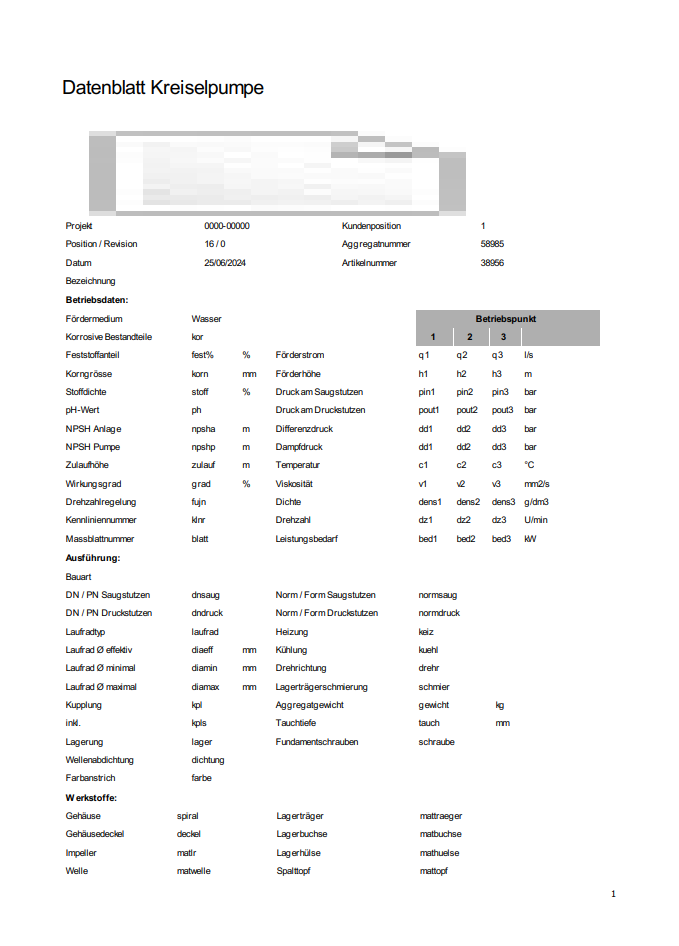
ANother problem is that my company logo is scribbled
@artwaw, i will try QPdfWriter
-
Still struggling here.
    // Create a QPrinter object
    QPrinter printer(QPrinter::PrinterResolution);
    printer.setOutputFormat(QPrinter::PdfFormat);
    printer.setPrinterName("Microsoft Print to PDF");
    printer.setOutputFileName(filePath);
    printer.setPageSize(QPageSize(QPageSize::A4));
    printer.setResolution(300);

    QPageLayout layout = printer.pageLayout();
    layout.setMode(QPageLayout::FullPageMode);
    layout.setMargins(QMarginsF(0, 0, 0, 0)); // Set all margins to zero
    printer.setPageLayout(layout);

    // Print the QTextDocument to the PDF
    document.print(&printer);
still leaves 20mm on each side empty.
this code:
    // Create a QPdfWriter object
    QPdfWriter pdfWriter(filePath);
    pdfWriter.setPageSize(QPageSize(QPageSize::A4));  // Set page size if needed

    // Create a QPainter object to draw on the PDF
    QPainter painter(&pdfWriter);
    if (!painter.isActive()) {
        qWarning("Failed to create QPainter object.");
        return;
    }

    // Render the QTextDocument to the QPdfWriter
    document.drawContents(&painter);
prints this pdf:

-
Still struggling here.
    // Create a QPrinter object
    QPrinter printer(QPrinter::PrinterResolution);
    printer.setOutputFormat(QPrinter::PdfFormat);
    printer.setPrinterName("Microsoft Print to PDF");
    printer.setOutputFileName(filePath);
    printer.setPageSize(QPageSize(QPageSize::A4));
    printer.setResolution(300);

    QPageLayout layout = printer.pageLayout();
    layout.setMode(QPageLayout::FullPageMode);
    layout.setMargins(QMarginsF(0, 0, 0, 0)); // Set all margins to zero
    printer.setPageLayout(layout);

    // Print the QTextDocument to the PDF
    document.print(&printer);
still leaves 20mm on each side empty.
this code:
    // Create a QPdfWriter object
    QPdfWriter pdfWriter(filePath);
    pdfWriter.setPageSize(QPageSize(QPageSize::A4));  // Set page size if needed

    // Create a QPainter object to draw on the PDF
    QPainter painter(&pdfWriter);
    if (!painter.isActive()) {
        qWarning("Failed to create QPainter object.");
        return;
    }

    // Render the QTextDocument to the QPdfWriter
    document.drawContents(&painter);
prints this pdf:
@Thomas-63 I see. I will be able to try to reproduce it all tomorrow (Monday).
-
Still struggling here.
    // Create a QPrinter object
    QPrinter printer(QPrinter::PrinterResolution);
    printer.setOutputFormat(QPrinter::PdfFormat);
    printer.setPrinterName("Microsoft Print to PDF");
    printer.setOutputFileName(filePath);
    printer.setPageSize(QPageSize(QPageSize::A4));
    printer.setResolution(300);

    QPageLayout layout = printer.pageLayout();
    layout.setMode(QPageLayout::FullPageMode);
    layout.setMargins(QMarginsF(0, 0, 0, 0)); // Set all margins to zero
    printer.setPageLayout(layout);

    // Print the QTextDocument to the PDF
    document.print(&printer);
still leaves 20mm on each side empty.
this code:
    // Create a QPdfWriter object
    QPdfWriter pdfWriter(filePath);
    pdfWriter.setPageSize(QPageSize(QPageSize::A4));  // Set page size if needed

    // Create a QPainter object to draw on the PDF
    QPainter painter(&pdfWriter);
    if (!painter.isActive()) {
        qWarning("Failed to create QPainter object.");
        return;
    }

    // Render the QTextDocument to the QPdfWriter
    document.drawContents(&painter);
prints this pdf:
@Thomas-63 You missed one point: QPdfWriter is of QPagedPaintDevice heritage. Hence instead of:
document.drawContents(&painter);you shoulddocument.print(&pdfWriter);.The result, however, still doesn't look right
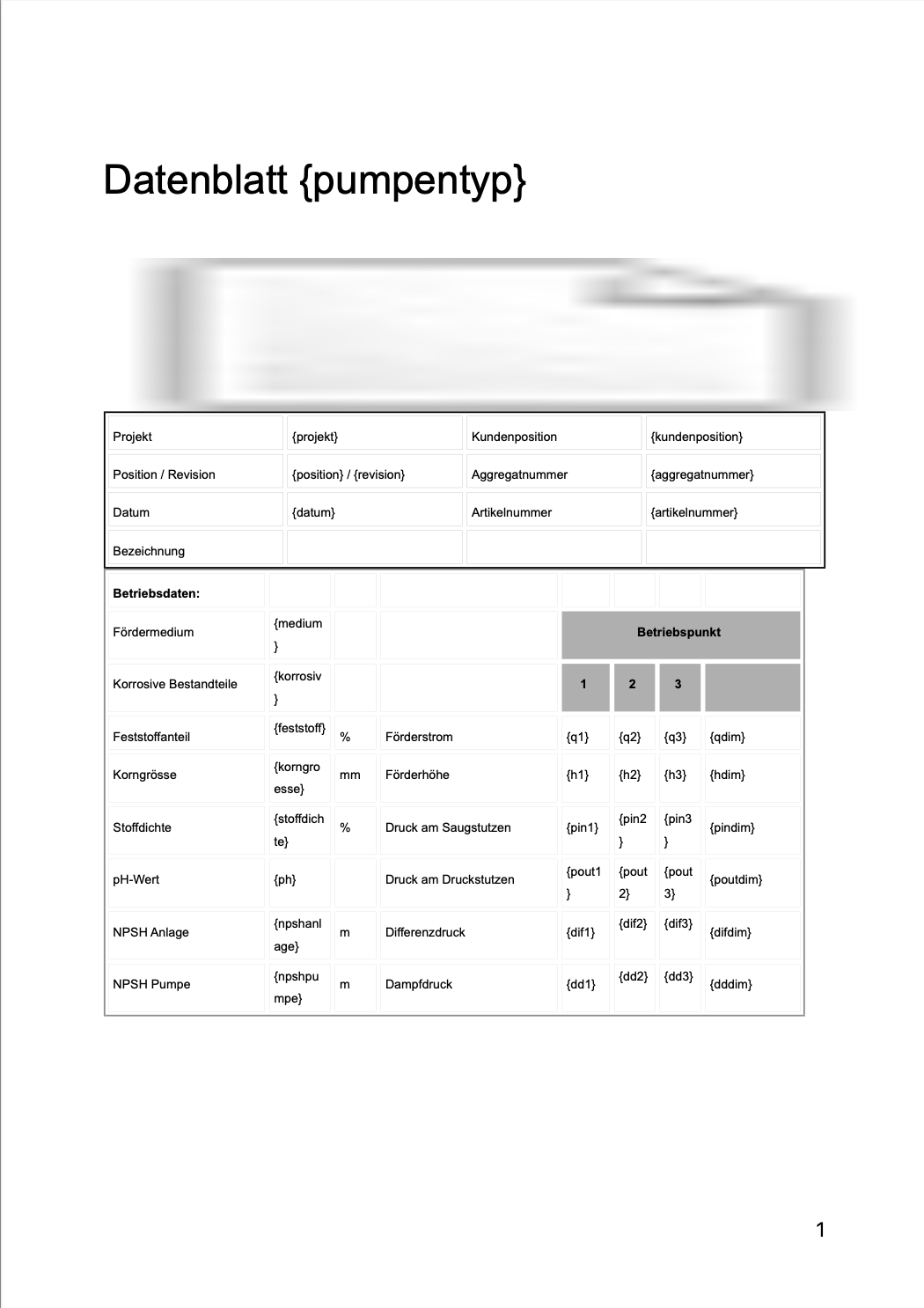
As for the garbled logo - please make sure it is available to QTextDocument as per documentation? What I suppose is it can't be loaded properly, hence the placeholder we see.
At this point I'd suggest constructing QTextDocument block by block, with image insert where appropriate.
After making some adjustments I managed to get this state of the pdf:
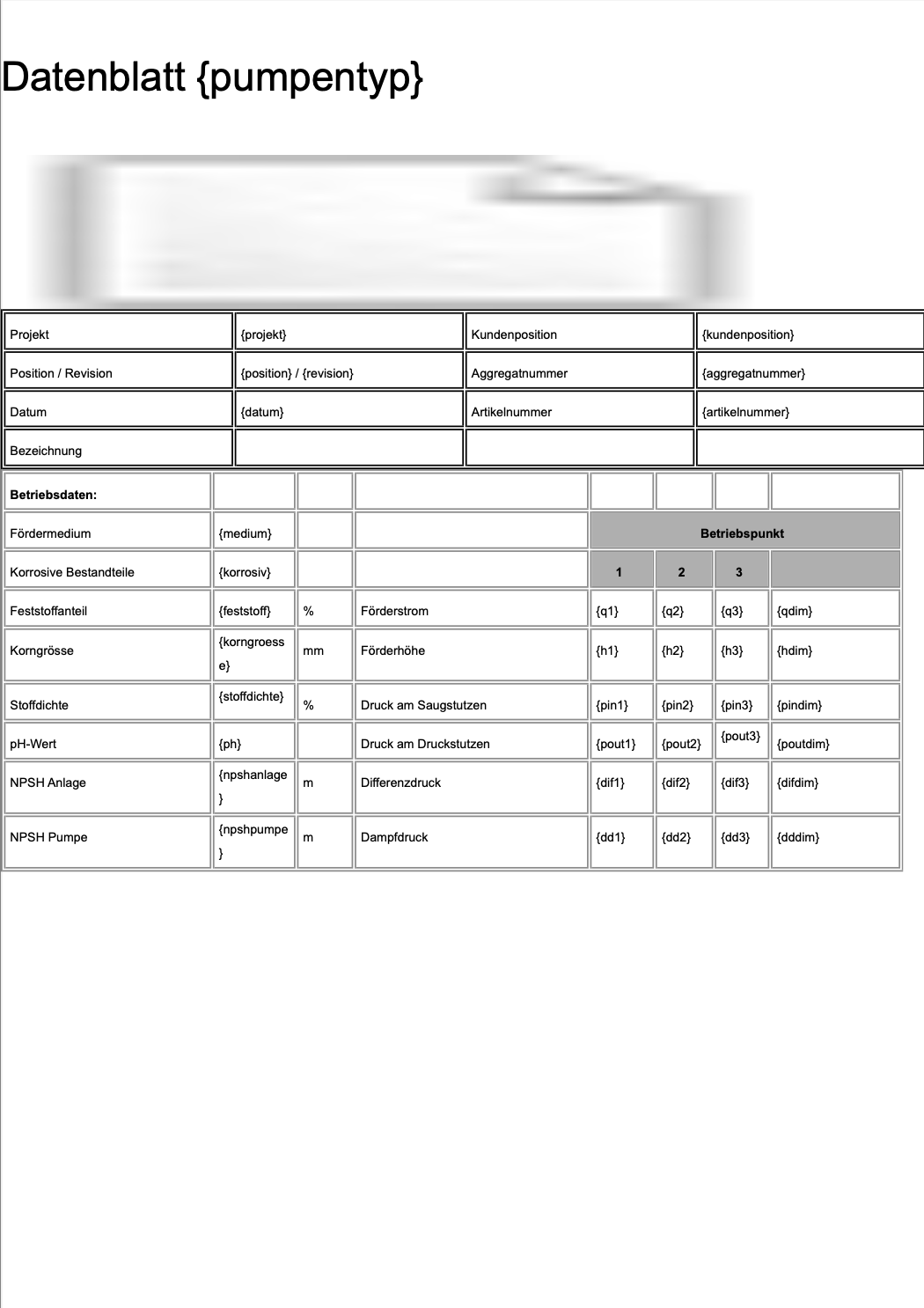 which I hope is what you aimed for.
Additional things I did:
document.setPageSize(QPageSize(QPageSize::A4).sizePoints());
document.setDocumentMargin(0);
pdfWriter.setPageSize(QPageSize(QPageSize::A4));
pdfWriter.setPageMargins(QMarginsF(0,0,0,0));
Some of them are probably redundant but I am living this for you to figure out ;)
Please let me know if that helped.
-
wow, that really helped a lot!
PDF looks like this now:
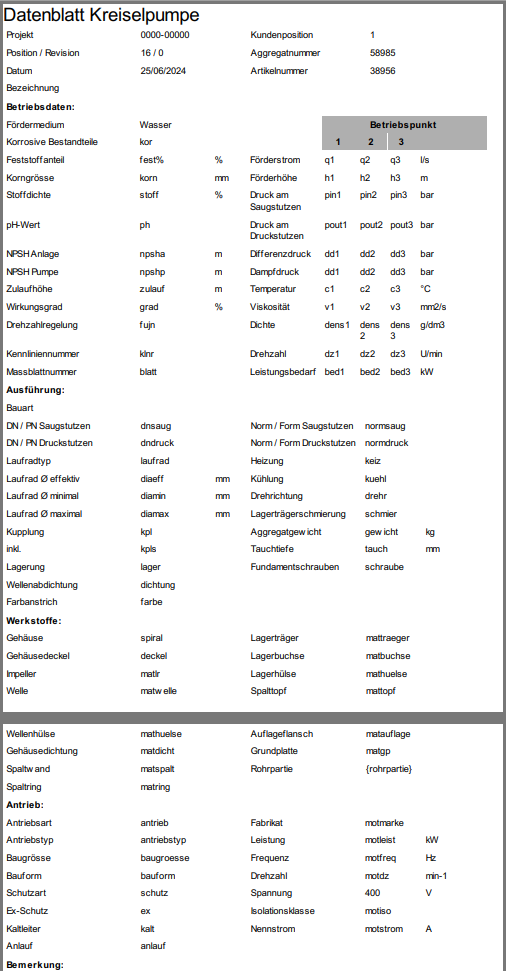
What I dont understand now are two things:
How can I make the logo available for the QTextDocument?
The logo is visible in the html document:

but it still appears as a placeholder in the PDF.What do you mean by constructing the document block by block? Should I use multiple html files and print each of them to the document? Like:
    document1.setHtml(html1);
    document1.print(&pdfWriter);
    document2.setHtml(html2);
    document2.print(&pdfWriter);
    document3.setHtml(html3);
    document3.print(&pdfWriter);
Thank you so much, I am really stepping forward now.
Thomas -
wow, that really helped a lot!
PDF looks like this now:
What I dont understand now are two things:
How can I make the logo available for the QTextDocument?
The logo is visible in the html document:
but it still appears as a placeholder in the PDF.What do you mean by constructing the document block by block? Should I use multiple html files and print each of them to the document? Like:
    document1.setHtml(html1);
    document1.print(&pdfWriter);
    document2.setHtml(html2);
    document2.print(&pdfWriter);
    document3.setHtml(html3);
    document3.print(&pdfWriter);
Thank you so much, I am really stepping forward now.
Thomas@Thomas-63 QTextDocument is a container built from QTextBlock parts. Essentially, what you do, is insert one such block - which is rather cumbersome when it comes to manipulating the content (you manipulate it through QTextCursor - it is not that complicated after all, just lots of reading). That's high level theory. Please take a look at https://doc.qt.io/qt-6/qtextcursor.html#insertBlock - the cursor object is your gateway to editing.
In practice, I think, you need two blocks: first one comes with the logo, second can be as is (assuming you'll take out the logo from html). I shall assume that the logo is the first item in your document, please correct me if that assumption is wrong.
I have not tested yet but based on my experience what you need to do is:- put logo in the resource file, so we know its path (i.e.: ":/img/logo.png" should logo reside under the prefix img)
- obtain cursor from the very start:
QTextCursor crs(&document);Then take a look here https://doc.qt.io/qt-6/qtextcursor.html#insertImage-2 and choose appropriate approach. Experiment with positioning the cursor in the document (by setPostion() method).
Once the logo is in place, adjust position again and call https://doc.qt.io/qt-6/qtextcursor.html#insertBlock
Then simply insert the rest of your html.Please let me know if you find that troublesome, I can prototype this for you later.
-
Hey Artur
Thank you so much! Now I am getting closer and closer to what I desired.
There is only one more issue: It is a two side PDF and I cant find a place to start a new page.@Thomas-63 said in Expand printed area in a PDF:
It is a two side PDF and I cant find a place to start a new page.
It should auto page, I think?
https://doc.qt.io/qt-6/qtextdocument.html#print"If the document is already paginated through a specified height in the pageSize() property it is printed as-is.
If the document is not paginated, like for example a document used in a QTextEdit, then a temporary copy of the document is created and the copy is broken into multiple pages according to the size of the paint device's paperRect(). By default a 2 cm margin is set around the document contents. In addition the current page number is printed at the bottom of each page."
@Thomas-63 said in Expand printed area in a PDF:
the table borders disappear when printing
All of them? Some of them? Have you tried thicker line? Reasons can be many...
-
I solved the pagination within the html code.
All of the frames and lines are gone. I even tried 5 px - nothing
HTML preview in Browser: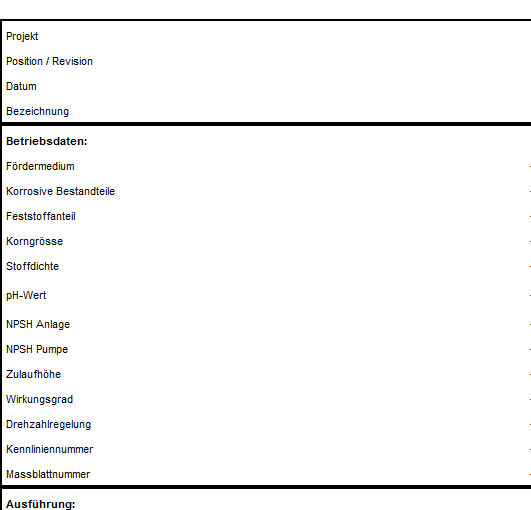
PDF:
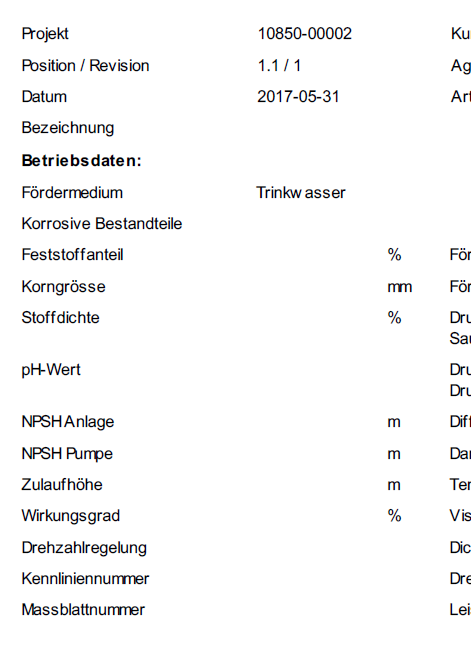
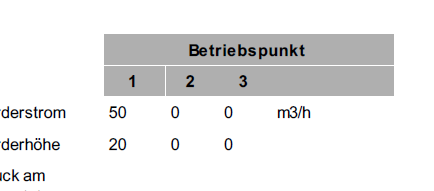
Interestingly the background color in cells does work:
@Thomas-63 a bit weird. As you can see above my test had lines in it.
Can you share the modified html so I can test too? And your current code please. Let's fix it :) -
@Thomas-63 a bit weird. As you can see above my test had lines in it.
Can you share the modified html so I can test too? And your current code please. Let's fix it :) -
HTML:
<!DOCTYPE html>
<html>
<head>
	<meta charset="utf-8">
	<meta name="viewport" content="width=device-width, initial-scale=1">
	<meta name="generator" content="RocketCake">
	<title></title>
</head>
<body style="background-color:#FFFFFF; padding:0;  margin: 0;">
<div style="text-align:left;">
<table id="table_798fb160" cellpadding="3" cellspacing="1"  style="box-sizing: border-box; vertical-align: bottom; position:relative; display: inline-table; width:50%; height:30px; background:none; Border: none; table-layout: fixed; ">	<tr>
		<td width="100%" height="18px" style="vertical-align: top; overflow:hidden; ">  <div style="" id="cell_d0123cd">
    <div style="text-align:left;">
      <span style="font-size:12pt; font-family:Arial, Helvetica, sans-serif; color:#000000; "> </span>
      </div>
    </div>
		</td>
	</tr>
</table>
<table id="table_4bfff64d" cellpadding="3" cellspacing="1"  style="box-sizing: border-box; vertical-align: bottom; position:relative; display: inline-table; width:100%; height:97px; background:none; border: 2px solid #000000; table-layout: fixed; ">	<tr>
		<td width="27%" height="15px" style="vertical-align: top; overflow:hidden; ">  <div style="" id="cell_6a5612c4">
    <div style="text-align:left;">
      <span style="font-size:8pt; font-family:Arial, Helvetica, sans-serif; color:#000000; ">Projekt</span>
      </div>
    </div>
		</td>
		<td width="22%" height="15px" style="vertical-align: top; overflow:hidden; ">  <div style="" id="cell_7a1f4a7c">
    <div style="text-align:left;">
      <span style="font-size:8pt; font-family:Arial, Helvetica, sans-serif; color:#000000; ">{projekt}</span>
      </div>
    </div>
		</td>
		<td width="24%" height="15px" style="vertical-align: top; overflow:hidden; ">  <div style="" id="cell_365f079f">
    <div style="text-align:left;">
      <span style="font-size:8pt; font-family:Arial, Helvetica, sans-serif; color:#000000; ">Kundenposition</span>
      </div>
    </div>
		</td>
		<td width="25%" height="15px" style="vertical-align: top; overflow:hidden; ">  <div style="" id="cell_798910f0">
    <div style="text-align:left;">
      <span style="font-size:8pt; font-family:Arial, Helvetica, sans-serif; color:#000000; ">{kundenposition}</span>
      </div>
    </div>
		</td>
	</tr>
	<tr>
		<td width="27%" height="15px" style="vertical-align: top; overflow:hidden; ">  <div style="" id="cell_6fab104c">
    <div style="text-align:left;">
      <span style="font-size:8pt; font-family:Arial, Helvetica, sans-serif; color:#000000; ">Position / Revision</span>
      </div>
    </div>
		</td>
		<td width="22%" height="15px" style="vertical-align: top; overflow:hidden; ">  <div style="" id="cell_3a151bc">
    <div style="text-align:left;">
      <span style="font-size:8pt; font-family:Arial, Helvetica, sans-serif; color:#000000; ">{position} / {revision}</span>
      </div>
    </div>
		</td>
		<td width="24%" height="15px" style="vertical-align: top; overflow:hidden; ">  <div style="" id="cell_63851a2">
    <div style="text-align:left;">
      <span style="font-size:8pt; font-family:Arial, Helvetica, sans-serif; color:#000000; ">Aggregatnummer</span>
      </div>
    </div>
		</td>
		<td width="25%" height="15px" style="vertical-align: top; overflow:hidden; ">  <div style="" id="cell_30174d59">
    <div style="text-align:left;">
      <span style="font-size:8pt; font-family:Arial, Helvetica, sans-serif; color:#000000; ">{aggregatnummer}</span>
      </div>
    </div>
		</td>
	</tr>
	<tr>
		<td width="27%" height="16px" style="vertical-align: top; overflow:hidden; ">  <div style="" id="cell_382cbccc">
    <div style="text-align:left;">
      <span style="font-size:8pt; font-family:Arial, Helvetica, sans-serif; color:#000000; ">Datum</span>
      </div>
    </div>
		</td>
		<td width="22%" height="16px" style="vertical-align: top; overflow:hidden; ">  <div style="" id="cell_276db422">
    <div style="text-align:left;">
      <span style="font-size:8pt; font-family:Arial, Helvetica, sans-serif; color:#000000; ">{datum}</span>
      </div>
    </div>
		</td>
		<td width="24%" height="16px" style="vertical-align: top; overflow:hidden; ">  <div style="" id="cell_49ec4bae">
    <div style="text-align:left;">
      <span style="font-size:8pt; font-family:Arial, Helvetica, sans-serif; color:#000000; ">Artikelnummer</span>
      </div>
    </div>
		</td>
		<td width="25%" height="16px" style="vertical-align: top; overflow:hidden; ">  <div style="" id="cell_4c46cf44">
    <div style="text-align:left;">
      <span style="font-size:8pt; font-family:Arial, Helvetica, sans-serif; color:#000000; ">{artikelnummer}</span>
      </div>
    </div>
		</td>
	</tr>
	<tr>
		<td width="27%" height="12px" style="vertical-align: top; overflow:hidden; ">  <div style="" id="cell_67c5a5c8">
    <div style="text-align:left;">
      <span style="font-size:8pt; font-family:Arial, Helvetica, sans-serif; color:#000000; ">Bezeichnung</span>
      </div>
    </div>
		</td>
		<td width="22%" height="12px" style="vertical-align: top; overflow:hidden; ">  <div style="" id="cell_6530c995">
    <div style="text-align:left;">
      <span style="font-size:8pt; font-family:Arial, Helvetica, sans-serif; color:#000000; "> </span>
      </div>
    </div>
		</td>
		<td width="24%" height="12px" style="vertical-align: top; overflow:hidden; ">  <div style="" id="cell_f645165">
    <div style="text-align:left;">
      <span style="font-size:8pt; font-family:Arial, Helvetica, sans-serif; color:#000000; "> </span>
      </div>
    </div>
		</td>
		<td width="25%" height="12px" style="vertical-align: top; overflow:hidden; ">  <div style="" id="cell_15ec8179">
    <div style="text-align:left;">
      <span style="font-size:8pt; font-family:Arial, Helvetica, sans-serif; color:#000000; "> </span>
      </div>
    </div>
		</td>
	</tr>
</table>
My Code:
QTextDocument document; document.setHtml(html); QString dateiname = QCoreApplication::applicationDirPath() + "/" + ui->db_projekt->text() + "_" + ui->db_pos->text() + "_" + ui->db_rev->text() + get_sprache() + ".pdf"; QString filePath = QFileDialog::getSaveFileName(this, tr("PDF Datenblatt speichern"), dateiname, tr("PDF Dateien (*.pdf);;All Files (*)")); QImage img(QCoreApplication::applicationDirPath() + "/Logo.jpg"); QImage resizedImg = img.scaled(QSize(286,56),Qt::IgnoreAspectRatio, Qt::SmoothTransformation); document.addResource(QTextDocument::ImageResource, QUrl("Logo.jpg"), QVariant(resizedImg)); QTextCursor crs(&document); crs.movePosition(QTextCursor::Start); // Tabellenformat verwenden, um das Bild rechtsbündig zu platzieren QTextTableFormat tableFormat; tableFormat.setAlignment(Qt::AlignRight); tableFormat.setBorder(0); tableFormat.setWidth(QTextLength(QTextLength::PercentageLength, 100)); QTextCharFormat textformat; textformat.setFontPointSize(16); QTextTable *table = crs.insertTable(1, 2, tableFormat); crs = table->cellAt(0, 0).firstCursorPosition(); // Erste Zelle der ersten Zeile auswählen crs.insertText("Datenblatt " + ui->db_bauart->currentText(), textformat); crs = table->cellAt(0, 1).firstCursorPosition(); // Zweite Zelle der ersten Zeile auswählen QTextImageFormat imageFormat; imageFormat.setName("Logo.jpg"); crs.insertImage(imageFormat); QPdfWriter pdfWriter(filePath); pdfWriter.setPageSize(QPageSize(QPageSize::A4)); pdfWriter.setPageMargins(QMarginsF(10,10,10,10)); document.setPageSize(QPageSize(QPageSize::A4).sizePoints()); document.setDocumentMargin(0); document.print(&pdfWriter); -
HTML:
<!DOCTYPE html>
<html>
<head>
	<meta charset="utf-8">
	<meta name="viewport" content="width=device-width, initial-scale=1">
	<meta name="generator" content="RocketCake">
	<title></title>
</head>
<body style="background-color:#FFFFFF; padding:0;  margin: 0;">
<div style="text-align:left;">
<table id="table_798fb160" cellpadding="3" cellspacing="1"  style="box-sizing: border-box; vertical-align: bottom; position:relative; display: inline-table; width:50%; height:30px; background:none; Border: none; table-layout: fixed; ">	<tr>
		<td width="100%" height="18px" style="vertical-align: top; overflow:hidden; ">  <div style="" id="cell_d0123cd">
    <div style="text-align:left;">
      <span style="font-size:12pt; font-family:Arial, Helvetica, sans-serif; color:#000000; "> </span>
      </div>
    </div>
		</td>
	</tr>
</table>
<table id="table_4bfff64d" cellpadding="3" cellspacing="1"  style="box-sizing: border-box; vertical-align: bottom; position:relative; display: inline-table; width:100%; height:97px; background:none; border: 2px solid #000000; table-layout: fixed; ">	<tr>
		<td width="27%" height="15px" style="vertical-align: top; overflow:hidden; ">  <div style="" id="cell_6a5612c4">
    <div style="text-align:left;">
      <span style="font-size:8pt; font-family:Arial, Helvetica, sans-serif; color:#000000; ">Projekt</span>
      </div>
    </div>
		</td>
		<td width="22%" height="15px" style="vertical-align: top; overflow:hidden; ">  <div style="" id="cell_7a1f4a7c">
    <div style="text-align:left;">
      <span style="font-size:8pt; font-family:Arial, Helvetica, sans-serif; color:#000000; ">{projekt}</span>
      </div>
    </div>
		</td>
		<td width="24%" height="15px" style="vertical-align: top; overflow:hidden; ">  <div style="" id="cell_365f079f">
    <div style="text-align:left;">
      <span style="font-size:8pt; font-family:Arial, Helvetica, sans-serif; color:#000000; ">Kundenposition</span>
      </div>
    </div>
		</td>
		<td width="25%" height="15px" style="vertical-align: top; overflow:hidden; ">  <div style="" id="cell_798910f0">
    <div style="text-align:left;">
      <span style="font-size:8pt; font-family:Arial, Helvetica, sans-serif; color:#000000; ">{kundenposition}</span>
      </div>
    </div>
		</td>
	</tr>
	<tr>
		<td width="27%" height="15px" style="vertical-align: top; overflow:hidden; ">  <div style="" id="cell_6fab104c">
    <div style="text-align:left;">
      <span style="font-size:8pt; font-family:Arial, Helvetica, sans-serif; color:#000000; ">Position / Revision</span>
      </div>
    </div>
		</td>
		<td width="22%" height="15px" style="vertical-align: top; overflow:hidden; ">  <div style="" id="cell_3a151bc">
    <div style="text-align:left;">
      <span style="font-size:8pt; font-family:Arial, Helvetica, sans-serif; color:#000000; ">{position} / {revision}</span>
      </div>
    </div>
		</td>
		<td width="24%" height="15px" style="vertical-align: top; overflow:hidden; ">  <div style="" id="cell_63851a2">
    <div style="text-align:left;">
      <span style="font-size:8pt; font-family:Arial, Helvetica, sans-serif; color:#000000; ">Aggregatnummer</span>
      </div>
    </div>
		</td>
		<td width="25%" height="15px" style="vertical-align: top; overflow:hidden; ">  <div style="" id="cell_30174d59">
    <div style="text-align:left;">
      <span style="font-size:8pt; font-family:Arial, Helvetica, sans-serif; color:#000000; ">{aggregatnummer}</span>
      </div>
    </div>
		</td>
	</tr>
	<tr>
		<td width="27%" height="16px" style="vertical-align: top; overflow:hidden; ">  <div style="" id="cell_382cbccc">
    <div style="text-align:left;">
      <span style="font-size:8pt; font-family:Arial, Helvetica, sans-serif; color:#000000; ">Datum</span>
      </div>
    </div>
		</td>
		<td width="22%" height="16px" style="vertical-align: top; overflow:hidden; ">  <div style="" id="cell_276db422">
    <div style="text-align:left;">
      <span style="font-size:8pt; font-family:Arial, Helvetica, sans-serif; color:#000000; ">{datum}</span>
      </div>
    </div>
		</td>
		<td width="24%" height="16px" style="vertical-align: top; overflow:hidden; ">  <div style="" id="cell_49ec4bae">
    <div style="text-align:left;">
      <span style="font-size:8pt; font-family:Arial, Helvetica, sans-serif; color:#000000; ">Artikelnummer</span>
      </div>
    </div>
		</td>
		<td width="25%" height="16px" style="vertical-align: top; overflow:hidden; ">  <div style="" id="cell_4c46cf44">
    <div style="text-align:left;">
      <span style="font-size:8pt; font-family:Arial, Helvetica, sans-serif; color:#000000; ">{artikelnummer}</span>
      </div>
    </div>
		</td>
	</tr>
	<tr>
		<td width="27%" height="12px" style="vertical-align: top; overflow:hidden; ">  <div style="" id="cell_67c5a5c8">
    <div style="text-align:left;">
      <span style="font-size:8pt; font-family:Arial, Helvetica, sans-serif; color:#000000; ">Bezeichnung</span>
      </div>
    </div>
		</td>
		<td width="22%" height="12px" style="vertical-align: top; overflow:hidden; ">  <div style="" id="cell_6530c995">
    <div style="text-align:left;">
      <span style="font-size:8pt; font-family:Arial, Helvetica, sans-serif; color:#000000; "> </span>
      </div>
    </div>
		</td>
		<td width="24%" height="12px" style="vertical-align: top; overflow:hidden; ">  <div style="" id="cell_f645165">
    <div style="text-align:left;">
      <span style="font-size:8pt; font-family:Arial, Helvetica, sans-serif; color:#000000; "> </span>
      </div>
    </div>
		</td>
		<td width="25%" height="12px" style="vertical-align: top; overflow:hidden; ">  <div style="" id="cell_15ec8179">
    <div style="text-align:left;">
      <span style="font-size:8pt; font-family:Arial, Helvetica, sans-serif; color:#000000; "> </span>
      </div>
    </div>
		</td>
	</tr>
</table>
My Code:
QTextDocument document; document.setHtml(html); QString dateiname = QCoreApplication::applicationDirPath() + "/" + ui->db_projekt->text() + "_" + ui->db_pos->text() + "_" + ui->db_rev->text() + get_sprache() + ".pdf"; QString filePath = QFileDialog::getSaveFileName(this, tr("PDF Datenblatt speichern"), dateiname, tr("PDF Dateien (*.pdf);;All Files (*)")); QImage img(QCoreApplication::applicationDirPath() + "/Logo.jpg"); QImage resizedImg = img.scaled(QSize(286,56),Qt::IgnoreAspectRatio, Qt::SmoothTransformation); document.addResource(QTextDocument::ImageResource, QUrl("Logo.jpg"), QVariant(resizedImg)); QTextCursor crs(&document); crs.movePosition(QTextCursor::Start); // Tabellenformat verwenden, um das Bild rechtsbündig zu platzieren QTextTableFormat tableFormat; tableFormat.setAlignment(Qt::AlignRight); tableFormat.setBorder(0); tableFormat.setWidth(QTextLength(QTextLength::PercentageLength, 100)); QTextCharFormat textformat; textformat.setFontPointSize(16); QTextTable *table = crs.insertTable(1, 2, tableFormat); crs = table->cellAt(0, 0).firstCursorPosition(); // Erste Zelle der ersten Zeile auswählen crs.insertText("Datenblatt " + ui->db_bauart->currentText(), textformat); crs = table->cellAt(0, 1).firstCursorPosition(); // Zweite Zelle der ersten Zeile auswählen QTextImageFormat imageFormat; imageFormat.setName("Logo.jpg"); crs.insertImage(imageFormat); QPdfWriter pdfWriter(filePath); pdfWriter.setPageSize(QPageSize(QPageSize::A4)); pdfWriter.setPageMargins(QMarginsF(10,10,10,10)); document.setPageSize(QPageSize(QPageSize::A4).sizePoints()); document.setDocumentMargin(0); document.print(&pdfWriter);@Thomas-63 Okay, that's an interesting mix of html and QTextDocument structures, not something I attempted.
However:
tableFormat.setBorder(0);That, obviously, sets border to zero so it can't be visible since it is not there.If you'd like to mix border/no border elements you likely need to separate them. So, I'd assume, new table with new QTextTableFormat. Please verify my reasoning?
Another, rather cosmetic thing: below is redundant:
QImage resizedImg = img.scaled(QSize(286,56),Qt::IgnoreAspectRatio, Qt::SmoothTransformation);
document.addResource(QTextDocument::ImageResource, QUrl("Logo.jpg"), QVariant(resizedImg));
You can do just
document.addResource(QTextDocument::ImageResource,QUrl("Logo.jpg"),img.scaled(QSize(286,56),Qt::IgnoreAspectRatio, Qt::SmoothTransformation);At any rate, please check that
setBorder(0);? -
@Thomas-63 Okay, that's an interesting mix of html and QTextDocument structures, not something I attempted.
However:
tableFormat.setBorder(0);That, obviously, sets border to zero so it can't be visible since it is not there.If you'd like to mix border/no border elements you likely need to separate them. So, I'd assume, new table with new QTextTableFormat. Please verify my reasoning?
Another, rather cosmetic thing: below is redundant:
QImage resizedImg = img.scaled(QSize(286,56),Qt::IgnoreAspectRatio, Qt::SmoothTransformation);
document.addResource(QTextDocument::ImageResource, QUrl("Logo.jpg"), QVariant(resizedImg));
You can do just
document.addResource(QTextDocument::ImageResource,QUrl("Logo.jpg"),img.scaled(QSize(286,56),Qt::IgnoreAspectRatio, Qt::SmoothTransformation);At any rate, please check that
setBorder(0);? -
@artwaw Hello and sory fo rot responding so ong - i was on holiday.
i modified that redundant line, thanks.
That setBorder(0) only removes the border from the top table with the logo:

all the othe borders are not affected.
@Thomas-63 okay, I'll dive in it again. Please bear with me.

