
Expand printed area in a PDF
-
wow, that really helped a lot!
PDF looks like this now:
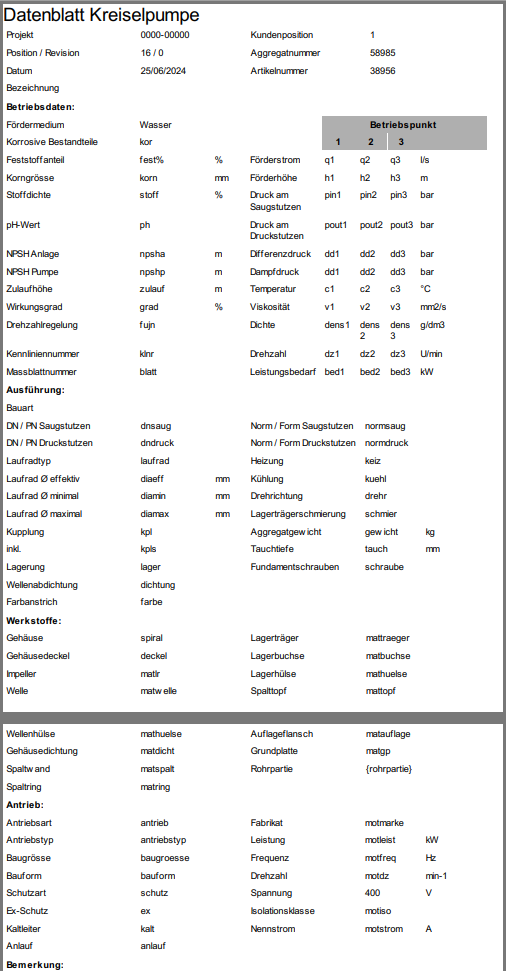
What I dont understand now are two things:
How can I make the logo available for the QTextDocument?
The logo is visible in the html document:

but it still appears as a placeholder in the PDF.What do you mean by constructing the document block by block? Should I use multiple html files and print each of them to the document? Like:
    document1.setHtml(html1);
    document1.print(&pdfWriter);
    document2.setHtml(html2);
    document2.print(&pdfWriter);
    document3.setHtml(html3);
    document3.print(&pdfWriter);
Thank you so much, I am really stepping forward now.
Thomas@Thomas-63 QTextDocument is a container built from QTextBlock parts. Essentially, what you do, is insert one such block - which is rather cumbersome when it comes to manipulating the content (you manipulate it through QTextCursor - it is not that complicated after all, just lots of reading). That's high level theory. Please take a look at https://doc.qt.io/qt-6/qtextcursor.html#insertBlock - the cursor object is your gateway to editing.
In practice, I think, you need two blocks: first one comes with the logo, second can be as is (assuming you'll take out the logo from html). I shall assume that the logo is the first item in your document, please correct me if that assumption is wrong.
I have not tested yet but based on my experience what you need to do is:- put logo in the resource file, so we know its path (i.e.: ":/img/logo.png" should logo reside under the prefix img)
- obtain cursor from the very start:
QTextCursor crs(&document);Then take a look here https://doc.qt.io/qt-6/qtextcursor.html#insertImage-2 and choose appropriate approach. Experiment with positioning the cursor in the document (by setPostion() method).
Once the logo is in place, adjust position again and call https://doc.qt.io/qt-6/qtextcursor.html#insertBlock
Then simply insert the rest of your html.Please let me know if you find that troublesome, I can prototype this for you later.
-
Hey Artur
Thank you so much! Now I am getting closer and closer to what I desired.
There is only one more issue: It is a two side PDF and I cant find a place to start a new page.@Thomas-63 said in Expand printed area in a PDF:
It is a two side PDF and I cant find a place to start a new page.
It should auto page, I think?
https://doc.qt.io/qt-6/qtextdocument.html#print"If the document is already paginated through a specified height in the pageSize() property it is printed as-is.
If the document is not paginated, like for example a document used in a QTextEdit, then a temporary copy of the document is created and the copy is broken into multiple pages according to the size of the paint device's paperRect(). By default a 2 cm margin is set around the document contents. In addition the current page number is printed at the bottom of each page."
@Thomas-63 said in Expand printed area in a PDF:
the table borders disappear when printing
All of them? Some of them? Have you tried thicker line? Reasons can be many...
-
I solved the pagination within the html code.
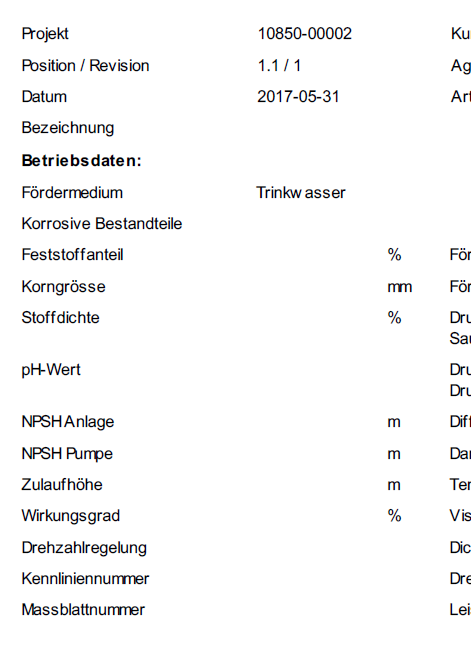
All of the frames and lines are gone. I even tried 5 px - nothing
HTML preview in Browser: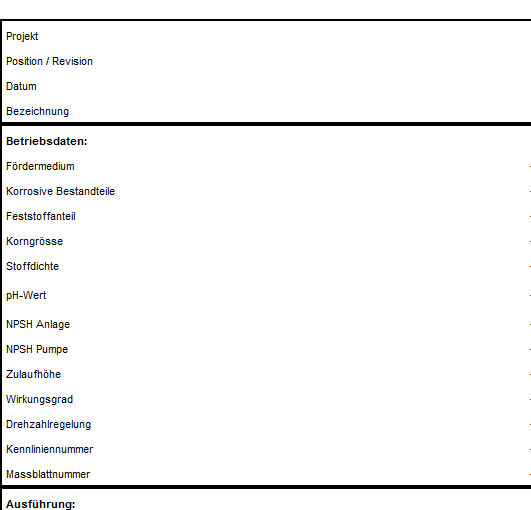
PDF:
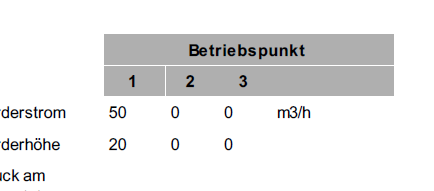
Interestingly the background color in cells does work:
@Thomas-63 a bit weird. As you can see above my test had lines in it.
Can you share the modified html so I can test too? And your current code please. Let's fix it :) -
@Thomas-63 a bit weird. As you can see above my test had lines in it.
Can you share the modified html so I can test too? And your current code please. Let's fix it :) -
HTML:
<!DOCTYPE html>
<html>
<head>
	<meta charset="utf-8">
	<meta name="viewport" content="width=device-width, initial-scale=1">
	<meta name="generator" content="RocketCake">
	<title></title>
</head>
<body style="background-color:#FFFFFF; padding:0;  margin: 0;">
<div style="text-align:left;">
<table id="table_798fb160" cellpadding="3" cellspacing="1"  style="box-sizing: border-box; vertical-align: bottom; position:relative; display: inline-table; width:50%; height:30px; background:none; Border: none; table-layout: fixed; ">	<tr>
		<td width="100%" height="18px" style="vertical-align: top; overflow:hidden; ">  <div style="" id="cell_d0123cd">
    <div style="text-align:left;">
      <span style="font-size:12pt; font-family:Arial, Helvetica, sans-serif; color:#000000; "> </span>
      </div>
    </div>
		</td>
	</tr>
</table>
<table id="table_4bfff64d" cellpadding="3" cellspacing="1"  style="box-sizing: border-box; vertical-align: bottom; position:relative; display: inline-table; width:100%; height:97px; background:none; border: 2px solid #000000; table-layout: fixed; ">	<tr>
		<td width="27%" height="15px" style="vertical-align: top; overflow:hidden; ">  <div style="" id="cell_6a5612c4">
    <div style="text-align:left;">
      <span style="font-size:8pt; font-family:Arial, Helvetica, sans-serif; color:#000000; ">Projekt</span>
      </div>
    </div>
		</td>
		<td width="22%" height="15px" style="vertical-align: top; overflow:hidden; ">  <div style="" id="cell_7a1f4a7c">
    <div style="text-align:left;">
      <span style="font-size:8pt; font-family:Arial, Helvetica, sans-serif; color:#000000; ">{projekt}</span>
      </div>
    </div>
		</td>
		<td width="24%" height="15px" style="vertical-align: top; overflow:hidden; ">  <div style="" id="cell_365f079f">
    <div style="text-align:left;">
      <span style="font-size:8pt; font-family:Arial, Helvetica, sans-serif; color:#000000; ">Kundenposition</span>
      </div>
    </div>
		</td>
		<td width="25%" height="15px" style="vertical-align: top; overflow:hidden; ">  <div style="" id="cell_798910f0">
    <div style="text-align:left;">
      <span style="font-size:8pt; font-family:Arial, Helvetica, sans-serif; color:#000000; ">{kundenposition}</span>
      </div>
    </div>
		</td>
	</tr>
	<tr>
		<td width="27%" height="15px" style="vertical-align: top; overflow:hidden; ">  <div style="" id="cell_6fab104c">
    <div style="text-align:left;">
      <span style="font-size:8pt; font-family:Arial, Helvetica, sans-serif; color:#000000; ">Position / Revision</span>
      </div>
    </div>
		</td>
		<td width="22%" height="15px" style="vertical-align: top; overflow:hidden; ">  <div style="" id="cell_3a151bc">
    <div style="text-align:left;">
      <span style="font-size:8pt; font-family:Arial, Helvetica, sans-serif; color:#000000; ">{position} / {revision}</span>
      </div>
    </div>
		</td>
		<td width="24%" height="15px" style="vertical-align: top; overflow:hidden; ">  <div style="" id="cell_63851a2">
    <div style="text-align:left;">
      <span style="font-size:8pt; font-family:Arial, Helvetica, sans-serif; color:#000000; ">Aggregatnummer</span>
      </div>
    </div>
		</td>
		<td width="25%" height="15px" style="vertical-align: top; overflow:hidden; ">  <div style="" id="cell_30174d59">
    <div style="text-align:left;">
      <span style="font-size:8pt; font-family:Arial, Helvetica, sans-serif; color:#000000; ">{aggregatnummer}</span>
      </div>
    </div>
		</td>
	</tr>
	<tr>
		<td width="27%" height="16px" style="vertical-align: top; overflow:hidden; ">  <div style="" id="cell_382cbccc">
    <div style="text-align:left;">
      <span style="font-size:8pt; font-family:Arial, Helvetica, sans-serif; color:#000000; ">Datum</span>
      </div>
    </div>
		</td>
		<td width="22%" height="16px" style="vertical-align: top; overflow:hidden; ">  <div style="" id="cell_276db422">
    <div style="text-align:left;">
      <span style="font-size:8pt; font-family:Arial, Helvetica, sans-serif; color:#000000; ">{datum}</span>
      </div>
    </div>
		</td>
		<td width="24%" height="16px" style="vertical-align: top; overflow:hidden; ">  <div style="" id="cell_49ec4bae">
    <div style="text-align:left;">
      <span style="font-size:8pt; font-family:Arial, Helvetica, sans-serif; color:#000000; ">Artikelnummer</span>
      </div>
    </div>
		</td>
		<td width="25%" height="16px" style="vertical-align: top; overflow:hidden; ">  <div style="" id="cell_4c46cf44">
    <div style="text-align:left;">
      <span style="font-size:8pt; font-family:Arial, Helvetica, sans-serif; color:#000000; ">{artikelnummer}</span>
      </div>
    </div>
		</td>
	</tr>
	<tr>
		<td width="27%" height="12px" style="vertical-align: top; overflow:hidden; ">  <div style="" id="cell_67c5a5c8">
    <div style="text-align:left;">
      <span style="font-size:8pt; font-family:Arial, Helvetica, sans-serif; color:#000000; ">Bezeichnung</span>
      </div>
    </div>
		</td>
		<td width="22%" height="12px" style="vertical-align: top; overflow:hidden; ">  <div style="" id="cell_6530c995">
    <div style="text-align:left;">
      <span style="font-size:8pt; font-family:Arial, Helvetica, sans-serif; color:#000000; "> </span>
      </div>
    </div>
		</td>
		<td width="24%" height="12px" style="vertical-align: top; overflow:hidden; ">  <div style="" id="cell_f645165">
    <div style="text-align:left;">
      <span style="font-size:8pt; font-family:Arial, Helvetica, sans-serif; color:#000000; "> </span>
      </div>
    </div>
		</td>
		<td width="25%" height="12px" style="vertical-align: top; overflow:hidden; ">  <div style="" id="cell_15ec8179">
    <div style="text-align:left;">
      <span style="font-size:8pt; font-family:Arial, Helvetica, sans-serif; color:#000000; "> </span>
      </div>
    </div>
		</td>
	</tr>
</table>
My Code:
QTextDocument document; document.setHtml(html); QString dateiname = QCoreApplication::applicationDirPath() + "/" + ui->db_projekt->text() + "_" + ui->db_pos->text() + "_" + ui->db_rev->text() + get_sprache() + ".pdf"; QString filePath = QFileDialog::getSaveFileName(this, tr("PDF Datenblatt speichern"), dateiname, tr("PDF Dateien (*.pdf);;All Files (*)")); QImage img(QCoreApplication::applicationDirPath() + "/Logo.jpg"); QImage resizedImg = img.scaled(QSize(286,56),Qt::IgnoreAspectRatio, Qt::SmoothTransformation); document.addResource(QTextDocument::ImageResource, QUrl("Logo.jpg"), QVariant(resizedImg)); QTextCursor crs(&document); crs.movePosition(QTextCursor::Start); // Tabellenformat verwenden, um das Bild rechtsbündig zu platzieren QTextTableFormat tableFormat; tableFormat.setAlignment(Qt::AlignRight); tableFormat.setBorder(0); tableFormat.setWidth(QTextLength(QTextLength::PercentageLength, 100)); QTextCharFormat textformat; textformat.setFontPointSize(16); QTextTable *table = crs.insertTable(1, 2, tableFormat); crs = table->cellAt(0, 0).firstCursorPosition(); // Erste Zelle der ersten Zeile auswählen crs.insertText("Datenblatt " + ui->db_bauart->currentText(), textformat); crs = table->cellAt(0, 1).firstCursorPosition(); // Zweite Zelle der ersten Zeile auswählen QTextImageFormat imageFormat; imageFormat.setName("Logo.jpg"); crs.insertImage(imageFormat); QPdfWriter pdfWriter(filePath); pdfWriter.setPageSize(QPageSize(QPageSize::A4)); pdfWriter.setPageMargins(QMarginsF(10,10,10,10)); document.setPageSize(QPageSize(QPageSize::A4).sizePoints()); document.setDocumentMargin(0); document.print(&pdfWriter); -
HTML:
<!DOCTYPE html>
<html>
<head>
	<meta charset="utf-8">
	<meta name="viewport" content="width=device-width, initial-scale=1">
	<meta name="generator" content="RocketCake">
	<title></title>
</head>
<body style="background-color:#FFFFFF; padding:0;  margin: 0;">
<div style="text-align:left;">
<table id="table_798fb160" cellpadding="3" cellspacing="1"  style="box-sizing: border-box; vertical-align: bottom; position:relative; display: inline-table; width:50%; height:30px; background:none; Border: none; table-layout: fixed; ">	<tr>
		<td width="100%" height="18px" style="vertical-align: top; overflow:hidden; ">  <div style="" id="cell_d0123cd">
    <div style="text-align:left;">
      <span style="font-size:12pt; font-family:Arial, Helvetica, sans-serif; color:#000000; "> </span>
      </div>
    </div>
		</td>
	</tr>
</table>
<table id="table_4bfff64d" cellpadding="3" cellspacing="1"  style="box-sizing: border-box; vertical-align: bottom; position:relative; display: inline-table; width:100%; height:97px; background:none; border: 2px solid #000000; table-layout: fixed; ">	<tr>
		<td width="27%" height="15px" style="vertical-align: top; overflow:hidden; ">  <div style="" id="cell_6a5612c4">
    <div style="text-align:left;">
      <span style="font-size:8pt; font-family:Arial, Helvetica, sans-serif; color:#000000; ">Projekt</span>
      </div>
    </div>
		</td>
		<td width="22%" height="15px" style="vertical-align: top; overflow:hidden; ">  <div style="" id="cell_7a1f4a7c">
    <div style="text-align:left;">
      <span style="font-size:8pt; font-family:Arial, Helvetica, sans-serif; color:#000000; ">{projekt}</span>
      </div>
    </div>
		</td>
		<td width="24%" height="15px" style="vertical-align: top; overflow:hidden; ">  <div style="" id="cell_365f079f">
    <div style="text-align:left;">
      <span style="font-size:8pt; font-family:Arial, Helvetica, sans-serif; color:#000000; ">Kundenposition</span>
      </div>
    </div>
		</td>
		<td width="25%" height="15px" style="vertical-align: top; overflow:hidden; ">  <div style="" id="cell_798910f0">
    <div style="text-align:left;">
      <span style="font-size:8pt; font-family:Arial, Helvetica, sans-serif; color:#000000; ">{kundenposition}</span>
      </div>
    </div>
		</td>
	</tr>
	<tr>
		<td width="27%" height="15px" style="vertical-align: top; overflow:hidden; ">  <div style="" id="cell_6fab104c">
    <div style="text-align:left;">
      <span style="font-size:8pt; font-family:Arial, Helvetica, sans-serif; color:#000000; ">Position / Revision</span>
      </div>
    </div>
		</td>
		<td width="22%" height="15px" style="vertical-align: top; overflow:hidden; ">  <div style="" id="cell_3a151bc">
    <div style="text-align:left;">
      <span style="font-size:8pt; font-family:Arial, Helvetica, sans-serif; color:#000000; ">{position} / {revision}</span>
      </div>
    </div>
		</td>
		<td width="24%" height="15px" style="vertical-align: top; overflow:hidden; ">  <div style="" id="cell_63851a2">
    <div style="text-align:left;">
      <span style="font-size:8pt; font-family:Arial, Helvetica, sans-serif; color:#000000; ">Aggregatnummer</span>
      </div>
    </div>
		</td>
		<td width="25%" height="15px" style="vertical-align: top; overflow:hidden; ">  <div style="" id="cell_30174d59">
    <div style="text-align:left;">
      <span style="font-size:8pt; font-family:Arial, Helvetica, sans-serif; color:#000000; ">{aggregatnummer}</span>
      </div>
    </div>
		</td>
	</tr>
	<tr>
		<td width="27%" height="16px" style="vertical-align: top; overflow:hidden; ">  <div style="" id="cell_382cbccc">
    <div style="text-align:left;">
      <span style="font-size:8pt; font-family:Arial, Helvetica, sans-serif; color:#000000; ">Datum</span>
      </div>
    </div>
		</td>
		<td width="22%" height="16px" style="vertical-align: top; overflow:hidden; ">  <div style="" id="cell_276db422">
    <div style="text-align:left;">
      <span style="font-size:8pt; font-family:Arial, Helvetica, sans-serif; color:#000000; ">{datum}</span>
      </div>
    </div>
		</td>
		<td width="24%" height="16px" style="vertical-align: top; overflow:hidden; ">  <div style="" id="cell_49ec4bae">
    <div style="text-align:left;">
      <span style="font-size:8pt; font-family:Arial, Helvetica, sans-serif; color:#000000; ">Artikelnummer</span>
      </div>
    </div>
		</td>
		<td width="25%" height="16px" style="vertical-align: top; overflow:hidden; ">  <div style="" id="cell_4c46cf44">
    <div style="text-align:left;">
      <span style="font-size:8pt; font-family:Arial, Helvetica, sans-serif; color:#000000; ">{artikelnummer}</span>
      </div>
    </div>
		</td>
	</tr>
	<tr>
		<td width="27%" height="12px" style="vertical-align: top; overflow:hidden; ">  <div style="" id="cell_67c5a5c8">
    <div style="text-align:left;">
      <span style="font-size:8pt; font-family:Arial, Helvetica, sans-serif; color:#000000; ">Bezeichnung</span>
      </div>
    </div>
		</td>
		<td width="22%" height="12px" style="vertical-align: top; overflow:hidden; ">  <div style="" id="cell_6530c995">
    <div style="text-align:left;">
      <span style="font-size:8pt; font-family:Arial, Helvetica, sans-serif; color:#000000; "> </span>
      </div>
    </div>
		</td>
		<td width="24%" height="12px" style="vertical-align: top; overflow:hidden; ">  <div style="" id="cell_f645165">
    <div style="text-align:left;">
      <span style="font-size:8pt; font-family:Arial, Helvetica, sans-serif; color:#000000; "> </span>
      </div>
    </div>
		</td>
		<td width="25%" height="12px" style="vertical-align: top; overflow:hidden; ">  <div style="" id="cell_15ec8179">
    <div style="text-align:left;">
      <span style="font-size:8pt; font-family:Arial, Helvetica, sans-serif; color:#000000; "> </span>
      </div>
    </div>
		</td>
	</tr>
</table>
My Code:
QTextDocument document; document.setHtml(html); QString dateiname = QCoreApplication::applicationDirPath() + "/" + ui->db_projekt->text() + "_" + ui->db_pos->text() + "_" + ui->db_rev->text() + get_sprache() + ".pdf"; QString filePath = QFileDialog::getSaveFileName(this, tr("PDF Datenblatt speichern"), dateiname, tr("PDF Dateien (*.pdf);;All Files (*)")); QImage img(QCoreApplication::applicationDirPath() + "/Logo.jpg"); QImage resizedImg = img.scaled(QSize(286,56),Qt::IgnoreAspectRatio, Qt::SmoothTransformation); document.addResource(QTextDocument::ImageResource, QUrl("Logo.jpg"), QVariant(resizedImg)); QTextCursor crs(&document); crs.movePosition(QTextCursor::Start); // Tabellenformat verwenden, um das Bild rechtsbündig zu platzieren QTextTableFormat tableFormat; tableFormat.setAlignment(Qt::AlignRight); tableFormat.setBorder(0); tableFormat.setWidth(QTextLength(QTextLength::PercentageLength, 100)); QTextCharFormat textformat; textformat.setFontPointSize(16); QTextTable *table = crs.insertTable(1, 2, tableFormat); crs = table->cellAt(0, 0).firstCursorPosition(); // Erste Zelle der ersten Zeile auswählen crs.insertText("Datenblatt " + ui->db_bauart->currentText(), textformat); crs = table->cellAt(0, 1).firstCursorPosition(); // Zweite Zelle der ersten Zeile auswählen QTextImageFormat imageFormat; imageFormat.setName("Logo.jpg"); crs.insertImage(imageFormat); QPdfWriter pdfWriter(filePath); pdfWriter.setPageSize(QPageSize(QPageSize::A4)); pdfWriter.setPageMargins(QMarginsF(10,10,10,10)); document.setPageSize(QPageSize(QPageSize::A4).sizePoints()); document.setDocumentMargin(0); document.print(&pdfWriter);@Thomas-63 Okay, that's an interesting mix of html and QTextDocument structures, not something I attempted.
However:
tableFormat.setBorder(0);That, obviously, sets border to zero so it can't be visible since it is not there.If you'd like to mix border/no border elements you likely need to separate them. So, I'd assume, new table with new QTextTableFormat. Please verify my reasoning?
Another, rather cosmetic thing: below is redundant:
QImage resizedImg = img.scaled(QSize(286,56),Qt::IgnoreAspectRatio, Qt::SmoothTransformation);
document.addResource(QTextDocument::ImageResource, QUrl("Logo.jpg"), QVariant(resizedImg));
You can do just
document.addResource(QTextDocument::ImageResource,QUrl("Logo.jpg"),img.scaled(QSize(286,56),Qt::IgnoreAspectRatio, Qt::SmoothTransformation);At any rate, please check that
setBorder(0);? -
@Thomas-63 Okay, that's an interesting mix of html and QTextDocument structures, not something I attempted.
However:
tableFormat.setBorder(0);That, obviously, sets border to zero so it can't be visible since it is not there.If you'd like to mix border/no border elements you likely need to separate them. So, I'd assume, new table with new QTextTableFormat. Please verify my reasoning?
Another, rather cosmetic thing: below is redundant:
QImage resizedImg = img.scaled(QSize(286,56),Qt::IgnoreAspectRatio, Qt::SmoothTransformation);
document.addResource(QTextDocument::ImageResource, QUrl("Logo.jpg"), QVariant(resizedImg));
You can do just
document.addResource(QTextDocument::ImageResource,QUrl("Logo.jpg"),img.scaled(QSize(286,56),Qt::IgnoreAspectRatio, Qt::SmoothTransformation);At any rate, please check that
setBorder(0);? -
@artwaw Hello and sory fo rot responding so ong - i was on holiday.
i modified that redundant line, thanks.
That setBorder(0) only removes the border from the top table with the logo:

all the othe borders are not affected.
@Thomas-63 okay, I'll dive in it again. Please bear with me.
-
Wow, you are such a big help! Thank you so much.
Why do you even spend that much effort with me?@Thomas-63 It's fun? I like solving problems and I like to learn. Crosswords are boring.
There is also that little thing: I learned most of what I know about Qt from this very forum (and the manual). So it's only fair to return the favour.
-
Wow, you are such a big help! Thank you so much.
Why do you even spend that much effort with me?@Thomas-63 More to the point - I ran the code you supplied (happy to share my full test sources with you) and for me it looks like this:
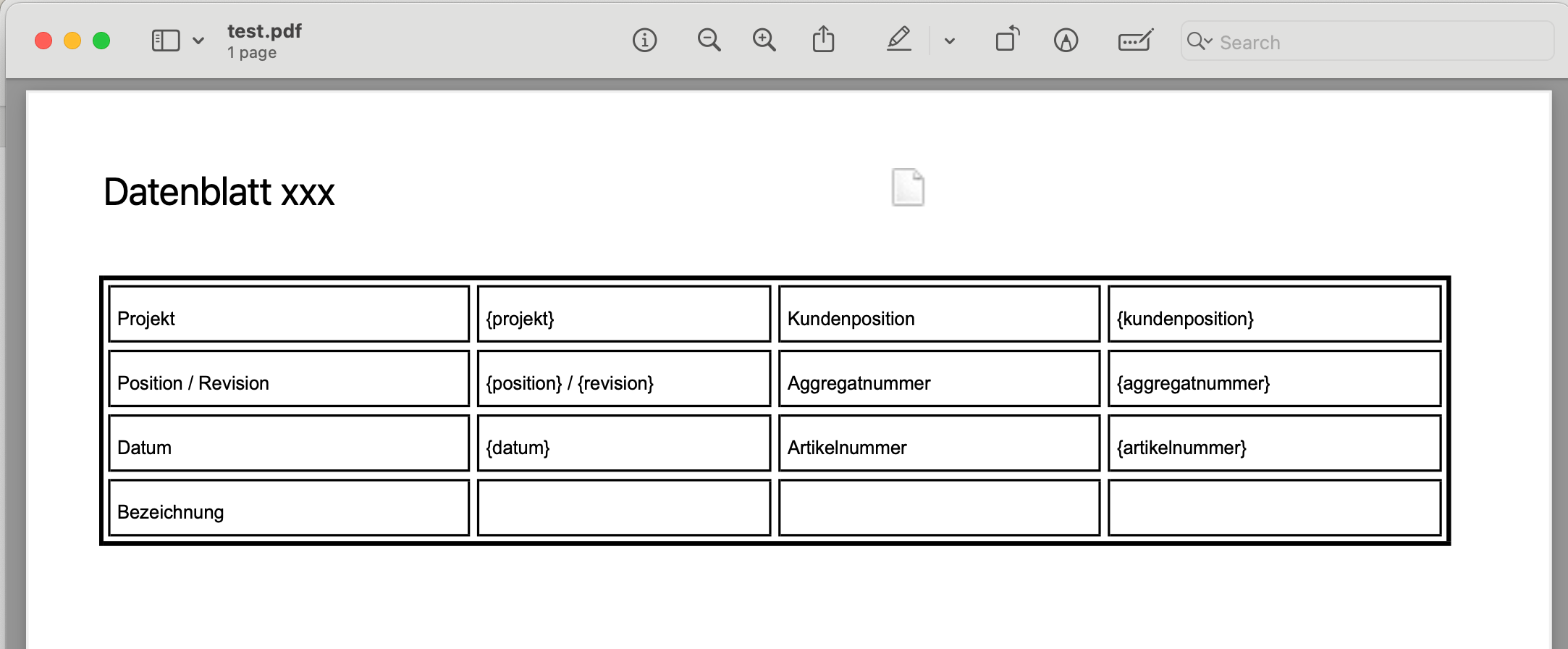
So now I am puzzled.
-
It's mostly generic.
CMakeLists:
cmake_minimum_required(VERSION 3.5)

project(qpdWriterTest VERSION 0.1 LANGUAGES CXX)

set(CMAKE_AUTOUIC ON)
set(CMAKE_AUTOMOC ON)
set(CMAKE_AUTORCC ON)

set(CMAKE_CXX_STANDARD 17)
set(CMAKE_CXX_STANDARD_REQUIRED ON)

find_package(QT NAMES Qt6 Qt5 REQUIRED COMPONENTS Widgets)
find_package(Qt${QT_VERSION_MAJOR} REQUIRED COMPONENTS Widgets)

set(PROJECT_SOURCES
        main.cpp
        mainwindow.cpp
        mainwindow.h
        mainwindow.ui
)

if(${QT_VERSION_MAJOR} GREATER_EQUAL 6)
    qt_add_executable(qpdWriterTest
        MANUAL_FINALIZATION
        ${PROJECT_SOURCES}
        res.qrc
    )
# Define target properties for Android with Qt 6 as:
#    set_property(TARGET qpdWriterTest APPEND PROPERTY QT_ANDROID_PACKAGE_SOURCE_DIR
#                 ${CMAKE_CURRENT_SOURCE_DIR}/android)
# For more information, see https://doc.qt.io/qt-6/qt-add-executable.html#target-creation
else()
    if(ANDROID)
        add_library(qpdWriterTest SHARED
            ${PROJECT_SOURCES}
        )
# Define properties for Android with Qt 5 after find_package() calls as:
#    set(ANDROID_PACKAGE_SOURCE_DIR "${CMAKE_CURRENT_SOURCE_DIR}/android")
    else()
        add_executable(qpdWriterTest
            ${PROJECT_SOURCES}
        )
    endif()
endif()

target_link_libraries(qpdWriterTest PRIVATE Qt${QT_VERSION_MAJOR}::Widgets)

# Qt for iOS sets MACOSX_BUNDLE_GUI_IDENTIFIER automatically since Qt 6.1.
# If you are developing for iOS or macOS you should consider setting an
# explicit, fixed bundle identifier manually though.
if(${QT_VERSION} VERSION_LESS 6.1.0)
  set(BUNDLE_ID_OPTION MACOSX_BUNDLE_GUI_IDENTIFIER com.example.qpdWriterTest)
endif()
set_target_properties(qpdWriterTest PROPERTIES
    ${BUNDLE_ID_OPTION}
    MACOSX_BUNDLE_BUNDLE_VERSION ${PROJECT_VERSION}
    MACOSX_BUNDLE_SHORT_VERSION_STRING ${PROJECT_VERSION_MAJOR}.${PROJECT_VERSION_MINOR}
    MACOSX_BUNDLE TRUE
    WIN32_EXECUTABLE TRUE
)

include(GNUInstallDirs)
install(TARGETS qpdWriterTest
    BUNDLE DESTINATION .
    LIBRARY DESTINATION ${CMAKE_INSTALL_LIBDIR}
    RUNTIME DESTINATION ${CMAKE_INSTALL_BINDIR}
)

if(QT_VERSION_MAJOR EQUAL 6)
    qt_finalize_executable(qpdWriterTest)
endif()
main.cpp
#include "mainwindow.h"

#include <QApplication>

int main(int argc, char *argv[])
{
    QApplication a(argc, argv);
    MainWindow w;
    w.show();
    return a.exec();
}
mainwindow.h
#ifndef MAINWINDOW_H
#define MAINWINDOW_H

#include <QMainWindow>
#include <QTextDocument>

QT_BEGIN_NAMESPACE
namespace Ui {
class MainWindow;
}
QT_END_NAMESPACE

class MainWindow : public QMainWindow
{
    Q_OBJECT

public:
    MainWindow(QWidget *parent = nullptr);
    ~MainWindow();

private:
    Ui::MainWindow *ui;
    QTextDocument txt;

private slots:
    void render();
};
#endif // MAINWINDOW_H
mainwindow.cpp
#include "mainwindow.h"
#include "./ui_mainwindow.h"

#include <QFile>
#include <QPdfWriter>
#include <QPainter>
#include <QStandardPaths>
#include <QTextCursor>
#include <QTextTable>

MainWindow::MainWindow(QWidget *parent)
    : QMainWindow(parent)
    , ui(new Ui::MainWindow)
{
    ui->setupUi(this);
    QFile f(":/test.html");
    f.open(QIODevice::ReadOnly);
    txt.setHtml(f.readAll());
    f.close();
    connect(ui->pushButton,&QPushButton::clicked,this,&MainWindow::render);
    txt.setPageSize(QPageSize(QPageSize::A4).sizePoints());
    txt.setDocumentMargin(0);
}

MainWindow::~MainWindow()
{
    delete ui;
}

void MainWindow::render() {
    QString filePath = QStandardPaths::writableLocation(QStandardPaths::DownloadLocation);
    QPdfWriter pdfWriter(filePath+"/test.pdf");

    QImage img(":/Logo.png");
    txt.addResource(QTextDocument::ImageResource, QUrl("Logo.png"), img.scaled(QSize(286,56),Qt::KeepAspectRatio, Qt::SmoothTransformation));

    QTextCursor crs(&txt);
    crs.movePosition(QTextCursor::Start);

    // Tabellenformat verwenden, um das Bild rechtsbündig zu platzieren
    QTextTableFormat tableFormat;
    tableFormat.setAlignment(Qt::AlignRight);
    tableFormat.setBorder(0);
    tableFormat.setWidth(QTextLength(QTextLength::PercentageLength, 100));

    QTextCharFormat textformat;
    textformat.setFontPointSize(16);

    QTextTable *table = crs.insertTable(1, 2, tableFormat);
    crs = table->cellAt(0, 0).firstCursorPosition();  // Erste Zelle der ersten Zeile auswählen
    crs.insertText("Datenblatt xxx", textformat);
    crs = table->cellAt(0, 1).firstCursorPosition();  // Zweite Zelle der ersten Zeile auswählen
    QTextImageFormat imageFormat;
    imageFormat.setName("Logo.jpg");
    crs.insertImage(imageFormat);
    pdfWriter.setPageSize(QPageSize(QPageSize::A4));
    pdfWriter.setPageMargins(QMarginsF(10,10,10,10));
    txt.setPageSize(QPageSize(QPageSize::A4).sizePoints());
    txt.setDocumentMargin(0);
    txt.print(&pdfWriter);
    txt.print(&pdfWriter);
}
Mainwindow.ui consists of just a QPushButton named, surprise!,
pushButton.There is also, for convenience, resource file (as you'd probably gather from cmake conf) having a placeholder logo and your html.
res.qrc:<RCC> <qresource prefix="/"> <file>test.html</file> <file>Logo.png</file> </qresource> </RCC>Copy of your html:
<!DOCTYPE html>
<html>
<head>
        <meta charset="utf-8">
        <meta name="viewport" content="width=device-width, initial-scale=1">
        <meta name="generator" content="RocketCake">
        <title></title>
</head>
<body style="background-color:#FFFFFF; padding:0;  margin: 0;">
<div style="text-align:left;">
<table id="table_798fb160" cellpadding="3" cellspacing="1"  style="box-sizing: border-box; vertical-align: bottom; position:relative; display: inline-table; width:50%; height:30px; background:none; Border: none; table-layout: fixed; ">	<tr>
                <td width="100%" height="18px" style="vertical-align: top; overflow:hidden; ">  <div style="" id="cell_d0123cd">
    <div style="text-align:left;">
      <span style="font-size:12pt; font-family:Arial, Helvetica, sans-serif; color:#000000; "> </span>
      </div>
    </div>
                </td>
        </tr>
</table>
<table id="table_4bfff64d" cellpadding="3" cellspacing="1"  style="box-sizing: border-box; vertical-align: bottom; position:relative; display: inline-table; width:100%; height:97px; background:none; border: 2px solid #000000; table-layout: fixed; ">	<tr>
                <td width="27%" height="15px" style="vertical-align: top; overflow:hidden; ">  <div style="" id="cell_6a5612c4">
    <div style="text-align:left;">
      <span style="font-size:8pt; font-family:Arial, Helvetica, sans-serif; color:#000000; ">Projekt</span>
      </div>
    </div>
                </td>
                <td width="22%" height="15px" style="vertical-align: top; overflow:hidden; ">  <div style="" id="cell_7a1f4a7c">
    <div style="text-align:left;">
      <span style="font-size:8pt; font-family:Arial, Helvetica, sans-serif; color:#000000; ">{projekt}</span>
      </div>
    </div>
                </td>
                <td width="24%" height="15px" style="vertical-align: top; overflow:hidden; ">  <div style="" id="cell_365f079f">
    <div style="text-align:left;">
      <span style="font-size:8pt; font-family:Arial, Helvetica, sans-serif; color:#000000; ">Kundenposition</span>
      </div>
    </div>
                </td>
                <td width="25%" height="15px" style="vertical-align: top; overflow:hidden; ">  <div style="" id="cell_798910f0">
    <div style="text-align:left;">
      <span style="font-size:8pt; font-family:Arial, Helvetica, sans-serif; color:#000000; ">{kundenposition}</span>
      </div>
    </div>
                </td>
        </tr>
        <tr>
                <td width="27%" height="15px" style="vertical-align: top; overflow:hidden; ">  <div style="" id="cell_6fab104c">
    <div style="text-align:left;">
      <span style="font-size:8pt; font-family:Arial, Helvetica, sans-serif; color:#000000; ">Position / Revision</span>
      </div>
    </div>
                </td>
                <td width="22%" height="15px" style="vertical-align: top; overflow:hidden; ">  <div style="" id="cell_3a151bc">
    <div style="text-align:left;">
      <span style="font-size:8pt; font-family:Arial, Helvetica, sans-serif; color:#000000; ">{position} / {revision}</span>
      </div>
    </div>
                </td>
                <td width="24%" height="15px" style="vertical-align: top; overflow:hidden; ">  <div style="" id="cell_63851a2">
    <div style="text-align:left;">
      <span style="font-size:8pt; font-family:Arial, Helvetica, sans-serif; color:#000000; ">Aggregatnummer</span>
      </div>
    </div>
                </td>
                <td width="25%" height="15px" style="vertical-align: top; overflow:hidden; ">  <div style="" id="cell_30174d59">
    <div style="text-align:left;">
      <span style="font-size:8pt; font-family:Arial, Helvetica, sans-serif; color:#000000; ">{aggregatnummer}</span>
      </div>
    </div>
                </td>
        </tr>
        <tr>
                <td width="27%" height="16px" style="vertical-align: top; overflow:hidden; ">  <div style="" id="cell_382cbccc">
    <div style="text-align:left;">
      <span style="font-size:8pt; font-family:Arial, Helvetica, sans-serif; color:#000000; ">Datum</span>
      </div>
    </div>
                </td>
                <td width="22%" height="16px" style="vertical-align: top; overflow:hidden; ">  <div style="" id="cell_276db422">
    <div style="text-align:left;">
      <span style="font-size:8pt; font-family:Arial, Helvetica, sans-serif; color:#000000; ">{datum}</span>
      </div>
    </div>
                </td>
                <td width="24%" height="16px" style="vertical-align: top; overflow:hidden; ">  <div style="" id="cell_49ec4bae">
    <div style="text-align:left;">
      <span style="font-size:8pt; font-family:Arial, Helvetica, sans-serif; color:#000000; ">Artikelnummer</span>
      </div>
    </div>
                </td>
                <td width="25%" height="16px" style="vertical-align: top; overflow:hidden; ">  <div style="" id="cell_4c46cf44">
    <div style="text-align:left;">
      <span style="font-size:8pt; font-family:Arial, Helvetica, sans-serif; color:#000000; ">{artikelnummer}</span>
      </div>
    </div>
                </td>
        </tr>
        <tr>
                <td width="27%" height="12px" style="vertical-align: top; overflow:hidden; ">  <div style="" id="cell_67c5a5c8">
    <div style="text-align:left;">
      <span style="font-size:8pt; font-family:Arial, Helvetica, sans-serif; color:#000000; ">Bezeichnung</span>
      </div>
    </div>
                </td>
                <td width="22%" height="12px" style="vertical-align: top; overflow:hidden; ">  <div style="" id="cell_6530c995">
    <div style="text-align:left;">
      <span style="font-size:8pt; font-family:Arial, Helvetica, sans-serif; color:#000000; "> </span>
      </div>
    </div>
                </td>
                <td width="24%" height="12px" style="vertical-align: top; overflow:hidden; ">  <div style="" id="cell_f645165">
    <div style="text-align:left;">
      <span style="font-size:8pt; font-family:Arial, Helvetica, sans-serif; color:#000000; "> </span>
      </div>
    </div>
                </td>
                <td width="25%" height="12px" style="vertical-align: top; overflow:hidden; ">  <div style="" id="cell_15ec8179">
    <div style="text-align:left;">
      <span style="font-size:8pt; font-family:Arial, Helvetica, sans-serif; color:#000000; "> </span>
      </div>
    </div>
                </td>
        </tr>
</table>
