
Expand printed area in a PDF
-
Still struggling here.
    // Create a QPrinter object
    QPrinter printer(QPrinter::PrinterResolution);
    printer.setOutputFormat(QPrinter::PdfFormat);
    printer.setPrinterName("Microsoft Print to PDF");
    printer.setOutputFileName(filePath);
    printer.setPageSize(QPageSize(QPageSize::A4));
    printer.setResolution(300);

    QPageLayout layout = printer.pageLayout();
    layout.setMode(QPageLayout::FullPageMode);
    layout.setMargins(QMarginsF(0, 0, 0, 0)); // Set all margins to zero
    printer.setPageLayout(layout);

    // Print the QTextDocument to the PDF
    document.print(&printer);
still leaves 20mm on each side empty.
this code:
    // Create a QPdfWriter object
    QPdfWriter pdfWriter(filePath);
    pdfWriter.setPageSize(QPageSize(QPageSize::A4));  // Set page size if needed

    // Create a QPainter object to draw on the PDF
    QPainter painter(&pdfWriter);
    if (!painter.isActive()) {
        qWarning("Failed to create QPainter object.");
        return;
    }

    // Render the QTextDocument to the QPdfWriter
    document.drawContents(&painter);
prints this pdf:

@Thomas-63 I see. I will be able to try to reproduce it all tomorrow (Monday).
-
Still struggling here.
    // Create a QPrinter object
    QPrinter printer(QPrinter::PrinterResolution);
    printer.setOutputFormat(QPrinter::PdfFormat);
    printer.setPrinterName("Microsoft Print to PDF");
    printer.setOutputFileName(filePath);
    printer.setPageSize(QPageSize(QPageSize::A4));
    printer.setResolution(300);

    QPageLayout layout = printer.pageLayout();
    layout.setMode(QPageLayout::FullPageMode);
    layout.setMargins(QMarginsF(0, 0, 0, 0)); // Set all margins to zero
    printer.setPageLayout(layout);

    // Print the QTextDocument to the PDF
    document.print(&printer);
still leaves 20mm on each side empty.
this code:
    // Create a QPdfWriter object
    QPdfWriter pdfWriter(filePath);
    pdfWriter.setPageSize(QPageSize(QPageSize::A4));  // Set page size if needed

    // Create a QPainter object to draw on the PDF
    QPainter painter(&pdfWriter);
    if (!painter.isActive()) {
        qWarning("Failed to create QPainter object.");
        return;
    }

    // Render the QTextDocument to the QPdfWriter
    document.drawContents(&painter);
prints this pdf:
@Thomas-63 You missed one point: QPdfWriter is of QPagedPaintDevice heritage. Hence instead of:
document.drawContents(&painter);you shoulddocument.print(&pdfWriter);.The result, however, still doesn't look right
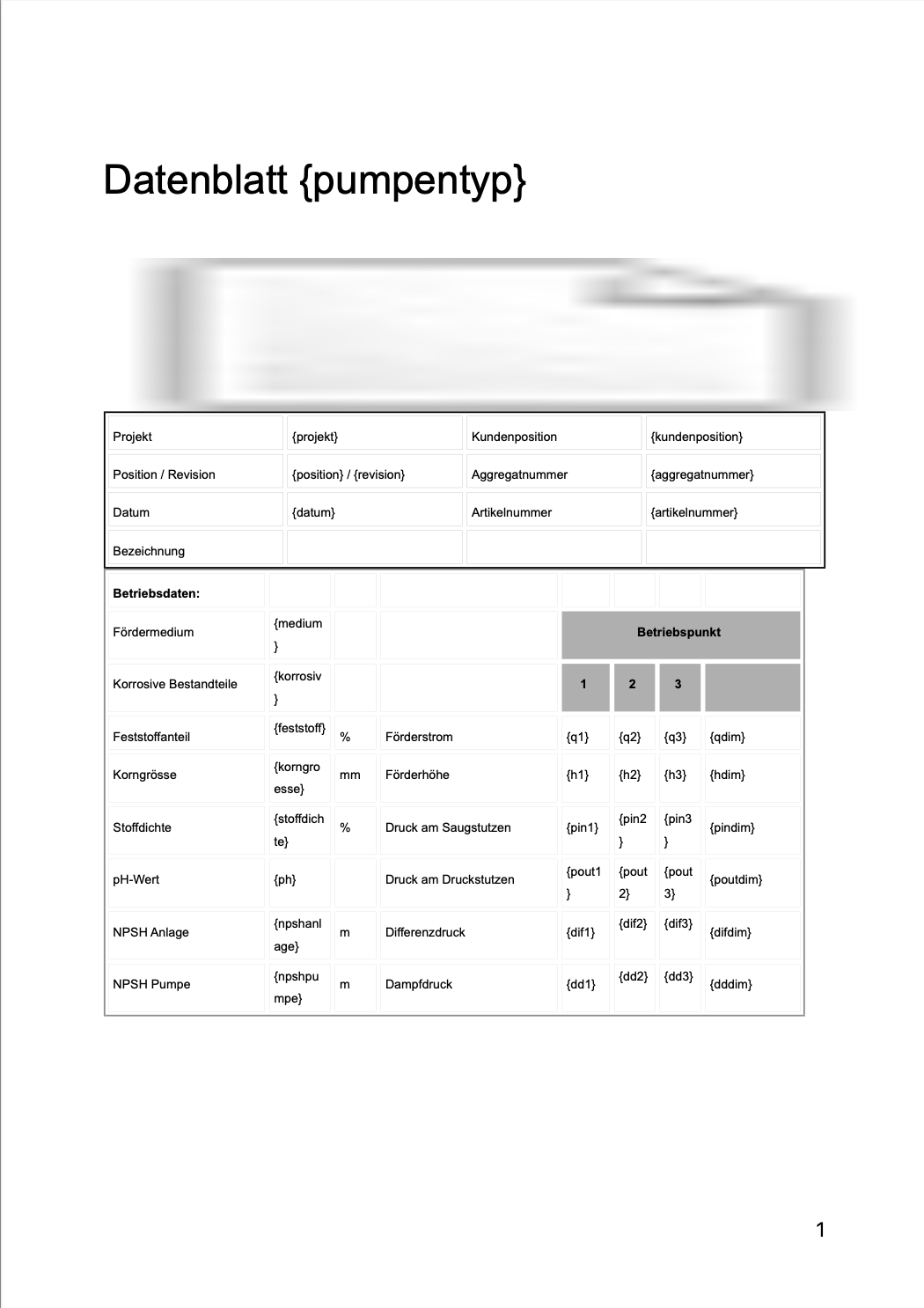
As for the garbled logo - please make sure it is available to QTextDocument as per documentation? What I suppose is it can't be loaded properly, hence the placeholder we see.
At this point I'd suggest constructing QTextDocument block by block, with image insert where appropriate.
After making some adjustments I managed to get this state of the pdf:
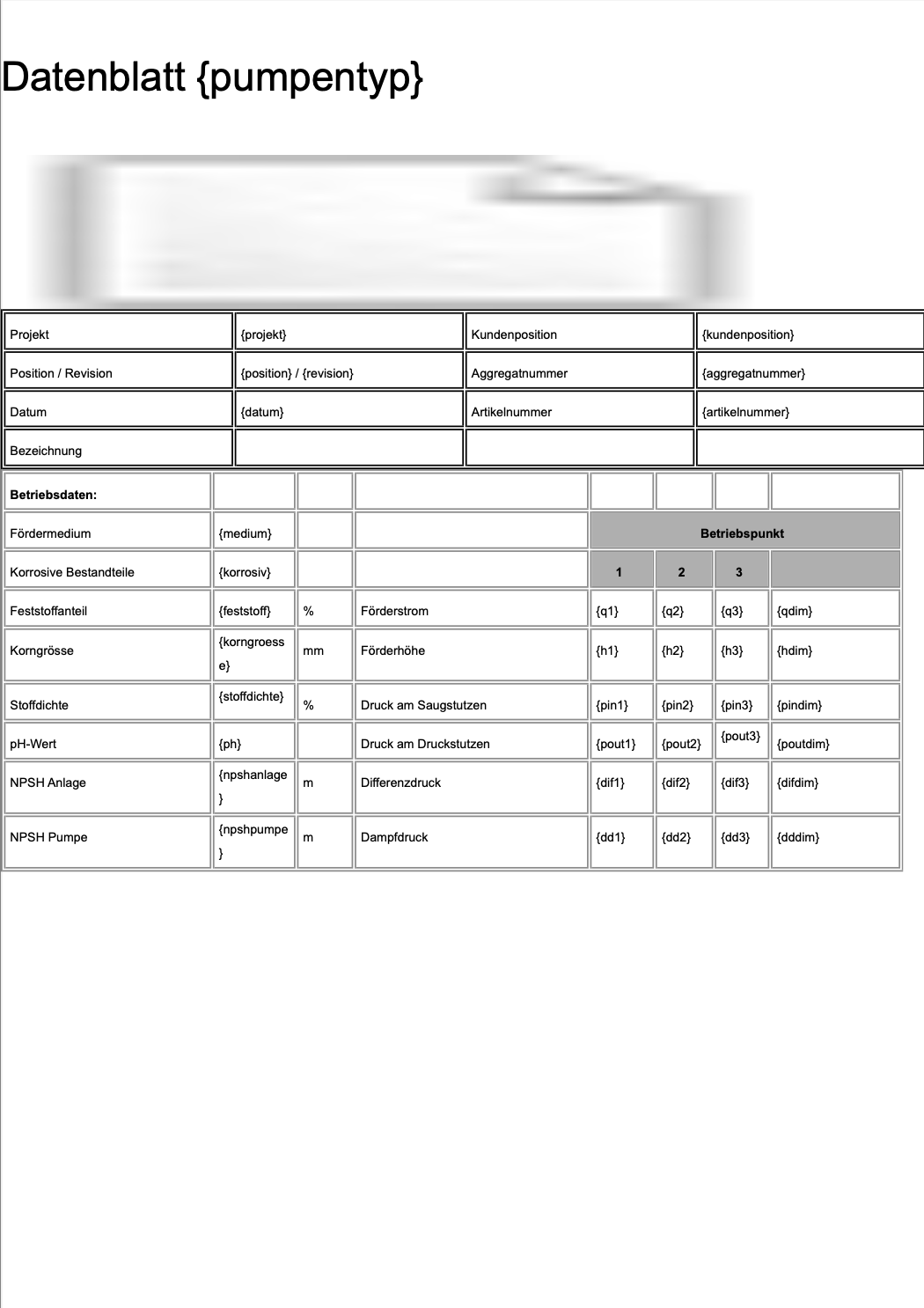 which I hope is what you aimed for.
Additional things I did:
document.setPageSize(QPageSize(QPageSize::A4).sizePoints());
document.setDocumentMargin(0);
pdfWriter.setPageSize(QPageSize(QPageSize::A4));
pdfWriter.setPageMargins(QMarginsF(0,0,0,0));
Some of them are probably redundant but I am living this for you to figure out ;)
Please let me know if that helped.
-
wow, that really helped a lot!
PDF looks like this now:
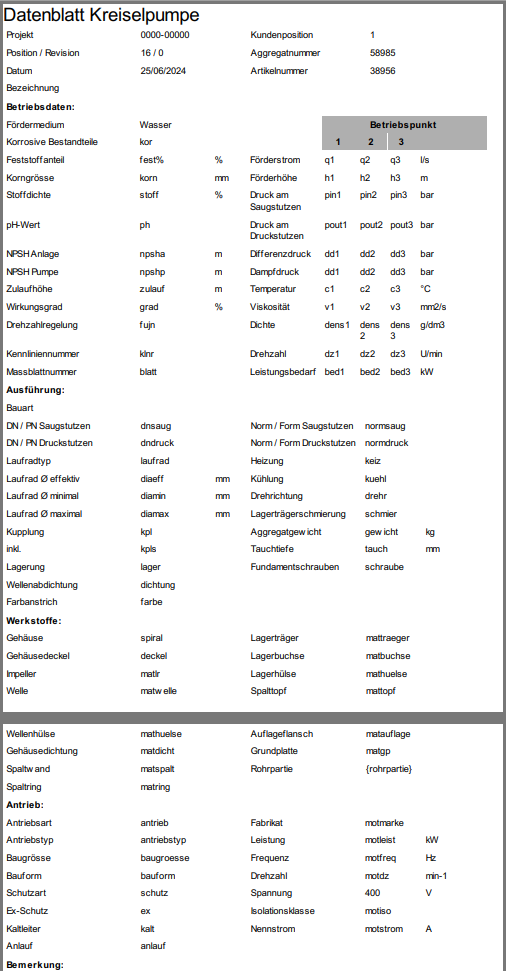
What I dont understand now are two things:
How can I make the logo available for the QTextDocument?
The logo is visible in the html document:

but it still appears as a placeholder in the PDF.What do you mean by constructing the document block by block? Should I use multiple html files and print each of them to the document? Like:
    document1.setHtml(html1);
    document1.print(&pdfWriter);
    document2.setHtml(html2);
    document2.print(&pdfWriter);
    document3.setHtml(html3);
    document3.print(&pdfWriter);
Thank you so much, I am really stepping forward now.
Thomas -
wow, that really helped a lot!
PDF looks like this now:
What I dont understand now are two things:
How can I make the logo available for the QTextDocument?
The logo is visible in the html document:
but it still appears as a placeholder in the PDF.What do you mean by constructing the document block by block? Should I use multiple html files and print each of them to the document? Like:
    document1.setHtml(html1);
    document1.print(&pdfWriter);
    document2.setHtml(html2);
    document2.print(&pdfWriter);
    document3.setHtml(html3);
    document3.print(&pdfWriter);
Thank you so much, I am really stepping forward now.
Thomas@Thomas-63 QTextDocument is a container built from QTextBlock parts. Essentially, what you do, is insert one such block - which is rather cumbersome when it comes to manipulating the content (you manipulate it through QTextCursor - it is not that complicated after all, just lots of reading). That's high level theory. Please take a look at https://doc.qt.io/qt-6/qtextcursor.html#insertBlock - the cursor object is your gateway to editing.
In practice, I think, you need two blocks: first one comes with the logo, second can be as is (assuming you'll take out the logo from html). I shall assume that the logo is the first item in your document, please correct me if that assumption is wrong.
I have not tested yet but based on my experience what you need to do is:- put logo in the resource file, so we know its path (i.e.: ":/img/logo.png" should logo reside under the prefix img)
- obtain cursor from the very start:
QTextCursor crs(&document);Then take a look here https://doc.qt.io/qt-6/qtextcursor.html#insertImage-2 and choose appropriate approach. Experiment with positioning the cursor in the document (by setPostion() method).
Once the logo is in place, adjust position again and call https://doc.qt.io/qt-6/qtextcursor.html#insertBlock
Then simply insert the rest of your html.Please let me know if you find that troublesome, I can prototype this for you later.
-
Hey Artur
Thank you so much! Now I am getting closer and closer to what I desired.
There is only one more issue: It is a two side PDF and I cant find a place to start a new page.@Thomas-63 said in Expand printed area in a PDF:
It is a two side PDF and I cant find a place to start a new page.
It should auto page, I think?
https://doc.qt.io/qt-6/qtextdocument.html#print"If the document is already paginated through a specified height in the pageSize() property it is printed as-is.
If the document is not paginated, like for example a document used in a QTextEdit, then a temporary copy of the document is created and the copy is broken into multiple pages according to the size of the paint device's paperRect(). By default a 2 cm margin is set around the document contents. In addition the current page number is printed at the bottom of each page."
@Thomas-63 said in Expand printed area in a PDF:
the table borders disappear when printing
All of them? Some of them? Have you tried thicker line? Reasons can be many...
-
I solved the pagination within the html code.
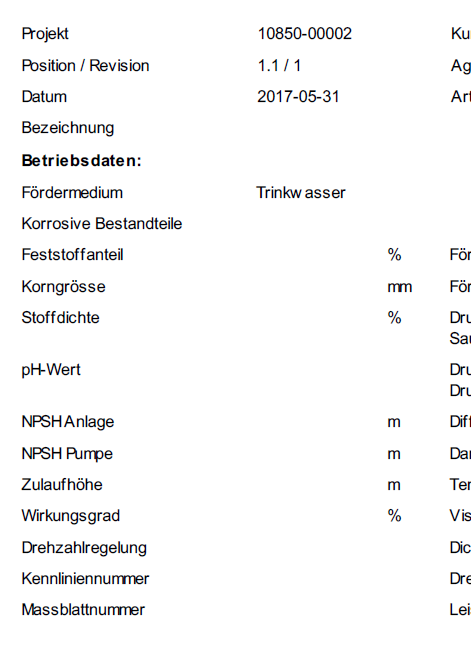
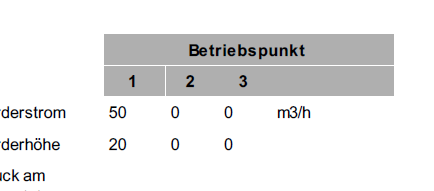
All of the frames and lines are gone. I even tried 5 px - nothing
HTML preview in Browser: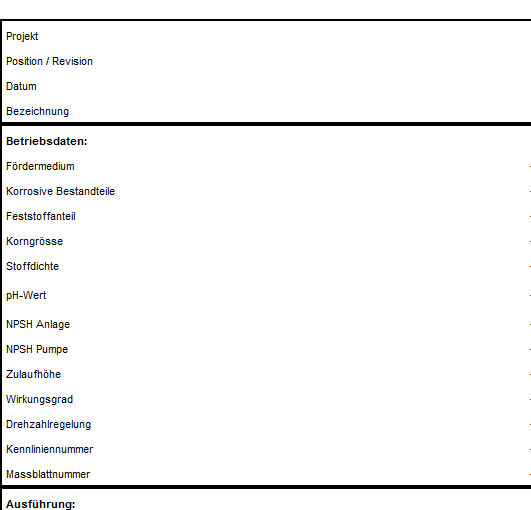
PDF:
Interestingly the background color in cells does work:
@Thomas-63 a bit weird. As you can see above my test had lines in it.
Can you share the modified html so I can test too? And your current code please. Let's fix it :) -
@Thomas-63 a bit weird. As you can see above my test had lines in it.
Can you share the modified html so I can test too? And your current code please. Let's fix it :) -
HTML:
<!DOCTYPE html>
<html>
<head>
	<meta charset="utf-8">
	<meta name="viewport" content="width=device-width, initial-scale=1">
	<meta name="generator" content="RocketCake">
	<title></title>
</head>
<body style="background-color:#FFFFFF; padding:0;  margin: 0;">
<div style="text-align:left;">
<table id="table_798fb160" cellpadding="3" cellspacing="1"  style="box-sizing: border-box; vertical-align: bottom; position:relative; display: inline-table; width:50%; height:30px; background:none; Border: none; table-layout: fixed; ">	<tr>
		<td width="100%" height="18px" style="vertical-align: top; overflow:hidden; ">  <div style="" id="cell_d0123cd">
    <div style="text-align:left;">
      <span style="font-size:12pt; font-family:Arial, Helvetica, sans-serif; color:#000000; "> </span>
      </div>
    </div>
		</td>
	</tr>
</table>
<table id="table_4bfff64d" cellpadding="3" cellspacing="1"  style="box-sizing: border-box; vertical-align: bottom; position:relative; display: inline-table; width:100%; height:97px; background:none; border: 2px solid #000000; table-layout: fixed; ">	<tr>
		<td width="27%" height="15px" style="vertical-align: top; overflow:hidden; ">  <div style="" id="cell_6a5612c4">
    <div style="text-align:left;">
      <span style="font-size:8pt; font-family:Arial, Helvetica, sans-serif; color:#000000; ">Projekt</span>
      </div>
    </div>
		</td>
		<td width="22%" height="15px" style="vertical-align: top; overflow:hidden; ">  <div style="" id="cell_7a1f4a7c">
    <div style="text-align:left;">
      <span style="font-size:8pt; font-family:Arial, Helvetica, sans-serif; color:#000000; ">{projekt}</span>
      </div>
    </div>
		</td>
		<td width="24%" height="15px" style="vertical-align: top; overflow:hidden; ">  <div style="" id="cell_365f079f">
    <div style="text-align:left;">
      <span style="font-size:8pt; font-family:Arial, Helvetica, sans-serif; color:#000000; ">Kundenposition</span>
      </div>
    </div>
		</td>
		<td width="25%" height="15px" style="vertical-align: top; overflow:hidden; ">  <div style="" id="cell_798910f0">
    <div style="text-align:left;">
      <span style="font-size:8pt; font-family:Arial, Helvetica, sans-serif; color:#000000; ">{kundenposition}</span>
      </div>
    </div>
		</td>
	</tr>
	<tr>
		<td width="27%" height="15px" style="vertical-align: top; overflow:hidden; ">  <div style="" id="cell_6fab104c">
    <div style="text-align:left;">
      <span style="font-size:8pt; font-family:Arial, Helvetica, sans-serif; color:#000000; ">Position / Revision</span>
      </div>
    </div>
		</td>
		<td width="22%" height="15px" style="vertical-align: top; overflow:hidden; ">  <div style="" id="cell_3a151bc">
    <div style="text-align:left;">
      <span style="font-size:8pt; font-family:Arial, Helvetica, sans-serif; color:#000000; ">{position} / {revision}</span>
      </div>
    </div>
		</td>
		<td width="24%" height="15px" style="vertical-align: top; overflow:hidden; ">  <div style="" id="cell_63851a2">
    <div style="text-align:left;">
      <span style="font-size:8pt; font-family:Arial, Helvetica, sans-serif; color:#000000; ">Aggregatnummer</span>
      </div>
    </div>
		</td>
		<td width="25%" height="15px" style="vertical-align: top; overflow:hidden; ">  <div style="" id="cell_30174d59">
    <div style="text-align:left;">
      <span style="font-size:8pt; font-family:Arial, Helvetica, sans-serif; color:#000000; ">{aggregatnummer}</span>
      </div>
    </div>
		</td>
	</tr>
	<tr>
		<td width="27%" height="16px" style="vertical-align: top; overflow:hidden; ">  <div style="" id="cell_382cbccc">
    <div style="text-align:left;">
      <span style="font-size:8pt; font-family:Arial, Helvetica, sans-serif; color:#000000; ">Datum</span>
      </div>
    </div>
		</td>
		<td width="22%" height="16px" style="vertical-align: top; overflow:hidden; ">  <div style="" id="cell_276db422">
    <div style="text-align:left;">
      <span style="font-size:8pt; font-family:Arial, Helvetica, sans-serif; color:#000000; ">{datum}</span>
      </div>
    </div>
		</td>
		<td width="24%" height="16px" style="vertical-align: top; overflow:hidden; ">  <div style="" id="cell_49ec4bae">
    <div style="text-align:left;">
      <span style="font-size:8pt; font-family:Arial, Helvetica, sans-serif; color:#000000; ">Artikelnummer</span>
      </div>
    </div>
		</td>
		<td width="25%" height="16px" style="vertical-align: top; overflow:hidden; ">  <div style="" id="cell_4c46cf44">
    <div style="text-align:left;">
      <span style="font-size:8pt; font-family:Arial, Helvetica, sans-serif; color:#000000; ">{artikelnummer}</span>
      </div>
    </div>
		</td>
	</tr>
	<tr>
		<td width="27%" height="12px" style="vertical-align: top; overflow:hidden; ">  <div style="" id="cell_67c5a5c8">
    <div style="text-align:left;">
      <span style="font-size:8pt; font-family:Arial, Helvetica, sans-serif; color:#000000; ">Bezeichnung</span>
      </div>
    </div>
		</td>
		<td width="22%" height="12px" style="vertical-align: top; overflow:hidden; ">  <div style="" id="cell_6530c995">
    <div style="text-align:left;">
      <span style="font-size:8pt; font-family:Arial, Helvetica, sans-serif; color:#000000; "> </span>
      </div>
    </div>
		</td>
		<td width="24%" height="12px" style="vertical-align: top; overflow:hidden; ">  <div style="" id="cell_f645165">
    <div style="text-align:left;">
      <span style="font-size:8pt; font-family:Arial, Helvetica, sans-serif; color:#000000; "> </span>
      </div>
    </div>
		</td>
		<td width="25%" height="12px" style="vertical-align: top; overflow:hidden; ">  <div style="" id="cell_15ec8179">
    <div style="text-align:left;">
      <span style="font-size:8pt; font-family:Arial, Helvetica, sans-serif; color:#000000; "> </span>
      </div>
    </div>
		</td>
	</tr>
</table>
My Code:
QTextDocument document; document.setHtml(html); QString dateiname = QCoreApplication::applicationDirPath() + "/" + ui->db_projekt->text() + "_" + ui->db_pos->text() + "_" + ui->db_rev->text() + get_sprache() + ".pdf"; QString filePath = QFileDialog::getSaveFileName(this, tr("PDF Datenblatt speichern"), dateiname, tr("PDF Dateien (*.pdf);;All Files (*)")); QImage img(QCoreApplication::applicationDirPath() + "/Logo.jpg"); QImage resizedImg = img.scaled(QSize(286,56),Qt::IgnoreAspectRatio, Qt::SmoothTransformation); document.addResource(QTextDocument::ImageResource, QUrl("Logo.jpg"), QVariant(resizedImg)); QTextCursor crs(&document); crs.movePosition(QTextCursor::Start); // Tabellenformat verwenden, um das Bild rechtsbündig zu platzieren QTextTableFormat tableFormat; tableFormat.setAlignment(Qt::AlignRight); tableFormat.setBorder(0); tableFormat.setWidth(QTextLength(QTextLength::PercentageLength, 100)); QTextCharFormat textformat; textformat.setFontPointSize(16); QTextTable *table = crs.insertTable(1, 2, tableFormat); crs = table->cellAt(0, 0).firstCursorPosition(); // Erste Zelle der ersten Zeile auswählen crs.insertText("Datenblatt " + ui->db_bauart->currentText(), textformat); crs = table->cellAt(0, 1).firstCursorPosition(); // Zweite Zelle der ersten Zeile auswählen QTextImageFormat imageFormat; imageFormat.setName("Logo.jpg"); crs.insertImage(imageFormat); QPdfWriter pdfWriter(filePath); pdfWriter.setPageSize(QPageSize(QPageSize::A4)); pdfWriter.setPageMargins(QMarginsF(10,10,10,10)); document.setPageSize(QPageSize(QPageSize::A4).sizePoints()); document.setDocumentMargin(0); document.print(&pdfWriter); -
HTML:
<!DOCTYPE html>
<html>
<head>
	<meta charset="utf-8">
	<meta name="viewport" content="width=device-width, initial-scale=1">
	<meta name="generator" content="RocketCake">
	<title></title>
</head>
<body style="background-color:#FFFFFF; padding:0;  margin: 0;">
<div style="text-align:left;">
<table id="table_798fb160" cellpadding="3" cellspacing="1"  style="box-sizing: border-box; vertical-align: bottom; position:relative; display: inline-table; width:50%; height:30px; background:none; Border: none; table-layout: fixed; ">	<tr>
		<td width="100%" height="18px" style="vertical-align: top; overflow:hidden; ">  <div style="" id="cell_d0123cd">
    <div style="text-align:left;">
      <span style="font-size:12pt; font-family:Arial, Helvetica, sans-serif; color:#000000; "> </span>
      </div>
    </div>
		</td>
	</tr>
</table>
<table id="table_4bfff64d" cellpadding="3" cellspacing="1"  style="box-sizing: border-box; vertical-align: bottom; position:relative; display: inline-table; width:100%; height:97px; background:none; border: 2px solid #000000; table-layout: fixed; ">	<tr>
		<td width="27%" height="15px" style="vertical-align: top; overflow:hidden; ">  <div style="" id="cell_6a5612c4">
    <div style="text-align:left;">
      <span style="font-size:8pt; font-family:Arial, Helvetica, sans-serif; color:#000000; ">Projekt</span>
      </div>
    </div>
		</td>
		<td width="22%" height="15px" style="vertical-align: top; overflow:hidden; ">  <div style="" id="cell_7a1f4a7c">
    <div style="text-align:left;">
      <span style="font-size:8pt; font-family:Arial, Helvetica, sans-serif; color:#000000; ">{projekt}</span>
      </div>
    </div>
		</td>
		<td width="24%" height="15px" style="vertical-align: top; overflow:hidden; ">  <div style="" id="cell_365f079f">
    <div style="text-align:left;">
      <span style="font-size:8pt; font-family:Arial, Helvetica, sans-serif; color:#000000; ">Kundenposition</span>
      </div>
    </div>
		</td>
		<td width="25%" height="15px" style="vertical-align: top; overflow:hidden; ">  <div style="" id="cell_798910f0">
    <div style="text-align:left;">
      <span style="font-size:8pt; font-family:Arial, Helvetica, sans-serif; color:#000000; ">{kundenposition}</span>
      </div>
    </div>
		</td>
	</tr>
	<tr>
		<td width="27%" height="15px" style="vertical-align: top; overflow:hidden; ">  <div style="" id="cell_6fab104c">
    <div style="text-align:left;">
      <span style="font-size:8pt; font-family:Arial, Helvetica, sans-serif; color:#000000; ">Position / Revision</span>
      </div>
    </div>
		</td>
		<td width="22%" height="15px" style="vertical-align: top; overflow:hidden; ">  <div style="" id="cell_3a151bc">
    <div style="text-align:left;">
      <span style="font-size:8pt; font-family:Arial, Helvetica, sans-serif; color:#000000; ">{position} / {revision}</span>
      </div>
    </div>
		</td>
		<td width="24%" height="15px" style="vertical-align: top; overflow:hidden; ">  <div style="" id="cell_63851a2">
    <div style="text-align:left;">
      <span style="font-size:8pt; font-family:Arial, Helvetica, sans-serif; color:#000000; ">Aggregatnummer</span>
      </div>
    </div>
		</td>
		<td width="25%" height="15px" style="vertical-align: top; overflow:hidden; ">  <div style="" id="cell_30174d59">
    <div style="text-align:left;">
      <span style="font-size:8pt; font-family:Arial, Helvetica, sans-serif; color:#000000; ">{aggregatnummer}</span>
      </div>
    </div>
		</td>
	</tr>
	<tr>
		<td width="27%" height="16px" style="vertical-align: top; overflow:hidden; ">  <div style="" id="cell_382cbccc">
    <div style="text-align:left;">
      <span style="font-size:8pt; font-family:Arial, Helvetica, sans-serif; color:#000000; ">Datum</span>
      </div>
    </div>
		</td>
		<td width="22%" height="16px" style="vertical-align: top; overflow:hidden; ">  <div style="" id="cell_276db422">
    <div style="text-align:left;">
      <span style="font-size:8pt; font-family:Arial, Helvetica, sans-serif; color:#000000; ">{datum}</span>
      </div>
    </div>
		</td>
		<td width="24%" height="16px" style="vertical-align: top; overflow:hidden; ">  <div style="" id="cell_49ec4bae">
    <div style="text-align:left;">
      <span style="font-size:8pt; font-family:Arial, Helvetica, sans-serif; color:#000000; ">Artikelnummer</span>
      </div>
    </div>
		</td>
		<td width="25%" height="16px" style="vertical-align: top; overflow:hidden; ">  <div style="" id="cell_4c46cf44">
    <div style="text-align:left;">
      <span style="font-size:8pt; font-family:Arial, Helvetica, sans-serif; color:#000000; ">{artikelnummer}</span>
      </div>
    </div>
		</td>
	</tr>
	<tr>
		<td width="27%" height="12px" style="vertical-align: top; overflow:hidden; ">  <div style="" id="cell_67c5a5c8">
    <div style="text-align:left;">
      <span style="font-size:8pt; font-family:Arial, Helvetica, sans-serif; color:#000000; ">Bezeichnung</span>
      </div>
    </div>
		</td>
		<td width="22%" height="12px" style="vertical-align: top; overflow:hidden; ">  <div style="" id="cell_6530c995">
    <div style="text-align:left;">
      <span style="font-size:8pt; font-family:Arial, Helvetica, sans-serif; color:#000000; "> </span>
      </div>
    </div>
		</td>
		<td width="24%" height="12px" style="vertical-align: top; overflow:hidden; ">  <div style="" id="cell_f645165">
    <div style="text-align:left;">
      <span style="font-size:8pt; font-family:Arial, Helvetica, sans-serif; color:#000000; "> </span>
      </div>
    </div>
		</td>
		<td width="25%" height="12px" style="vertical-align: top; overflow:hidden; ">  <div style="" id="cell_15ec8179">
    <div style="text-align:left;">
      <span style="font-size:8pt; font-family:Arial, Helvetica, sans-serif; color:#000000; "> </span>
      </div>
    </div>
		</td>
	</tr>
</table>
My Code:
QTextDocument document; document.setHtml(html); QString dateiname = QCoreApplication::applicationDirPath() + "/" + ui->db_projekt->text() + "_" + ui->db_pos->text() + "_" + ui->db_rev->text() + get_sprache() + ".pdf"; QString filePath = QFileDialog::getSaveFileName(this, tr("PDF Datenblatt speichern"), dateiname, tr("PDF Dateien (*.pdf);;All Files (*)")); QImage img(QCoreApplication::applicationDirPath() + "/Logo.jpg"); QImage resizedImg = img.scaled(QSize(286,56),Qt::IgnoreAspectRatio, Qt::SmoothTransformation); document.addResource(QTextDocument::ImageResource, QUrl("Logo.jpg"), QVariant(resizedImg)); QTextCursor crs(&document); crs.movePosition(QTextCursor::Start); // Tabellenformat verwenden, um das Bild rechtsbündig zu platzieren QTextTableFormat tableFormat; tableFormat.setAlignment(Qt::AlignRight); tableFormat.setBorder(0); tableFormat.setWidth(QTextLength(QTextLength::PercentageLength, 100)); QTextCharFormat textformat; textformat.setFontPointSize(16); QTextTable *table = crs.insertTable(1, 2, tableFormat); crs = table->cellAt(0, 0).firstCursorPosition(); // Erste Zelle der ersten Zeile auswählen crs.insertText("Datenblatt " + ui->db_bauart->currentText(), textformat); crs = table->cellAt(0, 1).firstCursorPosition(); // Zweite Zelle der ersten Zeile auswählen QTextImageFormat imageFormat; imageFormat.setName("Logo.jpg"); crs.insertImage(imageFormat); QPdfWriter pdfWriter(filePath); pdfWriter.setPageSize(QPageSize(QPageSize::A4)); pdfWriter.setPageMargins(QMarginsF(10,10,10,10)); document.setPageSize(QPageSize(QPageSize::A4).sizePoints()); document.setDocumentMargin(0); document.print(&pdfWriter);@Thomas-63 Okay, that's an interesting mix of html and QTextDocument structures, not something I attempted.
However:
tableFormat.setBorder(0);That, obviously, sets border to zero so it can't be visible since it is not there.If you'd like to mix border/no border elements you likely need to separate them. So, I'd assume, new table with new QTextTableFormat. Please verify my reasoning?
Another, rather cosmetic thing: below is redundant:
QImage resizedImg = img.scaled(QSize(286,56),Qt::IgnoreAspectRatio, Qt::SmoothTransformation);
document.addResource(QTextDocument::ImageResource, QUrl("Logo.jpg"), QVariant(resizedImg));
You can do just
document.addResource(QTextDocument::ImageResource,QUrl("Logo.jpg"),img.scaled(QSize(286,56),Qt::IgnoreAspectRatio, Qt::SmoothTransformation);At any rate, please check that
setBorder(0);? -
@Thomas-63 Okay, that's an interesting mix of html and QTextDocument structures, not something I attempted.
However:
tableFormat.setBorder(0);That, obviously, sets border to zero so it can't be visible since it is not there.If you'd like to mix border/no border elements you likely need to separate them. So, I'd assume, new table with new QTextTableFormat. Please verify my reasoning?
Another, rather cosmetic thing: below is redundant:
QImage resizedImg = img.scaled(QSize(286,56),Qt::IgnoreAspectRatio, Qt::SmoothTransformation);
document.addResource(QTextDocument::ImageResource, QUrl("Logo.jpg"), QVariant(resizedImg));
You can do just
document.addResource(QTextDocument::ImageResource,QUrl("Logo.jpg"),img.scaled(QSize(286,56),Qt::IgnoreAspectRatio, Qt::SmoothTransformation);At any rate, please check that
setBorder(0);? -
@artwaw Hello and sory fo rot responding so ong - i was on holiday.
i modified that redundant line, thanks.
That setBorder(0) only removes the border from the top table with the logo:

all the othe borders are not affected.
@Thomas-63 okay, I'll dive in it again. Please bear with me.
-
Wow, you are such a big help! Thank you so much.
Why do you even spend that much effort with me?@Thomas-63 It's fun? I like solving problems and I like to learn. Crosswords are boring.
There is also that little thing: I learned most of what I know about Qt from this very forum (and the manual). So it's only fair to return the favour.
-
Wow, you are such a big help! Thank you so much.
Why do you even spend that much effort with me?@Thomas-63 More to the point - I ran the code you supplied (happy to share my full test sources with you) and for me it looks like this:
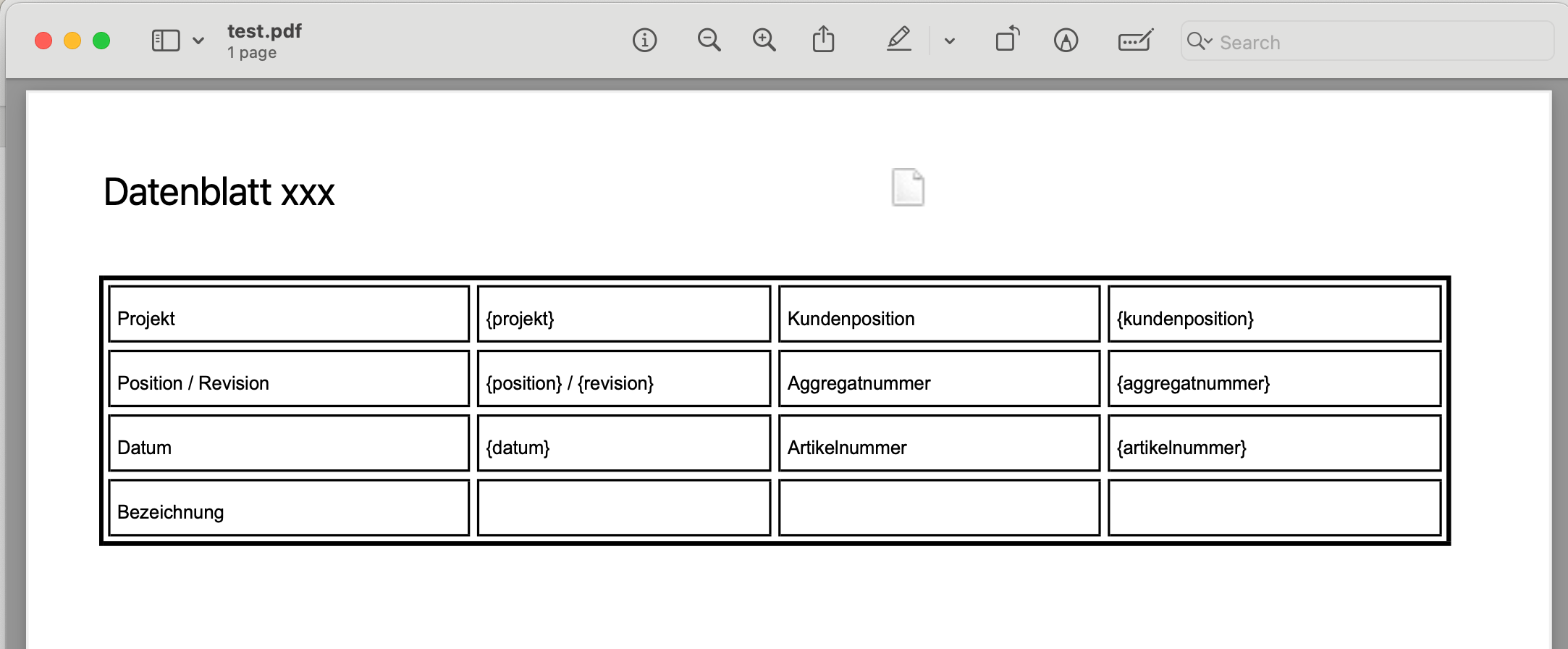
So now I am puzzled.
-
It's mostly generic.
CMakeLists:
cmake_minimum_required(VERSION 3.5)

project(qpdWriterTest VERSION 0.1 LANGUAGES CXX)

set(CMAKE_AUTOUIC ON)
set(CMAKE_AUTOMOC ON)
set(CMAKE_AUTORCC ON)

set(CMAKE_CXX_STANDARD 17)
set(CMAKE_CXX_STANDARD_REQUIRED ON)

find_package(QT NAMES Qt6 Qt5 REQUIRED COMPONENTS Widgets)
find_package(Qt${QT_VERSION_MAJOR} REQUIRED COMPONENTS Widgets)

set(PROJECT_SOURCES
        main.cpp
        mainwindow.cpp
        mainwindow.h
        mainwindow.ui
)

if(${QT_VERSION_MAJOR} GREATER_EQUAL 6)
    qt_add_executable(qpdWriterTest
        MANUAL_FINALIZATION
        ${PROJECT_SOURCES}
        res.qrc
    )
# Define target properties for Android with Qt 6 as:
#    set_property(TARGET qpdWriterTest APPEND PROPERTY QT_ANDROID_PACKAGE_SOURCE_DIR
#                 ${CMAKE_CURRENT_SOURCE_DIR}/android)
# For more information, see https://doc.qt.io/qt-6/qt-add-executable.html#target-creation
else()
    if(ANDROID)
        add_library(qpdWriterTest SHARED
            ${PROJECT_SOURCES}
        )
# Define properties for Android with Qt 5 after find_package() calls as:
#    set(ANDROID_PACKAGE_SOURCE_DIR "${CMAKE_CURRENT_SOURCE_DIR}/android")
    else()
        add_executable(qpdWriterTest
            ${PROJECT_SOURCES}
        )
    endif()
endif()

target_link_libraries(qpdWriterTest PRIVATE Qt${QT_VERSION_MAJOR}::Widgets)

# Qt for iOS sets MACOSX_BUNDLE_GUI_IDENTIFIER automatically since Qt 6.1.
# If you are developing for iOS or macOS you should consider setting an
# explicit, fixed bundle identifier manually though.
if(${QT_VERSION} VERSION_LESS 6.1.0)
  set(BUNDLE_ID_OPTION MACOSX_BUNDLE_GUI_IDENTIFIER com.example.qpdWriterTest)
endif()
set_target_properties(qpdWriterTest PROPERTIES
    ${BUNDLE_ID_OPTION}
    MACOSX_BUNDLE_BUNDLE_VERSION ${PROJECT_VERSION}
    MACOSX_BUNDLE_SHORT_VERSION_STRING ${PROJECT_VERSION_MAJOR}.${PROJECT_VERSION_MINOR}
    MACOSX_BUNDLE TRUE
    WIN32_EXECUTABLE TRUE
)

include(GNUInstallDirs)
install(TARGETS qpdWriterTest
    BUNDLE DESTINATION .
    LIBRARY DESTINATION ${CMAKE_INSTALL_LIBDIR}
    RUNTIME DESTINATION ${CMAKE_INSTALL_BINDIR}
)

if(QT_VERSION_MAJOR EQUAL 6)
    qt_finalize_executable(qpdWriterTest)
endif()
main.cpp
#include "mainwindow.h"

#include <QApplication>

int main(int argc, char *argv[])
{
    QApplication a(argc, argv);
    MainWindow w;
    w.show();
    return a.exec();
}
mainwindow.h
#ifndef MAINWINDOW_H
#define MAINWINDOW_H

#include <QMainWindow>
#include <QTextDocument>

QT_BEGIN_NAMESPACE
namespace Ui {
class MainWindow;
}
QT_END_NAMESPACE

class MainWindow : public QMainWindow
{
    Q_OBJECT

public:
    MainWindow(QWidget *parent = nullptr);
    ~MainWindow();

private:
    Ui::MainWindow *ui;
    QTextDocument txt;

private slots:
    void render();
};
#endif // MAINWINDOW_H
mainwindow.cpp
#include "mainwindow.h"
#include "./ui_mainwindow.h"

#include <QFile>
#include <QPdfWriter>
#include <QPainter>
#include <QStandardPaths>
#include <QTextCursor>
#include <QTextTable>

MainWindow::MainWindow(QWidget *parent)
    : QMainWindow(parent)
    , ui(new Ui::MainWindow)
{
    ui->setupUi(this);
    QFile f(":/test.html");
    f.open(QIODevice::ReadOnly);
    txt.setHtml(f.readAll());
    f.close();
    connect(ui->pushButton,&QPushButton::clicked,this,&MainWindow::render);
    txt.setPageSize(QPageSize(QPageSize::A4).sizePoints());
    txt.setDocumentMargin(0);
}

MainWindow::~MainWindow()
{
    delete ui;
}

void MainWindow::render() {
    QString filePath = QStandardPaths::writableLocation(QStandardPaths::DownloadLocation);
    QPdfWriter pdfWriter(filePath+"/test.pdf");

    QImage img(":/Logo.png");
    txt.addResource(QTextDocument::ImageResource, QUrl("Logo.png"), img.scaled(QSize(286,56),Qt::KeepAspectRatio, Qt::SmoothTransformation));

    QTextCursor crs(&txt);
    crs.movePosition(QTextCursor::Start);

    // Tabellenformat verwenden, um das Bild rechtsbündig zu platzieren
    QTextTableFormat tableFormat;
    tableFormat.setAlignment(Qt::AlignRight);
    tableFormat.setBorder(0);
    tableFormat.setWidth(QTextLength(QTextLength::PercentageLength, 100));

    QTextCharFormat textformat;
    textformat.setFontPointSize(16);

    QTextTable *table = crs.insertTable(1, 2, tableFormat);
    crs = table->cellAt(0, 0).firstCursorPosition();  // Erste Zelle der ersten Zeile auswählen
    crs.insertText("Datenblatt xxx", textformat);
    crs = table->cellAt(0, 1).firstCursorPosition();  // Zweite Zelle der ersten Zeile auswählen
    QTextImageFormat imageFormat;
    imageFormat.setName("Logo.jpg");
    crs.insertImage(imageFormat);
    pdfWriter.setPageSize(QPageSize(QPageSize::A4));
    pdfWriter.setPageMargins(QMarginsF(10,10,10,10));
    txt.setPageSize(QPageSize(QPageSize::A4).sizePoints());
    txt.setDocumentMargin(0);
    txt.print(&pdfWriter);
    txt.print(&pdfWriter);
}
Mainwindow.ui consists of just a QPushButton named, surprise!,
pushButton.There is also, for convenience, resource file (as you'd probably gather from cmake conf) having a placeholder logo and your html.
res.qrc:<RCC> <qresource prefix="/"> <file>test.html</file> <file>Logo.png</file> </qresource> </RCC>Copy of your html:
<!DOCTYPE html>
<html>
<head>
        <meta charset="utf-8">
        <meta name="viewport" content="width=device-width, initial-scale=1">
        <meta name="generator" content="RocketCake">
        <title></title>
</head>
<body style="background-color:#FFFFFF; padding:0;  margin: 0;">
<div style="text-align:left;">
<table id="table_798fb160" cellpadding="3" cellspacing="1"  style="box-sizing: border-box; vertical-align: bottom; position:relative; display: inline-table; width:50%; height:30px; background:none; Border: none; table-layout: fixed; ">	<tr>
                <td width="100%" height="18px" style="vertical-align: top; overflow:hidden; ">  <div style="" id="cell_d0123cd">
    <div style="text-align:left;">
      <span style="font-size:12pt; font-family:Arial, Helvetica, sans-serif; color:#000000; "> </span>
      </div>
    </div>
                </td>
        </tr>
</table>
<table id="table_4bfff64d" cellpadding="3" cellspacing="1"  style="box-sizing: border-box; vertical-align: bottom; position:relative; display: inline-table; width:100%; height:97px; background:none; border: 2px solid #000000; table-layout: fixed; ">	<tr>
                <td width="27%" height="15px" style="vertical-align: top; overflow:hidden; ">  <div style="" id="cell_6a5612c4">
    <div style="text-align:left;">
      <span style="font-size:8pt; font-family:Arial, Helvetica, sans-serif; color:#000000; ">Projekt</span>
      </div>
    </div>
                </td>
                <td width="22%" height="15px" style="vertical-align: top; overflow:hidden; ">  <div style="" id="cell_7a1f4a7c">
    <div style="text-align:left;">
      <span style="font-size:8pt; font-family:Arial, Helvetica, sans-serif; color:#000000; ">{projekt}</span>
      </div>
    </div>
                </td>
                <td width="24%" height="15px" style="vertical-align: top; overflow:hidden; ">  <div style="" id="cell_365f079f">
    <div style="text-align:left;">
      <span style="font-size:8pt; font-family:Arial, Helvetica, sans-serif; color:#000000; ">Kundenposition</span>
      </div>
    </div>
                </td>
                <td width="25%" height="15px" style="vertical-align: top; overflow:hidden; ">  <div style="" id="cell_798910f0">
    <div style="text-align:left;">
      <span style="font-size:8pt; font-family:Arial, Helvetica, sans-serif; color:#000000; ">{kundenposition}</span>
      </div>
    </div>
                </td>
        </tr>
        <tr>
                <td width="27%" height="15px" style="vertical-align: top; overflow:hidden; ">  <div style="" id="cell_6fab104c">
    <div style="text-align:left;">
      <span style="font-size:8pt; font-family:Arial, Helvetica, sans-serif; color:#000000; ">Position / Revision</span>
      </div>
    </div>
                </td>
                <td width="22%" height="15px" style="vertical-align: top; overflow:hidden; ">  <div style="" id="cell_3a151bc">
    <div style="text-align:left;">
      <span style="font-size:8pt; font-family:Arial, Helvetica, sans-serif; color:#000000; ">{position} / {revision}</span>
      </div>
    </div>
                </td>
                <td width="24%" height="15px" style="vertical-align: top; overflow:hidden; ">  <div style="" id="cell_63851a2">
    <div style="text-align:left;">
      <span style="font-size:8pt; font-family:Arial, Helvetica, sans-serif; color:#000000; ">Aggregatnummer</span>
      </div>
    </div>
                </td>
                <td width="25%" height="15px" style="vertical-align: top; overflow:hidden; ">  <div style="" id="cell_30174d59">
    <div style="text-align:left;">
      <span style="font-size:8pt; font-family:Arial, Helvetica, sans-serif; color:#000000; ">{aggregatnummer}</span>
      </div>
    </div>
                </td>
        </tr>
        <tr>
                <td width="27%" height="16px" style="vertical-align: top; overflow:hidden; ">  <div style="" id="cell_382cbccc">
    <div style="text-align:left;">
      <span style="font-size:8pt; font-family:Arial, Helvetica, sans-serif; color:#000000; ">Datum</span>
      </div>
    </div>
                </td>
                <td width="22%" height="16px" style="vertical-align: top; overflow:hidden; ">  <div style="" id="cell_276db422">
    <div style="text-align:left;">
      <span style="font-size:8pt; font-family:Arial, Helvetica, sans-serif; color:#000000; ">{datum}</span>
      </div>
    </div>
                </td>
                <td width="24%" height="16px" style="vertical-align: top; overflow:hidden; ">  <div style="" id="cell_49ec4bae">
    <div style="text-align:left;">
      <span style="font-size:8pt; font-family:Arial, Helvetica, sans-serif; color:#000000; ">Artikelnummer</span>
      </div>
    </div>
                </td>
                <td width="25%" height="16px" style="vertical-align: top; overflow:hidden; ">  <div style="" id="cell_4c46cf44">
    <div style="text-align:left;">
      <span style="font-size:8pt; font-family:Arial, Helvetica, sans-serif; color:#000000; ">{artikelnummer}</span>
      </div>
    </div>
                </td>
        </tr>
        <tr>
                <td width="27%" height="12px" style="vertical-align: top; overflow:hidden; ">  <div style="" id="cell_67c5a5c8">
    <div style="text-align:left;">
      <span style="font-size:8pt; font-family:Arial, Helvetica, sans-serif; color:#000000; ">Bezeichnung</span>
      </div>
    </div>
                </td>
                <td width="22%" height="12px" style="vertical-align: top; overflow:hidden; ">  <div style="" id="cell_6530c995">
    <div style="text-align:left;">
      <span style="font-size:8pt; font-family:Arial, Helvetica, sans-serif; color:#000000; "> </span>
      </div>
    </div>
                </td>
                <td width="24%" height="12px" style="vertical-align: top; overflow:hidden; ">  <div style="" id="cell_f645165">
    <div style="text-align:left;">
      <span style="font-size:8pt; font-family:Arial, Helvetica, sans-serif; color:#000000; "> </span>
      </div>
    </div>
                </td>
                <td width="25%" height="12px" style="vertical-align: top; overflow:hidden; ">  <div style="" id="cell_15ec8179">
    <div style="text-align:left;">
      <span style="font-size:8pt; font-family:Arial, Helvetica, sans-serif; color:#000000; "> </span>
      </div>
    </div>
                </td>
        </tr>
</table>
