
Custom Qt Quick UI app doesn't cover whole screen (white line on right)
-
Hi Qt Community,
I'm currently working on a Qt Quick app for an embedded system, using Qt version 6.5.6.
The deployment target is a Yocto Boot2Qt image v6.5.6 on a Toradex iMX6 board (I'm starting with the basic image from the tutorials). The startupscreen GUI provided displays on full screen correctly and as expected.
The connected screen is a 1366x768 LCD display.
I've created a very simple custom UI to replace the startupscreen, see code below:
Main.qml:
import QtQuick
import QtQuick.Window
import QtQuick.Controls

Window {
    width: 1366
    height: 768
    visible: true
    title: qsTr("Hello World")

    Rectangle{
        anchors.fill: parent
        color: "blue"

        Label{
            x: 200
            y: 300
            text: "Hello World"
            color: "white"
            font.pixelSize: 26
        }

        Button{
            x: 1267
            y: 600
            width: 100
            text: "Click!"
        }

        Rectangle{
            x: 1100
            y: 19
            width: 100
            height: 100
            color: "red"
            radius: 100
        }
    }
}
main.cpp:
#include <QGuiApplication>
#include <QQmlApplicationEngine>


int main(int argc, char *argv[])
{
    QGuiApplication app(argc, argv);

    QQmlApplicationEngine engine;
    QObject::connect(&engine, &QQmlApplicationEngine::objectCreationFailed,
        &app, []() { QCoreApplication::exit(-1); },
        Qt::QueuedConnection);
    engine.loadFromModule("UITest", "Main");

    return app.exec();
}
I've loaded it on the board and get the following display:
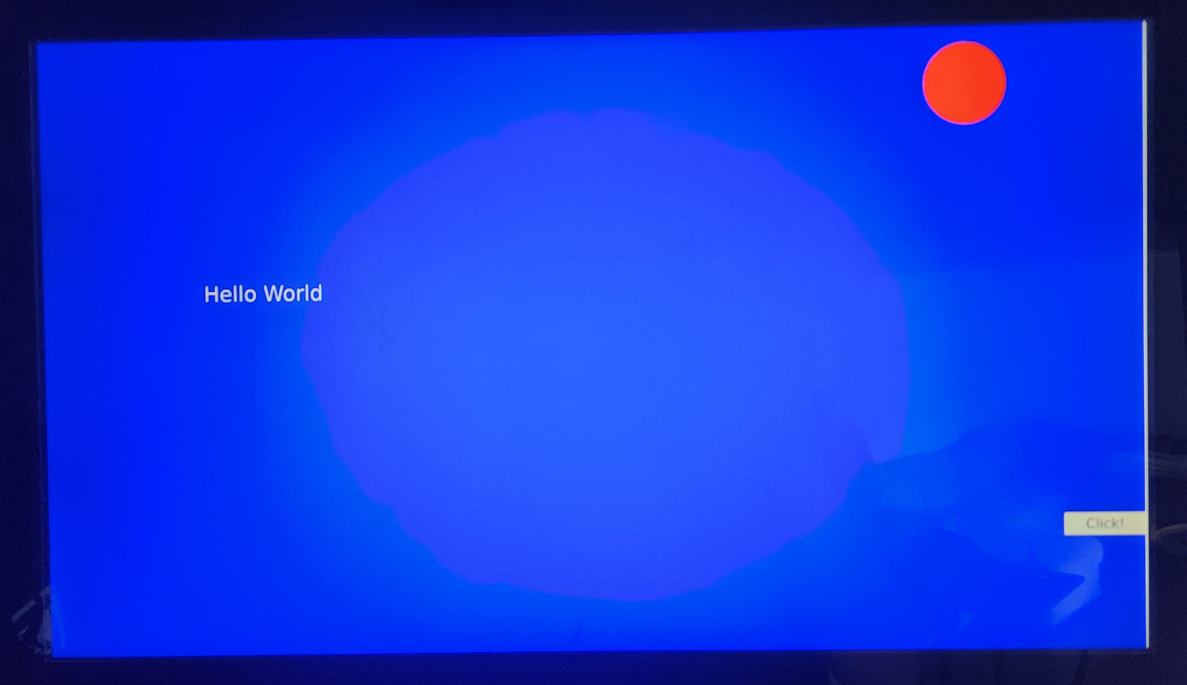
A vertical white line can be seen on the right side of the screen. Even if I change the width to 1368, or 1920 or whatever number, this line will always appear, but not with the startupscreen UI provided by Qt.
I've tried with the same hardware and screen on a previous version (Qt 5.12.4 and Yocto Boot2Qt 5.12.4), and all displayed well with the exact same code.
Also if it helps, whenever the startupscreen or my custom UIs launch, the terminal shoots the following line:
imx-ipuv3-crtc imx-ipuv3-crtc.2: 8-pixel align hactive 1366 -> 1368Any help on showing me how to get rid of this white line would be greatly appreciated.
Thanks in advance.
-
Hi,
Since you are mentioning Boot2Qt which is a commercial offering, I would recommend contacting the Qt Company directly for support.
