
Compile APK 33 Android
-
Good afternoon. Recently, Google Play is requiring that new APPs created or updated on its platform have at least API level 33.
Well, when making this change in the project, the "requestPermissionsSync" function of the "QtAndroid" class to request access permissions no longer works.I use QT 5.14.2.
Here is the function that no longer works:
//---------------------------------------------------------------------
bool System::requestStoragePermission() {
#ifdef AndroidARM64
    using namespace QtAndroid;
    //SOPermission sop;
    QStringList permissions = {"android.permission.READ_EXTERNAL_STORAGE", "android.permission.WRITE_EXTERNAL_STORAGE", "android.permission.INTERNET"};
    const QHash<QString, PermissionResult> results = requestPermissionsSync(permissions);
    auto ok = true;
    auto i = 0;
    while (ok && i< permissions.size()) {
        if (!results.contains(permissions[i]) || results[permissions[i]] == PermissionResult::Denied) {
            qCritical() << "Couldn't get permission: " << permissions[i];
            ok = false;
            --i;
        }
        ++i;
    }
    return ok;
#else
    return true;
#endif
}
Any solution?
-
Good afternoon. Recently, Google Play is requiring that new APPs created or updated on its platform have at least API level 33.
Well, when making this change in the project, the "requestPermissionsSync" function of the "QtAndroid" class to request access permissions no longer works.I use QT 5.14.2.
Here is the function that no longer works:
//---------------------------------------------------------------------
bool System::requestStoragePermission() {
#ifdef AndroidARM64
    using namespace QtAndroid;
    //SOPermission sop;
    QStringList permissions = {"android.permission.READ_EXTERNAL_STORAGE", "android.permission.WRITE_EXTERNAL_STORAGE", "android.permission.INTERNET"};
    const QHash<QString, PermissionResult> results = requestPermissionsSync(permissions);
    auto ok = true;
    auto i = 0;
    while (ok && i< permissions.size()) {
        if (!results.contains(permissions[i]) || results[permissions[i]] == PermissionResult::Denied) {
            qCritical() << "Couldn't get permission: " << permissions[i];
            ok = false;
            --i;
        }
        ++i;
    }
    return ok;
#else
    return true;
#endif
}
Any solution?
-
-
@jsulm It doesn't show any error... but at runtime it no longer asks the user to give permission... and the function always returns false
@RenanHm I would check the Android 13 notes. I think they finally removed WRITE_EXTERNAL_STORAGE entirely and READ_EXTERNAL_STORAGE was replaced with the scoped permissions [READ_MEDIA_IMAGES, READ_MEDIA_VIDEO, READ_MEDIA_AUDIO].
If your app really needs full storage access (e.g. a file explorer), you have to go through the dedicated guide for the MANAGE_EXTERNAL_STORAGE permission, but this can only be used with very specific apps.
All "standard" apps must use scoped storage, and don't have access to the legacy permissions anymore. Therefore, you should use the scoped storage of your app (doesn't require any permissions), and use a file provider and intents for sharing files with the system.
P.S.: I did the storage transition with API level 30 and my only use-case was generating a PDF file, storing it and open it with an installed PDF reader.
-
@RenanHm I would check the Android 13 notes. I think they finally removed WRITE_EXTERNAL_STORAGE entirely and READ_EXTERNAL_STORAGE was replaced with the scoped permissions [READ_MEDIA_IMAGES, READ_MEDIA_VIDEO, READ_MEDIA_AUDIO].
If your app really needs full storage access (e.g. a file explorer), you have to go through the dedicated guide for the MANAGE_EXTERNAL_STORAGE permission, but this can only be used with very specific apps.
All "standard" apps must use scoped storage, and don't have access to the legacy permissions anymore. Therefore, you should use the scoped storage of your app (doesn't require any permissions), and use a file provider and intents for sharing files with the system.
P.S.: I did the storage transition with API level 30 and my only use-case was generating a PDF file, storing it and open it with an installed PDF reader.
@lemons I performed the tests with the permissions "READ_MEDIA_IMAGES, READ_MEDIA_VIDEO" but unfortunately it didn't work on API 33.
My APP is not a file manager. Basically I need to select a JPG image or TXT file stored on the Android device.
Even API 31 was getting it. Now in API 33 I can't do it anymore. The above function no longer works on API 33 to request permissions.One way I managed to load the files in the APP is by placing the files inside the APP installation folder in "files", as shown in the image below.
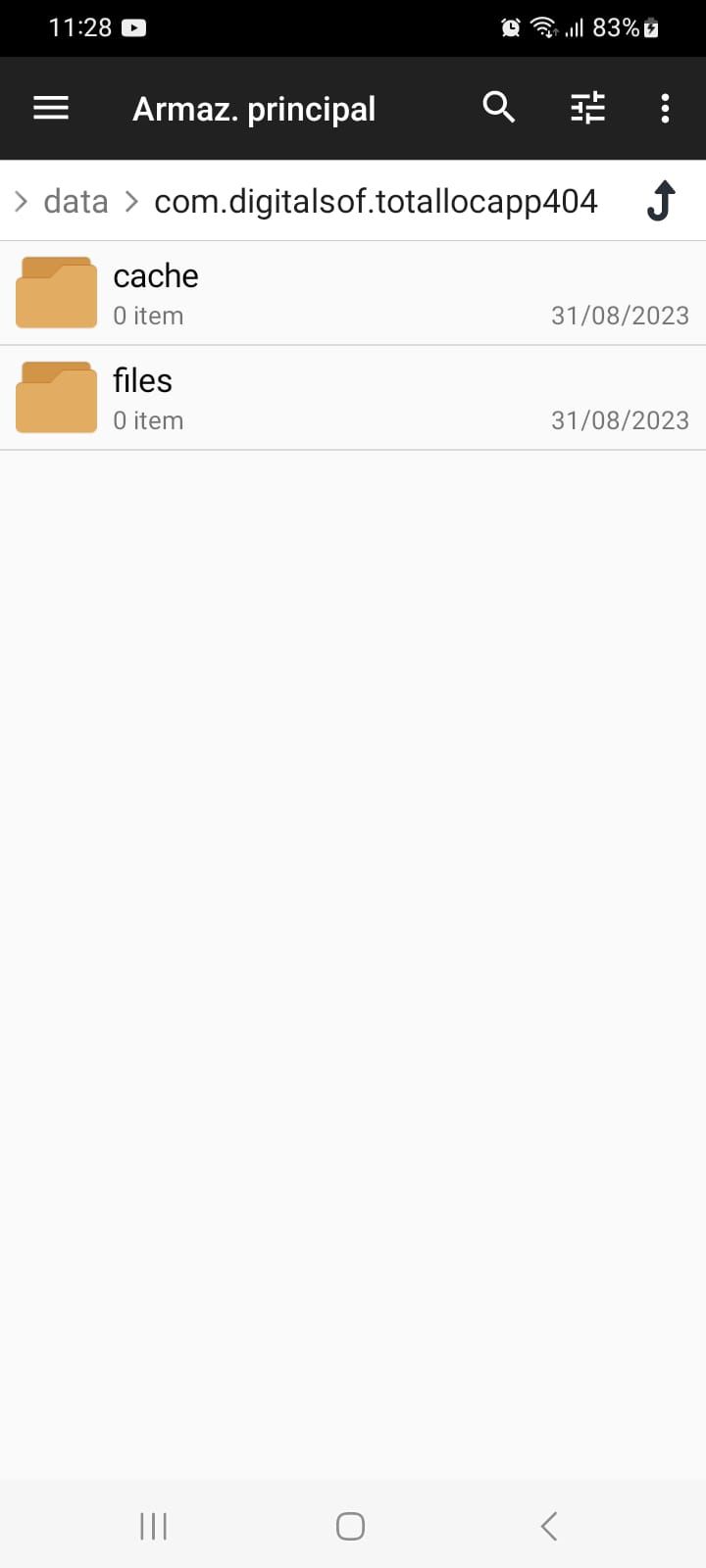
The problem is that for the end user it is very complicated to access and use this folder... it is not practical.
It was necessary to install a special file management APP to locate and open the folder in question, as the native Android APPs cannot find it.. they are hidden.Any other solution?
-
@lemons I performed the tests with the permissions "READ_MEDIA_IMAGES, READ_MEDIA_VIDEO" but unfortunately it didn't work on API 33.
My APP is not a file manager. Basically I need to select a JPG image or TXT file stored on the Android device.
Even API 31 was getting it. Now in API 33 I can't do it anymore. The above function no longer works on API 33 to request permissions.One way I managed to load the files in the APP is by placing the files inside the APP installation folder in "files", as shown in the image below.
The problem is that for the end user it is very complicated to access and use this folder... it is not practical.
It was necessary to install a special file management APP to locate and open the folder in question, as the native Android APPs cannot find it.. they are hidden.Any other solution?
@RenanHm
I can't really help you, as my use-case is the other way round only.
I assume you have to dive into the Android documentation and re-write all logic for this feature.Maybe some else can provide more information.
Note: You can request an extended deadline for the transition to API level 33 in the PlayStore, but this only buys you a few weeks.
Here a few ideas:
- You should be able to accept "incoming shares", so the user could share any file with your app, so you have direct access to the file.
- Also, you should be able to register your app for opening specific file-types, so your app will be present in the "app chooser", as long as the user hasn't set a default app for a certain file-type.
- If you are not bound to the file-type, you could try to define your own file-type to avoid default apps being set. (e.g. ".txt" -> ".armazptxt").
-> I don't know if Android allows this
-
@RenanHm
I can't really help you, as my use-case is the other way round only.
I assume you have to dive into the Android documentation and re-write all logic for this feature.Maybe some else can provide more information.
Note: You can request an extended deadline for the transition to API level 33 in the PlayStore, but this only buys you a few weeks.
Here a few ideas:
- You should be able to accept "incoming shares", so the user could share any file with your app, so you have direct access to the file.
- Also, you should be able to register your app for opening specific file-types, so your app will be present in the "app chooser", as long as the user hasn't set a default app for a certain file-type.
- If you are not bound to the file-type, you could try to define your own file-type to avoid default apps being set. (e.g. ".txt" -> ".armazptxt").
-> I don't know if Android allows this
-
 C Christian Ehrlicher locked this topic on
