
Qt 6.11 is out! See what's new in the release
blog
How to make the tip of a QSlider in PySide2 look like a triangle?
-

I want to make the end of QSlider triangular like in the image above, but I couldn't do it. When I use the code`self.mindelayclicki.setTickPosition(QSlider.TicksBelow)it becomes triangular, but I want it to be included in the stylesheet I added, and I don't want it to be in the red area:
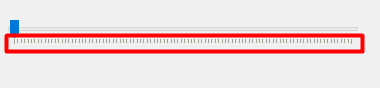
MyCode:from PySide2.QtWidgets import QMainWindow, QApplication, QSlider from PySide2.QtGui import Qt from sys import exit, argv class MyWin(QMainWindow): def __init__(self): super().__init__() self.setFixedSize(400, 400) self.mindelayclicki = QSlider(Qt.Horizontal, self) self.mindelayclicki.setGeometry(20, 100, 350, 25) self.mindelayclicki.setStyleSheet(""" QSlider::groove:horizontal { height: 8px; margin: 0px; background-color: #E7EAEA; border:1px solid #D6D6D6; } QSlider::handle:horizontal { height: 20px; width: 12px; margin: -12px 0px -12px 0px; background-color: #007AD9; } """) self.show() app = QApplication(argv) window = MyWin() exit(app.exec_()) -
Hi and welcome to devnet,
Did you consider using custom images ?
-
M makalidap has marked this topic as solved on
